That is a great getting started guide so far, thank you for taking notes!
Jason, would you mind sharing the SVG for your stool?
Thanks
Not sure I would make it as is. It could use a wider base to make it more stable.
Lightburn and Millmage can also auto detect the slots and adjust the size for the thickness of your material. Really handy if you wanted to go from plywood to 4/4 oak or something.
That sounds like an awesome feature. I’ll have to check it out.
That’s the only feature I’d really be interested in that no other software I know seems to have.
There are a handful of features like that. I am sure this is the perfect package for some people because you don’t have to leave it to do basic things very well. If you look at things like plasmacam if has a set of basics built in like gussets and flanges. I see MillMage fitting a role like this extremely well. Just turn it on, make a quick thing and do some cutting, Charcuterie board with some text, no problem. For a large portion of our users this is all they will ever need.
I was on the fence about giving it a try but this feature convinced me.
Nice and detailed documentation too.
oh that is cool that millmage will frame , ive been waiting for it to be released , ive been using lightburn for bout 2 yrs, so does millmage pretty much have all same features as lightburn , are you running millmage with the jackpot board? if so would you mind screenshotting you machine settings custom gcode tab etc , much appreciated
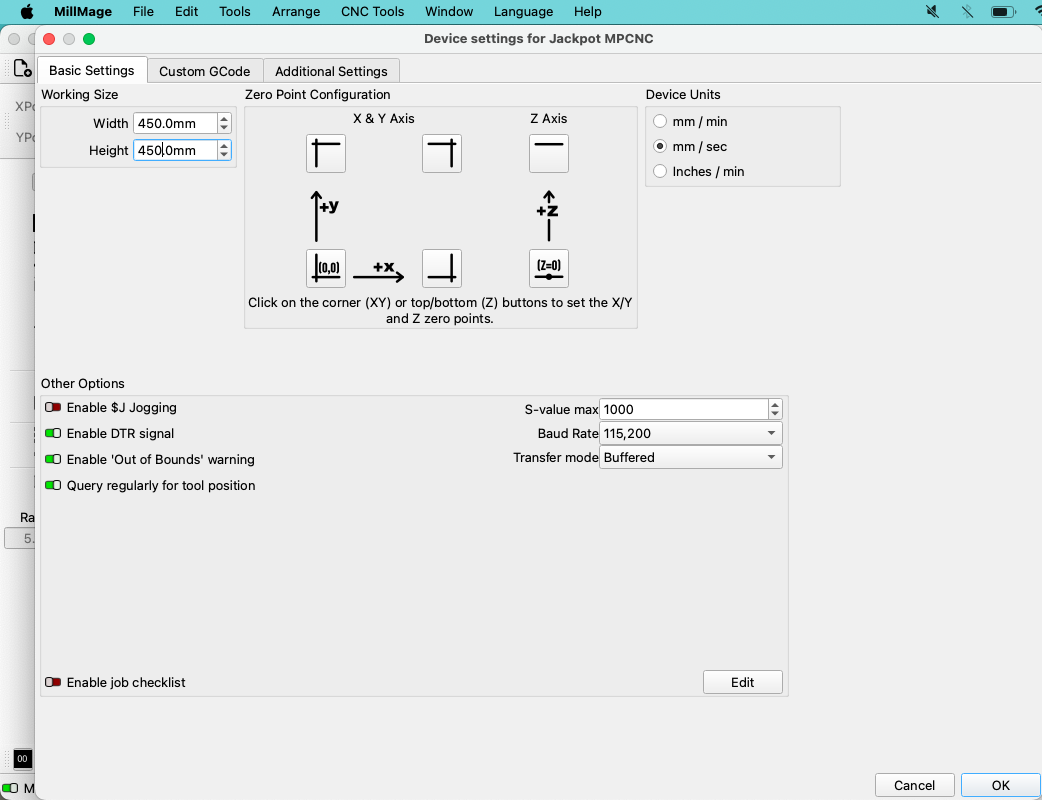
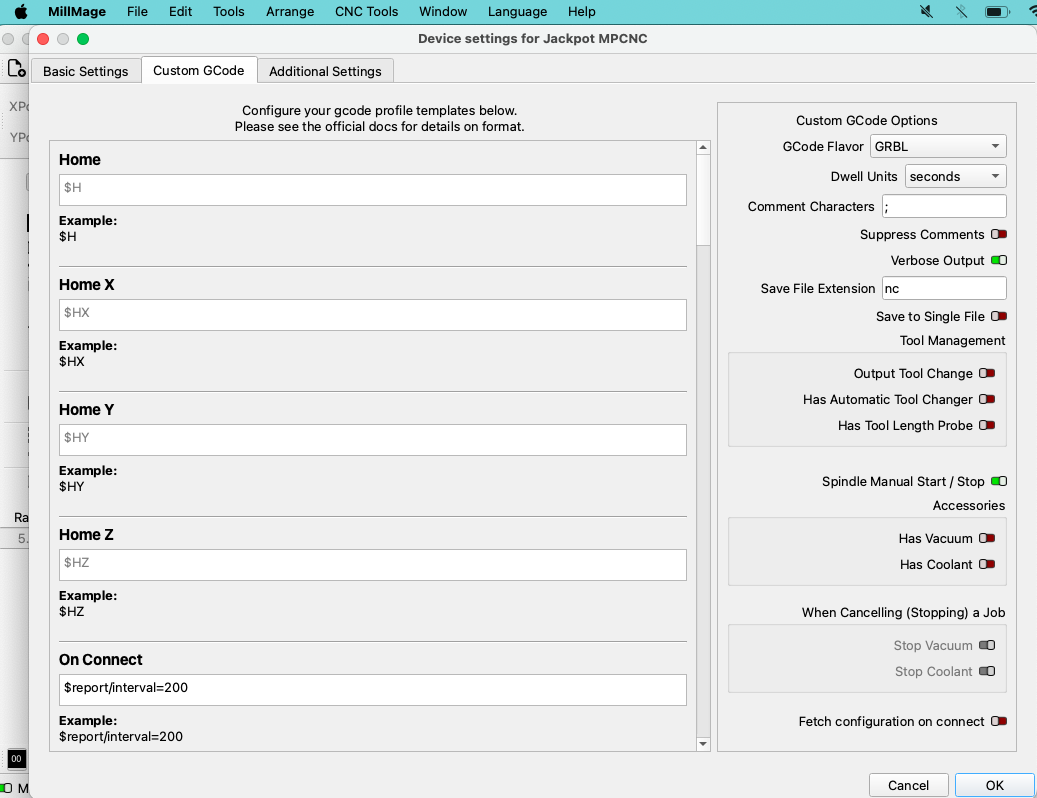
awesome , thanks . Q: any reason why you havent enabled jogging
as far as connecting through wifi , was it pretty straightforward , ive never run lightburn with wifi always been connected via usb
It’s very simple, just tell it the ip address of your jackpot.
I have a pendant that I use for jogging.
Like Dreyfus said, you just enter the IP address.
Ok. I am heading out on work trip for the week. When i get back. I will download and try. I have a big project to do!!
The feedback on pricing has been interesting to watch.
Im honestly interested in whats out there that has the feature set MillMage offers for the price. I think a lot of the knee jerk reactions are missing the benefit of the workflow we designed in MillMage with the Design, CAM, Control all in one package. Especially for “makers” where iteration and experimentation is common.
I know I didn’t get it at first until I worked to make an entire project in the software and it really clicked.
I really appreciate everyone taking the time to look at it and giving us direct opinions. It has already made changes to how some things are getting handled.
Pricing software is tricky. My initial reaction still stands which is purely based how much I’m willing to spend related to a 100% pure hobby on which I make $0. I think the price based on the feature set is completely reasonable. I know people like Aspire, but I definitely can’t drop 2 grand on that. I’m a software dev so I have some high level understanding of the tremendous effort and cost of creating an application like this.
Current paid software I’m using in some way related to CNC:
- Estlcam - ~$60 - CAM only, only “design” feature is adding text
- DrawingBot v3 Premium - ~$65 - Image/SVG to gcode for pen plotter
Current free/open source software/firmware I’m using:
- FreeCAD
- FluidNC (with ESP3D WebUI) - I have donated to each of those projects.
- Inkscape
“Free” software I’ve tried:
- Fusion - Stopped using due to limitations of free hobbyist version and that if I needed to upgrade, it’s $680/year. Found the CAM side to be difficult.
- OnShape - I only tried it but again has limitations of free hobbyist version and can’t justify the $1500/year price.
My only point here is to show that this represents a not insignificant increase in software costs. This is on a CNC with about a 3 x 6 ft working area that all in cost less than $1000 to build and could have been built cheaper.
In some ways, the cost is a good thing. That means there’s money to support the software well and continue to provide fixes and enhancements. Supporting free/open source software can be quite a challenge (FluidNC certainly comes to mind).
I’m 100% in support of the licensing model of a larger upfront cost with a reduced renewal cost. And the fact that it’s a perpetual license for versions covered while having a current license. I do not like things that require an annual subscription to keep using a product.
I hope there is some kind of discount if someone wants both Lightburn and Millmage, especially since they have a lot of overlapping features. This doesn’t affect me at the moment, but I’ve considered adding a laser to my CNC. I can see some of the potential reasoning, but in some ways it seems odd that they are different applications. I briefly attempted to use Millmage with my pen plotter. My initial attempt was unsuccessful but I could probably make it work. I would also be curious to make it work with a drag knife.
It’s kind of interesting the space that MillMage falls into, especially on the design side. A lot of the design features could be done in Inkscape, but I do appreciate the integrated features. It auto “welding” text together is handy. It doesn’t at all replace a CAD tool (nor is it reasonable to expect it to). A lot of the things I make, I design in CAD where the design features in MillMage don’t really help (nesting is surely useful). I am working on a sign right now, and the MillMage features are excellent for that.
I think the CAM side is excellent. Defining the workpiece size is a little odd compared to what I’m used to but not an issue. I love the way operations are defined and shared across shapes. The preview is very helpful, especially recently when I was trying to get a chamfer the way I wanted. I think in general, it’s even easier than Estlcam (which is already way easier than Fusion). The only part I haven’t completely figured out yet it how to do a finishing pass. I think I just do an operation setting a value for “Stock to Leave”, and then add another operation at full depth with that set to zero. This is something that I think is easier in Estlcam. I get a little confused when there’s a Rest Pocket thrown in that mix (which is a nice feature in itself).
In the context of FluidNC, I have not found the control side to be useful. I was able to point it at an IP address very simply, but with the built in WebUI for FluidNC, it just doesn’t make sense to me. In general, I’ve avoided gcode senders, because it’s most reliable and performant to run gcode off the SD card. Some gcode senders have convenient features, like seeing a gcode preview that shows the current position as it runs or simplifying restarting the job in the middle somewhere. I didn’t see anything like that in MillMage. For the FluidNC WebUI, I love that I can create custom extensions (I’m not a normal user here). For example, I didn’t like the jog panel, so I made my own virtual joystick style jog panel. Then again, I also made my own wireless pendant that does that too.
For FluidNC, it would be nice if it could upload the gcode directly to the SD card, which can be done with a simple curl command. It might even be useful if it could read the file list and start the job running the file off the SD card. Again, FluidNC makes things like that pretty easy.
I recognize that there will be a wide variety of opinions that don’t match my own. There are a collection of CNC controllers out there that will affect that too.
With all that said, I’m pretty sure I’m going to buy it when it’s released. I think Millmage is already a great piece of software, and it’s only going to get better. I want to be along for that ride.
Now I’m off to download the RC2 release that I see is out now.
scrolling further down the custom gcode tab at tool change did you change it or just left it as T{tool}
No I didn’t change it. I have not done any tool changes during a running job. I have been outputting one tool at a time.
For FluidNC, I put the tool change gcode from the milling basics page in there. You also need to select the “Output Tool Change” option.
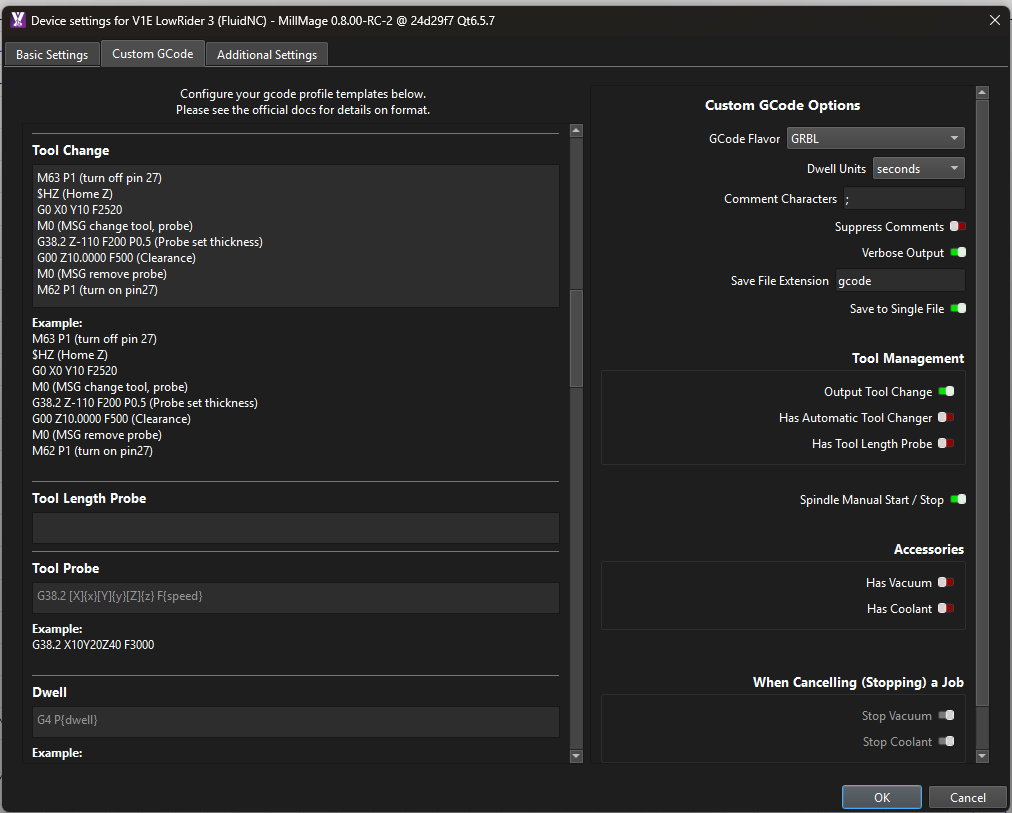
Should probably be updated to use some variables to add details about the which tool is being used.
I also added the ending gcode:

I haven’t sorted out the starting gcode but it will need to be different than what’s defined on milling basics. We assume that the first tool is already loaded where Millmage does not. Although, perhaps not assuming that is a reasonable workflow change.
It includes the tool change gcode at the start so that doesn’t need to be duplicated. However, I don’t want it to home Z at the start, and I want it to zero based on the current XY position.
I see this at the start in the file it generates:
G00 G17 G40 G21;Restore metric mode
G54
G90;Restore absolute mode
G0 Z20
G90;Restore absolute mode
where I want this:
G21
G90
G94
G92 X0 Y0
M0 (MSG Attach probe)
G38.2 Z-110 F200 P0.5 (probe down set thickness )
G1 Z10 F900
M0 (MSG Remove probe)
M62 P1 (If used start spindle pin27 )
Missing the G94 isn’t super critical since that’s the default and I’ve never used G93.
I’m not sure that I like that it’s throwing the G54 coordinate system in there. That’s normally ok since that’s the default one and what I typically use. I’m not sure how it’s determining which one to use.
Still learning.