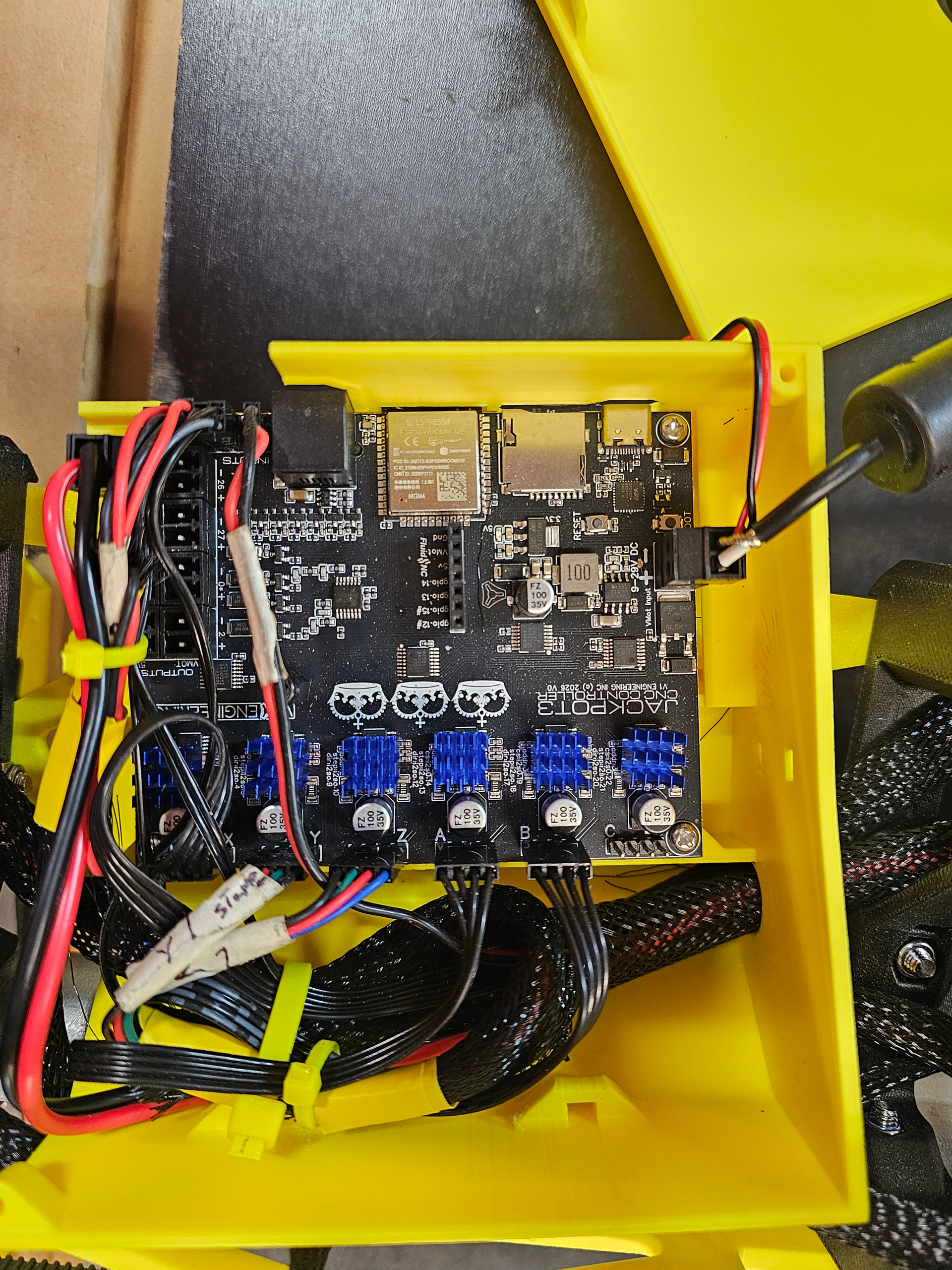
I have just finished building my second LR 4. I am unable to get the machine to hold its network connection. I will list the trouble shooting I have completed and a picture of the wiring to the board.
1 Made sure there are no wires over the ESP32.
2 I uninstalled Fluidnc, upgraded to 4.0.2 to see if that made any difference, it did not.
3 removed all files, downloaded the newest from GetHub and installed these.
4 tried AP mode, same issue, tried Bluetooth, unable to get it to connect, probably me on this one.
5 reinstalled fluidnc 4 times during this process.
My other LR 4 is about three feed from the new one, the router is 15 feet away mounted at the top of the wall with a clear shot to both machines. I have had the original machine running just as a test and it stayed connected for 4 hours straight no issues, Jackpot 1 on that one.
I do have a picture of the web installer showing it connected at 100% if I need to provide that I can.
The longest connection I have been able to hold is maybe an hour, most of the time it is just a few minutes with a bunch of just seconds thrown in for good measure.
I have not been able to cut my Strut Plates because I have not been able to keep it connected long enough to get them cut. I did get a start but only lasted about 1 1/2 minutes before it died.
Help!
The one wire running across the board is the probe, just not long enough to get it with the rest, will relocate the box once I get the Strut Plates in place.
I had this happen to me once also. The only thing that got mine working again was running the erase.sh in fluidterm and then installing a fresh copy of Fluidnc. Hopefully this works for you too.
I am sitting down to give this a try now. Thank you Britt.
I am streaming over wifi, I use MillMage to control my machines. I have a very strong wifi setup here in the shop. Hard wired to the building then a router sitting high on the wall at 15 feet away with a clear shot to the machines. I have never had an issue with the network
Good questions that I truly don’t know how to answer. Power coming is plugged directly into a 120 plug using a 12 gage 25 foot extension cord.
With the machine idle, you could try to wiggle the vmot power wires at the board a little bit to make sure there is not a loose connection or bad solder joint at the connector. Not too much, just try to simulate normal vibration. See if that triggers a reset or loss of connection.
I did this but it did not effect the machine at all. I do believe this is a good thing.
I am at my limit. I have been working with this for 2 days straight with no progress to show for it.
The latest is I uploaded the Strut Plates file to the SD Card with no issue while connected to the board via USB using the web installer. Now when I do get it to connect Fluidnc tells me there is no SD Card installed! I shut it down, removed the SD several times but it had no effect still says no SD Card.
I have erased Fluidnc a bunch of times with clean installs however the issue is just getting worse.
I am at a loss with this board.
I have considered pulling the Jackpot 1 out of my other machine but I really don’t want to do this. That little machine is rock solid, I would like to keep it that way.
Hey @BobFisher, sounds like a frustrating situation. Given this helpful info…
Am starting to wonder if there’s a hardware defect with your new jackpot. Wondering whether measuring signal strength differences between your solid Jackpot 1 and the newer board will help narrow down cause.
What machine are you connecting from, a windows PC, or a Android Tablet, or something else?
Signal strength is 100% on both, I am connecting with a windows 11 computer, the same computer for both. I am running MillMage and Fluidnc, both have the exact same behaviors. The board exhibits the same behavior in both STA or AP mode. I have not swapped the SD cards between the two machines because I am afraid the new board might corrupt the good card in the older machine. Don’t know if this is a valid fear or not.
The SD card in the Jackpot 3 was working up until about 2 hours ago. I do believe I have the misfortune of having received a bad Jackpot 3. I know these boards are highly regarded so it must just a stroke of bad luck. I actually had a bad board with my Jackpot 1 originally, it had to be replaced. Looks like I may be on the road to making this a 2 for 2.
I tried the erase.bat, erase.sh, ./erase.sh, you get the idea, I tried all the versions to no avail. I downloaded the file set and clicked on then actual files, I tried to enter the commands into the terminal. All failed. I must be doing something wrong but need assistance to discover what. In the end I did a clean install from the web installer.
I just had to walk away from it for a while, the frustration level was getting dangerously close to the doing something stupid point. I will go and give it another shot after a while.
Did this, when I reinstalled Fluidnc and all the other files. started the machine, it connected but lost it after about 30 seconds. AAaaarrrrrrgggg.
I did swap out the SD cards between the two machines, both could read the others card? I then put them back in the original position. The new machine could read the card for 2 starts then it started showing no SD card again.
I fired it up real quick before work but it is reading the SD Card this morning. It did lose connectivity after about 45 seconds, had time to home it but that was it. I do have G30 set to move to the other end of the table and it appears to have lost that setting if that helps.
I will include the $SS file I grabbed before it died although it appears to be normal.
Thank you all.
<Idle|MPos:0.000,0.000,0.000|FS:0,0|WCO:0.000,0.000,0.000>
[GC:G0 G54 G17 G21 G90 G94 M5 M9 T0 F0 S0]
<Idle|MPos:0.000,0.000,0.000|FS:0,0|Ov:100,100,100>
<Idle|MPos:0.000,0.000,0.000|FS:0,0>
$SS
[MSG:INFO: FluidNC v4.0.2 https://github.com/bdring/FluidNC]
[MSG:INFO: Local filesystem is /littlefs]
[MSG:INFO: Configuration file:config.yaml]
[MSG:INFO: Machine LowRider]
[MSG:INFO: Board Jackpot3 TMC2226]
[MSG:INFO: UART1 Tx:gpio.16 Rx:gpio.4 RTS:NO_PIN Baud:115200]
[MSG:INFO: I2SO BCK:gpio.22 WS:gpio.17 DATA:gpio.21Min Pulse:2us]
[MSG:INFO: SPI SCK:gpio.18 MOSI:gpio.23 MISO:gpio.19]
[MSG:INFO: SD Card cs_pin:gpio.5 detect:NO_PIN freq:20000000]
[MSG:INFO: Stepping:I2S_STATIC Pulse:2us Dsbl Delay:0us Dir Delay:1us Idle Delay:255ms]
[MSG:INFO: User Digital Output: 0 on Pin:gpio.26]
[MSG:INFO: User Digital Output: 1 on Pin:gpio.27]
[MSG:INFO: User Digital Output: 2 on Pin:gpio.0]
[MSG:INFO: User Digital Output: 3 on Pin:gpio.2]
[MSG:INFO: Axis count 3]
[MSG:INFO: Axis X (3.000,1223.000)]
[MSG:INFO:   Motor0]
[MSG:INFO:     tmc_2209 UART1 Addr:0 CS:NO_PIN Step:I2SO.2 Dir:I2SO.1 Disable:I2SO.0 R:0.110]
[MSG:INFO:  X Neg Limit gpio.25]
[MSG:INFO: Axis Y (3.000,2443.000)]
[MSG:INFO:   Motor0]
[MSG:INFO:     tmc_2209 UART1 Addr:1 CS:NO_PIN Step:I2SO.5 Dir:I2SO.4 Disable:I2SO.7 R:0.110]
[MSG:INFO:  Y Neg Limit gpio.33]
[MSG:INFO:   Motor1]
[MSG:INFO:     tmc_2209 UART1 Addr:3 CS:I2SO.14 Step:I2SO.13 Dir:I2SO.12 Disable:I2SO.15 R:0.110]
[MSG:INFO:  Y2 Neg Limit gpio.35]
[MSG:INFO: Axis Z (-147.000,3.000)]
[MSG:INFO:   Motor0]
[MSG:INFO:     tmc_2209 UART1 Addr:2 CS:NO_PIN Step:I2SO.10 Dir:I2SO.9 Disable:I2SO.8 R:0.110]
[MSG:INFO:  Z Pos Limit gpio.32]
[MSG:INFO:   Motor1]
[MSG:INFO:     tmc_2209 UART1 Addr:3 CS:I2SO.19 Step:I2SO.18 Dir:I2SO.17 Disable:I2SO.16 R:0.110]
[MSG:INFO:  Z2 Pos Limit gpio.34]
[MSG:INFO: X Axis driver test passed]
[MSG:INFO: Y Axis driver test passed]
[MSG:INFO: Y2 Axis driver test passed]
[MSG:INFO: Z Axis driver test passed]
[MSG:INFO: Z2 Axis driver test passed]
[MSG:INFO: Kinematic system: Cartesian]
[MSG:INFO: Connecting to STA SSID:Router 2]
[MSG:INFO: Connecting.]
[MSG:INFO: Connecting..]
[MSG:INFO: Connected - IP is 192.168.1.124]
[MSG:INFO: WiFi on]
[MSG:INFO: Start mDNS with hostname:http://fluidnc.local/]
[MSG:INFO: HTTP started on port 80]
[MSG:INFO: Telnet started on port 23]
[MSG:INFO: HTTP command registered]
[MSG:INFO: Probe gpio.36:low]
Did you download a fresh copy of the JP3 config? I would install a fresh unmodified copy and see how that works next. The reason I say this is that the gpios are different on the JP1 and JP3. After you upload it I would unplug power, USB and pendant if you have one and then power up to see if it works.
@vicious1 what else should Bob try to troubleshoot this?