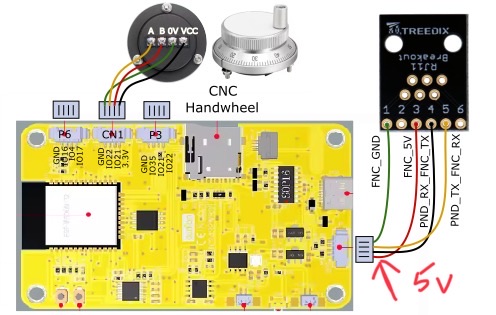
This sentence right here is, 100%, the part I am trying to solve. This is what I “hear” reading about the pendant as well.
I think the power users are having fun trying new things and the rest of the users are taking that as the webui is no good. In reality the webui is amazing, leaps and bounds above what we had before. The issue is now we have options and everyone is exploring them.
This never came up with the skr becuase the one choice is all you really had.
That might explain my gut reaction of just mass producing them cheaper, If I can’t fight it just make it look like a less extensive add on. Now we are getting down to the nitty gritty, there is no one stop solution, but there are many many options. It is even clearer to me now I need to show the options.
For sure. I don’t know if it is forum people supporting others by suggesting a pendant. But if you read support forums, you see a lot of the issues and not a lot of the successes. The same thing happens in the chevy Bolt forums. The car is awesome, but all the posts are about problems people have. Because what else would we talk about?
I have a special use condition of zombie fingers. Touch anything for me is problematic. ISB connection to a comp with a sealed keyboard and in set. UGS and a pendant usually from the nephew’s game system a couple of time’s. Then i can do emergency edits without running up to my main computer and back. Old computer gamer so lots of older hardware mouse keyboard.
I realized my case is different than most skin issues are frustrating
Little late to reply (been busy lately and haven’t had time to keep up with the forum - but the summary e-mail clued me into this discussion.)
I’ve tried both the M5 and the CYD pendant and honestly I’m not a big fan of either. I liked the CYD more but mine just fried last week and I can’t say I’m in a big hurry to rebuild it. Apparently I thought I had added a strain relief to it’s cord but never actually did - so powering on the machine last week the cord pulled loose from the jackpot as it was booting and now the CYD is dead.
I did vastly prefer the nice big dial on the CYD for jogging over any other method. The v2 webui looked great and made sense to me…but was too small to use reliably on touch screen whether that be my phone or my iPad. The v3webui I just don’t care for at all for jogging. It works…but it just doesn’t sit right for me and seems clunky. A bigger version of the v2 interface that’s big enough to be touch friendly would be nice…if I had the the time I would probably look into trying to implement something like that in v3.
The m5 is slick…but it’s not great for jogging and jogging is really what I wanted from a pendant.
Both m5 and CYD I found slow and frustrating to use for anything other than jogging. I was really hoping they’d be nice for starting and pausing jobs…but instead they just got in my way and I went back to using my ipad. They’re also both frustratingly slow to startup and connect. But that may be unique to how I use my machine - I have an idea and want to try it “now” so I run out the garage and do it. I’m not spending hours out there working at the CNC. I just pop out and want to power up, home, zero, run a project. And I can do that much quicker from the ipad right now.
I’ve considered doing something like @dkj4linux does and putting a Pi out there with a 10" touch screen. But…Honestly I don’t want to wait for the pi to boot either and don’t want to have to manually start a browser and all that. I want something that works like a pendant…but hopefully has a faster boot time than the current pendant options.
I’d also like to see some better options for ESD protection - Bart’s interface was out of stock when I built my pendants. But I never planned on disconnecting them so I took the risk of flying without protection. With an integrated ESP though I really wouldn’t want to take that risk and I’ve seen too many discussions about the protections in Barts board possibly not being sufficient.
All that said…for me right now my iPad is an almost perfect solution. Just overly expensive for what it is. I may pick up one of those cheap tablets to try though since I really don’t like having my expensive iPad out in the shop…
I think a new clean slate pendant design would be great…but that’s a lot for someone to take on. I am thinking about trying Jasons’s jog controller though since it may be the sweet spot for what I’m missing.
We have very much improved the Jackpot V2 board, with a built-in RJ12 connector and better ESD and power protection for the pendant interface. Potentially for all IO, where we continue to have discussions about the right mix.
I see this as one area where the pendant software could be massively improved.
I’m genuinely curious when I ask this: How long does it take?
When I time this on my test system (the JL1), From hitting power on it takes about 2 seconds for the pendant to power on, and a further 3-4 seconds for it to connect.
When doing the same thing using my iPad pro, from power on the jackpot is up in about 2 seconds, but it can take me 10-15 seconds to get to where the iPad sees the network in AP mode. Around 5-10 seconds if it is in STA mode (which is mostly FluidNC connecting to the network and all the network layer stuff being good.)
I’d really value some objective measurements, like-for-like. So, from power off to power on, how long does it actually take you to have a usable machine from the interfaces you have?
To be honest - I haven’t timed it. But it is slow enough that I’ve opened my ipad and started homing the machine before the CYD was active on more than one occasion.
Though that’s also assuming I already had the browser open and page loaded (STA mode) from having used the machine recently so I just had to hit reload.
I’d try to get some actual measured times - but with my CYD dead it will have to wait until I get around to ordering a new CYD board.
I don’t like leaving the machine powered on when I’m not in the room even if it’s not doing anything and the router is unplugged. So I’ll often do a cut or two - then shut the machine down to go back inside where my computer is (and where I’ve got AC that does more than get it down to “only” 92f - the garage has AC but it isn’t insulated so it only does so much when it’s 115f outside!) to prep some more cuts before coming back out and powering back up.
Side note - the machine has held up to the temps in my garage far better than I expected. I have had to snug up the tensioners on the belts a few times and even had to pull a few more teeth through to shorten the belts…and I have to snug up the adjustable bolts on the core almost every time I use it right now - and still have a bit of an issue with tram on my core that it’s just been too hot to investigate. But overall despite the garage being over 110f for the past 2.5 months and the machine being “normal” pla - it’s holding up great!
I have this experience as well. 112F isn’t uncommon in my garage in the summer. There is an LR4 in there all the time, one more part time, and also a JL1 and a MPR&P (as of this year). All are not showing any signs of significant impact from the temps.
I really want to time this out better. I just started trying to collect data and am surprised that the timings aren’t what I’d thought they’d be.
I’ll try and do some bench testing on my CYD tonight to see if there’s any chance of revival. Could be a pin or wire broke…I just haven’t looked into it since I’m not in a big rush to get it hooked back up until it cools down outside
And to be fair…I put most of the blame on the CYD itself - I’m just not that enamored by it overall. The device just seems slow and flakey even running the demo code it ships with. I can see the appeal of developing for it since it packs a lot of hardware into a very affordable package with decent software support.
I just like embedded devices that power on more or less instantly and don’t have to boot. But I’ve also long been critical of projects on pi’s that seem like they’d be better built on a microprocessor and projects built on arduino that seem like they’d be better suited to a pi
Then there are projects that blow me away by pushing things beyond what I thought possible like the pi1541 that emulates a commodore 1541 drive on a pi and treats the pi more like a uc not bothering with any kind of OS and just running right on the hardware so it can boot almost instantly.
Of course - that’s a LOT more work and not something I’d attempt. I can barely blink an LED working with assembly language. But…who knows. Putting the idea out there maybe someone with the skills to actually do it will get the same itch and dig in
Ugh…this week has turned out to be busier than I expected in the evenings.
But - yesterday I did find a few minutes to open up the case on my CYD Pendant and do some bench testing. Good news - it does power up over USB. And it does boot up quickly - about 2-3 seconds until it’s waiting for connection. So my memory about where the delay is was a bit off - it’s just how long it takes to connect to the jackpot/fulidnc that’s annoying to me.
Now though I’m not sure why it stopped working on the actual machine and I’ll have to do some additional digging/testing. Have to confirm it will run off 5v directly instead of USB next but didn’t have time to clear enough of the desk to get to my power supply. Hopefully in the next few days.
Oh I know it’s supposed to - and it was. Up until last weekend when the cord pulled loose and then it wasn’t coming up at all when plugged into the Jackpot.
Over lunch I took a few more minutes and hooked up my bench supply and confirmed that the CYD still powers up over it’s 5v line. So now I’ll have to take a look at the jackpot on my machine to confirm it’s still got 5v on the header. That may take a bit longer because it’s too hot for me to go out there unless I need to right now and while the LR4 may be “portable” I don’t really feel like taking it off the table and bringing it inside just to debug why the pendant is suddenly not working.
But - it seems the pendant works by itself still when powered through the cord so It’s either the connector on the jackpot or a regulator on the jackpot went out when it came loose (though that seems unlikely since the jackpot is still working otherwise…but I haven’t looked at the schematics to see what else may be on that power rail.)
Alright - not sure why my pendant stopped working the other day now. Because over lunch I went out and plugged it into the LR4 and sure enough it worked again. Maybe I just didn’t seat the connector well after it came unplugged?
Cool, so that’s nice for me
And I got some timings on it and can more accurately describe where my frustration with the speed comes from.
First test:
4 Seconds from power until interface was displayed with N/C
Another 8 seconds (12 seconds total) until Idle
Another 5 seconds before the interface became interactive (17 seconds total.)
Second Test:
4 seconds from power until interface with N/C
Another 17seconds (21 seconds total) until Idle
Another 5 seconds until the interface became interactive (26 seconds total)
Here’s a link to the video I took timings from: https://photos.app.goo.gl/GzFUmSnCN8LDo4di9 First test I called out when I plugged it in…second test I realized I could put it next to the jackpot and let the LED indicate when I powered up.
It’s the second step where it connects to FluidNC that seems to be the slowest - and most inconsistent (at least across a TINY sample size - I didn’t have time to do more testing)
But…it’s that final 5 seconds that really irritates me - that delay between when it says Idle and appears to be connected and when the interface actually becomes functional is just annoying.
But - almost 30 seconds from plugging in the machine until the pendant is ready to use is also why it feels slow to me. When it’s not up in about 10 seconds that’s when I usually reach for the ipad.
And when using the pendant it’s often slow switching between screens. The hardware buttons just being mapped to software buttons that are there even when I have hardware buttons also bugs me.
Overall the interface whether the touch buttons or the physical buttons also just seems slow and I don’t really trust it to do something critical like stop the machine. Too many times it just doesn’t seem to register button presses and then I wind up pressing the button more times than I meant to because it was actually just slow to respond to the first press.
Still like it for jogging - beats the heck out of any touch interface. But the reliance on the touch screen and how laggy it is just makes me go to the ipad for most things. Kind of tempted to pickup a $50 “raspi” 10" touch screen monitor off Amazon and set it up with a spare pi in the garage. But I feel like if I’m going to put a computer out there I’d want one that can run Fusion so I can edit designs out there - but that’s more computer than I want to leave out in the garage.


 up to my main computer and back. Old computer gamer so lots of older hardware mouse keyboard.