I just don’t understand the connections well enough. As in the actual technical differences, let alone how to edit or change them enough for fluidnc to support them. So I am pretty much stuck with fine-tuning what is available.
I looked at a few other machines today and they all have a hardwired computer bolted to the corner of the machines.
In term of simplicity to use, though not price, I think Level 2 would be more like a preconfigured ‘works out out of the box’ touchscreen mounted to the table or XMin - a direct comparative update of the skr controls.
Like Maker Jim noted at OpenSauce ( I think) some people don’t want a tool they need their phone to use.
Hey @vicious1 - turns out after doing more diving via @Dreyfus UART test topic
It looks like we MIGHT be able to use the CYD pendant and its’ SD card slot as a gcode sender. This changes the calculus. Walk over with an SD card, pop it in your CYD, use the CYD to home the machine and get set up, run the job from the pendant.
Some devices I use, like Ubiquiti outdoor radios (not Unifi, although they may do it too, I can’t remember) and Tapo/Kasa cameras (and other devices) have their Android/iOS app connect the smart phone to the device which is running as a wifi AP. You enter your network’s wifi credentials and it configures the device as a station. All via wifi, rather than bluetooth. The app then switches the smart phone back to your network’s wifi and connects to the device. I’ve not bothered to look to see if they are using mDNS, connecting as a station before shutting down the AP mode and passing the station IP address, or just relying on MAC addresses (the phone has to be on the local network segment with the device).
Lots of ways to skin the cat, probably fewer people willing to write and support such an app.
That definitely changes the situation. Being able to offer the pendant as an ‘all in one, no phone or networking needed’ solution would be exactly how 2 of the 4 machines I know of locally would be used.
I have opinions on a lot of the stuff said here… but not the time to respond
I also haven’t fully read everything in detail, but just wanted to add to this…
The appeal to me to have a pendant is the same reason why there is appeal to have a screen on my 3D Printer.
With my printer, I almost exclusively use the web for everything, except when I just real quick need to turn it on to do something. Run a file again that’s already there, move it, test something, etc. etc.
As someone who is not running production batches of stuff, my machine use is limited.
Most often, the time I want or need a pendant or attached screen, is because I just need to move the machine out of the way quickly to do something… or because I need to use a section of the table for something else, etc. etc.
I don’t have a dedicated iPad or tablet or whatever that stays out there. I have an old iPad in my house I’ll bring out there. It’s rarely already charged when I need it.
So if I’m in my garage doing something not related to the CNC, and I need to move the machine out of the way, I have to go back inside, find the tablet, wait for it to charge, power on, etc. etc.
Or I can pull my phone out and try to get connected.
It just would be a lot easier to do something really quick when I need it.
That convenience is worth the cost for me… even if it’s not my primary driver when I’m actually using the CNC machine for what it was intended.
Money and tine are always limited. They are more limited in our little community and your business than some other places. So the best technical solution isn’t always the winner.
The reason I am making these points has more to do with the jackpot v2 and what to include than anything. If there’s nothing compelling to put in the box with it that just connects with an ethernet port, then maybe it is a moot point. Or that connected should stay off until v3 or v4. But there is a bit of a chicken and an egg problem. If you make the board with the port, maybe someone would be more inclined to pre build a turn key controller that works for it
I thought the M5 dial could already read the filenames from the sdcard in the jackpot and start a job. Doesn’t the CYD do that too? What would be the benefit of sending gcode over serial vs just using the sdcard on the jackpot?
Those are sand tables that have similar technical challenges, but the userbase is not interested in DIY at all. The sysiphus also cost a ton and the oasis mini is limited to cloud based operation. So neither of those are reasonable solutions for us.
That’s using the Grbl/FluidNC protocol to dump file names from the host FluidNC controller and then tell FluidNC to run them.
The additional capability would be to put an SD card directly into the pendant and use the pendant as a gcode sender from the pendant SD card.
If the jackpot is buried in the X axis beam or otherwise hard to reach somewhere you just don’t care, the access needed would only be to get at the pendant.
I am not understanding how this is different than just using the Jackpots sd slot? We know the pendant already handles this. A little easier to get to?
edit -
Okay, I see. Having it as an option would be cool.
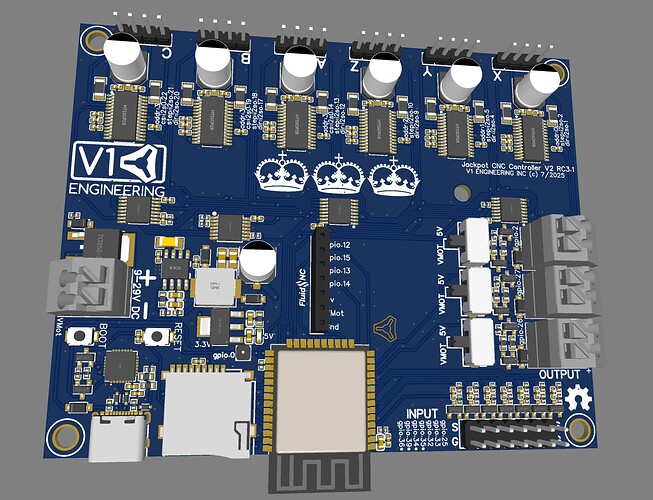
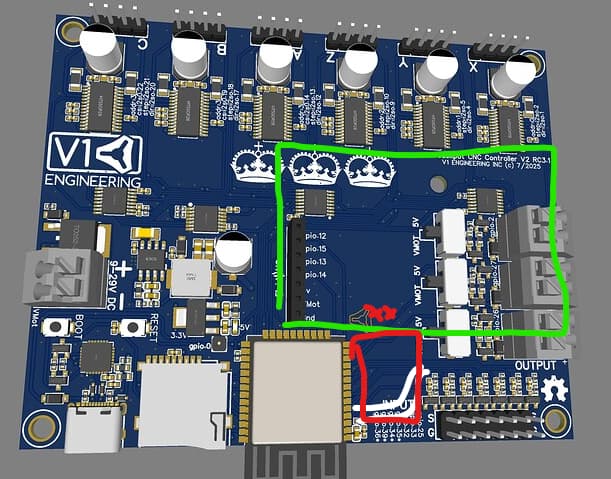
Ah, that makes sense. I spent some time yesterday and I do think I can squeeze the RJ port on there and hopefully the little protection chip Jono found.
If you do that, use the upper two GPIOs from the header, not the lower two. That preserves the use of the expansion header for non-UART stuff as you wouldn’t need a pin swizzler for the expansion modules. In other words, makes the JackpotV2 IO asssignments better by default.
green is the module outline, white are the traces I would need to bend, red is hopefully where it would fit. The current v1 log is another option but getting traces over there is no good. Anything else takes substantial rework.
Ignore this if it’s not relevant to the conversation. I know I’m out of my league here and doubt I can be of very much help. But I’ll try to share what I’m seeing as I play around with my MPR&P machine… and reading in this thread.
I’ve ordered and received a Jackpot from Ryan… fired it up to see what all the fuss is about and connected to FluidNC just fine. I’ve not actually connected it to my MPR&P and tried to control it… though I’ve no doubt it could. I suspect that when I do ever connect it to a machine I’ll just use the Jackpot’s direct USB functionality.
I’ve always used a RPi3/4/5 as my machine-local computer… connected directly to my controller through USB. That way I can remain connected indefinitely… often for days/weeks at a time without something going to sleep or tying up my main laptop. Initially I used Jeff’s V1Pi image and CNC.js… but I’m also now playing around with RPi OS and various other gcode senders and machines. I can then use VNC, or my browser for webserver like CNC.js, to connect to whatever machine and gcode sender I want to play with. I suspect I’ll end up with my Jackpot connected by USB to a mini PC (coming today!) so that I can use any gcode sender I want. From what I’ve read here, WebUI doesn’t seem to be all that popular… and I’m also not that crazy about the idea of being tied only to Jackpot’s options; i.e. I like playing around with other gcode senders and computers.
So far in my exploration, Gsender looked really good initially but it is quite sluggish on RPi4 (a bit better on RPi5) and I gave up on it… that’s why I ordered the mini PC. I’d like to give it another try.
But I’m also really liking UGS Platform which seems pretty full-featured. I especially like it’s pendant functionality… it offers up a QR code to scan with your cellphone and you can then connect and control your machine with it; i.e. it’s nice not having to take my laptop into the room with all the sawdust. Though I’ve not used UGS Platform a great deal yet, I’ve been first selecting and running/simulating the gcode file from my recliner (machine’s motor power has not been powered on yet) and then I’ve used the “cellphone pendant”, which has nice big buttons for my shaky hands, and I have most of what I need when I’m actually at the machine; i.e. jogging, setting zeros, and starting, stopping, and controlling jobs. And it didn’t cost anything extra to try it out.
I suppose that adding a RPi4/5 or mini PC to your setup is an extra expense if you don’t already have one laying around unused. But it offers IMO a great deal of flexibility that the Jackpot/wifi/WebUI/whatever by itself maybe doesn’t offer? But I guess, for some, this may also add complexity/confusion to the mix that is not welcome.
It does sort of sound like exactly what I was talking about earlier, Jason made a great cell phone pendant from the webui. So your method is sort of a mix of all the option, wired, wireless , and pendant.