I used the most recent Pi imager, but my printers are hard wired, so I don’t bother with the WiFi setup. The rest of the configs for login/password, hostname, and ssh creds all worked, though.
1 Like
Mental note. Don’t have your first z movement be z325 if you haven’t verified your steps.
3 Likes
What do you mean your printer won’t print?
Oh… The extruder direction pin is reversed in your config 
Derp.
It’s funny how many little things you forget to check or test when setting up a new config. And I thought I had a good checklist in my notes from last time.
2 Likes
Ok. It sort of prints again. I need to recalibrate the extruder. I found better values, but haven’t tested them yet.
I also need to cut up a usb-c cord so I can use the better power supply to run the pi. I have the one that came in a cheap “get you going” kit, but klipper keeps complaining about undervoltage and the print died before it finished.
I had one complain of low power and it was the wire i used
This is one of those ‘Valero’ 5v3A power supplies that are supposed to be good for pi4, but when you read the reviews, everyone says it’s over-spec’d for what it actually provides. I’m half tempted to put a meter inline on it and see what the voltage/current is when it’s running.
The din-mounted PS I have in the electronics box is much better quality. I wired up a USB-C cable this morning with terminals so I can hook it up later today when the shop isn’t freezing.
That is one of the draws for a pi3… Less power required. Good luck with the frozen shop. I gave up on that and moved my stuff to a tiny corner in the basement with a really cold floor, but with an insulating pad to stand on, it is manageable. Springing for a $15 usb-c wall plug was worth it to run the pi 5 now on the larger v5, however, I need to do the same as you and get it connected via the printer power supply. The small touch screen on it makes powering it via the gpio pins difficult.
My shop has a full-size AC/heat pump in it. The shop is set to 40f unless I’m out there. I just don’t want to walk out there to bump the heat up. It’s supposed to get up near 50f today, which is a lot nicer to be out there in. The metal shop will warm up probably into the 60s with the sun baking on it.
I’ve been poking around with AI more and more at work using Claude. It’s been working pretty good if you pay attention to it. I thought it’d be fun to ask it to compare my marlin configuration.h file with my klipper printer.cfg.
This was pretty impressive (Ignore the z_tilt, that’s stored in a different file called mesh.cfg). I could have done this myself.
CLAUDE’S ANSER:
I’ll analyze both your Marlin Configuration.h and Klipper printer.cfg to check for consistency and potential issues.After comparing your Marlin Configuration.h with your Klipper printer.cfg, I found several important issues and areas for verification:
Critical Issues:
-
Missing Z1 configuration in Marlin - Your printer.cfg has three Z steppers (Z, Z1, Z2), but your Marlin config only defines Z2 and Z3 drivers (lines 164-165). This suggests Marlin labels them differently:
- Marlin: Z, Z2, Z3
- Klipper: Z, Z1, Z2
You need to verify the physical wiring and ensure the stepper motor pins match.
-
Rotation Distance Issue - Your printer.cfg shows
rotation_distance: 32for all axes. I need to check what Marlin has configured to verify this is correct.Perfect! Now I can see the steps per unit. Let me check the BLTouch configuration as well:Now let me compile the analysis. Based on my review of both configurations:
Summary of Your Configuration Analysis:
Your Klipper printer.cfg has several issues that need correction:
Critical Issues:
-
Rotation Distance Mismatch
- Marlin: 100 steps/mm for X, Y, Z
- Klipper: rotation_distance: 32
- Calculation: rotation_distance = (full_steps_per_rotation × microsteps) / steps_per_mm
- For your setup: (200 × 16) / 100 = 32 ✓ This is actually correct!
-
BLTouch Y Offset Discrepancy
- Marlin: y_offset = -36
- Klipper: y_offset = -25
- Issue: This 11mm difference will cause incorrect probing positions and mesh alignment
-
Missing Z_TILT Configuration
- You have three Z motors but no
[z_tilt]section in your config - Without this, your three Z motors won’t level properly
- This is critical for a three-Z-motor setup
- You have three Z motors but no
Moderate Issues:
-
Extruder Rotation Distance
- Marlin: 395.45 steps/mm
- Klipper: rotation_distance: 7.824
- Calculation: (200 × 16) / 395.45 = 8.091
- Your value: 7.824 is close but not exact - this will cause slight under-extrusion
-
Max Velocities Don’t Match
- Marlin: max_feedrate = {100, 100, 100, 45} mm/s
- Klipper: max_velocity = 350 mm/s, max_z_velocity = 100 mm/s
- Your Klipper XY max velocity (350) is much higher than Marlin (100)
What You Need to Fix:
# 1. Fix BLTouch Y offset
[bltouch]
y_offset: -36  # Change from -25 to -36

# 2. Fix extruder rotation distance
[extruder]
rotation_distance: 8.091  # Change from 7.824

# 3. Add z_tilt configuration (add this entire section)
[z_tilt]
z_positions:
    -50, 0      # Front left Z motor position
    150, 350    # Rear center Z motor position
    350, 0      # Front right Z motor position
points:
    30, 30      # Probe point for front left
    150, 270    # Probe point for rear center
    270, 30     # Probe point for front right
speed: 120
horizontal_move_z: 10
retries: 5
retry_tolerance: 0.0075

# 4. Consider reducing max velocities to match Marlin (optional but safer)
[printer]
max_velocity: 100  # Change from 350
max_z_velocity: 100  # Keep at 100
The most critical fix is adding the [z_tilt] configuration - without it, your three Z motors won’t coordinate properly, which can cause bed leveling issues and poor print quality.
1 Like
In other news. I got a test cube to print. It’s even mostly all the right sizes. X and Y are a tad low (shrinkage). Z was almost spot on.
The infill looked horrible, which I think is due to the underextrusion and I have ringing which I think is from printing too fast. I don’t have any accelerometers on this machine. I need to look in my boxes. I think I bought one when I bought all the other upgrades.
2 Likes

I figured it out!
There were a lot of errors in the console I was missing because I was watching the printer and not the terminal… Unknown Command G2, Unknown command G3. I forgot to enable arcs in Klipper and the gcode was using arcs for all the gyroid infill
3 Likes
I give you a 24 minute xyz cube.
The startup homes the axis, runs z tilt, and gets a fresh mesh. I could speed it up if I had the extruder heating up while running the mesh.
Later I’ll actually test the mesh stuff to see if this fixes the whole reason I went through all the work.
The better power supply is working awesome. No more undervoltage messages.
I also have a chamber temp probe working already. Just need to wire up the heater and exhaust fan and program their configs.
Actual Measurements:
X: 19.9 mm
Y: 19.95 mm
Z: 20.05 mm
Close enough for the girls I date.

1 Like
I ran a mesh test last night. It looked a lot better and I could see the Z going up/down on the long traverses. There was still some squish on one side and it was a bit light on the other, but I think that’s because I didn’t have the start up script doing a G28 Z after the z-tilt. Correct me if I’m wrong, but I’m thinking the z-tilt adjustments could affect the starting z? I have the mesh using the middle of the bed where the Z homes as the “0 adjustment” point for the mesh. I used the paper method to set my nozzle height in the middle of the bed.
Anyways. The printer is printing again and it’s better than it was, which is what I was trying to accomplish. Plus it’s easier to make changes to the config in Klipper.
This morning, with the help of gemini, I adjusted my my config to add the chamber heater and exhaust fan. I need to go wire all those to the appropriate plugs later today. Then I need to print a mount for the Pi4.
1 Like
I kinda wish I had fancy wire management. At lest some of this will get removed now that I’ll have the skr controlling the chamber heater and exhaust fan.
I had to jump through a few hoops for the pi3 to control things via its header pins.
Maybe I’ll do some more cleanup while I’m in here.
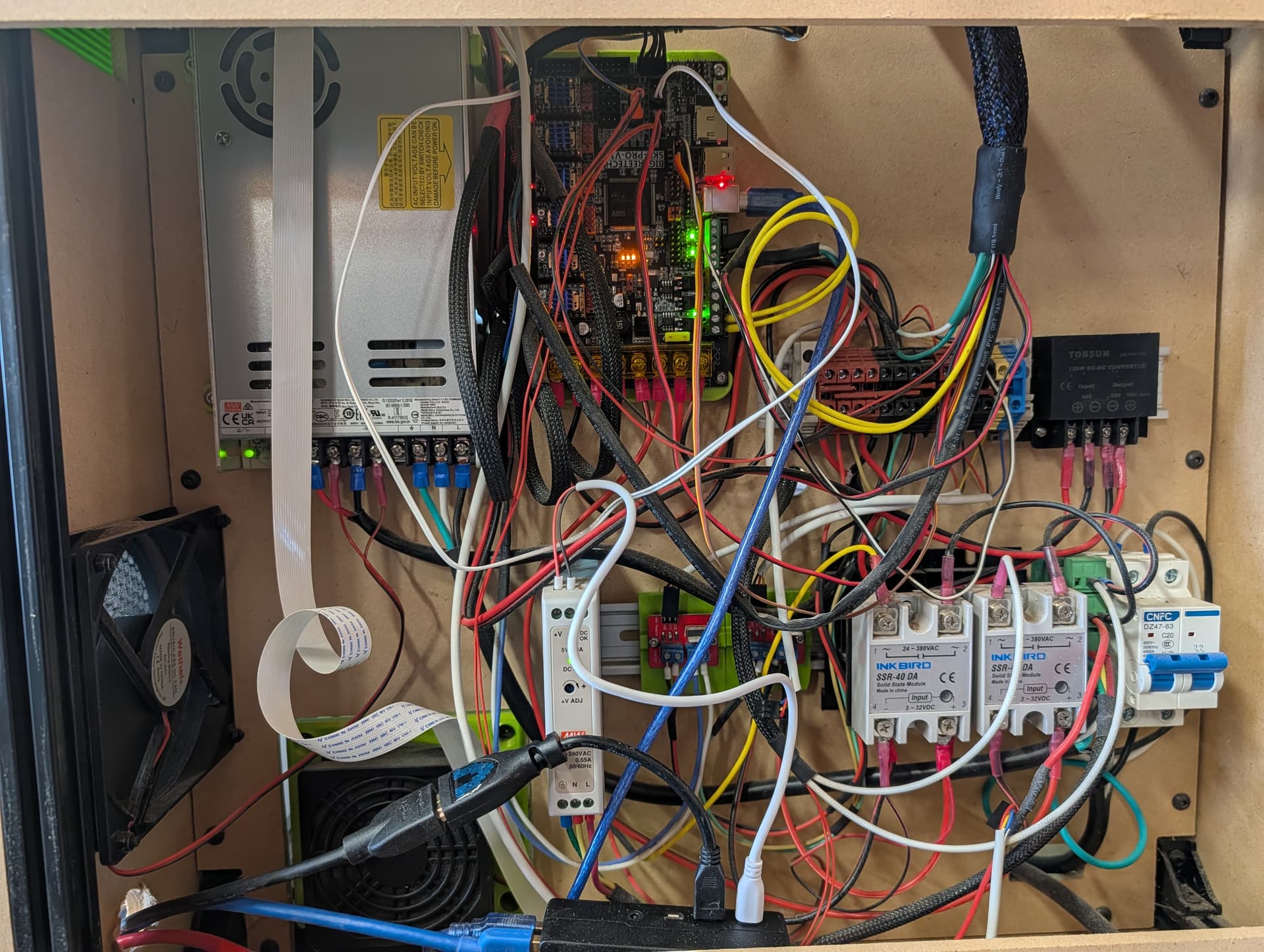
I also struggle with wire management. “Functional” is about what I get. I never seem to get the right wire length for what I want and tend to leave wires too long (better than too short, I guess) so they get snarled.
I start off with all teh best intentions but find I a get a bunch of just a little bit too short to router in a neat way so I end up with a bunch taking a shortcut.
Working and hectic, is better than not and clean.
2 Likes
Looking at my setup, it looks like past me was at least smart enough to standardize on some type of color codes… Red is some type of DC voltage, black is ground. white and yellow are AC line voltage. Although Yellow also looks to be the heater for the extruder, but I think that just ‘is what it is’.
I am sad to see I won’t be using the BTT TFT that’s on the front of the printer. I have an HDMI screen mounted up there too, so I guess that’s less of an issue. I guess that’s even more cables I’ll be able to clean up.
I’ll also be switching over to a USB camera with better resolution, so no more flat cables running around the inside of the lid.
I tried so hard to keep my V5 nice, but I wouldn’t even want to look back their right now  Its easy when you are starting out, but as you add or change things it gets harder and harder. My V4 is straight up just a mess
Wire management is an art form and I am not an artist.
2 Likes