If I needed an excuse I have it now! Shame I’m still somewhere in October in my Garage cleanup calendar…
Ooh and now there is an RC12 that may have the custom gcode fixes I was looking for. I’ll have to check that out later.
These two items will trigger me to take another look.
It does have the fixes I was looking for. Now I can include fancy gcode and do some other things. It seems like there might be a small bug but I need to investigate more.
What fancy gcode?
MillMage doesn’t work like Estlcam in that you can have separate tool change gcode for the first vs later tool changes. We do this in Estlcam because we usually assume we put the first tool in before starting the job. So, I can use the gcode parameters and expressions to conditionally do one thing the first time and other things later. I also have gcode somewhere so it takes the spindle speed and maps it to the number on my router dial so it can include that setting in the hold message. This way anything that calculates chip loads can still be used.
Dr Yeager in da house!
Can it do V-Carve inlays already? 
After Dr Yeager fixes it, yes
Lol don’t look at me. That’s over my head.
Wonder if Christian could talk them into a consulting fee ;l
After watching this video i realized have not given it a fair shake, i think i will today!
I do a lot of sheet work and it is SO SIMPLE for that. MUCH better than trying to do it in Estlcam. Even more so when working with multiple parts. Yes you can move them around in Estlcam but for me its just so much easier in MM.
I have also done work where I lay a full sheet on the LR4 but only use parts of it for the first job. Then I leave the parts on MM but delete the operations. That allows me to easily see what’s left on the sheet and use those “scraps” easily fitting more parts where I have wood left.
V-carve inlays or bust! 
agree i do the the same with left over sheets , I just change all parts to a T1 or T2 and save and leave all operations, the only thing it will delete is tabs, but if you ever need run that job again just change lines back to colour and done, i generally use auto layer on all operations, unless i have over 4 tool changes than i don’t,
Have you used the new template tab, saves so much time , no more having to set retract , clearance pocket lift height at start of every new job
No I haven’t. Most of my stuff is all through cuts. And rarely do I use any tabs. I HATE cleaning them off lol. But for the most part I am either cutting 1/4" or 1/2" plywood.
Well Bummer! I will not be testing today! I am past 30 days on trial and never got a testing key.
I have emailed them, we will see what happens.
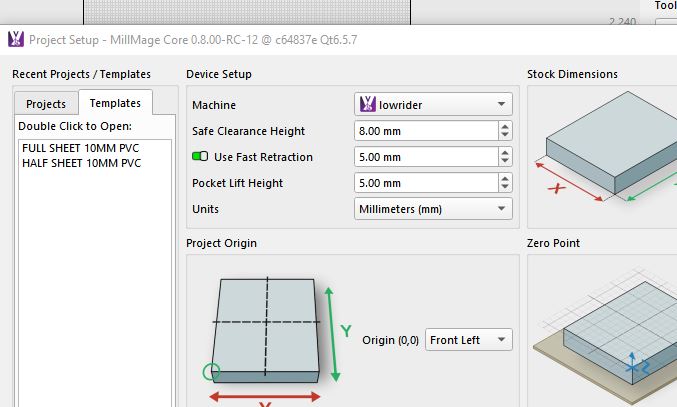
Yeah I looked at that just a little bit ago. Very nice addition.
sure is