Much like Dr. Evil and sharks, mounting lasers to things isn’t always straight forward.
I just ordered the LaserTree K60 60W laser and thinking about how to mount it. I was thinking about using @Fabienlaser mount on the Makita holder, but looking closer at the specs they list I am not sure having something that weighs 1263g (almost 3lbs) hanging on the outside of the Makita ring would be the strongest solution. Also with the Makita holder mount above was designed for the LR3, I don’t know if that part has changed for the LR4.
Has anyone tried mounting a K60 yet and have a solution? I do like the idea of a side mount option since taking the AutoSpin T1 off and on along with the wiring would be a minor hassle. Given the max weight of both on the head unit might be too much on a 55” gantry.
You’re not going to want to leave the laser mounted when you are using the router. All that dust will get inside and will negatively effect your laser.
Thanks for the tipbut wasn’t planning on leaving the laser on there, only attaching when needed. That is why I really like the laser mount on the Makita ring holder for easy removal.
Just don’t know if I should keep the router on while using the laser. It’s a much bigger laser than I originally thought.
Wow. That’s slightly twice as heavy as the K20 Pro I recently got.
I’m also trying to determine how I’m going to mount it. I’m mounting to my LR3 but I’ll need a different mount than the one you linked since I have the Kobalt router.
Okay, so here is another idea, what if I put a second core on gantry?
I built the gantry by just cutting a 10’ conduit in half so I have essentially 60” of total gantry, minus 6.5” for the core with the collet approximately in the middle of that. If I put a second core on the far side that would put me in the 46”-47” of actual cutting space by my fast calculations, right?
If that is the case, that would still give me the ability to cut full sheets minus ~1” which I could consider a border and I would deem an acceptable compromise. Has anyone done such a thing - is it preposterous?
I know this is being considered in the 3d printing world, but for CNC?
I was a little astounded by the size of the thing, but I guess I shouldn’t have been since it’s a diode laser with “true” 60W output - not just input.
One idea I am throwing around is to make a quick connect directly on the core that could swap between the two, maybe like an Arca mount that is getting popular in the camera world.
I am starting to like the idea of a second core more and more, especially if I can use them independently using the additional motor connection and place a second x-min switch in to monitor. Would also be a good puzzle project to set up the config as well - one I have no idea of beyond a hypothetical concept that it should work.
I know step files are limited due to really good reasons, but is there one available for the core? The LaserTree has a mounting plate and all it would need is a flat front parallel to the z plane with the correct mounting holes.
Putting another “fixed z lowrider” on the same table is actually the option I’m leaning on right now
I’ve been toying with the idea for quite some time but never actually built it….
On a side note, just a quick feedback on using a laser with the LR3 for the past 2 years:
Dust is a problem…
Lens get dirty real quick because using a laser on a dusty table will create fumes….
Security is a problem…
Covering/protecting the laser to guarantee you won’t get blind is a real issue
Not putting your workbench on fire is another issue too…
You’d need to:
ideally → build an enclosure around the machine
mandatory → make or buy a laser bed (honeycomb type)
At which point it really brings up the question: shouldn’t you build another machine?
Strapping a laser to the core is fine for occasionnal use (and even like that you’d still need at least a bed), but I suppose if you bought a 60W laser… well… it’s not for occasionnal use
That is a really interesting idea, one of the ideas I was considering was making a whole second gantry. At that point it’s like you say, then why not a full second table?
And thanks for sharing the years of experience under your belt, some I have anticipated but not everything.
I probably went a little aggressive with the 60W version, but after just getting a bonus and my wife not only supporting, but encouraging to “go big or go home” I went for it. Seeing that it is advertised to actually cutting through thicker stocks of plywood have me intrigued.
I am definitely securing items to make a laser bed for full cuts, have a welder friend who is willing to let me dig through his pile of steel mesh. I also have a few AC Infinity fans I use for a paint booth I made a few years ago I can adapt as a fume hood to place over the burning. It’s in a room that is the corner of a larger bay in the barn so not too worried about being overpowered, but still would like to extract what I can.
When it comes to the smoke, does it make everything in the room start smelling like ash?
I used an aircraft connector to shorten the power plug on one of my routers. I left a 6" whip. Then I could easily take it on/off the core of the CNC if needed.
Create a mount for the laser that will make it the same outer dimension as the router, then just hot swap the two devices as needed.
Love the aircraft connector idea, may actually have an extra one for the AutoSpin signal wire. I’ll look into it.
The mount insertion was the first ideas I was going to pursue until I realized the circumference of the router completely fits inside the dimensions of the laser.
I very quickly went with a whole other machine. Then another one.
My one 40W laser is on an XYY movement machine, so the drive is.kind of like a.LowRider, but no Z axis. That one is fairly large. It’s 500mm by 1000mm, but was supposed to be 1250mm, except I ordered the wrong 2040 extrusion.
The other laser is CoreXY, based on the MP3DPv3, because I had all of the pieces. The CF spar was replaced with aluminum, since my CF spar cracked on the printer. It would be trivial to migrate to the MP3DPv4 or even 5, since I made a laser mount that replaces the Hemera print head. This is smaller about 350mm square, which is good enough for most things. I still do need the larger format sometimes, particularly for cutting whole DT foam boards, but most of my engraving stuff is smaller and benefits from the speed of the CoreXY kinematics.
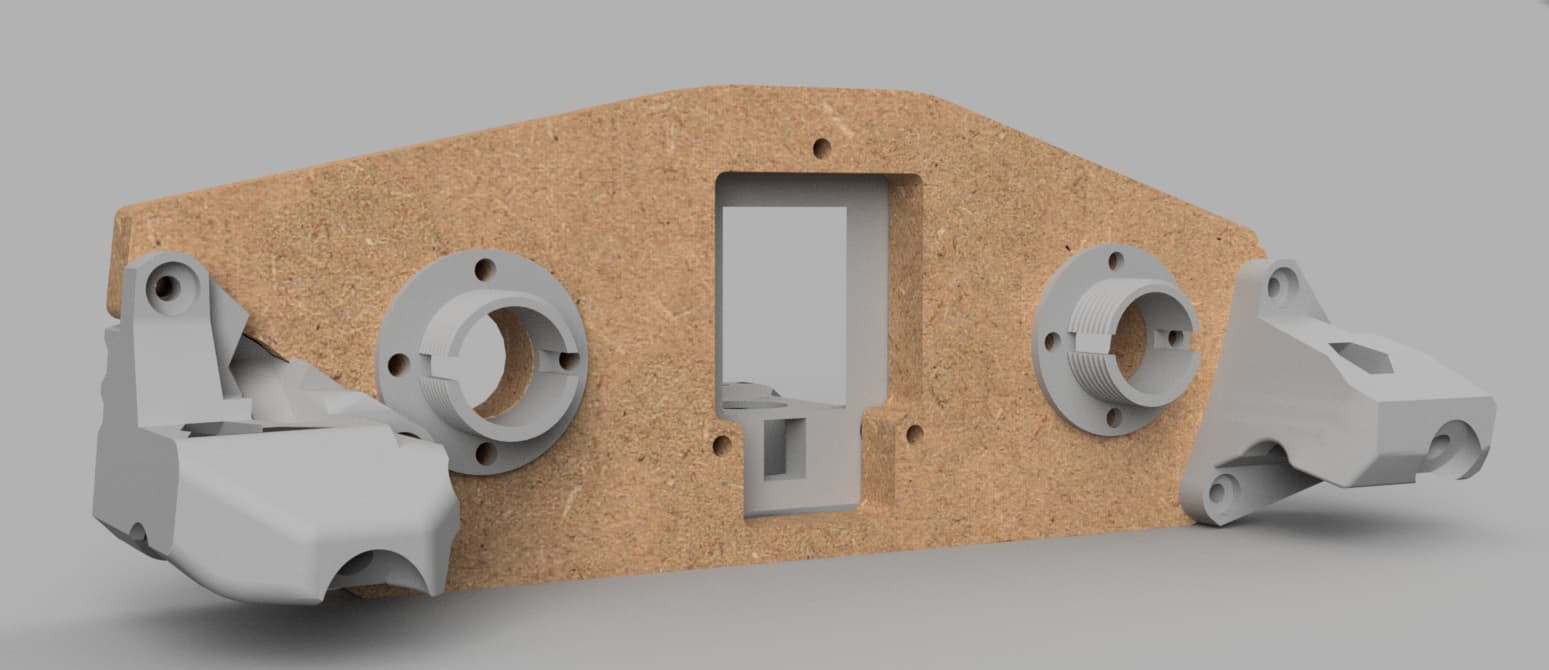
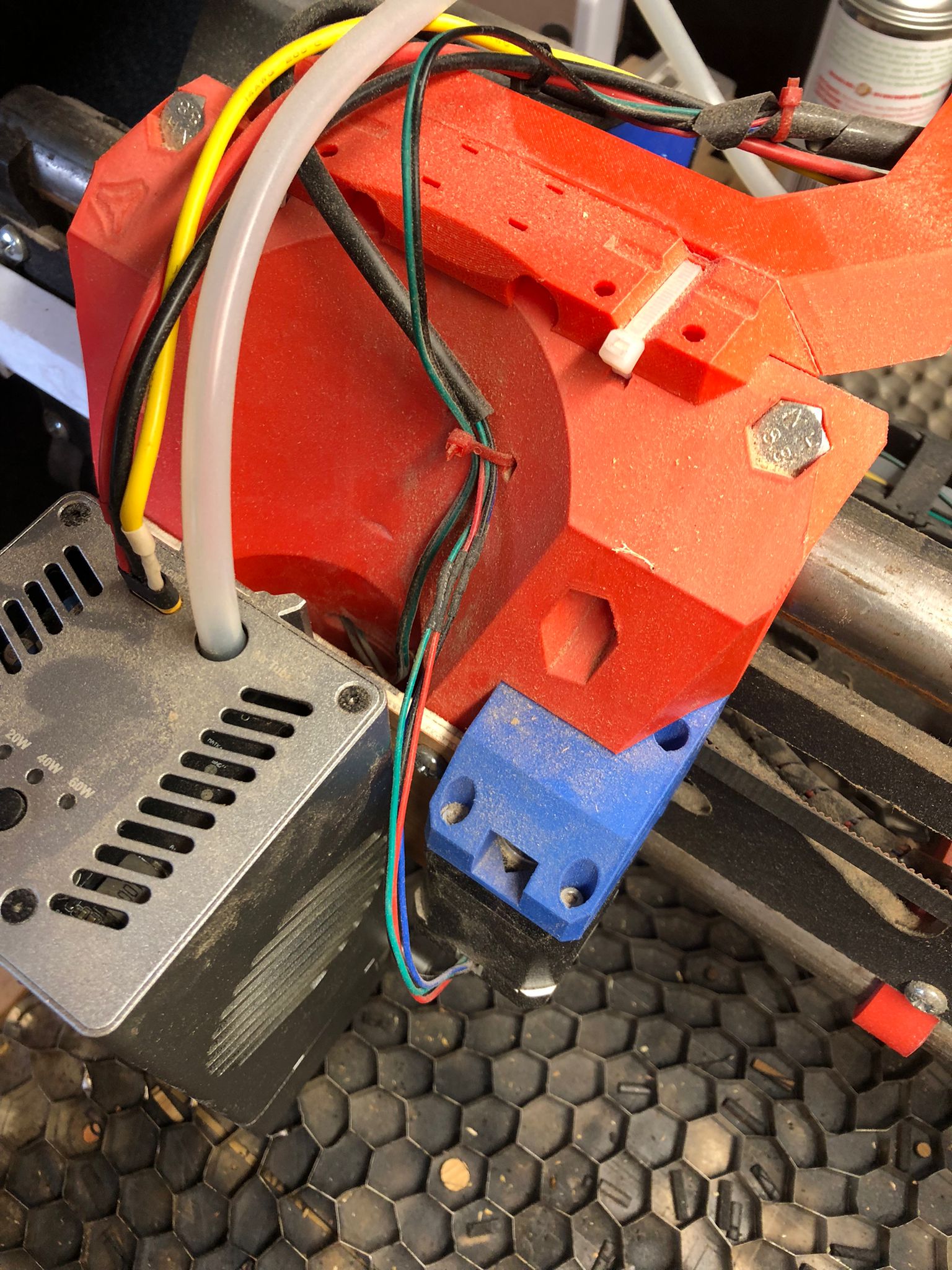
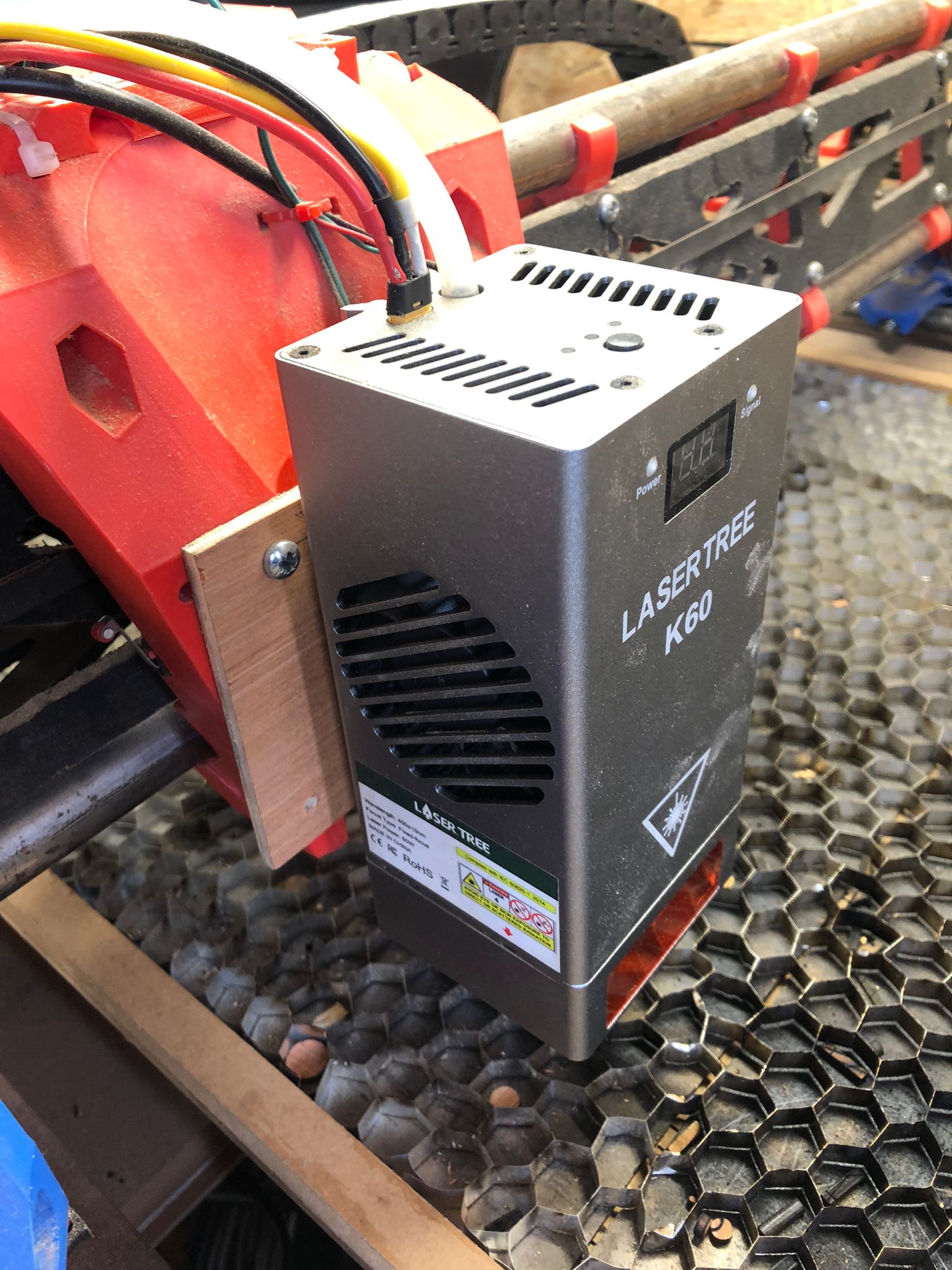
Hey Ty, I have a K60 mounted on an LR3. I laser cut a ply mount the with a K20 on the MPCNC before I retired it and built the LR4. So now I have a K60 mounted on a 2x4 LR3 and router on a 2x4 LR4. I briefly tried a 3d printed plate but found it too wobbly because of the weight of the module which was more to do with my rushing it but I think it could be done. But for me 6mm ply is fine but hardboard or MDF would’ve done. Just had to watch out for the weird shape of the core I think it has a notch in the bottom right; the plate is not entirely square. I got a hold of this sort of black plastic shower curtain type material to drop from the roof of my workshop as its not very high and have a wall mounted extractor inside the fabric booth that creates. I use glasses anyway so its just secondary. Smoke is not an issue. I hardly ever use it at 60w, almost always at 40w. I forgot to switch it back to 40w or 20w a few times and it scared the daylights out of me.
Thanks Jim, that is really interesting, how do you like the laser? Also, do you have any pictures of the mount? I imagine you would have just used the router bolt pattern to attach it, but having a hard time thinking exactly you did that.
With the overhead wrap, are you talking about visqueen? Just so you know that stuff can be extremely flammable, essentially solid napalm. I owned a haunted house back in the day and the fire marshall required us to use 100% fire retardant material - and if it wasn’t it needed to be covered in fire retardant paint. This was because there was a very tragic fire from a haunted house that used visqueen for its walls.
I guess my long-winded way of saying I would take a sample of your black plastic and give it a fire test outside. If the fire propagates and drips firey liquid I would move to a safer material.
You all are like drug dealers, just one more machine is all you need…. Love it!
I have a lot of space, but I’m not sure if I can dedicate more space for CNC/laser tables. I could set it up in my paint booth though and have it hang on the wall when not using….
One idea I toyed with too was to build a second machine “underneath” the first one
Like having the cnc table on top, and building a “shelf” under this to put the laser on
Pros:
Dedicated machine
Space saving
Easy to build an enclosure, just add some panels
Cons:
Accessibility, this machine would be kind of a “black box”
Maybe you can get creative on that, building some sort of “drawer” rather than a shelf, or having the top section of the table removable…
Structure rigidity? you may want to have only one side totally opened
Hi ty, thanks for the safety warning, the material im 99% sure is shower curtain and in the UK everything like that has to be fire retardant. Its purely just for smoke containment. In any case though if my laser or any part near it will catch fire, then it will. Its surrounded by wood walls, roof, floor and even the bed surround although sat on steel plate.
See photos re: mount Ive been though that many iterations I dont honestly fully remember but I must’ve cut it by hand after using and/or making digital rough versions. I slightly remember using the templates but where that led who knows. The notch to watch out for using this method is top right and therefore is not a square piece of wood.
As far as using the K60, Ive had great after sales (not that ive needed them much) with laser tree and moved up through the models through the years starting with a 5w laser on up to the k60. They’ve replaced lens that were damaged in transit and various other things. The one thing I would avoid is their Facebook channel the “fanboys” on there take things a little too seriously and wont see their good name shamed in anyway. Ive asked simple questions and got ridiculed and it could’ve been handled a little more sensitively lets say instead of always getting “its not the laser” answer. In use the K60 is a beast, Ive even seen it referred to as that elsewhere, the 60w Ive found frightening, especially when you are cutting something that only needs 20w or 40w and you forget to hit the button on top. That said I mistakenly had it set a 60w for a test at 40w on 9 or 12mm OSB and it laughed at the stuff, the cleanest cut and at reasonable speed as far as I remember.
And lastly something to watch out for; Im very lucky to have a K60 at all but make sure that when and if you extend the power cabling to the module that you are sensitive to the current needs of the module as I used the K20 cabling and upon first use the K60 drew too much current and burned through the cabling and Im lucky I hit the power off switch first and got it on time otherwise Id have been without K60. Ive heard a few folks making the same mistake and well it ending up worse for them. keep the questions coming, enjoy.
Huh, let me sit and think on that for a bit. Right now it’s on sit/stand adjustable table legs (see Project Cookie Monster in LR builds) and it does have a massive opening on the short side. The legs were set before I made the torsion box so it is sky high and tons of room underneath. Unfortunately that is the wall side so full sheets are out, but if I remake the bottom I could have the long side open.
Don’t follow my example… I have a Primo, a LowRider 3, Lowrider 4, large XYY laser, medium CoreXY laser, dedicated FluidNC based vinyl cutter, and more 3D printers than I can justify. (“Oh, but this one does 4 colours!) I should be the guy on the warning poster…