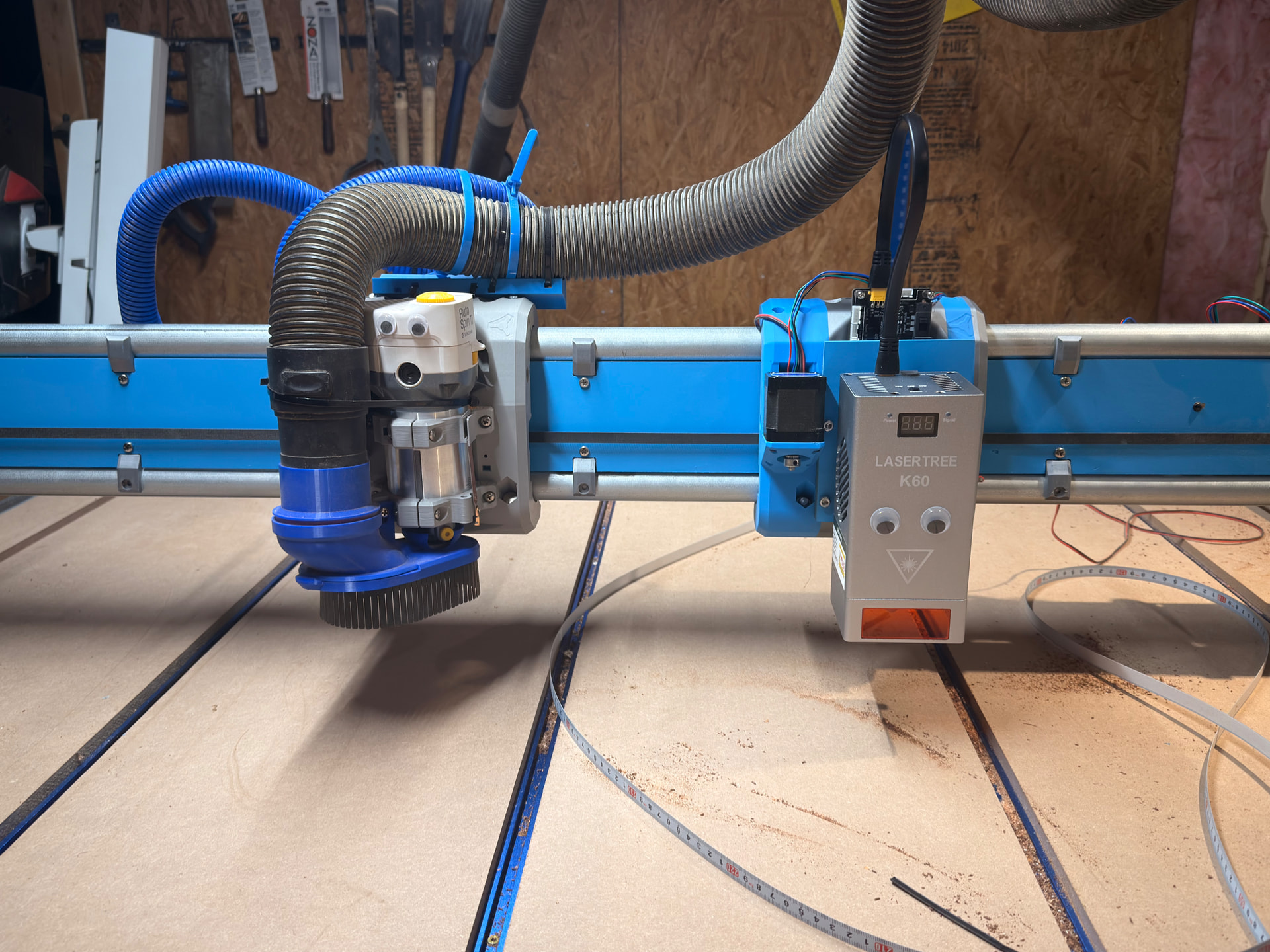
Thanks for the mounting pictures, it’s a pretty simple solution for the mount. And thanks for the heads up on the facebook group - I deleted FB and blocked from my home network, glad to hear that it’s still a good healthy decision for me.
I have been playing with the Core stl file in Freecad a bit, making the front plane flat and able to accept the rail. I’ll try to finalize it this weekend after I receive the unit - however I have tons of time because the unit shipped domestically but the safety glasses are shipping on the slow boat from China…. Go figure.
And thanks for the heads up on the power, I’ll try to make the power level a safety check before power up. I’ll need to run a dedicated power line from the barn box to the CNC area anyway, I think I’ll pull a 3-wire and have 2 x 20A circuits to run the systems. The current circuit is on a flakey breaker anyway so I’ll be happy when it’s off that. Hopefully copper isn’t $400/foot like everything else.
Sounds like you built yourself quite a robot-filled playground!
I think I came up with a wild idea last night dreaming, thinking of a modified version of what @fabian is considering. The laser table underneath the CNC machine with a pull-out metal bed on urethane rollerblade wheels so I can pull it out whenever I don’t want to hunch into to. To make this work I would have to hang the laser gantry/X &Y above which would be attached to the underneath of the CNC table.
That would be a pretty large redesign, and probably a lot more investment in time and money. Maybe I’ll get some sketches down this weekend to see if it’s even viable.
…but, I also have an old Anycubic Cobra Max that is screaming to be repurposed - vinyl, sandify, maybe a little 4-axis laser? Might be on your poster too!
I went with the one LaserTree sells which look a lot like this one. Probably would be prudent to have 2 sets so I will always have a pair when I inevitably misplace one of them or have a second person in the room.
Should get the laser tomorrow in the mail, but might be a minute before I use it while I figure out this mounting situation….
Yessir, do it! We cut all of it out a few years back - FB, Insta, etc. We were never hip enough for the TikToks, but now every single one is blocked from my network.
I use Adguard Home and they have a nice block checklist, I block more than I even knew about.
My city now hosts a mastodon server for our schools only that is disconnected from the Fediverse so we can safely teach our students about those networks, sticking to the European data protection laws but still being able to show them how those networks work and that public means public and all of Oldenburg’s registered students can see it. Pretty neat.
For the pi-hole there are really great blocklists as well.
The “laser beam” has arrived and Core 2 is almost finished printing with my remnants of blue and silver, so it should have an interesting pattern….
Start doing a little assembly as hardware arrives this weekend, in between doing taxes (whoops!). Going to use @Jimbo123 board hotfix idea to mount the sliding dovetail mount, looks both sturdy and painless.
I think for now I am going to attempt a dual core setup since making an alternate table is going to take a bit of time. Plus, I am imagining the dual setup might be cool for laser engraving with router cutting. I also like the problem on figuring out this dual core setup in FluidNC/MillMage/Lightburn because I have no idea how it’s going to work yet.
The answer is… I don’t know yet. Working on the hardware side first. I did put a limit switch on the x Max side so that is the direction I was thinking of taking.
My first thought is to Home router to X Min and laser to X Max, but have a constant scale between the two - so X Min will be zero that only the router can get and the laser can reach the max number of the mm scale. If I can make that happen then there could be a lot of interesting interactions with laser engraving, laser painting with powder coat, and then going directly to CNC milling.
No idea if FluidNC can do it or not, but I am hoping it’s a config situation I do. I did read that FluidNC can handle to heads, but haven’t really read more than that yet.
I assume you’d just setup the laser as another axis. ABCUVW are available. It might be interesting from a CAM perspective.
I guess you’d just set up appropriate offsets for each axis to get the work coordinates for each to mean the same physical position. Maybe this would warrant soft/hard limits.
Well, that would let you move each independently. Moving both at the same time could get really complicated, really fast. If you only ever plan on moving one at a time, I’d setup a router_config.yaml and a laser_config.yaml. It’s easy enough to switch back and forth. This would allow the active core to use X and keep CAM easier. Each would still have to setup the other axis so it homes out of the way. I’d probably set a startup macro to do that automatically.
Doing a little reading now and while not trivial, doesn’t sound as daunting as I first thought.
So they have and IDEX system built in and it explicitly accepts multiple tools. I can assign each a different tool number and call on it when needed. Maybe even use the tool numbers on CAM software to delegate them. It doesn’t seem to allow you to use multiple tools at the same time, but I don’t see when I would want to do that anyway. In the same program, that sounds fun.
Looks like I can assign a homing direction and assign it a known distance < 0 in the same machine config description. That sounds easy, just need to calibrate the two to be on the same distance plane. Haven’t read about distinct offsets yet, but I am sure they would be there as well.
Right now I was thinking of staying on the same axis, but you are right that would a good option too.
You are correct on the axis, if I set both up on X then it will mirror each other like the ice machine carver build. I have started to write up the A axis based on the following assumptions:
So max_travel_mm is literally how far it can travel, and it smart enough to spool out in the direction of positive_direction notation. So my 1176mm number was correct, just remove the negative sign since it understands intent.
1346mm is the theoretical total distance of the gantry if there was only one core. My 1176mm number came from the total distance in mm the laser can travel from 1346mm before running into the spindle core. The 170mm difference is the space between laser and spindle when they are at their safe closest position.
I updated the code to remove the sign since I had mpos and positive_direction correct and uploaded. Tried to do a homing procedure with my hand hovering over the e-stop, but everything traveled the way it should first time - wasn’t even reversed. The positive X limit switch worked as intended and pulled off correctly. Now I can move motor (A) to manual coordinates without issue.
Waiting to see about the soft limit, I don’t have the distance yet as my Dupont motor extensions should be coming in today.
Next up, “laser beam” wiring and setup. @Jimbo123 - did you have any special config setup beyond the relatively normal laser config setup? Also, did you get the LaserTree air pump and did you install it on the gantry? I am debating that because of the vibrations that it could introduce.