That is a weird sequence for an SRK Pro/TFT35. I’ve seen something like that happen with gcode senders (e.g. octoprint), but never with a locally attached screen on an SKR.
@MakerJim Yes, To clarify I’m not using OctoPrint. I’ve witnessed the non-STOP thing at least a few times, and it’s done this mis step thing more times than that.
This is “normal” for Marlin and the screen.
The screen is sending gcodes one line at a time to the skr/Marlin. Marlin reads those lines and keeps a few of them in a buffer (called the planner). When you hit stop on the screen, the screen stops sending gcodes to Marlin. But Marlin still has a few lines stored.
If the stored lines are small (like during a v carve), it will run out of things to do quickly.
If the stored lines are long (like long straight cutouts or pockets), then the next 2 lines might be a minute of carving.
It is possible to enable an emergency parser in Marlin and then make the screen send a special stop gcode command to force the planner to stop. We just never did that by default and V1 is pretty committed to moving on to the jackpot and fluidnc in the future.
2 Likes
The machine is designed for a 9lb load. that is equivalent to a heavy Aluminum cut.
I am not seeing anything right off the bat with your gcode. You are using fusionCAM Can you try estlcam please, I have no idea how the post processor works anymore in the free version rapids are not officially supported but you have them in there.
It is far easier to troubleshoot estlcam.
That post processor could be causing issues.
That endmill should be okay, provided it is sharp. Your speeds look okay rapids look okay.
Are you using a memory card that is compatible, smaller capacity?
ok, That 20-35lb was a guess. I was pushing against the X Axis pretty hard with the motor engaged and it took a bit to slip. At this point I’m confident that the issue is not the belt slipping, I have observed the Stepper on the X Carriage slip.
Yes I am using Fusion 360 and I pay for it, I do a lot of 3D designing and printing so I’ve had it for a few years now. I’m designing and prepping on the Manufacture tab in Fusion360 then exporting my files as gcode, I understood to use the Post Processor from @Flyfisher604 to create the gcode files. The gcode Fusion exports seems to be fine, all the files I’ve run have worked, until the Hardware gives out and the X Axis slips. RIP! I’ll do a test with ECAM though, Gotta chase down every lead at this point. On the SKR Board, I also switched the X Axis Motor Controller chip with the one beside it, No change to either axis since then.
This end mill is brand new. I tried one of my 64gb Sandisk cards and it did not work lol!, I think this Memory Card I’m using started its life shipped with one of the Prusa, or Ender 3D printers. VERY CHEAP. Seems to be working fine.
@vicious1 Are the JackPot or this SKR board capable of utilizing StallGuard4, Slip detection to detect when the Stepper Motors skip, and even better update the position to get back on track when it happens?
No, that requires closed loop
Your settings should be dead simple, I could do that all day. Something is funky here.
I am just guessing it is the post processor because I made it a long time ago, then he updated it and added features to add rapids so maybe since you actually have rapids it is messing things up, maybe the resolution is set to high and overwhelming the buffer.
You using arcs or no? Whatever you are using I would try it the other way.
Yes, I’m using the “MPCNC v3.0 (Beta 1).cps” post Processor from Fusion 360.
estlcam seems to be windows only and I’m all Mac lol, so that is not a great fit into my workflow but I might have to find a PC to give it a test. Can’t imagine there not a good solution out there to go straight from Fusion360 into a GCODE file. if this “MPCNC v3.0 (Beta 1).cps” solution is actually not working out.
I do see G2 & G3 in the .GCODE files I’m generating so I must be using ARCS. Also, I see it’s checked in the PostProcessor before export.
I’ve been looking through the documentation for everything again and I just realized I did not bend the Senseless Homing Pin on any of my the TMC2209 chips as instructed in the Doc: “Disable Sensorless Pin”. Could this cause my X Axis issues?
I’ve got this section in Fusion 360 to convert G0 into G1 in the PostProcess section.
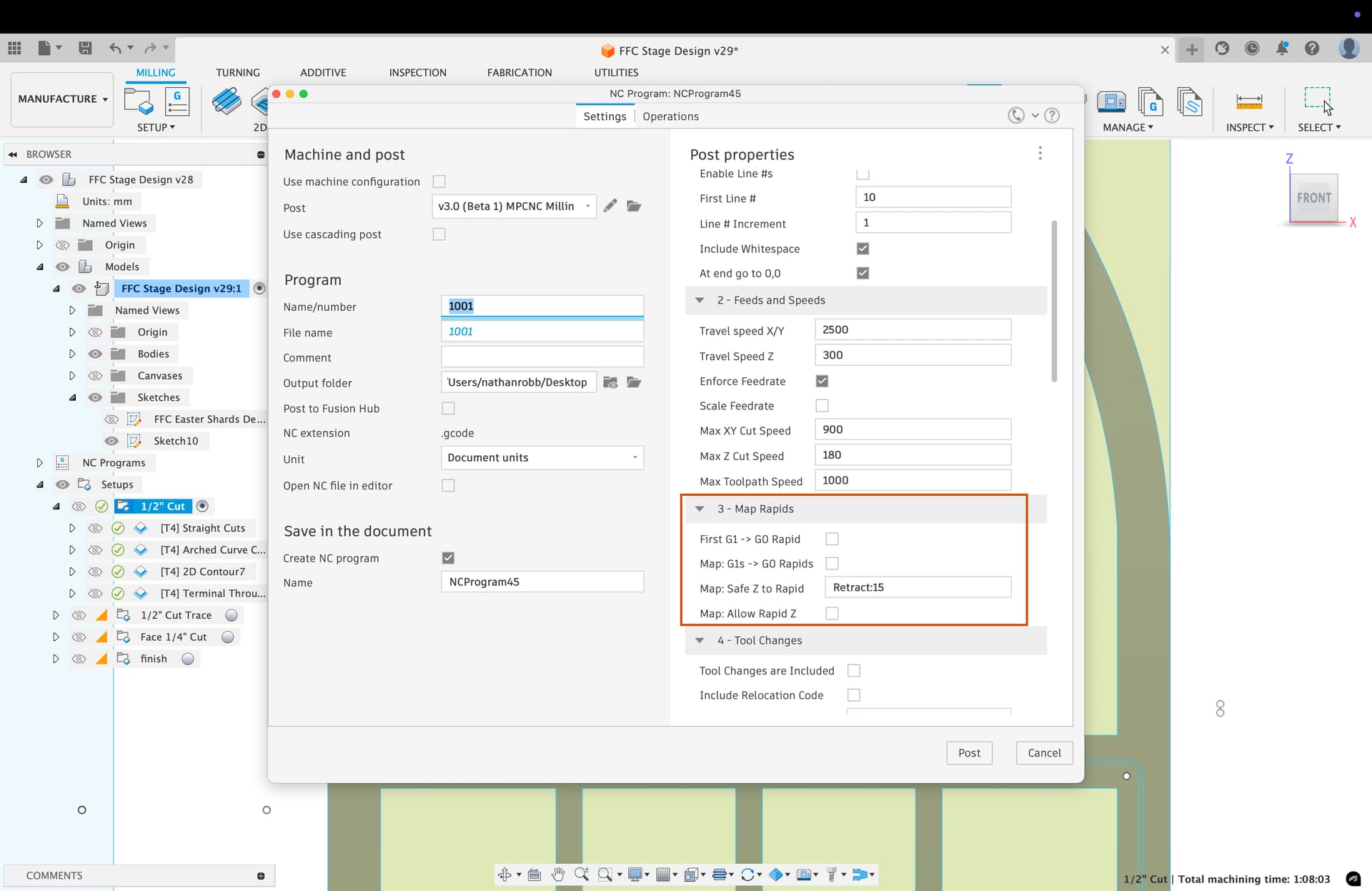
Yes, it could.
I’m surprised it has been working as well for you as it has with that miscofiguration.
@MakerJim Last night I bent those pins and it seems to not have changed anything. I had problems still last night, and now this morning I just tried to run a pass (FULL SEND lol) at 1500 mm/min, cut depth of 6.5mm (I’m cutting 1/2" OSB) (I’m having limited success with #3-4mm passes at 700mm/min) before X skips randomly. I just tried this fast and deep cut and it failed almost 3 inches into the first straight pull towards X-. The X- axis is skipping (not on the belt or Grub screws, just seems so weak. Rest of the axis seem fine. Thurs I’m getting a JackPot board, I’ll switch out this SKR and that is actually the last Hardware component that can be changed except the Nema 17 on X Axis. Can’t imagine that is bad though, usually NEMA 17 issues result in a problem with the Motor Driver/ Code.
This is very strange. Swapping to a Jackpot means going to a new board with hardware that we know is capable, but your existing electronics should have no problem with this.
I’m a little worried there’s an underlying issue here that isn’t electronics related, and all that will happen is a repeat with the new controller.
I increased the current on stepper X to 1300, and with the faster speed as mentioned before (which would get my cuts done in 1h vs 3h), it just seems to skip more often and fail faster. I had one run this morning that ran fine for 10min, then skipped and de-aligned from the plan. I restarted it and ran another one that failed on the second line of the cut which was a move towards the X axis. RIP!
I agree with you about an underlying issue that the new board won’t fix. @vicious1 suggested the PostProcessor I’m using “MPCNC v3.0 (Beta 1).cps” from @Flyfisher604 could be the issue and that I should try ESTLCam. But I’m seeing that users are having success with this Fusion360 PostProcessor.
I just downloaded ESTLCam and I’m not excited to have to watch this hour long video to get up to speed just to try to get a file to test. Any chance someone could make me a file to cut some lines back and forth. I’m cutting on 13mm OSB wood, 4x8ft, start 0.0.0 in one of the corners. I could test that file and see if anything changes. Here is my .DXF file, if it’s not any harder to setup a cut to cut the windows out, + the arch. Starting with 0.0.0 at the bottom left of the window design.
ARCH for ESTLCAM Attempt.dxf (26.8 KB)
Been at this 12h per day for the past 6 days, and I’ve managed to cut 4 sheets. Moving to the Jig Sawing might be my best option till Thurs when the Jackpot board arrives to replace this SKR board. Not a solution but at least I can do some of it manually.
Changing the controller won’t fix this, the problem is that you are pushing the envelope too far (IMO). Increasing the feedrate too far will mean that your acceleration settings will likely be too high, which will lead to skipped steps. Trying to find a balance between feedrate and acceleration is not a trivial exercise.
Personally, I would suggest dialing back the feedrate and DOC, and making quality the priority, rather than speed.
Sorry y’all, not ignoring you. Have been a a family situation (everyone is okay but we lost a car far from home). I should be back tomorrow.
5 Likes
Great advice, but others have told me this machine should be shredding through the OSB board. Even when I was running cuts 4mm deep and 700mm/min) the X was still skipping. I recently jacked up the speed figuring that if I cut fast, that will allow for less time to error. I’m currently switched to cutting one pass of 1/4" subfloor wood and it’s working much better. 5mm at 1000mm/min. So yes, I’d say cut amount is some of my problem. I think I have a 2mm bow in the middle of my table, I’ve added a sheet of OSB to even it out, but that means the middle of the table should have less material to cut, and that might be where I have my issues when cutting the 1/2" more often than on the edges. But it happens everywhere, I really don’t see many consistent variables that cause issues.
Sorry to hear you aren’t having a great day @vicious1 Prayers that everything works out! Life happens, I’ve appreciated your input on this as much as you have.
2 Likes
Did we check your power supply whether it delivers enough power? Can’t recall.
Nope, but I just checked and got good 24volt on the board. Also checked each of the TMC2209 chips and got good 24V.
Hope everyone is OK!
3 Likes