Matter of fact can I see a picture of your Y end stops as you have them installed please. I just need to see them from the side, you do not need to flip it over or anything.
For the Y endstops there are two and they are set to auto square so does one side stop and the other keeps moving?
We need more details.
If you home and trigger one side with your finger does that side stop moving and the other side keep moving?
This is what is happening. One side triggers then the opposite chatters. I can stop the chattering by hand triggering the side opposite the chattering stepper. Both switches appear to be triggered but I think one slips off the screw after it triggers but not sure. If I move the triggering stop closed the moving parts bind and then one side does not trigger. I am going to find some machine truss , bigger head, screws and try it .
that sounds like the switches are plugged into the wrong sockets.
The test is simple.
Give yourself some room, tell the machine to home Y, touch a limit switch. What side stops? What happens to the other side with the same test?
You have to do this quick, get ready to cut power or stop the other side as well as it will twist itself off the rail if not.
1 Like
How critical is the homing function to the operation of the machine? Can I set my zero points based on the object I want to cut?
Yes but then you can not auto square or auto level the Z.
The test is real easy just hit home and touch a Y endstop switch to see it the correct side stops.
Homing y and touching the endstop stops the same side. What is auto leveling the z axis , can I just use the probe to set the z? For z what has to be the end to end along the x axis tolerance?
Does this work on both sides? If so your machine is working correctly and the Y homing issue is likely the trigger screw and the endstop switch are not aligned well enough. Ther should be a one belt width gap or less between the two. Take you time and align the two, and you will have XY auto squaring nearly complete. LowRider CNC V4 - V1 Engineering Documentation
Is there a direct way to communicate with the Jackpot 3 board other then wifi. I keep losing my wifi connection using fludicnc. I have checked that their are no wires near the antenna. Can I do this with a USB cable?
Yes, but you can only use the terminal that way.
Have you told your browser to “use this network as is”? From the instructions here, Jackpot3 CNC Controller - V1 Engineering Documentation On most mobile divices this is in the hamburger menu in the top corner, if you are on a computer just click the link that pops up that says 192.168.0.1.
If you do not follow that part of the instructions your device will fall back to an internet connection and drop out the jackpot.
Thanks will try
I am looking for the pictures I have of this so I can update the instructions right now,
y-axis homing is now working. I swaped out the linit screws for M3 truss head screws, the screw heads are about twice as large as the ones that came in the kit.. I still get an alarm that it does not find the switch within the limits. It touches the screws on both sides then backs off a small amount. From the back of the support the two screws and the same distance out 2.221”. Should one be a different distance out then the other?
Currently, yes they are set to the exact same distance, that only gets changed after you calibrate for square, if you need to do that as shown in the LR4 instructions. To get started you can leave that alone for now.
From a fresh start up, if you type, $HY , in the terminal what exactly does the machine do?
It should move towards you and the belt blocks, the first click will stop one side and wait for the other to hit, then both sides will click a second time, then they will back up a few millimeters. There should be no alarm in the terminal window.
If anything is different please describe what happens in excruciating detail or take a little video of it and post it to youtube so we can watch what happens on the machine and the screen if possible.
I does this most of the time, I think I have the y-axis problem solved. I am still trying to communicate via USB rather then wireless. I have read through the instructions multiple times but am unable to find “Use this network as is”. Also how do I see the terminal with the USB hooked up?
What kind of device are you using to connect? Phone, android or iphone, Computer, mac or PC?
This is a little more complicated but if you go to the fluidnc installer page you can connect directly and use that terminal. The link is in the instructions.
PC and thanks for the location of the terminal
On a PC, all you have to do is click the link that pops up when you connect.
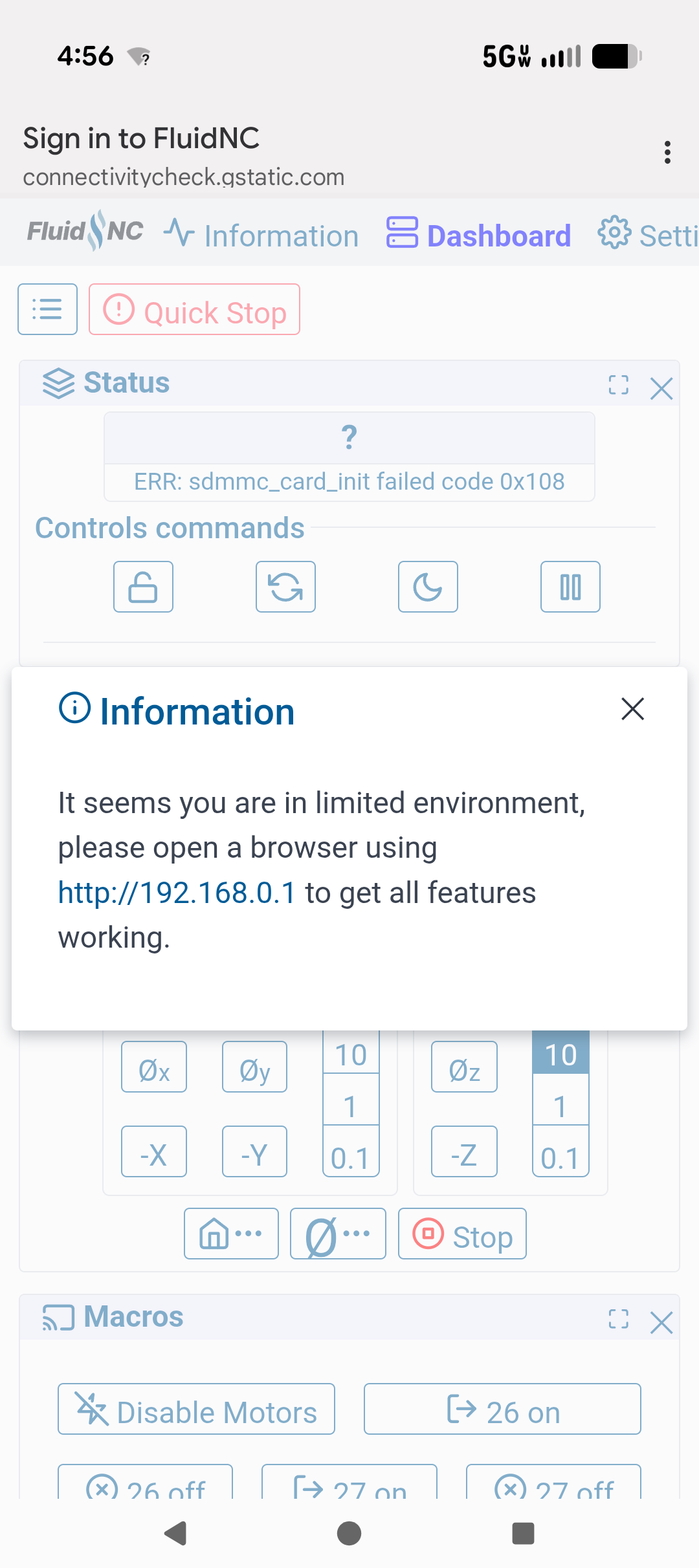
If you click that 192.168.0.1 link you should have zero issues in the new tab that opens up. If you do, we really need to figure out what is wrong.
I get this on my wierless connection and it works but it just periodically drops the connection.
Do you click the link every time?
How far are you from the CNC?
Please show me a picture of your CNC as it sits, in particular the Jackpot controller.