So why not just the $10 screen?? CYD Dial Pendant | Wiki.js
1 Like
Yes, that is the only reason.
I have Jackpot connected to AP in the garage since day one. Never had a problem like others mention. I transfer the file and that is about it.
Positioning, touch plate, resume is all on the pendant.
It’s nice not having to move an SD card back and forth like the SKR
2 Likes
I think you require the dial for motion, don’t you? Or does it have buttons on screen to let you move, even if it is more of a pain?
I don’t know if I saw the cheap yellow screen before.
The pendant isn’t going to win a UI award, so yellow screen is probably fine
I like the m5 dial more if the buttons were not required. That seems redundant with a touch screen. looks to me like the cheap screen might have the buttons built into the interface.
1 Like
That screen wasn’t an “option” when I built mine.
Yeah thats what you do. You have buttons on the screen to say how much at a time, and then spin the dial
1 Like
What do folks like about the wired Pendant that isn’t possible/convenient with a decent responsive layout web interface on the Phone ? e.g. Jason created a virtual joystick, that I’ve yet to try properly. With the right Web UI, would expect Phone to be same/better option than pendant.
Am still using amzn tablet for jogging and starting job, charger at the CNC bench. Uploading files from PC with LAN + wireless wifi. Configured JackPot as AP with 1.2.3.4 so PC can easily straddle both the JackPot wifi, and home LAN.
Am more likely to use an old phone as dedicated wifi pendant rather than buy a wired pendant.
2 Likes
I use my phone, or I bring my laptop to the garage.
2 Likes
There was a thread on Discord where they were using a $30 7" Elecrow screen to make a tablet interface. Not sure what state it is in now, but it looked like it had promise in the beginning
The intent was to replace Mitch “Tablet UI” with this, I think.
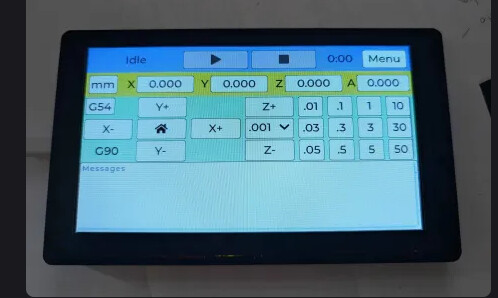
I was waiting on the dial, honestly, to see if this became a thing
1 Like
I don’t have any where to put the computer or tablet while trying to home / zero / probe.
1 Like
I don’t understand why we just can’t use the pendant interface on our touchscreen devices?
I have one sitting right here on my desk, seemed like the better option than a wired pendant.
1 Like
Maybe the web interface is better now, but it was pretty annoying to try and hit the buttons on a touch screen.
Actually was annoying to try and hit them with a mouse
#1 reason discord is stupid, it is not google searchable. I can never find the thread.
4 Likes
V3 is for sure better for that part. In my opinion anyways.
Under displays_pendants → Elecrow 7.0 LCD Touch Screen
2 Likes
I regret not planning my bench size better for this too. Planning to solve using slide out shelve, or something more fancy like Izzy Swan’s Under counter swing out tool lift https://www.youtube.com/watch?v=DHqt0YwIa7Q.
1 Like
I’m on STA mode. I upload the file using the WebUI from my PC. I walk out to the machine. Pull my phone out of my pocket. Touch the shortcut on my home screen. Start the file. Deal with probing. Put the phone back in my pocket.
I have an M5 dial but I find it awkward to use. I built my wireless pendant thing but only use it sometimes.
2 Likes
Yeah, but still I would have to look back and forth from the endmill to the computer. Maybe there is a keyboard binding or something. Having a button I can press without looking I guess is what I’m after
1 Like