Jackpot V2

we already do.

The V1 board box does, I am making some airflow changes to the V2 box but it does as well.

This part is tough, I know people hate touching the micro SD card but AP mode it 1000% easier to troubleshoot than someone’s home network. Coupled with the fact that you should absolutely always be in the same room as your CNC I have never understood connection issues. In AP mode everything should be fine with any antenna within 50 feet.

The only time I see connection issues is STA mode.


I want to make an amazing board but I do not want to spend all our time troubleshooting 10 year old routers and 15 year old laptops. AP mode is perfect for this, if you know what you are doing by all means use STA mode, but lets be real honest here 90%+ of our users should just use AP mode.

I want an easy to use board, having more board options is kind of a bummer to me, I want a yellow brick road, and to start spending more time on CNC machines. I really don;t want people to have to decide on jackpot V1, with internal or external antenna, or jackpot 2 with internal or external antenna, or skr pro, or ramps. I want the machines to work with as many boards as possible (for people that know enough that they do not need to ask us for help) but I want to provide the best option for the money and not have another “thing” people need to research before buying a V1 machine. If someone reviewd the machine I would love to hear “simple” as a descriptor.

Maybe if we all look at it from this perspective, it will make more sense. For example, if I supply the external antenna version of the board, where should the antenna be mounted, do we need to be extra cautious of static, what direction should it face, if they change builds will the adhesive come off. I just think the internal antenna is simple, zero choices need to be made by the end user, and it costs less.

For me I picture my computer illiterate friends and family trying to build and wire my machines. The antenna really feels like it is adding a extra step for the possible gain of 15’ better reception seems pointless.

1 Like

But…I am hear to listen to all perspectives and I have not ordered a production batch yet. So there is still time to change my mind.

1 Like

So when the V2 is ready it will be the choice for the machine bundles and the V1 will only be available from the shop on it’s own page for as long as it keeps selling.

I like the idea of the antenna. :slightly_smiling_face:

3 Likes

I think we’ve had multiple people using AP mode that have issues in the forum with connections, usually due to wiring being too close, etc., or maybe a bad ESP-32. I think the external antenna somewhat alleviates that concern because it moves the antenna in a spot where it can’t interfere.

This goes against what FluidNC recommends. Whether their recommendation is valid or not, I haven’t tested or confirmed, but it’s possible that at some point that could become contentious…

That seems a bit farther range than what I’ve experienced.

In the end, I think it comes down more to convenience than anything for using STA mode over AP. Many DIY just don’t have dedicated shops and spaces and extra computers, etc. etc. That’s the biggest complaint I’ve seen, is having to switch over to another network, etc.

I understand that completely. When I was first setting mine up, having to switch my laptop back and forth was a pain when I needed to go search the FluidNC wiki, or try to use the forum, etc. while also trying to troubleshoot.

The way I see it is, most people in this space are used to and expect these machines to be available just like our printers are. It’s a big day when people get to start uploading files remotely to their printers, etc. etc. I see this the same.

I see it as much more likely that someone will buy something other than a Jackpot because it doesn’t have an external antenna rather than not buying a Jackpot because it does.

This is kinda why I prefer the pluggable ESP32 over integrated.

For me, I have a very strong wifi signal at my table when I’m looking at my phone (router is maybe 30 ft away on the other side of a wall), but the ESP32 is still shaky sometimes. I intend to test the external antenna soon, but I think that would possibly firmly put me in the group of people that would want to stick with Jackpot V1 if it tests much better.

The inconvenience of having to walk back and forth between my computer and table that are 100-150ft away through multiple doors, etc., honestly, sometimes stops me from feeling like using my machine, or drops my enthusiasm quite a bit. My other printers/lasers/etc I can all upload, etc. from my desk before I go to them to start a job.

Not necessarily trying to convince you one way or the other, but I think the antenna benefits the casual user more, and the built-in antenna with AP mode is better for the “power user” that is more likely to have a proper shop and dedicated shop electronics, etc. etc.

That’s just my $0.02

2 Likes

Am losing count, also, maybe some folks reading are busy/reluctant to post details, and prefer to express their preference via vote…

  • PCB Antenna
  • External Whip Antenna
  • Don’t mind, either works
  • Other/alternative antenna option (please specify…)
0 voters
2 Likes

I said this in the other thread. I haven’t used an external antenna in any of my esp devices and I have dozens. But I live in the suburbs.

It is important to not completely screw up the antenna placement. You can certainly nerf an antenna. But as long as it pretty much works, the esp builtin antenna has excellent range.

Curious what @Jonathjon and others with Alu struts and larger spindles (noiser EMF?) have experienced, and prefer? Vaguely recall Jonathan has wifi repeater in his shop area, maybe Jeff does too?

1 Like

That is getting into STA mode again. That is just another option. The new user will be using AP mode.

STA mode relies solely on the persons ability to be able to connect to their own home network and find their IP address if needed. So internal versus external is just a matter of reception distance in that case. I really don;t think the difference will be that huge.

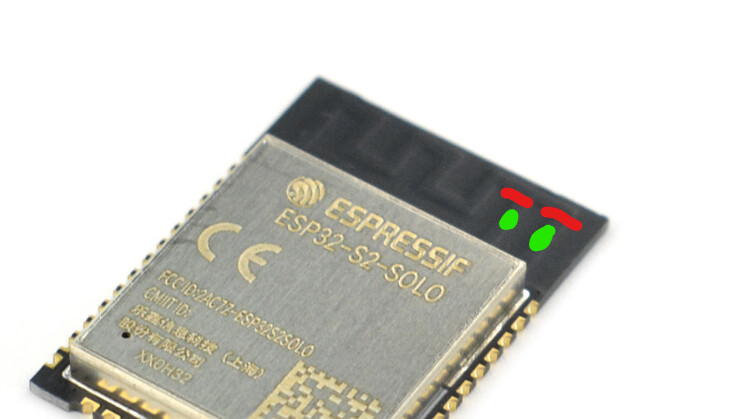
Can the external not be soldered onto the two pins coming out of the PCB antenna and the rest of the antenna trace be cut? It is a pretty large set of pads.

Yea, I’ve seen on the FluidNC Discord emphasized over and over again that AP mode is strictly for initial setup. I’ve seen people having issues who switched to STA and performance issues went away.

Basically, it’s a performance hit for the ESP32 to have to run the AP network instead of offloading it to a router. I agree that AP mode is easier to setup, since there really is no setup.

I’ve been using STA mode for a long time without issues. It’s always felt weird that the V1 recommendation is the opposite of the FluidNC recommendation.

From the FluidNC wiki:

AP mode is not recommended for production, only for initial setup. It will affect the performance of your machine, possibly causing crashes after some time. Change to STA or STA>AP mode after FluidNC is set up. If you do not have an external WiFi access point to connect to in STA mode, you can set up a private network using a WiFi router that need not be connected to any outside networks. The router can be an old slow one - perhaps one that has been removed from service - because the ESP32 WiFi speed is limited to about 30 mBits/sec, which is more than enough for WebUI.

I guess if AP mode works for someone that’s fine. But if we ever need support from the FluidNC devs for performance issues, the first thing they’re going to have you do is switch to STA mode.

1 Like

Trying to help people connect to the home network of their design in all these different countries seems like a nightmare to me.

Squeezing out a little performance out of the esp is secondary to getting someone using the CNC to me. Pulling a phone out of their pocket and hitting go seems like the most simple yellow brick road.

From their I don’t really care how people connect to the machine. I am solely focoused on getting them making tier first cuts. I have to assume every single person using the CNC has a smartphone. The smartphone uses a browser, we don’t have to care what OS, or even what browser. (reason I have not switch to the webUi v3 yet, it still 100% takes and extra two clicks to use for for little benefit)

2 Likes

Maybe I’m not the average person because I’ve been doing computer stuff for 25-30 years now…

But, personally, I think this is not any more complicated, and probably easier, than any of the other setup we have to do to get it working, and definitely way less than we do for the printers, etc.

At least for the DIYers. I appreciate that it’s different for the people ordering from you and expecting to plug it in and have it work, etc.

1 Like

I do understand that, and have seen that mentioned here a lot.

The flip side of that, I think, is that I don’t see this coming up as a problem in the FluidNC discord with Bart’s boards.

But, like I said, I’m not here trying to convince you to change your mind… just offering a different perspective.

In the end, you have to do what’s best for your business. I just want to make sure all the variables are being accounted for in the decision making

2 Likes

I am in a very odd position. Not a single one of my local acquaintances is computer savvy, at all. To be honest, it was like pulling teeth to get my lady to use a laptop. she yells at her phone for so many things, and site crashes but will not use a real computer. My buddy runs his entire company from a cell phone. the computer savvy kids one is in year 3 of high school just used his first real computer that was not a Chromebook. Not single one of my neighbors at the shop have anything other than phones.

I think we are in the minority that know how to use a network. (reminds me of forums versus discord…)

2 Likes

I can make a two batches of boards but that is 100% going to increase the cost of them. I will entertain this for a batch or two and see what sells.

We also have a ton of people wanting to use the wired pendant and not the wireless at all. I think that is proving teh type of connection is not as important as it is to the power users.

I guess the question to ponder, then is, is this representative of your target demographic?

I think that’s where the trouble comes, for me. Most of the complaints I see from people about AP mode is that they only have one device, and once they connect to the AP mode, they have no network access for anything else, and it’s a pain to switch back and forth.

AP mode is much easier if you have a dedicated screen there for only that, especially if that screen happens to also be your design computer, or your design computer is in the same room

2 Likes

On my LR3 with Aluminum struts and Spindle I never had an issue with the built in antenna. On the LR4 I run a Kobalt and wood struts (for now) and don’t have any issues either. But I do have a mesh node in my garage about 10’ away from the LR4

1 Like

But is it really. Is it harder than finding the ip address of the esp if .local stops working? We all know it is as simple as two clicks. Click on wifi, click on your home network. I think people find it inconvenient to have to swap to check out instagram as they babysit the CNC, but it is far from difficult.

I think it is. I used to think the people around me were the different ones, but that simply is not true. I have several computers and HATE using my phone for anything. All my local friends are the opposite. My buddy ran his restaurant from his phone, he only got a Mac laptop because his accountant forced him. he is in his early 40’s