Microcenter in Denver on a weekend is a thing to see, and not for those who don’t like a crush of people.
I miss Fry’s, there was one near an office I worked at in Irvine, CA a long time ago.
What is this Anchor you speak of?
Microcenter in Denver on a weekend is a thing to see, and not for those who don’t like a crush of people.
I miss Fry’s, there was one near an office I worked at in Irvine, CA a long time ago.
What is this Anchor you speak of?
Our Microcenter is near where we go to church. There’s a lot of Sundays I need to kill time between events and will go wander around their aisles. My kids both like the place and we got my wife’s keyboard there.
We had a Fry’s near where I worked for a while. That was nice too. Their electronic component area was nice when you couldn’t wait for Amazon. Microcenter’s similar area always looked like it was an after thought. My last time there it looks like they finally cleaned it up some.
Google Search check out the pictures. This is one of the smaller ones but besides the random stuff they have surplus from tech company’s liquidation. Sometimes you can score a nice projector really cheap, a long while back we scooped up a cisco speak phone setup to mess with. Workstations, desks, crazy equipment. I went into anchor once and it was full of lab glass. You just never know.
I have to say, Amazon is amazing but dammed if it did not feel amazing to drive out there grab a power supply and fix my box same day, and have it cost $5 less to boot.
My last trip to microcenter ended at home minus two small components. Empty bags. I tried to call, but no listed number. I left a contact comment on the web site. The local store is 30 minutes away in low traffic. Fast forward 2 weeks and the store manager called and resolved it with a shipped package. I’m still a fan of microcenter.
I just recently found out their warranty is walk in only. I have one of their branded micro sd cards that crapped out on the first use. Can’t send it in. Support dude was like, yea, you’ll have to bring that into the store for replacement. Closest store to me is a 23 hour drive. So I have it taped to my pegboard. Next time I go visit the folks, I’ll take it in.
American customer protection laws are wiiiiiiiild… 
Barely extant.
First time I open a browser window after arriving in the EU or UK, I’m like “ahhhhh, this is what it is like where consumers have rights!”
Man I miss having a Microcenter near  I grew up just west of Cleveland and they opened their store on the east side in 91. It seemed like a long drive to get there at the time (about 40 minutes but growing up in a dense suburban area with multiple malls within 10 minutes that felt like a major journey) - it was like something out of a dream. Almost like a walk in version of Computer Shopper (which at the time was a massive 1.5” thick oversized monthly magazine that I’d spend hours going through looking for the best deals.)
After I went to college it was it was an hour and a half drive to their original store. But sometimes necessary and a fun road trip.
Now…it’s a 3.5 hour trip to one in Phoenix or 4 hours to one in CA
I had forgotten how nice it was to have one close until I was visiting my parents a year or so ago and my mom commented how her computer was outdated and should be replaced. Then asked since I was there could I run up to Microcenter and build or buy her a new one. It was late afternoon but we had just enough time to get there half an hour before closing and quickly found a great deal on a new computer for her.
But I still live in a town that’s notable for having the smallest best buy ever built (it was an experiment they did to see if they could enter smaller markets) and it really is tiny. The best buys I grew up with in ohio had more square footage for CD sales than this store has in total. Kind of wonder what they use that space for now 
Yes! I wanted to build a whole new computer just so I could make it look cool and use some of the fancy stuff!
Whoa, a Phoenix store! News to me, glad I checked on this thread (though my wife won’t be)
I’m not sure if it’s actually open yet…saw it on their site last year that it’s supposed to open this year…just not sure when exactly.
I used to live just north of Dayton, so I had the Columbus, or the Cinci stores almost the same distance away. Now I’m almost in Canada and the closest store is your Cali store.
Prolly vinyl records.
And now back to our regular programming [about Linux on computers]…
In my last post, I was able to get LMDE (Linux Mint - Debian Edition) installed and working on the tiny $81 LarkBox Pro mini PC… after finally determining that my original USB boot stick had somehow been corrupted with all the abortive attempts at getting the BIOS settings set up to boot from USB. When I finally created another LMDE boot media, it was recognized and installed fine. But I was still unclear what the BIOS settings needed to be…
So, I ordered another $81 LarkBox Pro from the same vendor. I had no problem this time installing LMDE. Though they come pre-installed with that other OS, the “Secure Boot” setting in the BIOS is already disabled and, on the “Boot Options” tab, disabling the “Windows Boot Manager” should result in your USB media being recognized… provided you’ve plugged it in before booting into the BIOS. Repeatedly tapping Del during first moments while powering up get you into the BIOS. There’s one other setting on the BIOS Boot tab about “New Boot Policy” (or somesuch) which gives a “first” or “last” or “default” option. I’m not sure whether it’s “first” or “last” since the BIOS entries change once you install the new OS… you just don’t want “default”. Try “first” and if it doesn’t boot to your media… try “last”. It shouldn’t take more than a couple of tries… and you never need to boot to the pre-installed OS.
Again, as I’ve noted [probably] ad nauseam, I’m replacing RPi5’s with these little devices… which are actually cheaper but far more powerful with their Celeron CPU, 6G RAM, and 125G SSD. Gsender, UGS, CNC.js, Lightburn, and any number of other programs can all be installed on the same device… and any/all programs I’ve tried run smoothly and quite responsively; i.e. and without the lag I’ve seen with the RPi’s.
I’ve also left these mini PC’s running 24/7 while connected to my Grbl controller for several days at a time… and they don’t drop the USB connection or go to sleep. I think this is because I’m controlling them across wifi with Xrdp, which doesn’t actually run a desktop environment on the device itself. VNC OTOH shares a desktop running on the device and the screensaver/sleep/lock screen and power management settings are in play if you don’t disable them. I’ve got 3 or 4 mini PC’s now running 24/7 and have been running the occasional GSendre or UGS CNC “job” (without motor power) to completion… even while playing Spider/Mahjongg or running other programs on the same device. I’ve not seen a single “job” failure yet… as long as you don’t fire up two gcode senders at once, so that they contend for the USB connection.
Anyway, I just wanted to share my observations and will now hush about these little devices… unless someone asks questions or wants more info about how I’m using them. I’ll be happy to help as I can.
– David
I’ll bet they get a few more orders. 
That’s spectacularly better price/capability/performance Vs. the Pi.
Thanks for updating us.
None of those for me in Germany.
I really really would like an AMD STRIX (AI 395+). It’s finely tuned/aimed at AI, being able to run LLMs well locally. I enjoy using AI a lot, but I’d prefer keeping it in my basement, as I do with more and more of my other services…
Wow, you are making it really hard today to not go for that low-hanging fruit. 
Another observation…
I know that the little LarkBox Pro machine is very modest by PC standards. I certainly don’t want it as my main compute platform. BUT as a “super RPi without GPIO”… it shines as a CNC or laser engraver machine-local computer; i.e. you’re not tying up your main computer running CNC or laser jobs. And no keyboard/mouse/large monitor around the machine to catch dust and debris.
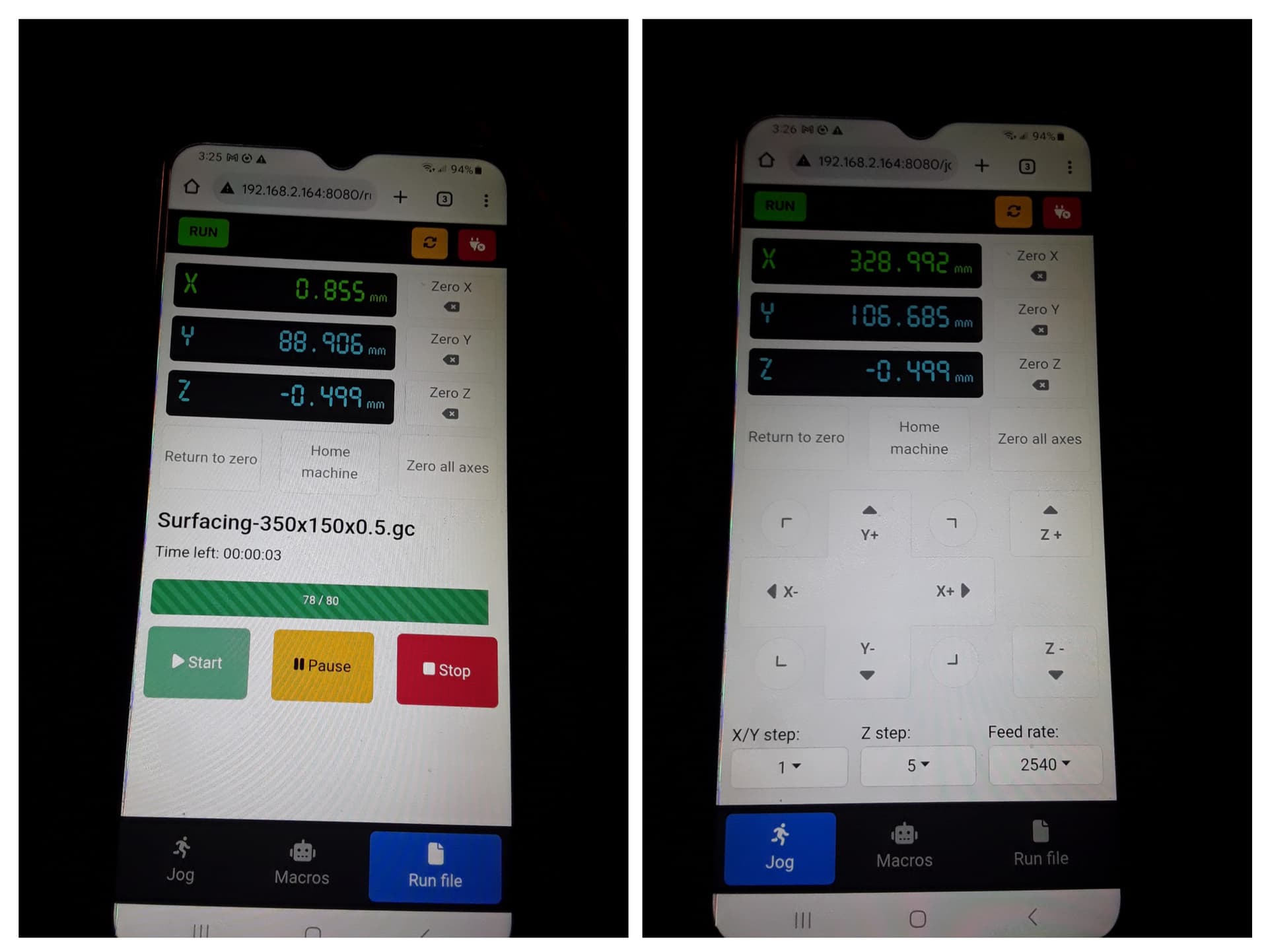
I think I’ve actually come to prefer UGS for it’s cellphone pendant functionality. In addition to the mini PC’s 24/7 operation over days at a time without dropouts or going to sleep… the pendant functionality is still running in the background on the phone and reconnects as soon as I bring it to the machine and foreground. It also has big and readable buttons and DRO… great for fat fingers and shaky hands.
– David