I found that and could enable it. But which pin is triggered by the command? Or where can i change the pin?
Pins file for your board
1 Like
Thanks for your help! The output is on Pin 6 by default and it works like a charm.
hi guys
I have spend a few hours to made a few improvements to pp.
improvements:
- support line numbers
- support empty inter-words space
- support output gcode targets “Marlin 2.0, Repetier 1.0.3” / “GRBL 1.1”
- definition of Fusion laser modes changed to percent of full power - 100%, 80%, 40%
- changeable laser output for Marlin - M106 S{pwm}+M107 / M3 O{pwm}+M5 / M42 P{pin} S{pwm}. Pin is configurable
- support laser mode for GRBL. M4 S{pwm}+M5 / M3 S{pwm}+M5. Section surrounded with $32 command to enable/disable GRBL laser mode
honestly i do not clearly understand how to change and measure tool with GRBL. just added M6 + G54 as standalone grbl pp does. any suggestions are welcome
1 Like
Wow!
Removed. You have to configure this mode manually before laser job
new version pushed.
- added G2/G3 support to grbl for non-XY planes
- fixed bug (marlin) - produce tool measurement for first laser section
all firmware-related code have been rewritten as modern prototype-based javascript OOP.
1 Like
added initial support of RepRap Firmware (Duet3d board)
a few important fixes had been commited
by the way, i think about idea to split it to set of separate post-processors that used common code from dedicated javascript file. making support 3 firmwares (potentially 4 - maybe smoothie too) in single PP seems not best idea because there are too much firmware-specific properties and it looks like a mess.
so I think to maybe split it to:
diycnc_common.js
diycnc_marlin20.cps
diycnc_grbl11.cps
diycnc_reprapfmw.cps
diycnc_smootie.cps
also i think about do support of external files is really need in the PP? or drop it?
also i think how to support cycles. as example stock XY measurement. it seems HAAS has special commend for this - G65. how to emulate it on marlin/grbl firmwares?
what do you think, guys?
Thank you for your great work.
I have updated the post processor I use with your last but I can’t find the start of the file to edit it.
In my last PP, I removed M84 on the start to keep my CNC squared.
Thanks.
Edit:Sorry, found it !
hi guys
a step forward in the post processor.
i have decided to split the code of pp to 4 files
DIYCNC_Common.js - common code
DIYCNC_Grbl11.cps - code and properties specific to grbl
DIYCNC_Marlin20.cps - code and properties specific to marlin 20
DIYCNC_RepRapFW.cps - code and properties specific to reprap firmware
so now you will see 3 post processors in the Fusion drop down box instead of selecting target firmware in the properties.
as result there is much less messing of properties belong to different firmwares in the properties control
Easier is awesome…er!
I made something in fusion I would love to use this , but I have no clue how to. Do I have to place this in the autodesk lib?
C:\Users<your user id>\AppData\Roaming\Autodesk\Fusion 360 CAM\Posts
Your profile might be stored differently… But easy to find in Fusion

1 Like
Hi Guffy,
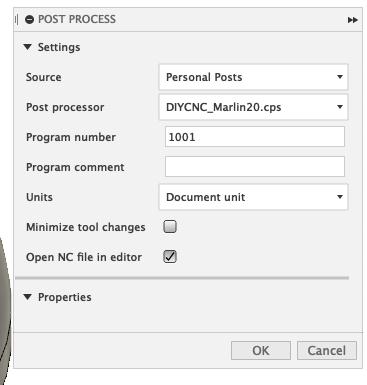
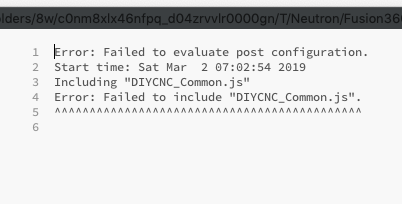
I tried to update the PP on my mac. I can select all 3 PP, but DIYCNC_Common.js fails to get included. As a result, no gcode is being made.
How can I fix this?
regards,
Marcel
Wondering if this is a place where I may be able to request a feature? I haven’t been able to find a post that has the features needed for plasma cutting that also works with marlin. I’d do it myself, but all I know about scripting this stuff is that you cant just copy and paste some random bits of code and expect it to work. I’d like to know if a function can be added to enable “touch and go” abilities. I’ve attached what I think is the code responsible for this feature from another post processor found here;
https://cam.autodesk.com/posts/post.php?name=mach3%20plasma
Id also like to know if a feature could be added to call an M109 after each time power is turned on “M106”?

Have you tried copy and paste all files into the post processor folder? I made the mistake of only copying the marlin file and left out the common.
Yes, I copied all relevant files. As can be seen in my attachment of earlier post, I can select the marlin pp but the properties do not appear…
Hi Marcel
I have just all 4 files (3 cps and 1 js) in same folder (my custom folder) and it works well, at least in fusion on windows.
As temporary workaround i can suggest to just insert content of js file in required cps file (replace include command) with a text editor
And compare case of the js filename on filesystem and in cps file. On Mac case may matters