Yeah, but 250€ for the calipers… I just bought a used Mauser for 20€, I am set now. 
4 Likes
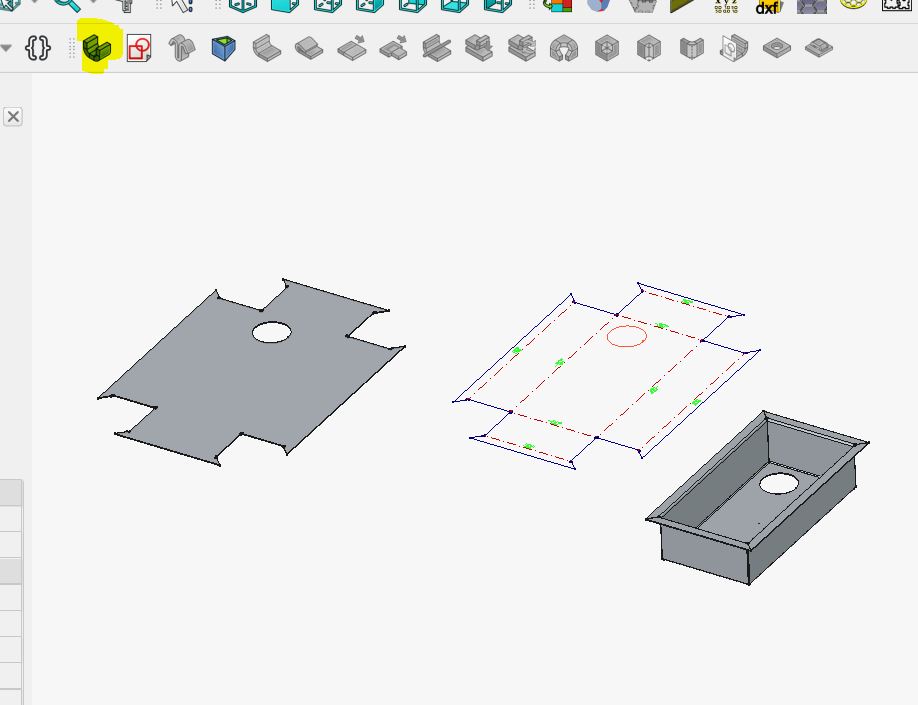
try the sheet metal work bench in free cad , ive only played with it for once so cant help to much , may be helpful to you but went from right to left in 10 min
click highlighted which creates your shape on right , drop down to choose box angle channel etc , than go to part bench add holes etc , back to sheet metal click unfold and you end up with this
Okay… so I opened freecad for the first time today…
Simple task:
- Open @jeyeager ‘s Elecrow panel case model
- Make the back cover a bit thinner
- Change a countersink’s depth
Simple enough, right? … right?

Okay… it’s been 2 f*** hours!!!
And I quoted @Tokoloshe here, because it’s not a “all must be constrained” problem: I always, always, always make sure everything is properly constrained in my F360 designs, no problem about that
It’s just the UI.. the overall look and feel…
The interface is just plain awful! Everything hurts, every little action is painful!
Orbit around your model? Shift + right click, release right click and then move the mouse…
Seriously?! Click, then release, then move ?
Who the hell thought this was a good idea? I mean, it’s not like “drag nd drop” has bbeen around for 30 years…
Want to know which operation in the timeline correspond to a specific feature?
Easy: Clicking on the filleted surface and it will highlight the corresponding operation.. oh, wait! no! it doesn’t… ah… ok I’ll click through every step until the feature disappears…
Want to deepen that pocket recess? Yeah, that’s a fairly simple process in 42 steps…
- Click on the surface you want to “push”
- Click “Pad”, which seems to be the equivalent of the “Extrude” command you know
- Read a popup telling you an object needs to be selected before you can do any operation…
What did I just do in the first step dumb*** ?! That face is part of an object, it should be obvious I want to work on this one… -_- - Ah, nevermind, click that object in the popup
- Realize that “Pad” and “Pocket” are two separate operations, and if you wanted to cut away material, well, I have bad news…
- Do it all again…
I’m a bit frustrated right now so I may sound overly dramatic, but I swear you this software just leave an impression that everything is more ocmplicated than it need to be… -_-
Never again…
I wouldn’t base too much opinion on that case. I’m still learning and there are things I would have done differently to make it more editable.
Maybe check out this “soft fork”
I’ll take a look thanks 
No plan to transition to FreeCAD anytyme soon though
That’s the part that got me mad in fact…
All problems I encountered weren’t from the design or “misunderstanding” of how the software work, it’s all just how things are presented, everything seems “heavy” (eg: having to select an object I already selected) if not “foreign” (eg: there are established conventions about how you manipulate a camera)
It’s a bit like running a race, which may already be hard all by itself, and I’m perfectly aware/ready for this, but with freecad you’re with a heavy coat on, and a pair of stilleto
You can choose between six or seven different modes… -_- I have the OpenScad mode, feels the best.
Right click anywhere in your model, choose Navigation Styles and choose one that suits you.
No? It’s one step?
Well, your loss. I am really happy with it now. The beginning was unusual, but now I really like it. 
Also, disable the bench dropdown and let it show you all the benches on top in a row. Much easier to grasp.
What is also different to Fusion is that you can’t just draw the hole thing and happily extrude. You need to do the first part, then draw a sketch on it again. It’s really a good ideal to work with a mastersketch and projection sometimes.
This is the main limitation to FreeCAD, in my opinion.
I went to an introduction to FreeCAD class at a local makerspace where our local FreeCAD guru spent the first 15 minutes having us make a bunch of UI customization changes because the default ones suck so badly. It was a lot more usable after that.
Also, use one of the weekly builds. They’re technically fragile, but there are massive UI improvements happening.
As @Tokoloshe said, right-click anywhere in the drawing area and choose other UI layouts to see what works best for you.
Somehow the defaults couldn’t be any worse. A mentor of mine once told me “None of us are as dumb as all of us”, (about decisions made by committee.). He’s been proven right countless times.
I saw this for the first time on a website that makes demodivational posters. That was the quote for the “Teamwork” poster. My favorite one is “Failure When your best just isn’t good enough “
I finally finished the first 2 of 3 freecad to 3d print tutorials. The first 53 minute one took me more than 4 hours over 3 different attempts to get through it to export the lego piece 3mf file. The second one took a few hours as well to make the chess rook two different ways, but it is making sense. Thanks for the continued updates on this topic!
That’s a good one:
This one was on my high school bedroom wall:
Yep, that’s the place. Ahh, meetings, not teamwork. My mistake
You’re still on ‘step 1’ of the ‘i switched to freecad’ process.
- try it out and fail misserably
- watch 3 videos
- try again and still have issues
- watch 1/2 of a video
- succeed
Steps 3->5 are repeated multiple times the first week or two.
After about the 4th or 5th project, you decide it’s not so bad and you finish the migration and continue the 3->5 process indefinitely
Curious how Fusion 360 Users feel by their 5th+ FreeCAD project?
By then, are folks happily using FreeCAD to sprint through actualizing their ideas, or, are they still heavily using Fusion360? Or, maybe just using Fusion360 for specific tasks where FreeCAD still has too much friction.
guys, guys, guys…
how would you go about model which is made of two boards, which will have to be milled separately? two solids? or two bodies?
I was just trying to figure that out today. Correct me if im not yet understanding:
A body holds sketches and revolutions, pockets and other construction information.
A part can be a collection of bodies, so i think you would want a body for one and a body for the other unless each has multiple bodies then you would use a part for each.
I would make 2 bodies, possibly using a master sketch shared between both if it makes sense.
separate bodies. If they have the same ‘base’ design, then I’d use a master sketch with elements from both, then only link the lines I need from the master sketch into each body. But that’s because I do 99.9% of my work in PartDesign.
As an Autodesk user since college, I can tell you I haven’t touched Fusion360 since making the migration. I’d uninstall it, but I still have past projects in it I need to modify.