I don’t know how FluidNC.local can be resolved to the IP address in AP mode - that’s why I thought using the IP address might work instead.
It does resolve FluidNC.local on all of my machines that use AP mode.
There must be a tiny DNS server in AP mode…
Huh, fair enough. Good test though - use 192.168.1.1:81
Or whatever FluidNCuses in AP mode.
192.168.0.1
I’ve previously tried the connect and restart several times … no luck. I’m interested in AP mode, because this will be a portable machine and I’m not always by a known WiFi address to connect with.
Log file here:
[17:16:52][30] LVGL running, Free heap: 276688, FluidNC: Disconnected
[17:16:52]PowerManager: Entering DIMMED (brightness=25)
[17:16:52]Backlight set to: 25% (hw=63)
[17:16:52][35] LVGL running, Free heap: 276688, FluidNC: Disconnected
[17:16:52][40] LVGL running, Free heap: 276688, FluidNC: Disconnected
[17:16:52][45] LVGL running, Free heap: 276688, FluidNC: Disconnected
[17:16:52][50] LVGL running, Free heap: 276688, FluidNC: Disconnected
[17:16:54]PowerManager: Entering FULL_BRIGHTNESS (brightness=100)
[17:16:54]Backlight set to: 100% (hw=255)
[17:16:54]UIMachineSelect: Machine selected: HyperScan1 (index 0)
[17:16:54]UICommon: Creating main UI
[17:16:54]MachineConfigManager: Using cached machines
[17:16:54]UICommon: Connecting to FluidNC…
[17:16:54]MachineConfigManager: Using cached machines
[17:16:54]MachineConfigManager: Using cached machines
[17:16:55]MachineConfigManager: Using cached machines
[17:16:55]Jog settings loaded for machine 0:
[17:16:55] XY Step: 10 mm
[17:16:55] Z Step: 1 mm
[17:16:55] XY Feed: 3000 mm/min
[17:16:55] Z Feed: 1000 mm/min
[17:16:55] Max XY Feed: 3000 mm/min
[17:16:55] Max Z Feed: 1000 mm/min
[17:16:55]MachineConfigManager: Using cached machines
[17:16:55]Probe settings loaded for machine 0:
[17:16:55] Feed Rate: 100 mm/min
[17:16:55] Max Distance: 10 mm
[17:16:55] Retract: 2 mm
[17:16:55] Thickness: 0.0 mm
[17:16:55][ 53055][E][Preferences.cpp:503] getBytesLength(): nvs_get_blob len fail: m0_macros NOT_FOUND
[17:16:55]Initialized empty macros for machine 0
[17:16:55][FluidNC] Terminal callback registered
[17:16:55]UITabSettingsGeneral: Loaded show_mach_sel=1, folders_on_top=0
[17:16:55]MachineConfigManager: Using cached machines
[17:16:55]Jog settings loaded for machine 0:
[17:16:55] XY Step: 10 mm
[17:16:55] Z Step: 1 mm
[17:16:55] XY Feed: 3000 mm/min
[17:16:55] Z Feed: 1000 mm/min
[17:16:55] Max XY Feed: 3000 mm/min
[17:16:55] Max Z Feed: 1000 mm/min
[17:16:55]MachineConfigManager: Using cached machines
[17:16:55]Probe settings loaded for machine 0:
[17:16:55] Feed Rate: 100 mm/min
[17:16:55] Max Distance: 10 mm
[17:16:55] Retract: 2 mm
[17:16:55] Thickness: 0.0 mm
[17:16:56]
[17:16:56]=== WiFi Connection ===
[17:16:56]Connecting to WiFi: FluidNC
[17:17:00]…
[17:17:00]WiFi connected!
[17:17:00]IP Address: 192.168.0.2
[17:17:00]Initializing screenshot server with WiFi connection…
[17:17:00]
[17:17:00]=== Screenshot Server ===
[17:17:00]WiFi already connected!
[17:17:00]IP Address: 192.168.0.2
[17:17:00]Access the screenshot server at: http://192.168.0.2
[17:17:00]Web server started
[17:17:00]Screenshot server available at: http://192.168.0.2
[17:17:00]UICommon: Connecting popup hidden
[17:17:00]UICommon: Connecting to HyperScan1…
[17:17:00]UICommon: Connecting to FluidNC at fluidnc.local:82
[17:17:00][FluidNC] Connecting to fluidnc.local:82 via WebSocket
[17:17:00][FluidNC] WebSocket heartbeat enabled (30s interval, 10s timeout, 3 retries)
[17:17:00]UICommon: Main UI created
[17:17:00][58] LVGL running, Free heap: 237476, FluidNC: Disconnected
[17:17:07][ 65542][E][WiFiGeneric.cpp:1583] hostByName(): DNS Failed for fluidnc.local
[17:17:08][65] LVGL running, Free heap: 237416, FluidNC: Disconnected
[17:17:08][FluidNC] WebSocket disconnected
[17:17:08][FluidNC] Connection attempt failed, retrying…
[17:17:08]ESP-ROM:esp32s3-20210327
[17:17:08]Build:Mar 27 2021
[17:17:08]rst:0x1 (POWERON),boot:0x8 (SPI_FAST_FLASH_BOOT)
[17:17:08]SPIWP:0xee
[17:17:08]mode:DIO, clock div:1
[17:17:08]load:0x3fce3808,len:0x4bc
[17:17:08]load:0x403c9700,len:0xbd8
[17:17:08]load:0x403cc700,len:0x2a0c
[17:17:08]entry 0x403c98d0
[17:17:10]
[17:17:10]
[17:17:10]=== FluidTouch - LVGL 9 with LovyanGFX ===
[17:17:10]Free heap: 282492 bytes
[17:17:10]PSRAM size: 8386279 bytes
[17:17:10]Free PSRAM: 8386035 bytes
[17:17:10]Initializing display driver…
[17:17:10]Initializing Advance hardware (I2C backlight control)…
[17:17:10]Waking STC8H1K28 microcontroller…
[17:17:10] Wake result: 0
[17:17:10]Configuring STC8H1K28 for GT911 reset…
[17:17:10]Scanning I2C for GT911…
[17:17:10] Found device at 0x30
[17:17:10] Found device at 0x51
[17:17:10] Found device at 0x5D
[17:17:10]Found 3 I2C device(s), GT911: YES
[17:17:10]Enabling backlight via STC8H1K28…
[17:17:10] Brightness command result: 0
[17:17:10]Backlight initialization complete
[17:17:10]Display buffers allocated in PSRAM: 2 x 1152000 bytes
[17:17:10]Display driver initialized successfully
[17:17:10]Initializing touch driver…
[17:17:10]Initializing touch controller…
[17:17:10]Touch I2C pins: SDA=15, SCL=16 (managed by LovyanGFX)
[17:17:10]Touch Controller: GT911 initialized by LovyanGFX
[17:17:10]Touch driver registered with LVGL
[17:17:10]Touch driver initialized successfully
[17:17:10]Initializing power manager…
[17:17:10]
[17:17:10]=== Power Manager Initialized ===
[17:17:10]Enabled: YES
[17:17:10]Dim timeout: 30 seconds
[17:17:10]Sleep timeout: 300 seconds
[17:17:10]Deep sleep timeout: 900 seconds
[17:17:10]Normal brightness: 100%
[17:17:10]Dim brightness: 25%
[17:17:10]Backlight set to: 100% (hw=255)
[17:17:10]Applied initial brightness: 100%
[17:17:10]Power manager initialized successfully
[17:17:10]Screenshot server will initialize after WiFi connection…
[17:17:10]Initializing FluidNC client…
[17:17:10][FluidNC] Initializing client
[17:17:10]Checking for settings auto-import…
[17:17:10]
[17:17:10][SettingsManager] Checking for auto-import…
[17:17:10]MachineConfigManager: Loading machines from NVS…
[17:17:10] Slot 0: is_configured = 1
[17:17:10] Name: HyperScan1, URL: fluidnc.local:82
[17:17:10] Slot 1: is_configured = 0
[17:17:10] Slot 2: is_configured = 0
[17:17:10] Slot 3: is_configured = 0
[17:17:10]MachineConfigManager: Load complete
[17:17:10][SettingsManager] Machines already configured, skipping auto-import
[17:17:10]Showing splash screen…
[17:17:13]Main: show_mach_sel preference = 1
[17:17:13]Showing machine selection screen…
[17:17:13]UIMachineSelect: Creating machine selection screen
[17:17:13]MachineConfigManager: Using cached machines
[17:17:13]UIMachineSelect::refreshMachineList: Starting refresh
[17:17:13]UIMachineSelect: Found 1 configured machines
[17:17:13] Machine 0: is_configured=1, name=‘HyperScan1’
[17:17:13] Machine 1: is_configured=0, name=‘’
[17:17:13] Machine 2: is_configured=0, name=‘’
[17:17:13] Machine 3: is_configured=0, name=‘’
[17:17:13]UIMachineSelect: NORMAL MODE - creating machine buttons
[17:17:13] Creating button for machine 0: HyperScan1
[17:17:13]MachineConfigManager: Using cached machines
[17:17:13]UIMachineSelect: Machine selection screen displayed
[17:17:13][5] LVGL running, Free heap: 276688, FluidNC: Disconnected
Hmm. I would try with 192.168.0.1
If that doesn’t work, I’m suspecting the screenshot server is interfering. I might have to disable that if using AP mode.
Success using the 192.168.0.1 … and port 81
1 Like
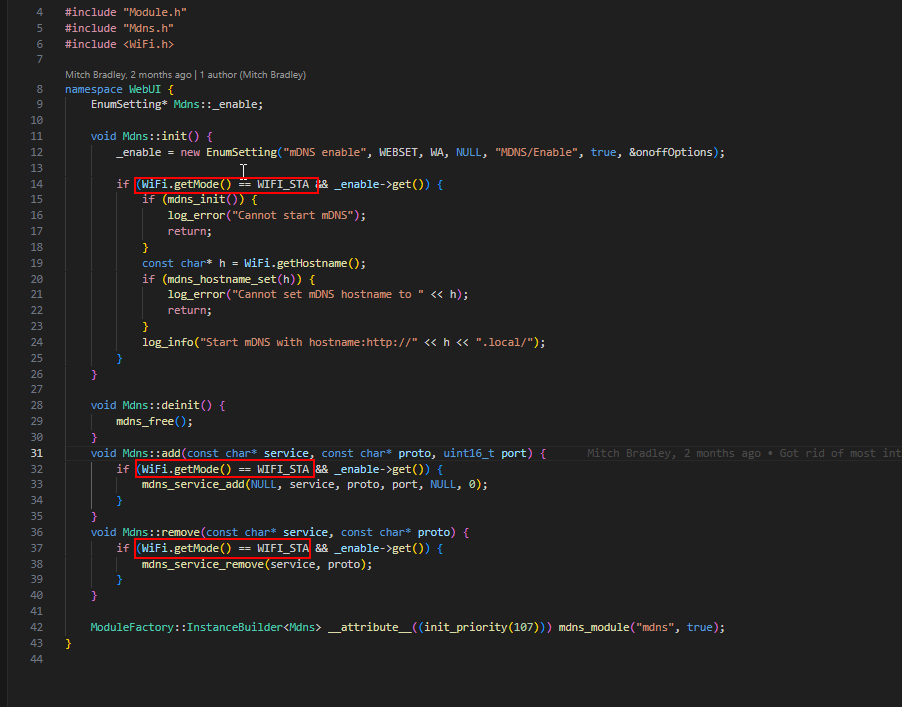
I thought FluidNC required STA mode in order to enable the mDNS service…
I’m surprised you are saying it ever works for you.
If you are using AP mode, the IP is always hardcoded, so you don’t really have any benefit of using http://fluidnc.local.
It’s benefit comes when you are in STA mode with DHCP and you don’t know what the IP will be
2 Likes
Quick code check seems to confirm… but I didn’t look in great detail to see if it would happen elsewhere
1 Like
Hmm. Maybe it isn’t running mDNS. I’ll go try again later today.
There’s a chance that I’ve added fluidnc.local to the /etc/hosts file that I sync across my boxes, in which case my setup is masking it.
I pushed out some updates this morning to hopefully fix some of the flickering issues. What I tend to see is especially when on the status tab while a running a job, the screen will sometimes shift a few pixels. I’m not sure I’m ever going to completely get rid of it, but it seems to be much improved.
If you could try it and let me know, I’d appreciate it!
It’s the 1.0.2_flickering version.
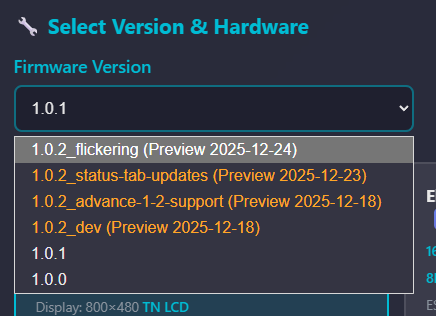
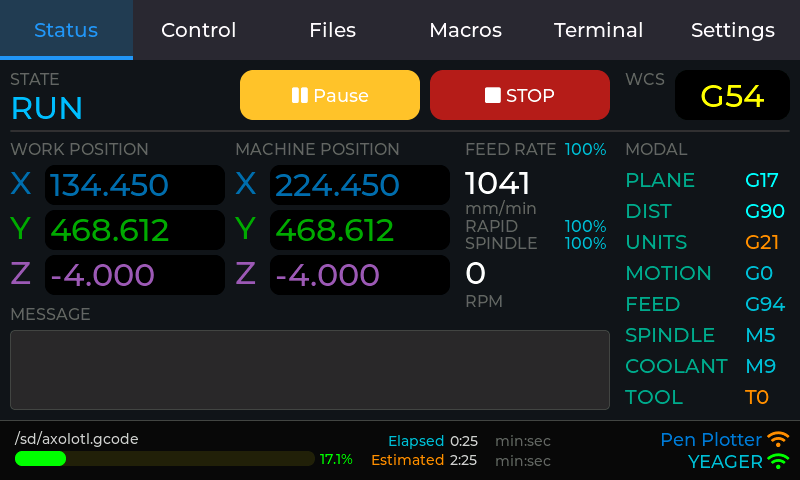
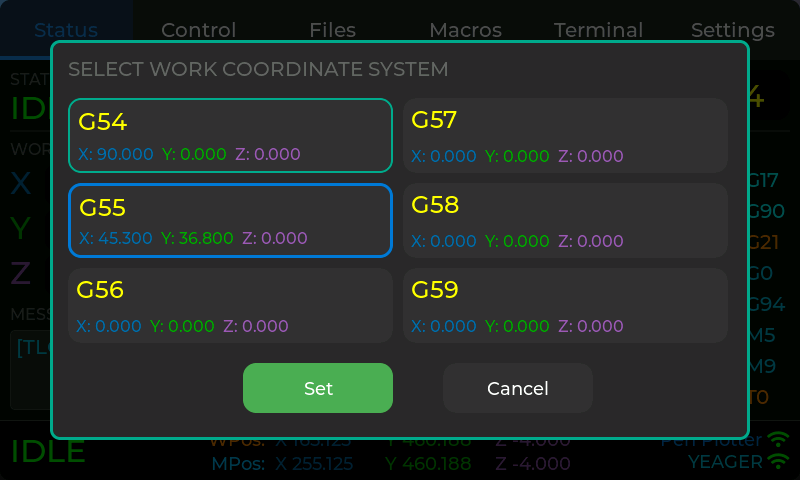
Also, if you’re curious, that 1.0.2_status-tab-updates build has these changes to the status tab (but not the flickering fixes):
- Edit position (goto) with Cancel Jog button
- Pause/Resume and Stop button - I’m questioning including the stop button. It results in a DOOR status which you can resume from, so it effectively feels like pause and stop do the same thing. Thoughts?
- Change the working coordinate system.
- To make room, the progress bar was moved to the status bar at the bottom.
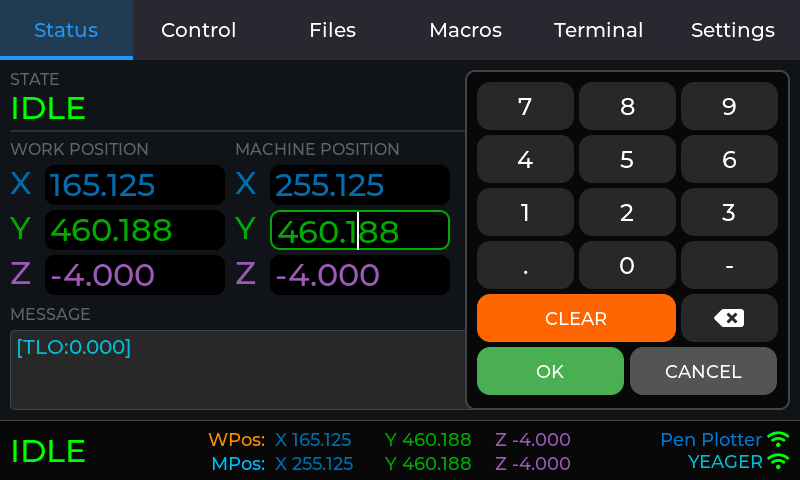
I’ll probably put out an RC1 build this weekend with all the changes.
3 Likes
Found that case design the other day and modified it a little since i didn’t have the antenna etc
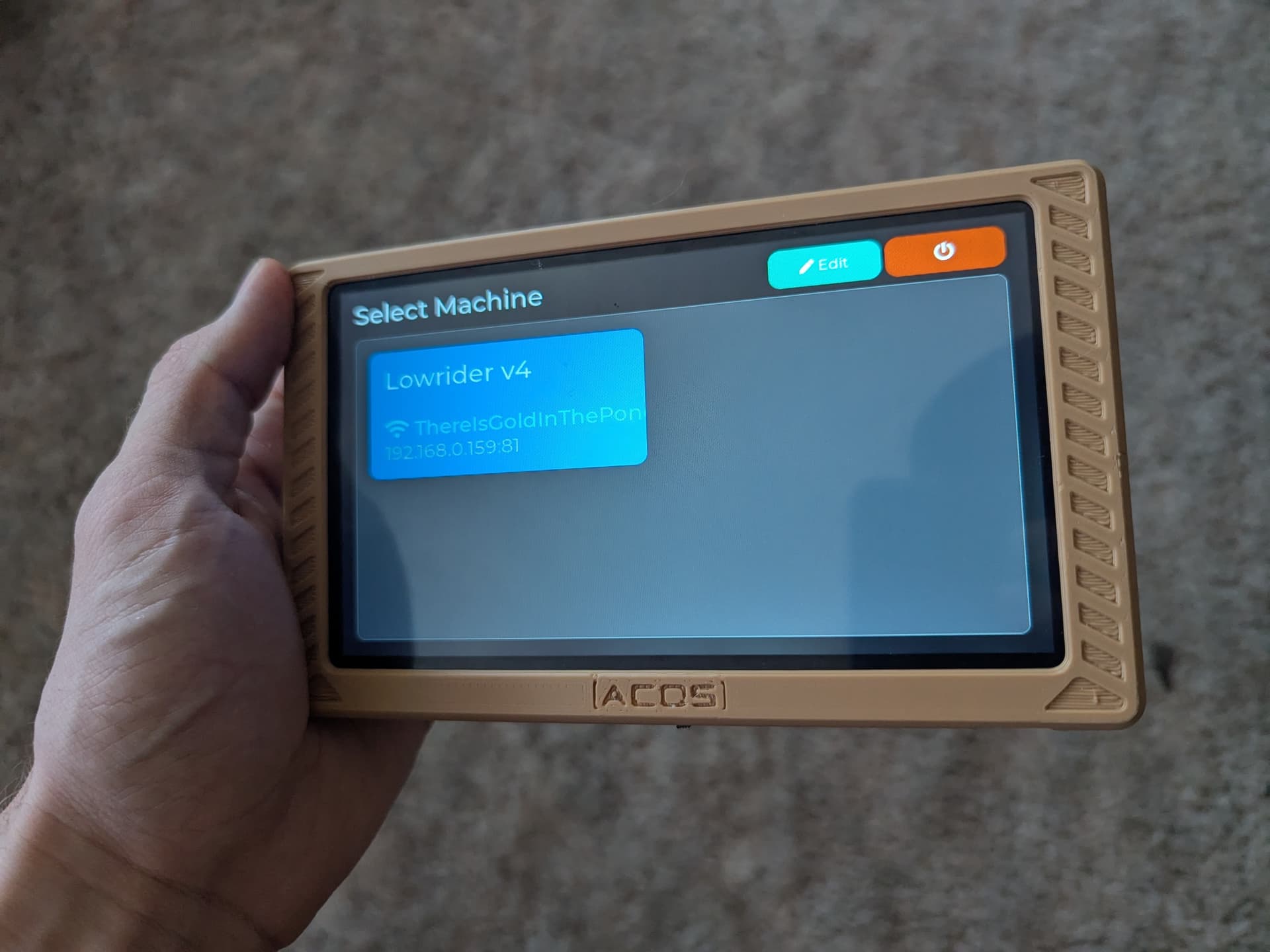
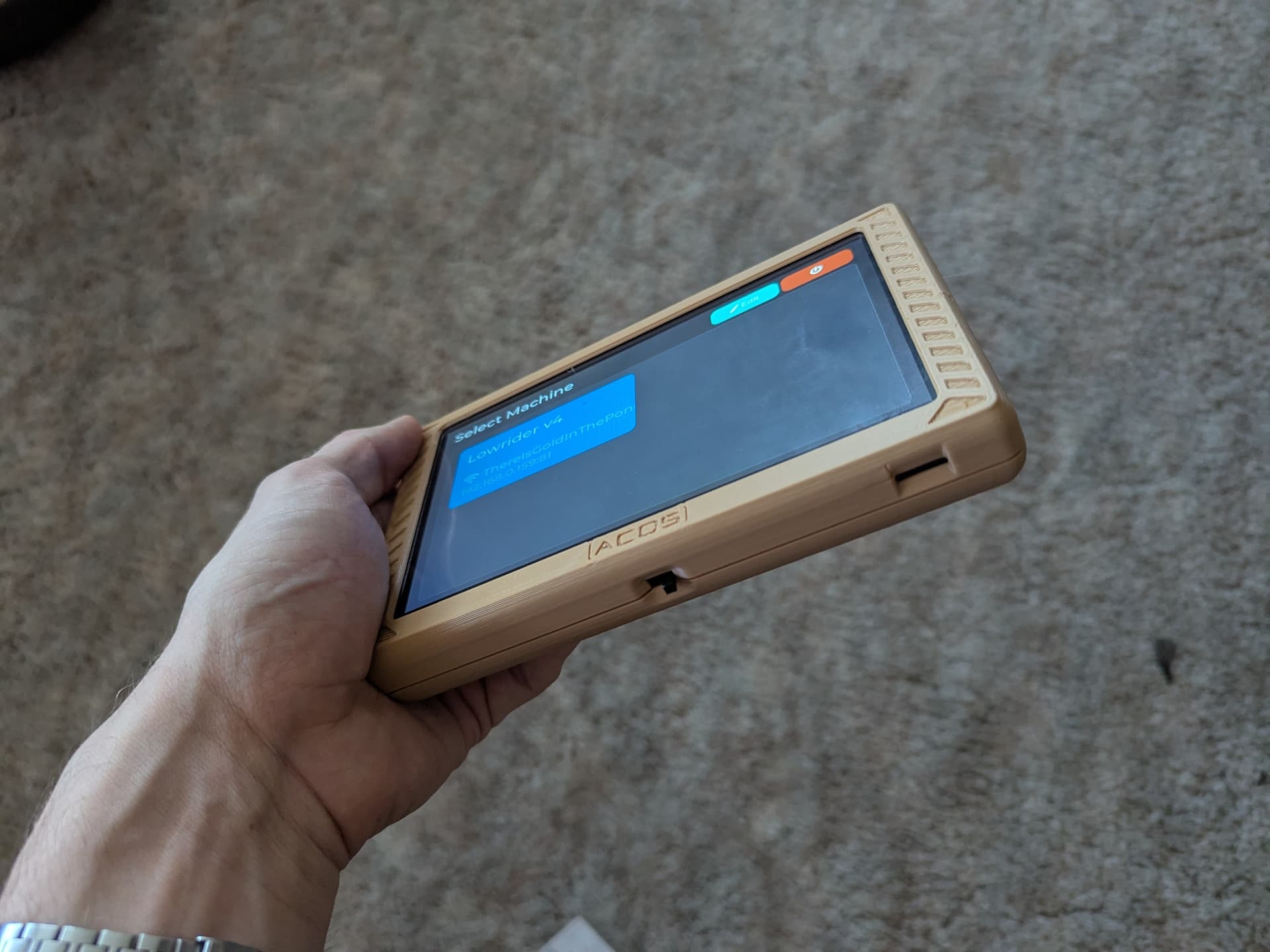
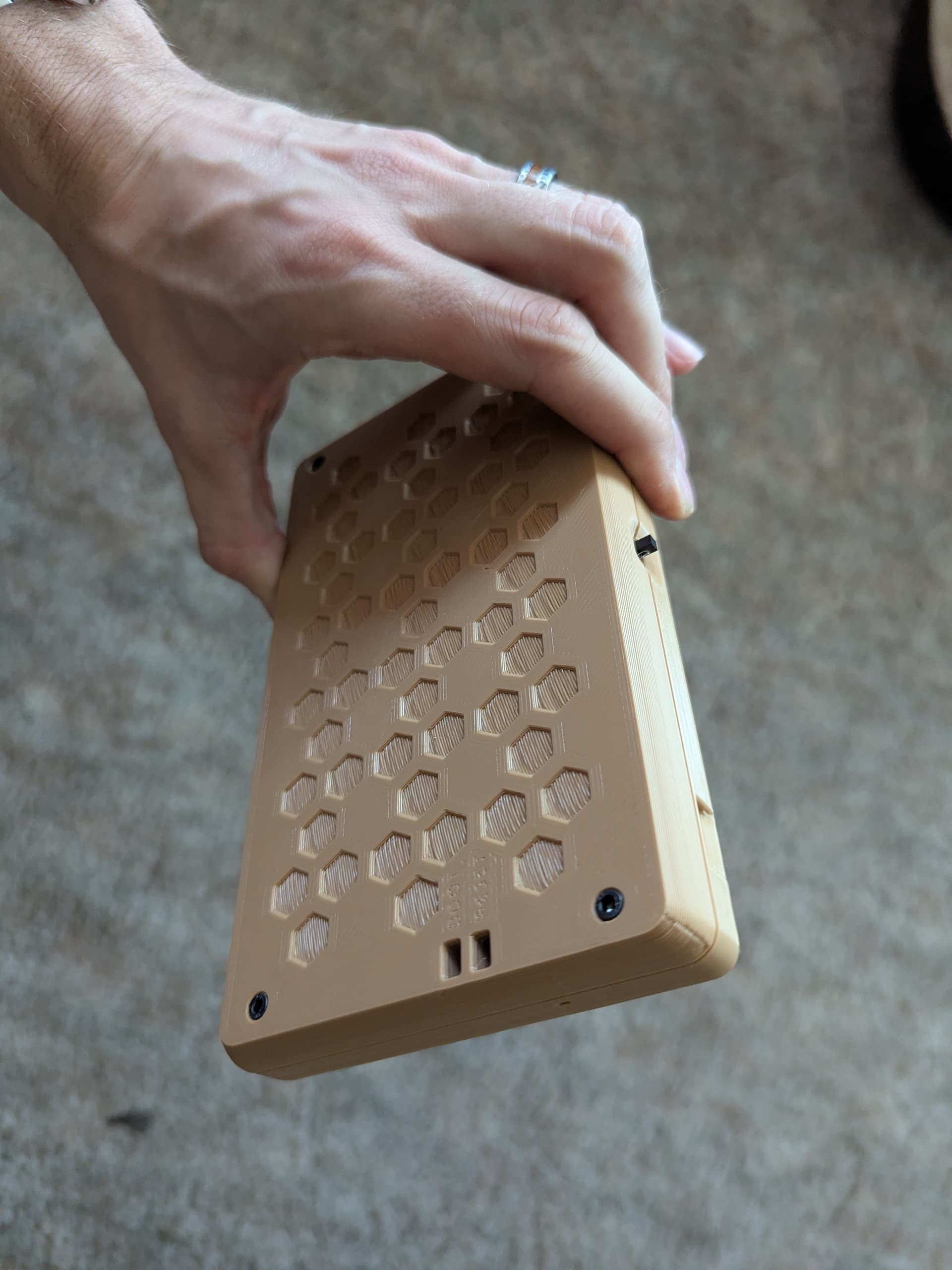
Had a few fitment issues. Not sure if it’s because i printed with 6mm nozzle, but had to adjust a few spots with soldering iron. And there is a little bit more of a gap than I’d like, but i’d say good enough…
Big improvement on the acrylic case!
5 Likes
Nice!
I love the way you’ve implemented this - no extra clutter on the screen.
A ‘Go To’ as well as ‘Set’ would be great but regardless = thankyou for all that you’ve done already, you’re a wizard.
3 Likes
Are you referring to the working coordinate system change? So, goto would go to 0,0 (probably not change Z) in that new WCS? That makes sense in my head.
Looks cool! Able to share link?
Curious what larger battery(s) people are squeezing into custom printed case?
 , now that I’ve seen this UI, and other dedicated CNC tablets, am increasingly frustrated with the clunkyness of other UIs that require Users to scroll and fumble around for common scenarios/features.
3 Likes
Just replicating the tablet tab of FluidNC you can either enter a number and jog directly to it or enter a number and use ‘Set’ to update the current coordinate.
Although now I say it I can’t think of a value other than zero you’d want to set so maybe it isn’t needed after all 
1 Like
This is the original file:
Here’s my modified design file (no antenna, also got rid of the threaded inserts, which seemed to work fine) - the stl in there has the final modifications that I think should make it fit well without modifications
3 Likes
I contacted the creator of the original design and he is going to release a version without the antenna slot very soon.
2 Likes
I think it’s a she going by the profile picture and the nice nails in their video.
2 Likes