While working on this, I’ve also had an iPad Pro and an iPhone out monitoring for the SSID (in addition to the two computers.) It could be a Mac/Apple thing. But I did reinstall with Chrome from my son’s gaming PC and still couldn’t see the SSID. When testing the Wifi, it’s an Orbi, so not an Apple product. One thought I’d had was that somehow it was being blocked as an option until I plug into it, then all of my devices think it’s OK to talk to it. Obviously based on that description, I have no idea what I’m talking about and I’ll need to do some research to see if there’s any basis in fact.
I did do another little “test” (probably a strong word.). The other night I posted separately about an episode with the Y2 and Z2 steppers being very hot. It was suggested that the config.yaml doesn’t execute properly if it’s already on USB when its powered on from an external power supply. Empirically this has proven true. Turn it on with a computer on the USB and the “2 side” steppers get hot.
Today I purposefully turned it on and let it sit without plugging in with the computer or running FluidTerm. The stepper motors did engage, but they did not feel as hot as with the prior event. This makes me think that the config.yaml did execute, and the steppers were properly sitting idle at 0.5 A. (Although I’ll make a note here that on a second test the Y2 and Z2 steppers are warmer to the touch than the other steppers after being on and idle for 10 mins. No where near as hot as the other night.)
@steved You’re correct. I suspected the same issue and had the router assign a static ip address so I could find it on the 2.4 GHz band. I’ve had other 2.4 GHz devices not join because of the 5 GHz conflict. However, it only joins after I do the same ./fluidterm.sh trick. I run FluidTerm, do absolutely nothing else but unplug the USB, and voilà, the ESP is on the network.
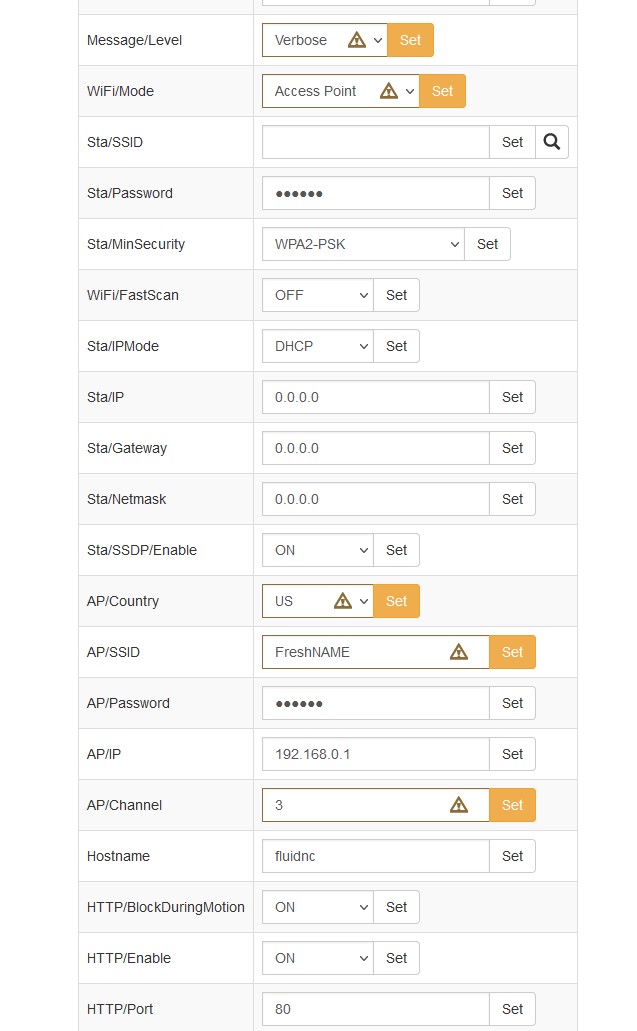
For testing purposes I have left it in AP mode.
Hypotheses at this point:
Antenna/Interference thing
Mac thing
Power supply profile at power-on (I have not yet had a chance to test on a genuine V1 Engineering approved 24V power supply which is what Ryan has tested with.)
I may take a short break and come at this with fresh eyes next week.
If it does we know it has something to do with FluidNC, if it still does not then we know it is a network or MAC thing. (we do have mac users that are not having issues so Leaning network).
What happens if you connect USB and don’t open fluidTerm?
When you connect USB, it does give the esp direct 5V power from the computer. If that is “better” in some way than the converted power on the jackpot, and it is able to run then fluid term would not matter.
Same for the antenna theory, mostly. If you plug in the USB, but do nothing over the data lines, then it may be improving the signal. I can’t imagine it is adding to the antenna strength. But maybe it makes the ground circuit stronger and the antenna can work better. IDK, RF is a mystery to me.
If it doesn’t work with a USB connected, without running fluid term, then it really points at the software. Or at least, something aggravated by software. I wonder if it is getting stuck in the bootloader somehow until it is talked to over serial. Or maybe the esp is trying to do something with every ssid it can see and it gets hosed, but why would it work with the fluid term connected.
I wonder if these is a way to have some starting gcode do something to show that it has booted without fluid term. Something like toggle the state of an LED.
FWIW, I had a good working setup at home with the ZenXY FluidNC and when I took it to RMRRF, I couldn’t connect most of the time. I blamed the crowded wifi (there were dozens, if not 100 ssids in that metal building). I brought my own router and tried all three modes. I didn’t bring a good computer to try fluid term though. Taking it to work, or a library, or a friends house could be a worthy test.
I do think we can, there are two boot macros you can have it run. In this case it might be a good idea to have it cycle all of the outputs (which would trigger the LED’s).
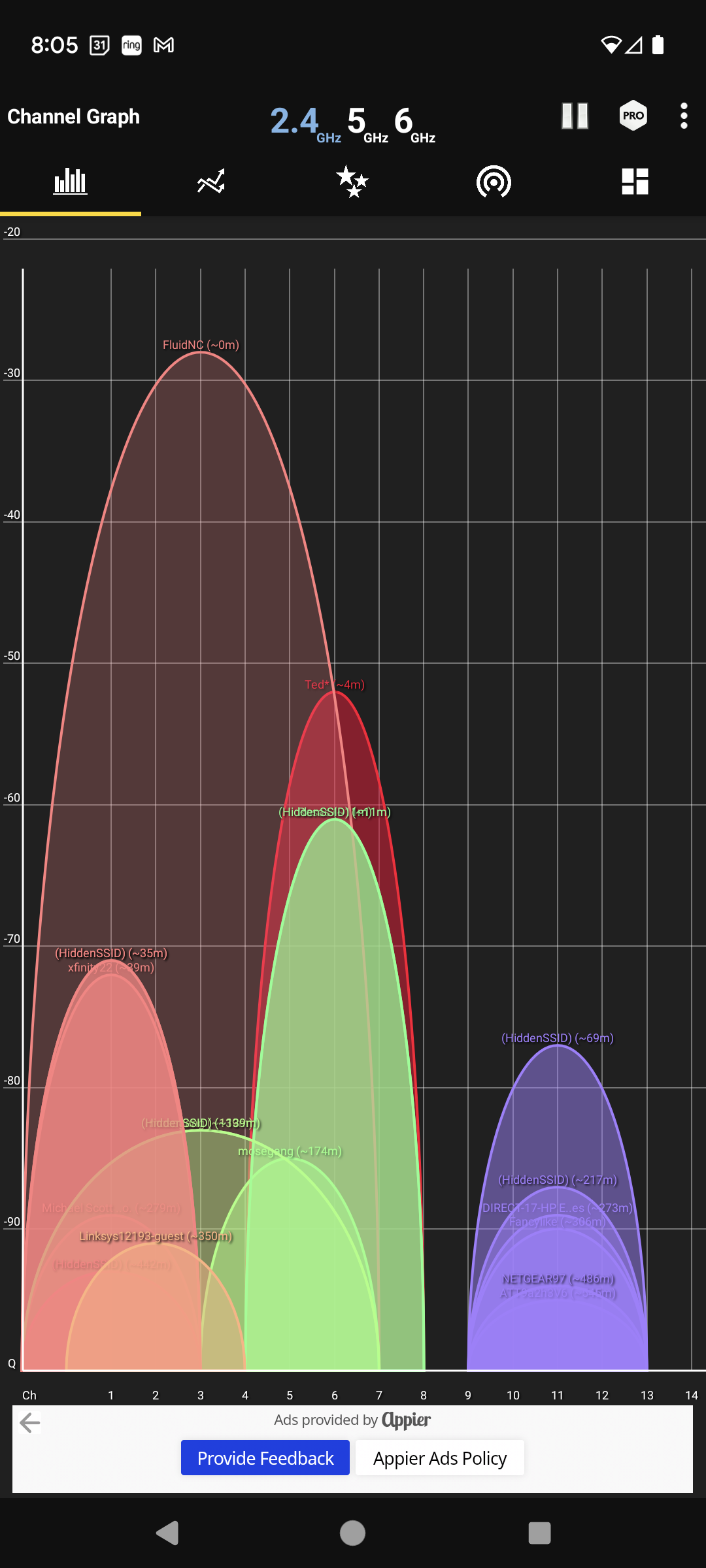
Dang I did not piece together the similarities. This is making me think there is one device interfering, and it has to be close. A wifi visualizer should help here right?
Okay and I just noticed something giving that a try. Fluid is using 40mhz width instead of 20mhz. That picks up more interference correct?
In these shots I think I might be slightly better off on Channel 11 as well.
Thank you guys so much for putting more thought into it. I had some fun cutting the table this last weekend, but now I’m reinstalling the LR3 on that table and it’s time to revisit this (in my brain at least.)
If I connect USB 30s after powering on the Jackpot from its power supply it doesn’t appear to have any effect until I run FluidTerm. BUT - at that point the only thing I can detect is whether I can see the SSID (and I can’t.) Even if I let it sit there a bit. But then I run ./fluidterm.sh and I can see the SSID within 10s, consistently.
If I power on the board after connecting the USB the Y2 and Z2 steppers get very hot over time. They appear to be receiving too much current (certainly for just idle.) Based on feedback on another thread, this may be because the config.yaml isn’t process properly in this situation.
Note that the motors do not get hot in scenario 1, “USB after boot” (and I did a test where I left the machine running without connecting USB at all to confirm.)
This does make me think that something is happening during boot to set the current properly for the steppers.
Adding some additional observations - at times when I’ve been messing with this at my desk, I’ve been able to get it to broadcast the SSID if I plug it into my USB battery rather than the computer. I thought I was on to something, but it wasn’t consistent. My impression was it would work for 1 - 2 boots, then not work. And once it wasn’t working, the battery never seemed to start working until I booted the thing properly. Again - this was an observation, but I was never able to create a consistently repeatable scenario, so I dismissed it. (For completeness, this occurred with the board installed on the Jackpot, but without the Jackpot on its power supply.)
I have not had a chance to try channel 11, but that is a good test. I’ll try that as soon as I can get some time to work on it. Running a macro to flash the LEDs would also be a great indicator of whether the code is actually executing completely, or getting hung up at some point. Perhaps the ./fluidterm.sh call over serial is somehow affecting the completion of the boot cycle?
RF is mostly a mystery to me. The more I learn, the more I need to know… But I think these are spread spectrum. So the wider range means they can bounce around to more places to find an open spot.
There are layers to wifi. The RF and frequencies are the very bottom. There are a lot of layers on top that could still be having an impact. Like maybe some AP is named “EspNoBoot” and it refuses to leave the bootloader until the serial port connects, and resets the connection (kicking free of the bootloader). I don’t expect this to be the case, just trying to find one possible explaination.
That is really interesting. I wonder if just using a regular serial program will do the same. I use miniterm.py, but connecting the arduino serial monitor or another basic serial program might connect, let you inspect the state, but not do something fluid is doing to unstick it.
Nope. The channel width is just that- how wide a swath of spectrum the channel is using. The tricks like MIMO where you use multiple antennas and the resulting multipath routing between nodes is a whole different beast. Spread spectrum is yet another entirely different thing.
In general, using wider bandwidth means you can sustain higher data rates- but you chew up more of the available spectrum and are more likely to see interference. In the US, there’s only three non-overlapping channels at 2.4 Ghz (1, 6, 11) .
When designing your Jackpot setup, use a WiFi analyzer to see your RF environment. If there’s a hole or at least less interference at channels 1,6, or 11 then use that. In my own home environment, I have an IOT network using channel 1, a guest wifi using channel 6, and my home office wifi on channel 11.
I don’t know if there’s some reason an ESP32 needs to use 40Mhz of bandwidth, but I think that’s a bad idea.
Edit to add: 40Mhz 2.4Ghz channels were added to the N specification, and lots of older equipment and even some newer equipment has problems dealing with this. Another reason I think using 40Mhz on the ESP32 is a bad idea.
Well actually… You can get RF conduction over a copper path, so you can get RF effects on your target and host machines if they have a copper connection between them. Aside that, the copper in the USB cable can act as a counterpoise and even be a (really crappy) radiator if there’s something wrong with the antenna or pigtail. RF is a funky beast, just as you note.
So there is a setting in the newer espwifi library to change it back to 20MHz, it seems Mitch has made some minor changes to the library and is using a custom slightly older version. So either the setting did not get ported to Fluid or it just isn’t there in that version.
I really hope this has something to do with Dgkeith237’s issue. Maybe the ORB mesh doesn’t like it.
I think I might start a wishlist or some sort of bounty for a few FluidNC edits if they are okay with the help.
Some sort of wish list or suspected issue tracking makes sense.
The other one that comes immediately to mind is the behavior if the ESP32 is powered up by USB while the board power (actually motor power) is not present. Users are reporting that the motor drivers end up misconfigured in that event. Seems like a bug to me- if powering up without motor power present there should at least be a status that is visible to the user.
Edit to add: In this WiFi not showing up case, it seems like there may be oddities in how the system boots. I know on my Jackpot/JL1 laser there were a few times where the system came up “funny” and I chalked that up to my inexperience with it, but now I’m not sure there isn’t some weird race condition or whatever where sometimes it just doesn’t boot correctly.
To be expected, but this means there needs to be clear documentation that the workflow is to always power up first with motor power before plugging in a USB cable. I also don’t agree with the outcome. If the motor drivers aren’t powered and it thus renders them not properly usable, they should be locked out until either reinitialized or FluidNC is cycled properly.
Well then it’s time to look at the other end of the equation.
Did you happen to try connecting via WiFi on the gaming PC?
I wonder if part of the problem is on the Mac side of things.
Specifically addressing the Windows Gaming PC, it is hardwired to a mesh node. It does not have a wireless card.
So the only way I’ve checked whether it can be “seen” by non-apple devices is whether the mesh routers can see it when it’s on STA>AP mode. It behaves similarly. Can’t see it with the mesh nodes until I’ve run FluidTerm.
A cell phone or wifi enabled computer can run free wifi analyzer apps, like I showed above that would really help here. I don’t think this is a MAC thing anymore I am leaning routers now.
I am kinda hoping changing to channel 11 on the esp will help this. If those mesh routers are slamming channel 1 the esp has no chance of shouting louder than them in AP mode. (That would also mean somehow the USB is boosting the signal or something)
I am holding off adding the Jackpots to the bundles until we figure this out or someone can duplicate it. I feel like we need to understand what is going on here to some degree. I want to be able to say “it won’t work if you have &&&&” or “try changing &&&&&& setting on your router”…or finding a setting I can change on my end. If you are tired of troubleshooting Dgkeith237 if you can tell me the exact model or version of your routers I will try to track down a set to test with.
It would be good to see what a WiFi analyzer says about the RF environment.
I don’t have the USB-C version of the ESP32, but I do have a couple of Intel MacBook Pros. Last week, I ordered a new M2 MacBook Air that will arrive at the end of this coming week (they only stock the 8Gb RAM variants in store).
The USB-C variant is the one I would prefer, so maybe it’s time for me to order a spare ESP-32 and do some testing with that. I could easily put it on my JL1 laser and do some charactarization that way.
It’s been a good while since I used a Mac for embedded work, lately I prefer Linux or even Windows boxes. The reason is that in the distant past, I had problems where Macs would do weird stuff with the hardware handshaking lines, or would be sending queries out the serial port trying to plug and play ID devices. (To be fair, sometimes I’ve seen this on Windows too). So that could be disrupting the boot configuration and be a variable here.
I’ve also seen on my Intel Macbook Pros where sometimes it takes a while for them to recognize a new SSID on an AP when the same wireless MAC (wireless hardware address) has previously been a peer (I see this with travel / VPN rotuers). Never figured it out, just ended up shutting off wireless and turning it back on if the Mac wasn’t seeing a device I thought it should be.
It’s really weird that the Mac sees the hotspot when tethered via USB but not otherwise. This could still be RF related. with a direct copper connection providing a signal improvement. But I suspect it’s signalling related and perhaps impacting the boot of the ESP32.
Can you use your 2nd Mac to continuously ping the IP that the ESP32 gets from the mesh network? Then go through a couple of boot scenario tests. I’m really curious if there are times the ESP32 connects to the APs in STA mode and it’s just not obvious.
Then monitor from the other Mac and compare what’s happening when connected or “not”.
I’m not sure I wrote that clearly.
I’m also curious about the specific models of ORB routers making the mesh- I might have missed that up thread. Can you confirm this?
Finally, any chance you have a “Charge only” USB-C cable or “Data isolator” adapter? The idea is to test whether your ESP-32 misbehaves when only power and no data lines are connected to the Mac. (This helps rule in or out the scenario where the Mac is doing something weird with the serial hardware handshaking lines as if the Mac can’t see the UART on the jackpot it can’'t twiddle those lines)
A really crude test if you don’t have data isolators or charge-only cable would be to touch just the outer shell of the USB-C cable to the body of the Mac and see if that changes the RF behavior. In this case, getting a signal improvement because of the copper path afforded by the shell to shell contact.
Kieth has said that just connecting USB doesn’t fix the ssid, but immediately after connecting fluid term, it does repair it. I think that is a big flag that it is logic related and not RF. The charge only test, or sharing ground, would be lesser to the test where you connect USB, but don’t use fluid term.

 You can get RF conduction over a copper path, so you can get RF effects on your target and host machines if they have a copper connection between them. Aside that, the copper in the USB cable can act as a counterpoise and even be a (really crappy) radiator if there’s something wrong with the antenna or pigtail. RF is a funky beast, just as you note.