I’ve seen my jackpot reboot when starting fluid term on Linux, and in particular saw this a couple of times early when I was trying to update FluidNC from a Linux laptop. I didn’t notice any weird RF behavior, but then again I wasn’t looking for any.
1 Like
Thanks all for the help in troubleshooting. I’m still not convinced my esp32 is completing the boot for some reason. Since we’ve swapped the board and esp32, it’s got to be something on my end. I continue to work the power supply angle. I had an issue with the original switch I had wired into my MPCNC, and the only switches I could get fast were very cheap. So I found a source for switches I’ve used before and replaced that fused switch between the wall and the power supply. I’ve ordered a 24V power supply from the shop, and I’ll try powering it up with that as soon as it arrives.
I did make a short recording of the behavior. In my best narrator voice,
I powered on, and switched the esp32 to AP mode. (Once it’s connected it works well on either AP, or STA modes.)
I rebooted and had to fluidterm.sh to see it.
I powered on, and the esp32 lights illuminated.
I waited 60s to see if I could see the SSID.

The bluish peaks at channel 9 are my wifi mesh. No USB is connected.
I connected the USB, and waited to see if it would appear just based on the USB connection. I could not see the SSID.
Then I ran fluidterm.sh:
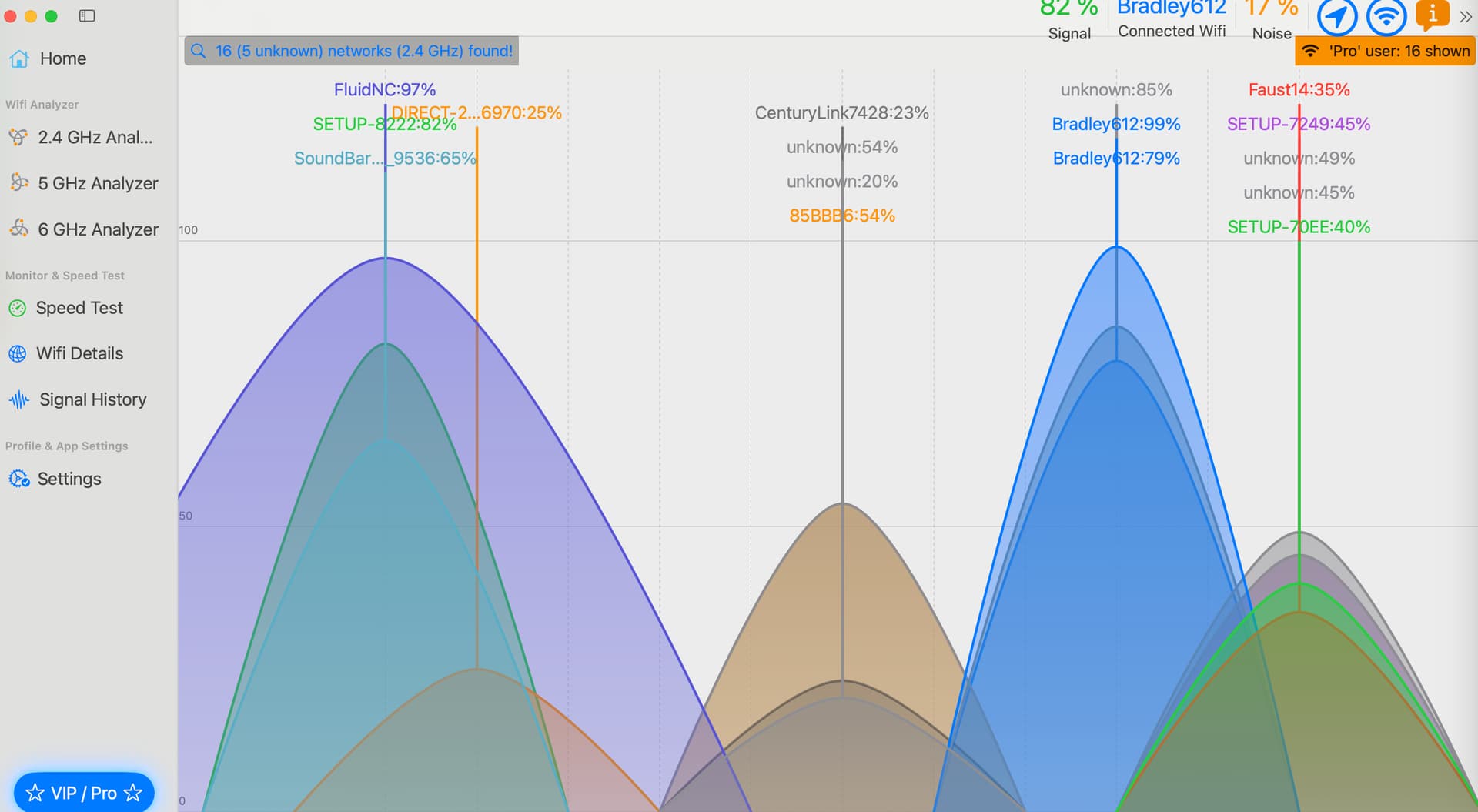
I did switch the esp32 to channel 9 since I know the interference at that channel is my network, and eventually I’d like to connect it in STA mode.
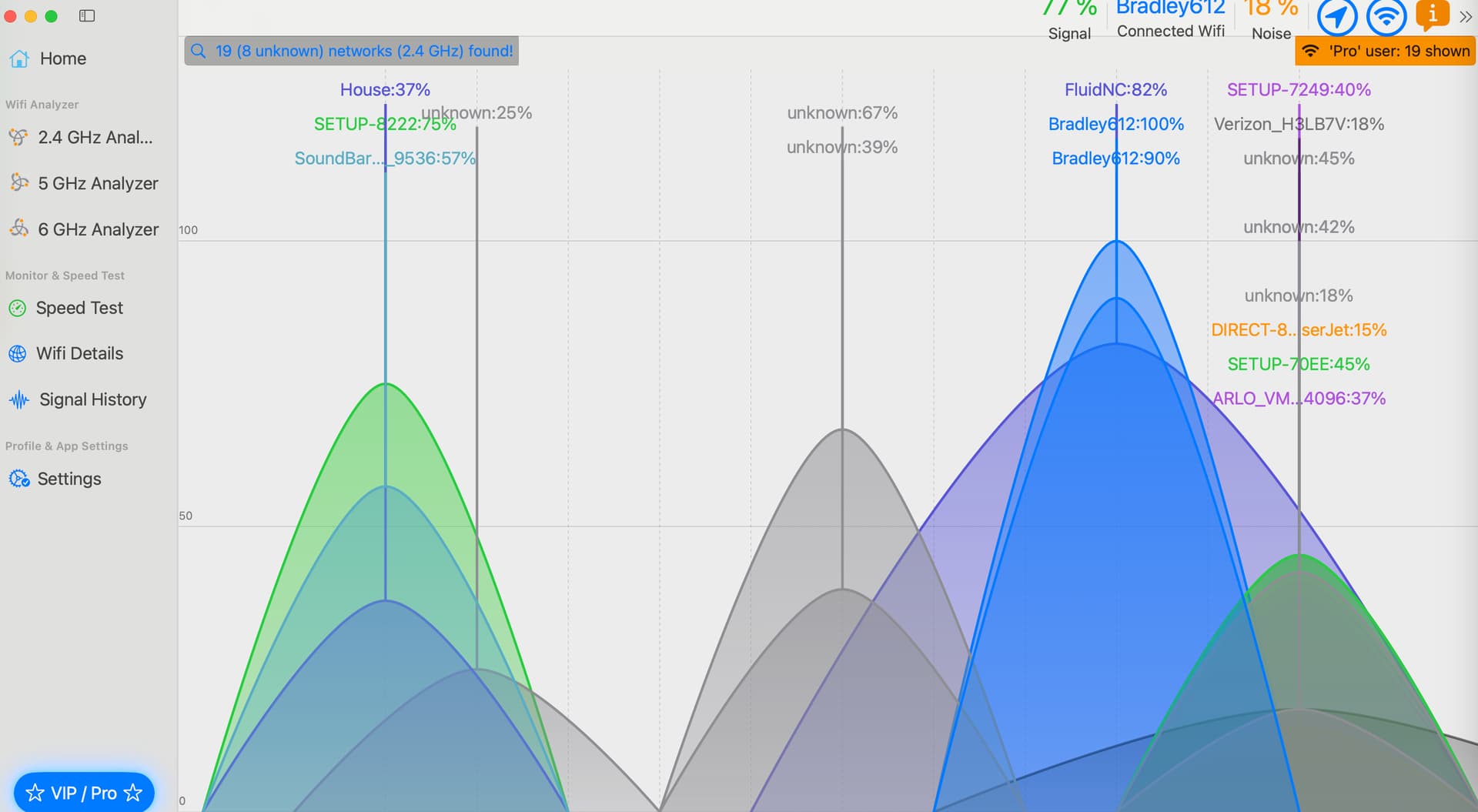
For the recording:
I powered on and waited 60s to ensure I couldn’t see the SSID.
I plugged in the USB and started the recording a few moments later. I trimmed about 10s of me arranging the windows so you could see the behavior.
I sliced it a bit short. If you move the transit to 27s you can see the FluidNC show up.
1 Like
Can you try powering it with the normal psu, connecting via usb, and then hitting the reset button on the esp?
Something fluid term is doing when it connects is causing it to unfreeze.
That video is really helpful. I know support at FNC can be a little rough, but I assume that video would be excellent evidence for them.
I had tried this on the other board, and it didn’t work to press RST or Boot.
So, I expanded this experiment slightly, to confirm the same behavior, then to see if pressing RST while connected would change the result.
- I powered on. Waited 60s. No SSID.
- I pressed RST. Waited 60s No SSID.
- I pressed RST, but held for about 1/2 second. Waited 60s. No SSID.
- I pressed BOOT, waited for 60s. No SSID.
- I plugged in my Macbook pro. Did NOT run fluidterm.sh. Pressed RST. Within 20s, the SSID is visible and stable.
It does work with USB connect, but does not work without.
EDIT: I added one more stage to this.
I booted. No SSID.
I plugged in a USB battery (No computer.)
Pressed RST. Nothing.
Pressed it a second time (hoping for a different result.)
SSID appears.
I repeated the steps above and the SSID appeared with the first reset. This is consistent with my observation that I could boot occassionally from a USB battery when at my desk. This process appears to be more consistent when on power supply.
What power supply are you using?
Also, what mode are you trying to use? Ap or connect to your ssid? Is your ssid hidden?
Something lleads me to believe something is getting passed to fluidterm from your pc but why/how??
My Meanwell PSU. LRS-350-24
And I did switch to exclusively AP mode for testing so as not to add another factor.
When in AP mode you want to be on a channel with the lowest other signals, and you should stick to 1, 6, or 11. All other channels get more interference because of overlap. For you 11 seems best…but that is definitely not the issue here.
This is breaking my brain. Can you take this on a drive and plug it in and see if it acts any different. If that works it will confirm it has something to do with your home network or if it still doesn’t your web interface connection (phone/laptop). It works here (my house and all the other ones that have been sent out) as expected, so it can’t be the jackpot/esp causing this issue. That said, whatever this is hopefully we can change some settings to make this work in this case in the firmware or preferences.
1 Like
I can take it on a drive, but I’m at the point I’m pretty sure it’s not completing the boot. As I worked with it today, I noticed that once powered on, I seem to have a “window” of time to use the USB/Push RST technique. If I have waited too long, I have to push RST twice to get it to show. I’ve never had to push it more than twice, and it seems like it’s only if I let it sit for a long time after power-on.
I did take the time to tune the PSU to deliver exactly 24V at the screw terminal on the Jackpot. I’m running some longer wires since I haven’t mounted the PSU inside the beam. It was only a 0.2 V drop, but easy enough to compensate.
The PSU you sent out should arrive on Monday. I’ll test that first. If I hook it up and everything works, at least we know the problem. If I use the same PSU as you, the same board and esp32, and the same drivers, then I’ll work the Wifi angle and drive to another location. (I will use your PSU for the testing on the drive-about.)
When I search Meanwell and esp32 I do see various comments about needing a capacitor to delay the boot. example: Power supply for the ESP32 - #3 by Andreas - Stromversorgung / Power supply - Hiveeyes
Some of the comments say that 100uF wasn’t enough and they needed 470uF capacitor.
Anyway - I’m patiently waiting for your PSU. Thanks so much for the amount of support you’ve provided on this.
It might not be completing the boot there, but for some reason it completes it fine where I am at. So is your network crushing it the millisecond it starts to broadcast, and you never see it happen?
I would be very happy if that is the issue.
The jackpot does have a power circuit on it though, I do not think that is the issue. You can use any other power supply you have that is 9V or larger. Without moving a stepper it takes very little amperage.
Meanwell does not appear in that discussion. It’s about poorly build dev modules, which may be a possibility for the USB-C version of ESP32, but it seems unlikely given the relative weirdness that seems localized to your use location.
If one of Ryan’s Power Supplies cleans this up, then someone needs to put your Meanwell on the bench and see what’s wrong with it. Maybe ripple, maybe bad regulation on startup, lots of things could be wrong with it.
Such a curious problem that you’re having.
True - I only linked the end of the chain of forums on the capacitor conversation. The MeanWell mentions in my search were also for lower watt units. Mine should be over-provisioned for the task.
Also - I know this is a long thread and there is a lot of experimentation. But just to be clear:
I disconnect everything as soon as I see the SSID is available. The thing is bulletproof once I’ve got visibility. This has been true for both AP mode and in my experiments with STA>AP mode. Once it’s there, I don’t have any issue with stability, signal strength, etc.
NEW DATA:
I added:
startup_line0: $HX
-
When I power up the PSU, it does not home even left for 30s.
-
When I plug in my iPad Pro and press RST, it does home.
-
When I plug in my external battery and press RST, it does home.
The FluidNC wiki says that startup_line0: is executed when the firmware enters idle for the first time.
Thanks again so much.
1 Like
The easiest way for use to overrun one of these is connecting multiple devices. I am starting to think there is something in your network that is trying to log into the AP automatically. That is why I suggested changing the SSID in case there are some auto-logins, and getting away from your network in case something tries to get into an AP automatically. This would all happen immediately.
I am with you, it is not fully booting, that also means it never has a chance to be idle.
If you can get to a place where it is just the jackpot and single phone to see if it boots just fine like it does here. Or unplug all of your mesh routers and try a normal power supply only boot.
Oh man - we are close now. I am so thankful to everyone (especially Ryan) that has put their brains to work on this problem.
Just to put everyone in suspense, I’ll need to go through a careful process this evening to confirm the issue and see if I can fix it.
When I was thinking through (again, at 2AM) all the things we’ve done, I had (what I think is) an important revelation.
Ryan had me pull the drivers off the board I sent back. Board 1 didn’t boot with those drivers, Board 2 doesn’t boot with those drivers. Hmmm…
This morning I pulled all drivers from the board and booted from power supply. It works every time, every boot. Obviously, I can’t test motion with no drivers, but I can access the WebUI.
It is (at least) one of the TMC 2209 drivers… (Banging head on desk.)
I do have some spare drivers here in the shop. I don’t know that I have enough to swap all 5 at once, but I figure if I careful and systematically swap the drivers I should be able to identify the gremlin and appropriately dispatch said villain.
The drivers I received with the Jackpot are rev. 1.3. Does anyone know if the rev. 1.2 drivers work in the Jackpot?
Again, I can’t express enough gratitude for all those that thoughtfully worked this problem with me.
3 Likes
Well there is a twist…
Since the machine ran fine after it connected, I disregarded the drivers all together.
Once you find the offending driver you should look for a solder bridge. Or post a good clear, well lit picture of the top and bottom. If we don’t see anything, the solder bridge can be under the plastic pin strips.
Yes I think the 1.2 will work just fine, I can’t find a changelog though.
wait, so here, Mark the drivers, 1 through, (i assume 5).
Put driver 1 in position 1 does it boot?
turn off, remove driver 1 from Slot 1, Install driver 2 in, slot 1 does it boot,
turn Remove driver 2 from slot 1, install Driver 3, does it boot.
turn off Remove Driver 3 from slot 1, install Driver 4, does it boot?
turn off Same again, remove Driver 4 from slot 1, install driver 5, does it boot?
If it boots on all 5, then we have a problem elsewhere, if it does not boot for any of them, then we finally have a solution.
Now, question, didn’t you buy a fully populated, tested board from Ryan?
Did you change the drivers? if so why?
I don’t typically install the drivers. If this is the case this will be the very first case of a bad 2209 driver we have ever had.
1 Like
I couldn’t help myself over lunch, so I arranged to eat in my garage… 
(NOTE: I will identify the drivers by their position in the LR3 - X, Y1, Z1, Y2, Z2)
- I sequentially installed and removed each driver in the X slot and each time the SSID was visible almost immediately.
- Once all were tested, I left one in X and installed one in Y1. It failed. I tried 3 of the remaining 4.
- I skipped Y1 and left it empty. I installed one in Z1 and it failed.
- I pulled that one and left Y1 and Z1 empty. I placed one in Y2 and it boots normally.
- I moved that one to Z2 and it boots normally.
- I put a driver in Y2 (so at this point X, Y2 and Z2) and it boots normally.
- I tried putting a driver back in Y1 and it prevents boot.
More experimentation to come! I need to check my config.yaml to make sure I didn’t screw something up. I may just upload a new config.yaml without messing with anything, but in scanning my current file, I don’t see anything changed. (In fact, all my squaring data is gone from this last weekend.  Apparently I haven’t been hitting save…)
I also need to pull the board and look to see if there is any unintended contact with the elements under the drivers in those positions. (This would be weird since the behavior is consistent across 2 jackpots and literally nobody else has ever reported the issue. But maybe I screwed something up on install.)
have you shared your config.yaml here yet? If you post it here I can do a quick compare to what Ryan has posted and see what’s different
Here’s what I’m using. I don’t recall making many changes.
I certainly don’t remember messing with the driver addresses. But I see multiple drivers addressed to 3. I’m guessing I need to ensure there aren’t conflicts. Starting at zero (X?) to 4 (Z2?). But in this I’m out of my element.
board: Jackpot TMC2209
name: LowRider3
meta: 09-10-2023

planner_blocks: 32

stepping:
  engine: I2S_STATIC
  idle_ms: 255
  pulse_us: 4
  dir_delay_us: 1
  disable_delay_us: 0

uart1:
  txd_pin: gpio.0
  rxd_pin: gpio.4
  rts_pin: NO_PIN
  baud: 115200
  mode: 8N1

axes:
  shared_stepper_disable_pin: NO_PIN

  x:
    steps_per_mm: 50.000
    max_rate_mm_per_min: 9000.000
    acceleration_mm_per_sec2: 200.000
    max_travel_mm: 1220
    soft_limits: false
    homing:
      cycle: 3
      positive_direction: false
      mpos_mm: 0
      feed_mm_per_min: 300.000
      seek_mm_per_min: 1500.000
      settle_ms: 500
      seek_scaler: 1.100
      feed_scaler: 1.100
    #X
    motor0:
      limit_neg_pin: gpio.25:high
      limit_pos_pin: NO_PIN
      limit_all_pin: NO_PIN
      hard_limits: false
      pulloff_mm: 4.000
      tmc_2209:
        uart_num: 1
        addr: 0
        cs_pin: NO_PIN
        r_sense_ohms: 0.110
        run_amps: 0.680
        hold_amps: 0.500
        microsteps: 8
        stallguard: 0
        stallguard_debug: false
        toff_disable: 0
        toff_stealthchop: 5
        toff_coolstep: 3
        run_mode: StealthChop
        homing_mode: StealthChop
        use_enable: false
        direction_pin: I2SO.1
        step_pin: I2SO.2
        disable_pin: I2SO.0

  y:
    steps_per_mm: 50.000
    max_rate_mm_per_min: 9000.000
    acceleration_mm_per_sec2: 200.000
    max_travel_mm: 2440
    soft_limits: false
    homing:
      cycle: 2
      positive_direction: false
      mpos_mm: 0
      feed_mm_per_min: 300.000
      seek_mm_per_min: 1500.000
      settle_ms: 500
      seek_scaler: 1.100
      feed_scaler: 1.100
    #Y
    motor0:
      limit_neg_pin: gpio.33:high
      limit_pos_pin: NO_PIN
      limit_all_pin: NO_PIN
      hard_limits: false
      pulloff_mm: 4.000
      tmc_2209:
        uart_num: 1
        addr: 1
        cs_pin: NO_PIN
        r_sense_ohms: 0.110
        run_amps: 0.680
        hold_amps: 0.500
        microsteps: 8
        stallguard: 0
        stallguard_debug: false
        toff_disable: 0
        toff_stealthchop: 5
        toff_coolstep: 3
        run_mode: StealthChop
        homing_mode: StealthChop
        use_enable: false
        step_pin: I2SO.5
        direction_pin: I2SO.4
        disable_pin: I2SO.7

    #A
    motor1:
      limit_neg_pin: gpio.35:high
      limit_pos_pin: NO_PIN
      limit_all_pin: NO_PIN
      hard_limits: false
      pulloff_mm: 4.000
      tmc_2209:
        uart_num: 1
        addr: 3
        cs_pin: i2so.14
        r_sense_ohms: 0.110
        run_amps: 0.680
        hold_amps: 0.500
        microsteps: 8
        stallguard: 0
        stallguard_debug: false
        toff_disable: 0
        toff_stealthchop: 5
        toff_coolstep: 3
        run_mode: StealthChop
        homing_mode: StealthChop
        use_enable: false
        step_pin: I2SO.13
        direction_pin: I2SO.12
        disable_pin: I2SO.15

  z:
    steps_per_mm: 200.000
    max_rate_mm_per_min: 1200.000
    acceleration_mm_per_sec2: 80.000
    max_travel_mm: 300.000
    soft_limits: false
    homing:
      cycle: 1
      positive_direction: true
      mpos_mm: 0
      feed_mm_per_min: 300.000
      seek_mm_per_min: 800.000
      settle_ms: 500
      seek_scaler: 1.100
      feed_scaler: 1.100

    motor0:
      limit_neg_pin: NO_PIN
      limit_pos_pin: gpio.32:high
      limit_all_pin: NO_PIN
      hard_limits: false
      pulloff_mm: 4.000
      tmc_2209:
        uart_num: 1
        addr: 2
        cs_pin: NO_PIN
        r_sense_ohms: 0.110
        run_amps: 0.680
        hold_amps: 0.500
        microsteps: 8
        stallguard: 0
        stallguard_debug: false
        toff_disable: 0
        toff_stealthchop: 5
        toff_coolstep: 3
        run_mode: StealthChop
        homing_mode: StealthChop
        use_enable: false
        step_pin: I2SO.10
        direction_pin: I2SO.9
        disable_pin: I2SO.8

     #B
    motor1:
      limit_neg_pin: NO_PIN
      limit_pos_pin: gpio.34:high
      limit_all_pin: NO_PIN
      hard_limits: false
      pulloff_mm: 4.000
      tmc_2209:
        uart_num: 1
        addr: 3
        cs_pin: i2so.19
        r_sense_ohms: 0.110
        run_amps: 0.680
        hold_amps: 0.500
        microsteps: 8
        stallguard: 0
        stallguard_debug: false
        toff_disable: 0
        toff_stealthchop: 5
        toff_coolstep: 3
        run_mode: StealthChop
        homing_mode: StealthChop
        use_enable: false
        step_pin: I2SO.18
        direction_pin: I2SO.17
        disable_pin: I2SO.16

#  c:
#    steps_per_mm: 80.000
#    max_rate_mm_per_min: 5000.000
#    acceleration_mm_per_sec2: 100.000
#    max_travel_mm: 300.000
#    soft_limits: false
#    homing:
#      cycle: 0
#      positive_direction: true
#      mpos_mm: 150.000
#      feed_mm_per_min: 100.000
#      seek_mm_per_min: 800.000
#      settle_ms: 500
#      seek_scaler: 1.100
#      feed_scaler: 1.100
#
#    motor0:
#      limit_neg_pin: gpio.39:low
#      limit_pos_pin: NO_PIN
#      limit_all_pin: NO_PIN
#      hard_limits: false
#      pulloff_mm: 3.000
#      tmc_2209:
#        uart_num: 1
#        addr: 3
#        cs_pin: i2so.22
#        r_sense_ohms: 0.110
#        run_amps: .1
#        hold_amps: 0.050
#        microsteps: 16
#        stallguard: 0
#        stallguard_debug: false
#        toff_disable: 0
#        toff_stealthchop: 5
#        toff_coolstep: 3
#        run_mode: StealthChop
#        homing_mode: StealthChop
#        use_enable: false
#        step_pin: I2SO.21
#        direction_pin: I2SO.20
#        disable_pin: I2SO.23


i2so:
  bck_pin: gpio.22
  data_pin: gpio.21
  ws_pin: gpio.17

spi:
  miso_pin: gpio.19
  mosi_pin: gpio.23
  sck_pin: gpio.18

sdcard:
  cs_pin: gpio.5
  card_detect_pin: NO_PIN
  frequency_hz: 20000000

probe:
  pin: gpio.36:low
  toolsetter_pin: NO_PIN
  check_mode_start: true

start:
  must_home: false

coolant:
  flood_pin: gpio.2
  mist_pin: gpio.16
  delay_ms: 0

control:
  safety_door_pin: NO_PIN
  reset_pin: NO_PIN
  feed_hold_pin: NO_PIN
  cycle_start_pin: NO_PIN
  macro0_pin: NO_PIN
  macro1_pin: NO_PIN
  macro2_pin: NO_PIN
  macro3_pin: NO_PIN

macros:
  startup_line0:
  startup_line1:
  macro0:
  macro1:
  macro2:
  macro3:

user_outputs:
  analog0_pin: NO_PIN
  analog1_pin: NO_PIN
  analog2_pin: NO_PIN
  analog3_pin: NO_PIN
  analog0_hz: 5000
  analog1_hz: 5000
  analog2_hz: 5000
  analog3_hz: 5000
  digital0_pin: gpio.26
  digital1_pin: gpio.27
  digital2_pin: NO_PIN
  digital3_pin: NO_PIN

#Laser:
#  pwm_hz: 5000
#  output_pin: gpio.27
#  enable_pin: NO_PIN
#  disable_with_s0: false
#  s0_with_disable: true
#  tool_num: 0
#  speed_map: 0=0.000% 255=100.000%
#  off_on_alarm: true

# pwm:
#  pwm_hz: 5000
#  direction_pin: gpio.26
#  output_pin: gpio.27
#  enable_pin: NO_PIN
#  disable_with_s0: false
#  s0_with_disable: true
#  spinup_ms: 0
#  spindown_ms: 0
#  tool_num: 0
#  speed_map: 0=0.000% 1000=100.000%
#  off_on_alarm: false

# 5V out gpio.26/27
# VMot out gpoi.2/16
# In's left to right gpoi.25/33/32/35/34/39/36
X motor0 is 0
Y motor0 is 1
A motor1 is 3
Z motor0 is 2
B motor1 is 3
I’m guessing B motor 1 is supposed to be 4.