Hi there, I just finished my build. Was homing my axis and making sure everything worked great. When I got the attached error. Now I can’t get anything to work. Anyone able to give me any direction?

Unfortunately, that long screenshot doesn’t show all of the log, so it’s not of any help.
If you haven’t rebooted, go into the terminal and type $SS, then cut/paste that here using the </> formatting tag from the ribbon in the edior.
If you have rebooted, that’s OK, but we will still need to get that error log in text rather than graphical form.
Everything from a $ss
ss
[MSG:ERR: Showing startup log from previous panic]
[MSG:INFO: FluidNC v3.9.1 https://github.com/bdring/FluidNC]
[MSG:INFO: Compiled with ESP32 SDK:v4.4.7-dirty]
[MSG:INFO: Local filesystem type is littlefs]
[MSG:INFO: Configuration file:config.yaml]
[MSG:INFO: Machine LowRider]
[MSG:INFO: Board Jackpot TMC2209]
[MSG:INFO: UART1 Tx:gpio.0 Rx:gpio.4 RTS:NO_PIN Baud:115200]
[MSG:INFO: I2SO BCK:gpio.22 WS:gpio.17 DATA:gpio.21]
[MSG:INFO: SPI SCK:gpio.18 MOSI:gpio.23 MISO:gpio.19]
[MSG:INFO: SD Card cs_pin:gpio.5 detect:NO_PIN freq:20000000]
[MSG:INFO: Stepping:I2S_STATIC Pulse:2us Dsbl Delay:0us Dir Delay:1us Idle Delay:255ms]
[MSG:INFO: User Digital Output: 0 on Pin:gpio.26]
[MSG:INFO: User Digital Output: 1 on Pin:gpio.27]
[MSG:INFO: Axis count 3]
[MSG:INFO: Axis X (3.000,1263.000)]
[MSG:INFO:   Motor0]
[MSG:INFO:     tmc_2209 UART1 Addr:0 CS:NO_PIN Step:I2SO.2 Dir:I2SO.1 Disable:I2SO.0 R:0.110]
[MSG:INFO:  X Neg Limit gpio.25]
[MSG:INFO: Axis Y (3.000,2483.000)]
[MSG:INFO:   Motor0]
[MSG:INFO:     tmc_2209 UART1 Addr:1 CS:NO_PIN Step:I2SO.5 Dir:I2SO.4 Disable:I2SO.7 R:0.110]
[MSG:INFO:  Y Neg Limit gpio.33]
[MSG:INFO:   Motor1]
[MSG:INFO:     tmc_2209 UART1 Addr:3 CS:I2SO.14 Step:I2SO.13 Dir:I2SO.12 Disable:I2SO.15 R:0.110]
[MSG:INFO:  Y2 Neg Limit gpio.35]
[MSG:INFO: Axis Z (-297.000,3.000)]
[MSG:INFO:   Motor0]
[MSG:INFO:     tmc_2209 UART1 Addr:2 CS:NO_PIN Step:I2SO.10 Dir:I2SO.9 Disable:I2SO.8 R:0.110]
[MSG:INFO:  Z Pos Limit gpio.32]
[MSG:INFO:   Motor1]
[MSG:INFO:     tmc_2209 UART1 Addr:3 CS:I2SO.19 Step:I2SO.18 Dir:I2SO.17 Disable:I2SO.16 R:0.110]
[MSG:INFO:  Z2 Pos Limit gpio.34]
[MSG:INFO: X Axis driver test passed]
[MSG:INFO: Y Axis driver test passed]
[MSG:INFO: Y2 Axis driver test passed]
[MSG:INFO: Z Axis driver test passed]
[MSG:INFO: Z2 Axis driver test passed]
[MSG:INFO: Kinematic system: Cartesian]
[MSG:INFO: STA SSID is not set]
[MSG:INFO: AP SSID FluidNC IP 192.168.0.1 mask 255.255.255.0 channel 1]
[MSG:INFO: AP started]
[MSG:INFO: WiFi on]
[MSG:INFO: Captive Portal Started]
[MSG:INFO: HTTP started on port 80]
[MSG:INFO: Telnet started on port 23]
[MSG:INFO: Flood coolant gpio.2]
[MSG:INFO: Mist coolant gpio.16]
[MSG:INFO: Probe gpio.36:low]
ok
Also, I have rebooted a couple times. Same error keeps coming up, and nothing will respond to any buttons.
Very strange. We may need to get FluidTerm connected over USB to try and capture what is happening. That $SS result doesn’t look wrong at all to me.
What type of macine are you using for your web browser?
1 Like
You get an error every time you home?
Chances are really good you have an endstop plugged in in the wrong spot.
I’m using an Android Pixel phone for most of my work.
It’s not every time I home, it’s as soon as it boots up I get that error. I had it working fine, but when I homed on Y the machine got caught on something. I shut it down so I could fix what was catching, and now as soon as I boot it up, I get the error I posted.
The error you posted it is from “the last time” You are not showing any current errors.
Move your machine around, home each axis make sure everything works and try hitting the shutdown button in the menu to clear the previous error.
You don’t normally need to hit shut down or reboot but you do when you want to clear an error.
My machine won’t move at all now. When I close the error, none of the buttons will work. I did see that when I push those buttons they are throwing errors:
ERROR:8
Grbl '$' command cannot be used unless Grbl is IDLE. Ensures smooth operation during a job.
Error : error:8 :undefined
[MSG:ERR: Command requires idle state]
$J=G91 G21 F5000 X100
ERROR:8
Grbl '$' command cannot be used unless Grbl is IDLE. Ensures smooth operation during a job.
Error : error:8 :undefined
[MSG:ERR: Command requires idle state]
$J=G91 G21 F5000 X-100
ERROR:8
Grbl '$' command cannot be used unless Grbl is IDLE. Ensures smooth operation during a job.
Error : error:8 :undefined
[MSG:ERR: Command requires idle state]
$HZ
ERROR:19
error:19
Error : error:19 :undefined
[MSG:ERR: Single axis homing not allowed]
$J=G91 G21 F400 Z10
ERROR:8
Grbl '$' command cannot be used unless Grbl is IDLE. Ensures smooth operation during a job.
Error : error:8 :undefined
[MSG:ERR: Command requires idle state]
$J=G91 G21 F400 Z1
ERROR:8
Grbl '$' command cannot be used unless Grbl is IDLE. Ensures smooth operation during a job.
Error : error:8 :undefined
[MSG:ERR: Command requires idle state]
I did try to send an M0 command, but it says G-code commands are locked out during alarm or jog states.
Yea, when it restarts like that it’s going to be in an Alarm state. You should be able to clear the alarm by sending $X in the terminal.
1 Like
Can we see a picture of your board wired up pleae.
$x gave me back:
ERROR:152
Configuration is invalid. Check boot messages for ERR's.
[MSG:ERR: Configuration is invalid. Check boot messages for ERR's.]
Also attaching the photos requested
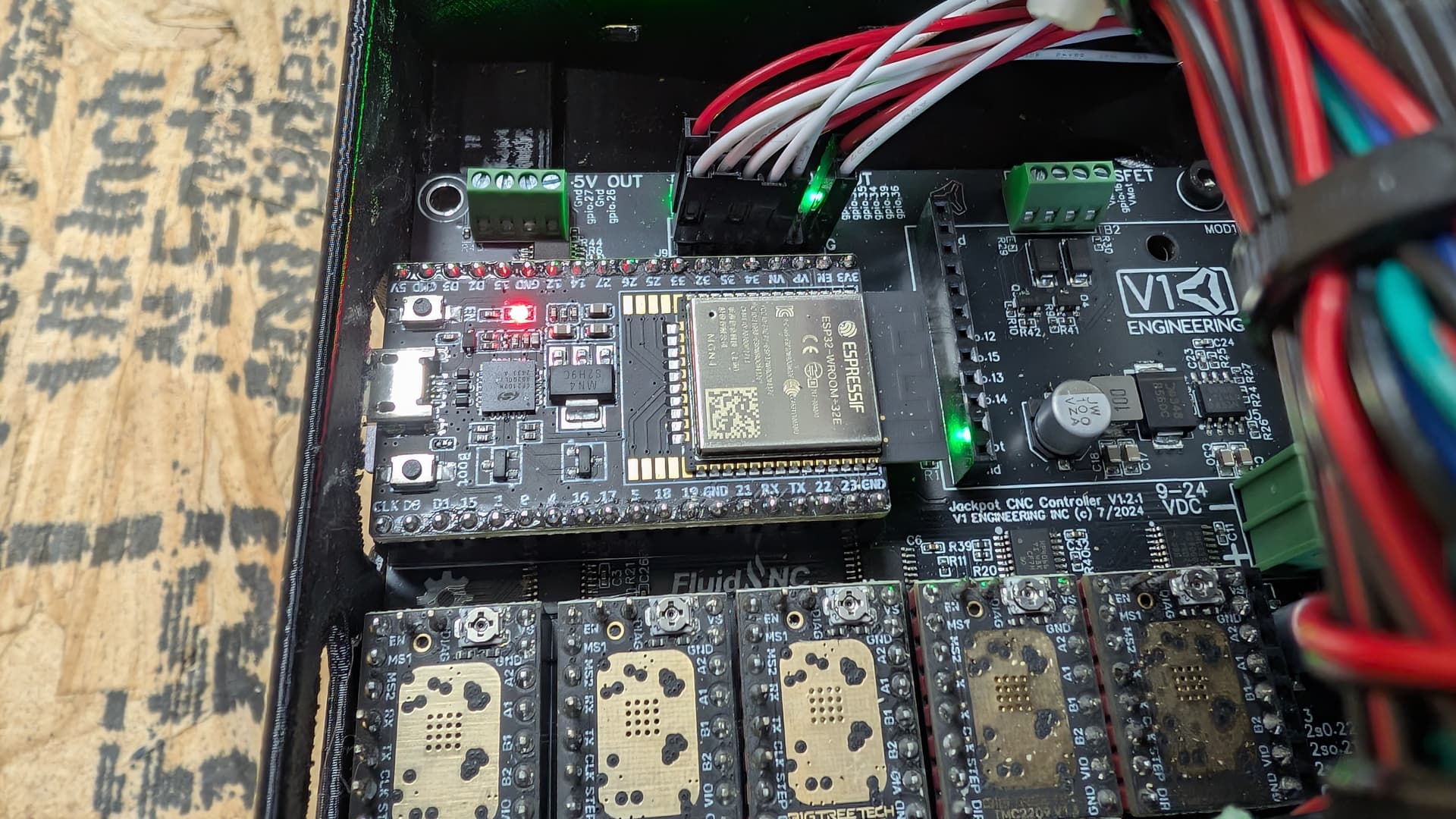
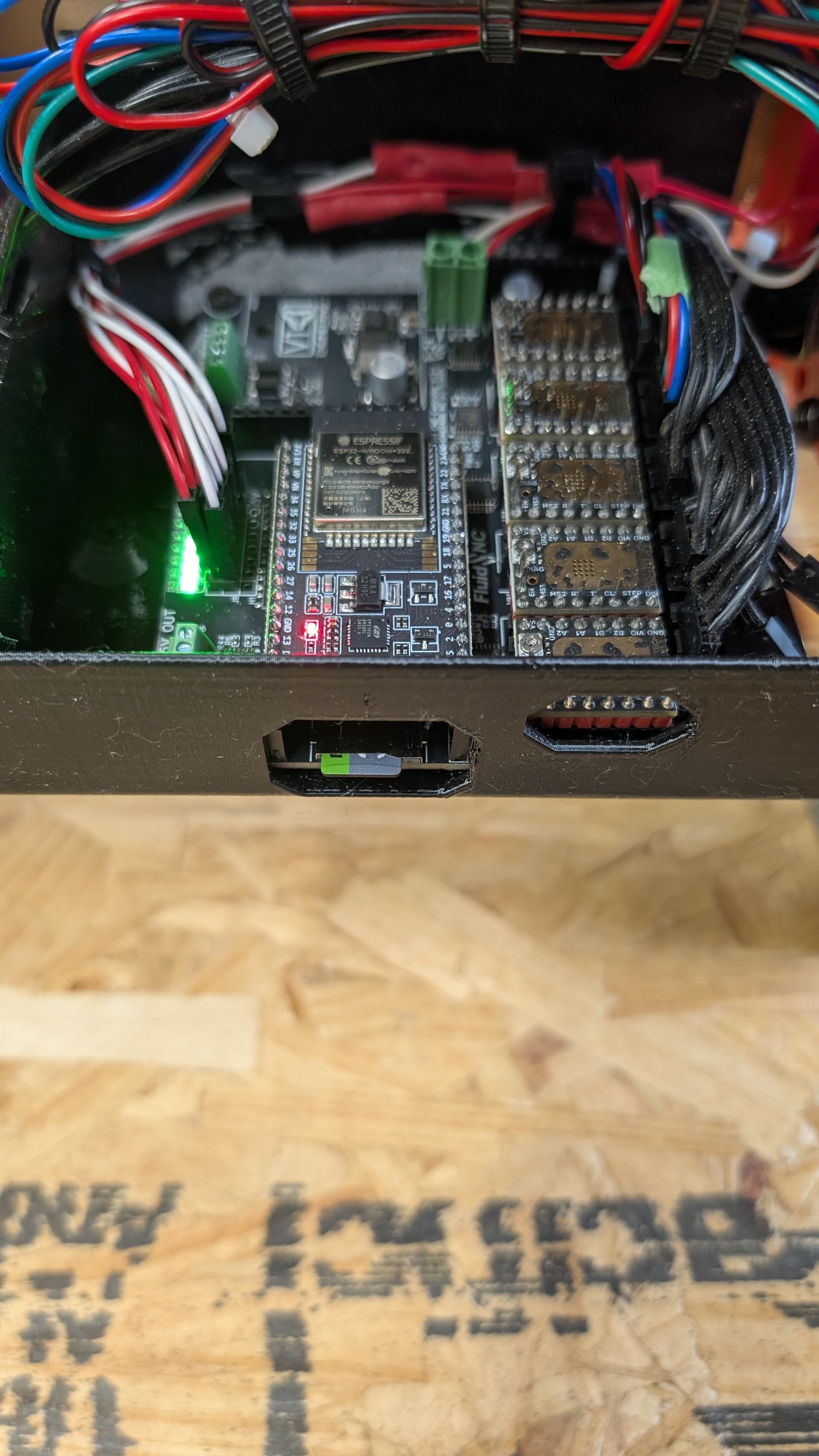
I would start with uploading a new config file. Maybe you changed a setting without realizing.
Links are in the jackpot flashing section of the instructions
Probably another dumb question, but I only see V2 and V3 configs here. Should there be separate V4 configs?
We use the webui v2 configs by default.
1 Like
downloaded the V2 version of config.yaml, uploaded via fluinNC. Rebooted through the app. Same error.
Then reflash and reload. That error is old and should get deleted on a reboot. If you rebooted from the WebUI and that is still there ref lash, and then reload all the files. I am not sure why that is happening, this is a first.
I apologize for taking up your time. When I went to plug in so I could flash, I noticed I had put a micro sd card it for files. on a whim I popped it out, and the error immediately cleared up. Apparently I need to reformat this card or get a new one. Thanks for all of your help.