Babyshark155
November 14, 2025, 2:02pm
1
Hi everyone.
I have to admit that I can’t figure this out. I’ve been trying to fix my lowrider v4 with laser and rotation axis for the past week. I DON’T UNDERSTAND CODING.
What happens during Homing:
I have checked:
I don’t get any error messages.
So my conclusion is:
board: Jackpot TMC2209
name: LowRider
meta: 10-31-2024 RyanZ
planner_blocks: 32
stepping:
  engine: I2S_STATIC
  idle_ms: 255
  pulse_us: 2
  dir_delay_us: 1
  disable_delay_us: 0
uart1:
  txd_pin: gpio.0
  rxd_pin: gpio.4
  rts_pin: NO_PIN
  baud: 115200
  mode: 8N1
uart2:
  txd_pin: gpio.14
  rxd_pin: gpio.13
  rts_pin: NO_PIN
  cts_pin: NO_PIN
  baud: 1000000
  mode: 8N1
uart_channel2:
  uart_num: 2
  report_interval_ms: 75
axes:
  shared_stepper_disable_pin: NO_PIN
  x:
    steps_per_mm: 50
    max_rate_mm_per_min: 11000
    acceleration_mm_per_sec2: 200
    max_travel_mm: 1245
    soft_limits: false
    homing:
      cycle: 2
      positive_direction: false
      mpos_mm: 3
      feed_mm_per_min: 11000
      seek_mm_per_min: 2500
      settle_ms: 500
      seek_scaler: 1.1
      feed_scaler: 1.1
    #X
    motor0:
      limit_neg_pin: gpio.39:high
      limit_pos_pin: NO_PIN
      limit_all_pin: NO_PIN
      hard_limits: false
      pulloff_mm: 3
      tmc_2209:
        uart_num: 1
        addr: 3
        cs_pin: NO_PIN
        r_sense_ohms: 0.11
        run_amps: 1
        homing_amps: 0.8
        hold_amps: 1
        microsteps: 8
        stallguard: 0
        stallguard_debug: false
        toff_disable: 0
        toff_stealthchop: 5
        toff_coolstep: 3
        run_mode: StealthChop
        homing_mode: StealthChop
        use_enable: false
        direction_pin: I2SO.1
        step_pin: I2SO.2
        disable_pin: I2SO.0
  y:
    steps_per_mm: 50
    max_rate_mm_per_min: 9000
    acceleration_mm_per_sec2: 200
    max_travel_mm: 1500
    soft_limits: false
    homing:
      cycle: 2
      positive_direction: false
      mpos_mm: 3
      feed_mm_per_min: 9000
      seek_mm_per_min: 2500
      settle_ms: 500
      seek_scaler: 1.1
      feed_scaler: 1.1
    #Y
    motor0:
      limit_neg_pin: gpio.33
      limit_pos_pin: NO_PIN
      limit_all_pin: NO_PIN
      hard_limits: false
      pulloff_mm: 3
      tmc_2209:
        uart_num: 1
        addr: 0
        cs_pin: NO_PIN
        r_sense_ohms: 0.11
        run_amps: 1
        homing_amps: 1
        hold_amps: 1
        microsteps: 8
        stallguard: 0
        stallguard_debug: false
        toff_disable: 0
        toff_stealthchop: 5
        toff_coolstep: 3
        run_mode: StealthChop
        homing_mode: StealthChop
        use_enable: false
        step_pin: I2SO.5
        direction_pin: I2SO.4
        disable_pin: I2SO.7
    #A
    motor1:
      limit_neg_pin: gpio.35
      limit_pos_pin: NO_PIN
      limit_all_pin: NO_PIN
      hard_limits: false
      pulloff_mm: 3
      tmc_2209:
        uart_num: 2
        addr: 1
        cs_pin: i2so.22
        r_sense_ohms: 0.11
        run_amps: 1
        homing_amps: 1
        hold_amps: 1
        microsteps: 8
        stallguard: 0
        stallguard_debug: false
        toff_disable: 0
        toff_stealthchop: 5
        toff_coolstep: 3
        run_mode: StealthChop
        homing_mode: StealthChop
        use_enable: false
        step_pin: I2SO.21
        direction_pin: I2SO.20
        disable_pin: I2SO.23
  z:
    steps_per_mm: 200
    max_rate_mm_per_min: 1800
    acceleration_mm_per_sec2: 80
    max_travel_mm: 130
    soft_limits: false
    homing:
      cycle: 1
      positive_direction: true
      mpos_mm: 3
      feed_mm_per_min: 800
      seek_mm_per_min: 800
      settle_ms: 500
      seek_scaler: 1.1
      feed_scaler: 1.1
    #Z
    motor0:
      limit_neg_pin: NO_PIN
      limit_pos_pin: gpio.32
      limit_all_pin: NO_PIN
      hard_limits: false
      pulloff_mm: 3
      tmc_2209:
        uart_num: 1
        addr: 2
        cs_pin: NO_PIN
        r_sense_ohms: 0.11
        run_amps: 0.8
        homing_amps: 0.8
        hold_amps: 0.7
        microsteps: 8
        stallguard: 0
        stallguard_debug: false
        toff_disable: 0
        toff_stealthchop: 5
        toff_coolstep: 3
        run_mode: StealthChop
        homing_mode: StealthChop
        use_enable: false
        step_pin: I2SO.10
        direction_pin: I2SO.9
        disable_pin: I2SO.8
    #B
    motor1:
      limit_neg_pin: NO_PIN
      limit_pos_pin: gpio.34
      limit_all_pin: NO_PIN
      hard_limits: false
      pulloff_mm: 3.4
      tmc_2209:
        uart_num: 2
        addr: 3
        cs_pin: i2so.19
        r_sense_ohms: 0.11
        run_amps: 0.8
        homing_amps: 0.8
        hold_amps: 0.7
        microsteps: 8
        stallguard: 0
        stallguard_debug: false
        toff_disable: 0
        toff_stealthchop: 5
        toff_coolstep: 3
        run_mode: StealthChop
        homing_mode: StealthChop
        use_enable: false
        step_pin: I2SO.18
        direction_pin: I2SO.17
        disable_pin: I2SO.16

    #C
  a:
    steps_per_mm: 17.7699
    max_rate_mm_per_min: 1000
    acceleration_mm_per_sec2: 150
    max_travel_mm: 720
    soft_limits: false
    homing:
      cycle: 0
      positive_direction: true
      mpos_mm: 0
      feed_mm_per_min: 800
      seek_mm_per_min: 800
      settle_ms: 500
      seek_scaler: 1.1
      feed_scaler: 1.1
    motor0:
      limit_neg_pin: NO_PIN
      limit_pos_pin: NO_PIN
      limit_all_pin: NO_PIN
      hard_limits: false
      pulloff_mm: 0.1
      tmc_2209:
        uart_num: 2
        addr: 0
        cs_pin: i2so.14
        r_sense_ohms: 0.11
        run_amps: 0.8
        hold_amps: 0.8
        homing_amps: 0.8
        microsteps: 8
        stallguard: 0
        stallguard_debug: false
        toff_disable: 0
        toff_stealthchop: 5
        toff_coolstep: 3
        run_mode: StealthChop
        homing_mode: StealthChop
        use_enable: false
        step_pin: I2SO.13
        direction_pin: I2SO.12
        disable_pin: I2SO.15
i2so:
  bck_pin: gpio.22
  data_pin: gpio.21
  ws_pin: gpio.17
spi:
  miso_pin: gpio.19
  mosi_pin: gpio.23
  sck_pin: gpio.18
sdcard:
  cs_pin: gpio.5
  card_detect_pin: NO_PIN
  frequency_hz: 20000000
probe:
  pin: gpio.36:low
  toolsetter_pin: NO_PIN
  check_mode_start: true
start:
  must_home: false
coolant:
  flood_pin: gpio.2
  mist_pin: gpio.16
  delay_ms: 0
control:
  safety_door_pin: NO_PIN
  reset_pin: NO_PIN
  feed_hold_pin: NO_PIN
  cycle_start_pin: NO_PIN
  macro0_pin: NO_PIN
  macro1_pin: NO_PIN
  macro2_pin: NO_PIN
  macro3_pin: NO_PIN
macros: {}
user_outputs:
  analog0_pin: NO_PIN
  analog1_pin: NO_PIN
  analog2_pin: NO_PIN
  analog3_pin: NO_PIN
  analog0_hz: 5000
  analog1_hz: 5000
  analog2_hz: 5000
  analog3_hz: 5000
  digital0_pin: NO_PIN
  digital1_pin: NO_PIN
  digital2_pin: NO_PIN
  digital3_pin: NO_PIN
Laser:
  pwm_hz: 5000
  output_pin: gpio.26
  enable_pin: NO_PIN
  disable_with_s0: false
  s0_with_disable: true
  tool_num: 0
  speed_map: 0=0.000% 1000=100.000%
  off_on_alarm: true
Boot the board, copy/paste the terminal output from $SS
Babyshark155
November 14, 2025, 2:16pm
3
Grbl 3.9 [FluidNC v3.9.9 (wifi) '$' for help]
ets Jul 29 2019 12:21:46

rst:0x1 (POWERON_RESET),boot:0x13 (SPI_FAST_FLASH_BOOT)
configsip: 0, SPIWP:0xee
clk_drv:0x00,q_drv:0x00,d_drv:0x00,cs0_drv:0x00,hd_drv:0x00,wp_drv:0x00
mode:DIO, clock div:1
load:0x3fff0030,len:1184
load:0x40078000,len:13260
load:0x40080400,len:3028
entry 0x400805e4
[MSG:INFO: uart_channel0 created]

[MSG:RST]
[MSG:INFO: FluidNC v3.9.9 https://github.com/bdring/FluidNC]
[MSG:INFO: Compiled with ESP32 SDK:v4.4.7-dirty]
[MSG:INFO: Local filesystem type is littlefs]
[MSG:INFO: Configuration file:config.yaml]
[MSG:INFO: Machine LowRider]
[MSG:INFO: Board Jackpot TMC2209]
[MSG:INFO: UART1 Tx:gpio.0 Rx:gpio.4 RTS:NO_PIN Baud:115200]
[MSG:INFO: UART2 Tx:gpio.14 Rx:gpio.13 RTS:NO_PIN Baud:1000000]
[MSG:INFO: uart_channel2 created at report interval: 75]
[MSG:INFO: I2SO BCK:gpio.22 WS:gpio.17 DATA:gpio.21Min Pulse:2us]
[MSG:INFO: SPI SCK:gpio.18 MOSI:gpio.23 MISO:gpio.19]
[MSG:INFO: SD Card cs_pin:gpio.5 detect:NO_PIN freq:20000000]
[MSG:INFO: Stepping:I2S_STATIC Pulse:2us Dsbl Delay:0us Dir Delay:1us Idle Delay:255ms]
[MSG:INFO: Axis count 4]
[MSG:INFO: Axis X (3.000,1248.000)]
[MSG:INFO:   Motor0]
[MSG:INFO:     tmc_2209 UART1 Addr:3 CS:NO_PIN Step:I2SO.2 Dir:I2SO.1 Disable:I2SO.0 R:0.110]
[MSG:INFO:  Neg Limit gpio.39]
[MSG:INFO: Axis Y (3.000,1503.000)]
[MSG:INFO:   Motor0]
[MSG:INFO:     tmc_2209 UART1 Addr:0 CS:NO_PIN Step:I2SO.5 Dir:I2SO.4 Disable:I2SO.7 R:0.110]
[MSG:INFO:  Neg Limit gpio.33]
[MSG:INFO:   Motor1]
[MSG:INFO:     tmc_2209 UART2 Addr:1 CS:I2SO.22 Step:I2SO.21 Dir:I2SO.20 Disable:I2SO.23 R:0.110]
[MSG:INFO:  Neg Limit gpio.35]
[MSG:INFO: Axis Z (-127.000,3.000)]
[MSG:INFO:   Motor0]
[MSG:INFO:     tmc_2209 UART1 Addr:2 CS:NO_PIN Step:I2SO.10 Dir:I2SO.9 Disable:I2SO.8 R:0.110]
[MSG:INFO:  Pos Limit gpio.32]
[MSG:INFO:   Motor1]
[MSG:INFO:     tmc_2209 UART2 Addr:3 CS:I2SO.19 Step:I2SO.18 Dir:I2SO.17 Disable:I2SO.16 R:0.110]
[MSG:INFO:  Pos Limit gpio.34]
[MSG:INFO: Axis A (-720.000,0.000)]
[MSG:INFO:   Motor0]
[MSG:INFO:     tmc_2209 UART2 Addr:0 CS:I2SO.14 Step:I2SO.13 Dir:I2SO.12 Disable:I2SO.15 R:0.110]
[MSG:ERR: X Axis TMC driver not detected - expected 0x21 got 0x0]
[MSG:INFO: Y Axis driver test passed]
[MSG:ERR: Y2 Axis TMC driver not detected - expected 0x21 got 0x0]
[MSG:INFO: Z Axis driver test passed]
[MSG:ERR: Z2 Axis TMC driver not detected - expected 0x21 got 0x0]
[MSG:ERR: A Axis TMC driver not detected - expected 0x21 got 0x0]
[MSG:INFO: Kinematic system: Cartesian]
[MSG:INFO: Connecting to STA SSID:MiniModels]
[MSG:INFO: Connecting.]
[MSG:INFO: Connecting..]
[MSG:INFO: Connected - IP is 10.0.0.100]
[MSG:INFO: WiFi on]
[MSG:INFO: Start mDNS with hostname:http://fluidnc.local/]
[MSG:INFO: HTTP started on port 80]
[MSG:INFO: Telnet started on port 23]
[MSG:INFO: Laser Ena:NO_PIN Out:gpio.26 Freq:5000Hz Period:8191]
[MSG:INFO: Flood coolant gpio.2]
[MSG:INFO: Mist coolant gpio.16]
[MSG:INFO: Probe gpio.36:low]

Grbl 3.9 [FluidNC v3.9.9 (wifi) '$' for help]
ok
[VER:3.9 FluidNC v3.9.9:]
[OPT:MPHS]
[MSG:Machine: LowRider]
[MSG:Mode=STA:SSID=MiniModels:Status=Connected:IP=10.0.0.100:MAC=5C-01-3B-80-29-24]
ok

Grbl 3.9 [FluidNC v3.9.9 (wifi) '$' for help]
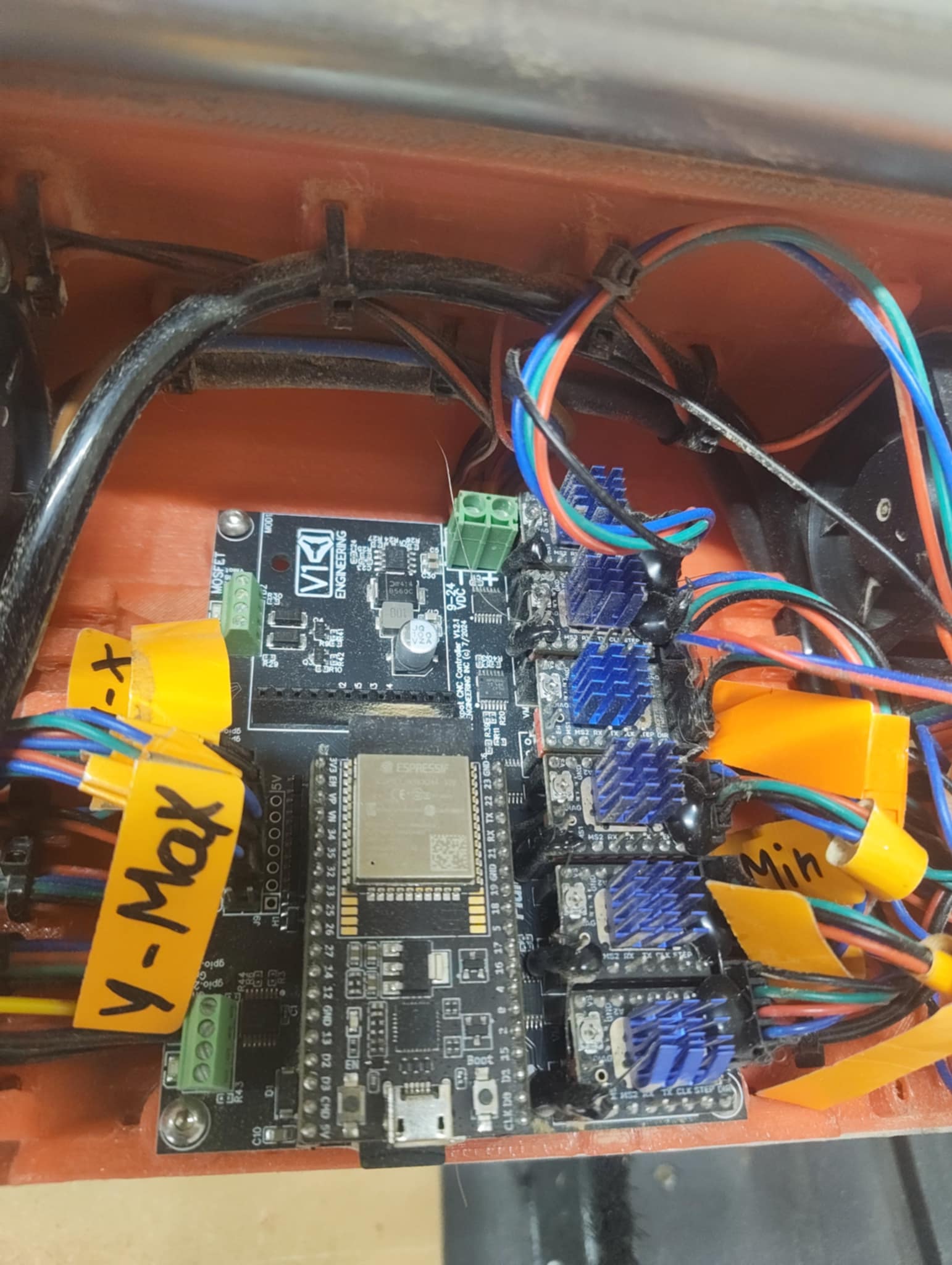
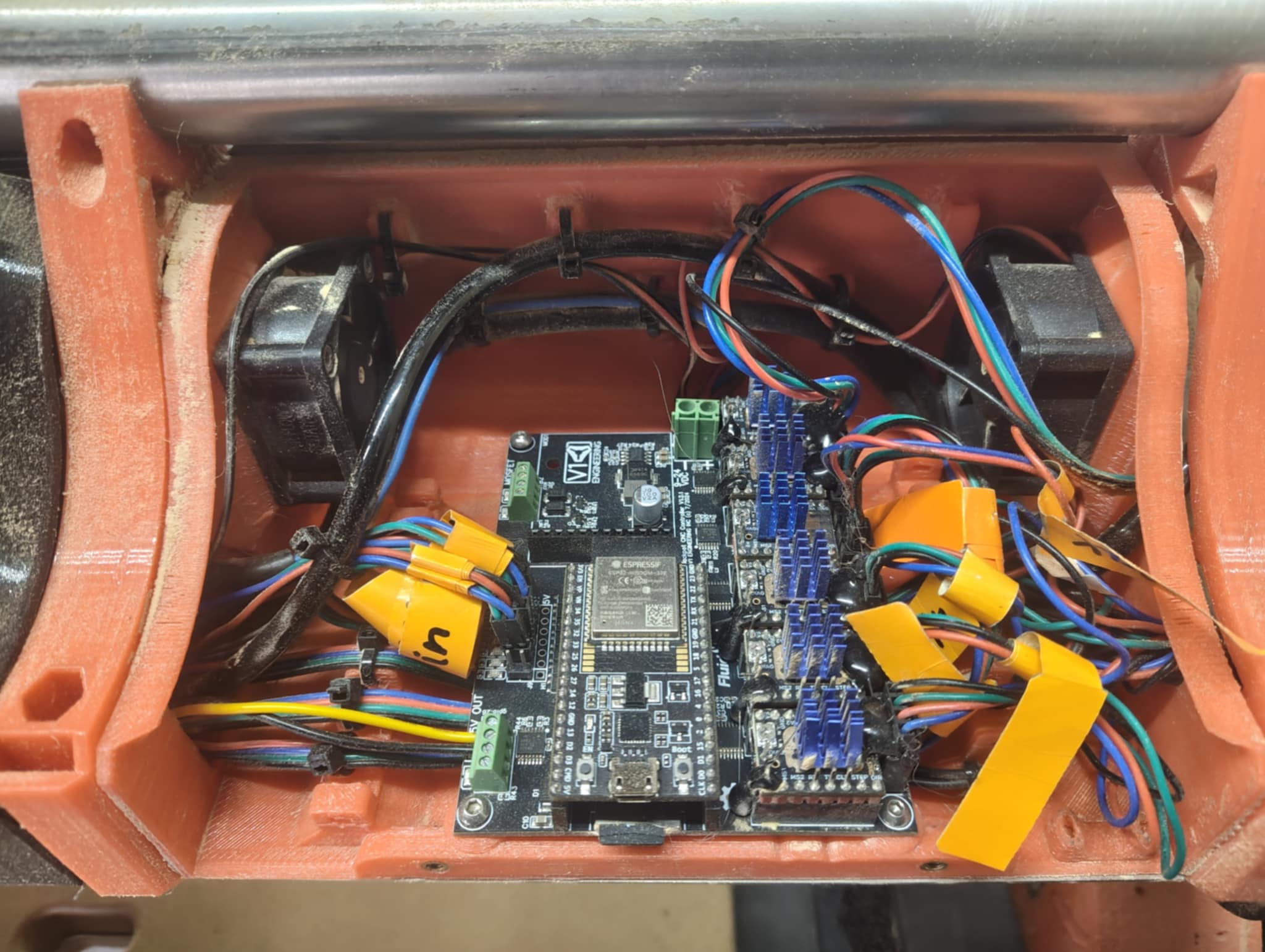
You have multiple TMC drivers that do not have functioning UART communications.
What version of Jackpot board do you have?
2 Likes
Babyshark155
November 14, 2025, 2:36pm
5
Sorry it’s taking a while, I have to move down 3 floors.
Yes now I can see the errors… I’ve tried changing the code by taking my esp32 to the office. And the errors it shows are that it’s not connected.. stupid me!!
I think it must be version 2.
1 Like
Not stupid, just learning.
We should try again to get a $SS output. You can do this over wireless from the WebUI terminal, though WiFi can be unreliable so we might need a couple of attempts to get the full output.
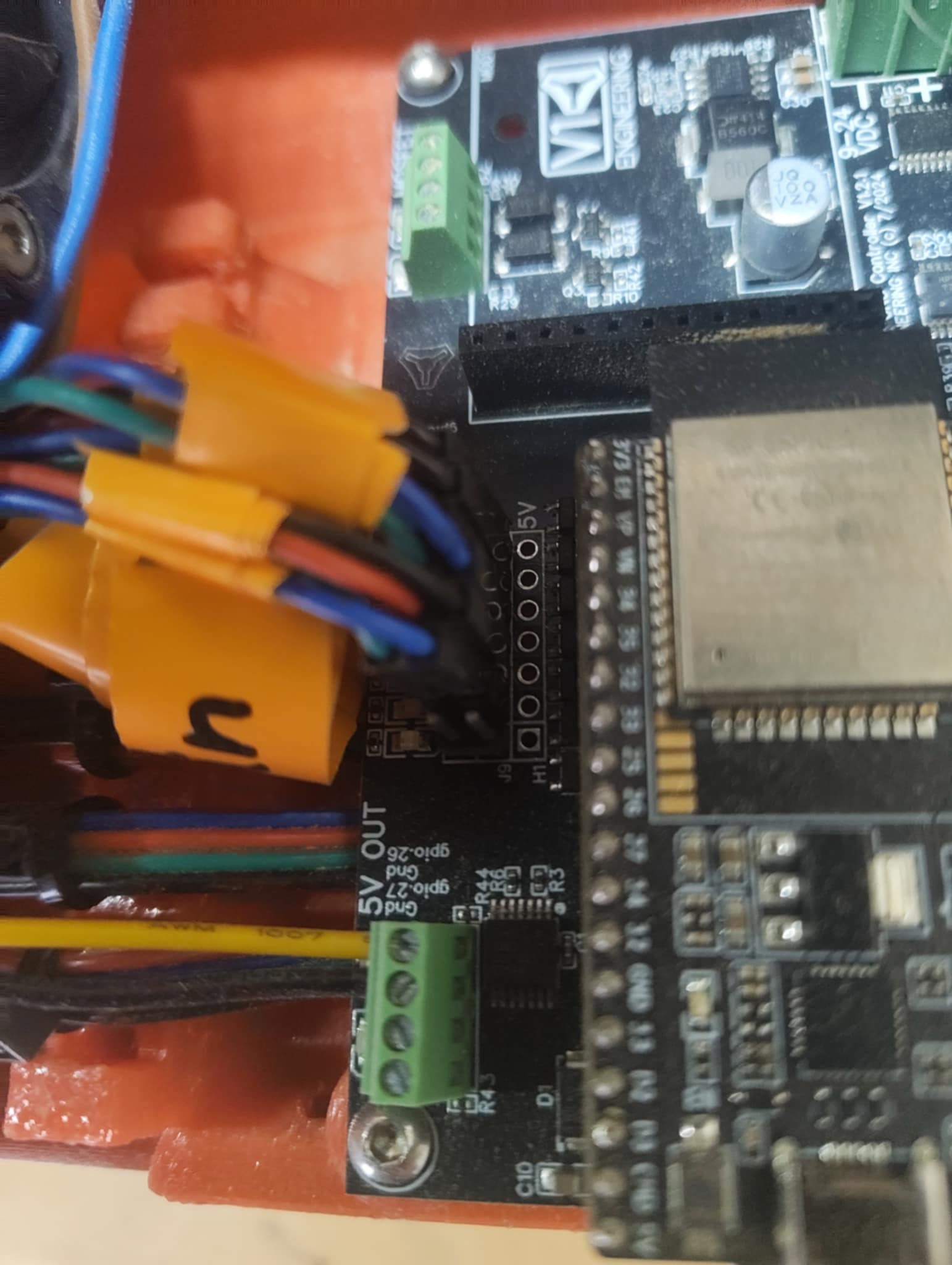
You have a Jackpot V1.2.1, so a Jackpot V1.
Tell us more about your machine. Did it work for a while and then stop, or has it never worked right?
Babyshark155
November 14, 2025, 2:56pm
7
I use the machine at the workshop where there is only a local network. NO internet. Can I get you what you are asking for even though there is that speed bump?
The machine worked perfectly with cnc and laser until I started messing with the rotation axis. In my frustration I ended up overwriting the yaml that worked. Ever since then I have been trying to get things to work (without success). Nothing has been physically changed other than the last tcm 2209 has been added and the wire from the rotation axis has been added.
Babyshark155
November 14, 2025, 3:05pm
8
MakerJim:
$SS output
$SSGitHub - bdring/FluidNC: The next generation of motion control firmware ]http://fluidnc.local/ ]
vicious1
November 14, 2025, 3:37pm
9
easy fix. Here is a link to the stock yaml. Just upload it and power cycle the board.
If you want to add a rotary we can help you edit a yaml after we verify everything works again (it should).https://github.com/V1EngineeringInc/FluidNC_Configs/releases/download/2025_8_4/Jackpot1_LowRider.zip
Just unzip that and dig out the yaml file.
3 Likes
Babyshark155
November 14, 2025, 3:54pm
10
Thanks a lot Ryan. Now all the primary axes XYZ work as they should and here is the latest $SS
$GGitHub - bdring/FluidNC: The next generation of motion control firmware ]http://fluidnc.local/ ]
Then I need to set up the laser and rotation.
1 Like
When you do that, I’d add the laser first. It looks like your laser config was using the following, put that back in:
Laser:
  pwm_hz: 5000
  output_pin: gpio.27
  enable_pin: NO_PIN
  disable_with_s0: false
  s0_with_disable: true
  tool_num: 0
  speed_map: 0=0.000% 1000=100.000%
  off_on_alarm: true
Then, you have to take GPIO.27 back out of the generic jackpot config file.
that stuff lives in the user_outputs section of config.yaml.
I’d make that look like the following:
user_outputs:
  analog0_pin: NO_PIN
  analog1_pin: NO_PIN
  analog2_pin: NO_PIN
  analog3_pin: NO_PIN
  analog0_hz: 5000
  analog1_hz: 5000
  analog2_hz: 5000
  analog3_hz: 5000
  digital0_pin: gpio.26
  digital1_pin: NO_PIN
  digital2_pin: NO_PIN
  digital3_pin: NO_PIN
If that restores laser operation for you, then we’d need to address your rotary axis next.
[EDIT: changed thise to GPIO 26 for reasons Britt notes below]
1 Like
Babyshark155
November 14, 2025, 4:37pm
12
Now the laser also works 100% except that it runs on gpio.26 instead of gpio.27
Jonathjon
November 14, 2025, 4:40pm
13
You had it set to run on gpio.26 in your config at the top. Is there a reason you need it on 27 vs 26?
Yep, I copied what was in the previously posted config.yaml.
1 Like
Babyshark155
November 14, 2025, 4:49pm
15
I can’t give you a better explanation than that that’s where it was installed and if it works, I’d rather not change it. But if it causes problems in the future, I promise to move it.
Do you also have a clever solution for that rotation axis?
Britt
November 14, 2025, 4:56pm
16
This is from the Jackpot Docs:
Quick note, gpio.26 can have a quick pulse when starting. If you are using a 5V pin for your laser pin 27 is the better option for your enable pin.
I use gpio.27 for my laser.
2 Likes
Babyshark155
November 14, 2025, 4:57pm
17
Then I will move it tomorrow.
1 Like
I’ll update my post above to reflect GIPO 26.
1 Like
Britt
November 14, 2025, 5:00pm
19
This is from your config above.
This is what I have for my rotary. The A axis doesn’t actually use mm, it uses degrees.
    max_rate_mm_per_min: 20000
    acceleration_mm_per_sec2: 500.00
1 Like
You’ll need to define the rotary axis next.
I don’t have a rotary A axis on any of my machines so don’t have anything ready made to share.
We’ll need to figure out a config. You have a true 6 driver config so that will be a bit off the beaten path. The order on the Jackpot will be X, Y0, Z0, Y1, Z1, A.
You can help us help you by confirming some things about your rotary axis (pictures would help, too).
Does your rotary axis free rotate (e.g. no limits or homing cycle?)
Edit: Brit may be more helpful here than me; he’s got a working rotary.
1 Like