Really!? Why not? Heck at least 1-2mm can’t hurt.
If you turn off the fade, then it follows the mesh the whole way. I guess I think the layer thickness is what matters. I doubt it matters much either way.
Well that is cool, have you ever had a funky top layer because of a high or low spot. That sounds like a cool thing to see.
1 Like
My bed looks perfectly flat to me, so the top layers look fine to me too. The top layers have texture anyway that is larger than the errors.
Well that is no fun I want to see a whole layer variation translated through. I wonder if I can print on that penny I laid on the bed earlier. If I tape it on with Kapton maybe I can make it work.
2 Likes
Can you print a ramp?
1 Like
Print a ramp then print on the ramp?!? That could be fun.
1 Like
So using a visualizer might have a lot of benefits.
3D Printer Auto Bed Leveling Mesh Visualizer | ChillRain browser based.
In my #00002, it looks like I might be sitting on the power cord or something in the back corner. Shoot, this is some high-tech build optimizing. Both printers work perfectly, but this will make them even more perfect
There is an octoprint plugin with bed visualization:
Works with Marlin and Klipper. It definitely helps a lot.
1 Like
My bed mesh…
[bed_mesh]
algorithm: Bicubic
speed: 500
mesh_min: 30,43
mesh_max: 292,264
probe_count: 16,16
horizontal_move_z: 12

#*# [bed_mesh default]
#*# version = 1
#*# points =
#*# 	0.015903, -0.017847, -0.047847, -0.054097, -0.064097, -0.070347, -0.084097, -0.099097, -0.114097, -0.135347, -0.150347, -0.177847, -0.184097, -0.211597, -0.222847, -0.247847
#*# 	0.025903, -0.005347, -0.025347, -0.030347, -0.035347, -0.045347, -0.059097, -0.069097, -0.080347, -0.095347, -0.121597, -0.145347, -0.156597, -0.171597, -0.199097, -0.200347
#*# 	0.013403, 0.008403, -0.006597, 0.005903, -0.007847, -0.004097, -0.031597, -0.031597, -0.057847, -0.067847, -0.079097, -0.107847, -0.120347, -0.132847, -0.147847, -0.174097
#*# 	0.018403, -0.007847, -0.000347, -0.000347, -0.000347, -0.001597, -0.011597, -0.017847, -0.030347, -0.055347, -0.069097, -0.091597, -0.097847, -0.110347, -0.134097, -0.131597
#*# 	0.023403, 0.024653, 0.024653, 0.034653, 0.030903, 0.039653, 0.024653, 0.015903, -0.006597, -0.014097, -0.030347, -0.052847, -0.059097, -0.077847, -0.082847, -0.094097
#*# 	0.023403, 0.023403, 0.032153, 0.039653, 0.043403, 0.044653, 0.038403, 0.028403, 0.012153, 0.007153, 0.005903, -0.022847, -0.037847, -0.046597, -0.064097, -0.059097
#*# 	0.039653, 0.057153, 0.058403, 0.077153, 0.069653, 0.067153, 0.065903, 0.069653, 0.044653, 0.042153, 0.022153, 0.005903, 0.000903, -0.011597, -0.021597, -0.035347
#*# 	0.043403, 0.040903, 0.065903, 0.065903, 0.077153, 0.060903, 0.062153, 0.059653, 0.037153, 0.040903, 0.034653, 0.023403, 0.003403, -0.004097, -0.014097, -0.011597
#*# 	0.050903, 0.065903, 0.074653, 0.092153, 0.099653, 0.085903, 0.078403, 0.075903, 0.064653, 0.058403, 0.055903, 0.034653, 0.029653, 0.024653, 0.013403, 0.008403
#*# 	0.048403, 0.060903, 0.078403, 0.093403, 0.103403, 0.085903, 0.083403, 0.083403, 0.068403, 0.060903, 0.048403, 0.045903, 0.039653, 0.027153, 0.019653, 0.047153
#*# 	0.052153, 0.072153, 0.083403, 0.097153, 0.114653, 0.097153, 0.090903, 0.090903, 0.080903, 0.079653, 0.063403, 0.060903, 0.058403, 0.050903, 0.043403, 0.035903
#*# 	0.053403, 0.059653, 0.077153, 0.095903, 0.115903, 0.094653, 0.088403, 0.088403, 0.078403, 0.073403, 0.065903, 0.079653, 0.057153, 0.050903, 0.083403, 0.054653
#*# 	0.035903, 0.065903, 0.089653, 0.102153, 0.128403, 0.107153, 0.107153, 0.113403, 0.099653, 0.089653, 0.085903, 0.100903, 0.075903, 0.078403, 0.082153, 0.064653
#*# 	0.003403, 0.034653, 0.062153, 0.097153, 0.088403, 0.092153, 0.087153, 0.094653, 0.084653, 0.090903, 0.079653, 0.073403, 0.075903, 0.070903, 0.072153, 0.068403
#*# 	-0.016597, 0.029653, 0.065903, 0.083403, 0.099653, 0.090903, 0.095903, 0.088403, 0.095903, 0.085903, 0.080903, 0.079653, 0.085903, 0.087153, 0.077153, 0.079653
#*# 	-0.020347, 0.017153, 0.035903, 0.067153, 0.072153, 0.074653, 0.069653, 0.075903, 0.063403, 0.072153, 0.065903, 0.062153, 0.070903, 0.067153, 0.059653, 0.068403
My variance across the bed is .3762mm

2 Likes
That’s beautiful.
That is so freaking impressive!
1 Like
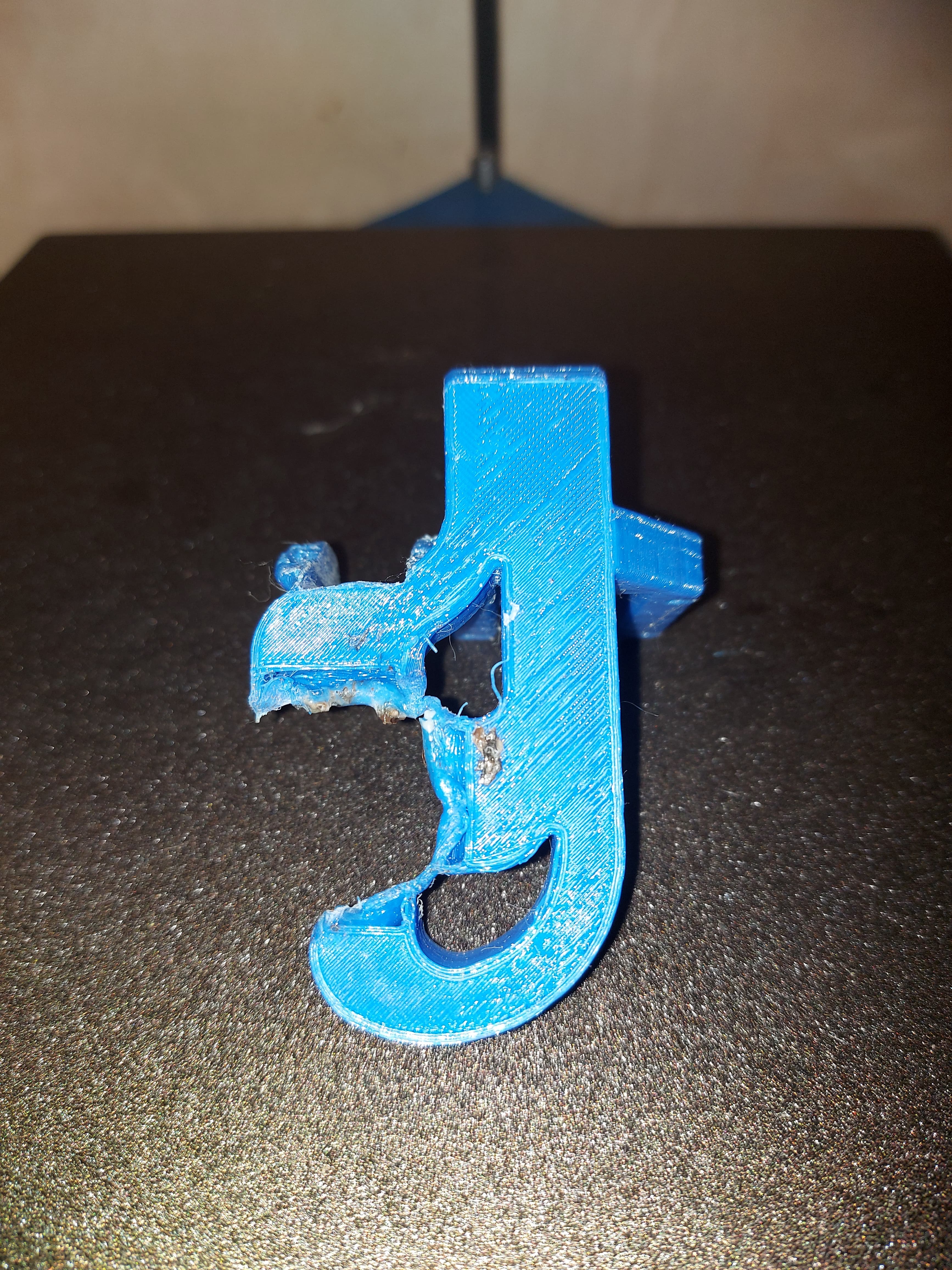
Okay… maybe I tend to print a little hot…
That’s PETg, so supposed to be more temperature tolerant.
I started havimg some weird print problems. Turned out that the fan shroud was sometimes catching the edges of the print and moving thinfs around on the bed, or knocking things over… or sometimes picking up the perimeters of the first layer. Only a few, then more. I re-did the fan shroud early on, so I replaced it, but it will probably happen again.
Maybe I’ll see if I can get nylon or polycarbonate working… might be time to look at those new BIQU extruders, supposed to be good to crazy high temperatures.
The good news is that the bridging for the replacement fan shroud is great, so it doesnt have that big dip in it.
I have my slicer settings turn off the cooling fan unless bridging or small layers. Maybe I should let it run all the time when printing… give it a non-zero minimum speed…
1 Like
Interesting. I know some filaments need no fan, I had not really considered that. I wonder if a minimum flow would have prevented that…and not messed up the print.
It is fairly easy to take off, if you leave the plug on your fan…or we could make a new shroud with the ducts a bit further back.
1 Like
I doubt it got up over the melting point of 230C or whatever. But it probably got hotter than it’s glass transition temperature, which is something like 85C for PETG. Certainly higher than pla. There’s a nice chart here:
I think my fan shroud is HTPLA. And I didn’t heat treat it. So I assume it would be close to 60C, but it still looks fine to me. Maybe it does need to be a bit further from the hot end.
1 Like
Well, I print almost exclusively PETg at 250°C. Probably didn’t get hot enough, I do have the silicone sock on the heat block. (I had to remove a bunch of gunk from a print getting fouled, but I’m pretty sure that was after this happened.)
Something to note that after replacing the fan shroud, I started having trouble with the pin on my 3Dtouch (BLTouch clone) catching on stuff, too. I had to re-mount it with a couple of 3mm nuts under it to space it up a couple of mm, but not before it bent the nylon pin. I straightened the pin mostly, but it’s still off center by about .5mm. Of course I had to re-tune the probe offset spec. Seems like I make that adjustment backwards on the first try every time…
There is a very specific ideal height of the bltouch. I think it should trigger about 1mm below the nozzle. That should raise it up enough to not drag, but you also won’t crash the nozzle when probing on an uneven surface.
1 Like
It seems that my clone is a little different. Seems about right with the nuts as spacers, actually.
Not sure why this wasn’t a problem with the first fan shroud but was with the second. Both printed from the same .STL file. I was thinking that maybe it was a change in first layer height, but that doesn’t make sense, since both the mounting screw holes and the touch mounting surface are well above that. I can’t see the change in Z accuracy (400 steps/mm vs. 100 steps/mm) being the difference, either. Something strange happened there. The probe offset changed just enough to need adjustment with the new shroud.
With the nuts under the mount, the offset is -2.47mm now. It was at -4.06 with the old shroud. The new offset seems more reasonable to me, I think that’s pretty close to what it is at with my old printer. It retracts to be about even with the bottom of the heat block.
If it’s not one thing…
That squeaky bearing is back. Also, thlere seems to be a bit of play in the core. The fan shroud is just barely above the printed surface in the front right corner, enough that if the surface isn’t right, it can pick at the edge.
So… remedial actions. I’m going to try to tighten up the core pieces, to see if that eliminates that twist. Fortunately it seems consistent across the X axis, but that explains why it was suddenly out of whack and the nozzle gouged into my PEI sheet surface. I bought a spare CF rail last time, too, so I might even try to replace that.
I also got another spool of the “Jolly Rancher” transparent blue PETg, so I am going to re-print some of the pieces of the printer. I think new trucks and new corner pieces ought to do the trick. I’m very happy with the motor mounts as they are, and while the Z axis parts aren’t perfect, they aren’t causing problems, either.The biggest issues there were that the M5 screws were a little tight in the holes, and they aren’t making squealing noises. Something (I think in the corner) of the current build is. I’ve pretty much got it figured as the lower belt chain, because it’s worst when that belt is most active.
Anyway, I’ll take it all apart and lube those bearings again. If I can figure out which one specifically is being noisy, I’ll just replace it. I’m tempted to just replace ALL of the idlers at this point though.
1 Like
Oh no, I hope it is no big deal.
I do pack all my idlers and wheels with lube when assembling them. They have such tiny bearings, but they are not sealed. I actually put a drop of this Teflon liquid stuff I have, then pack them with some super lube.
That is why I use the 20T idlers instead of the smaller ones, it gets us the larger bearings.
1 Like