Yeah, one or the other. Setting the locations should be best but when I tested it, it wasn’t night and day better.
This is definitely the case on my Prusa clone. I’m using an IR sensor near to, but a bit to the X+ side of, the nozzle. So, not only are the two Z lead screws farther out, they’re at a different distance from the sensor in each direction. I may have accounted for that a bit by selecting points where the sensor would be equidistant from the motors, but I can’t check right now.
If on the “Repeat” the sensors/switches are right next to the screws, there’s probably not a lot of benefit to tuning the Amplification.
No they are a bit away and behind on the sides and the third back one is further than the others. I am making a note to get the numbers from a test first thing so we can see what is happening on one of mine.
Is the bed heating while you’re leveling? That can cause issues sometimes.
1 Like
Can’'t speak for what others do, of course, but I have it set up to start the levelling after the bed reaches temperature.
Playing with the M666 parameters now, but the printer’s been mostly busy this past couple of days
2 Likes
My printer heats while leveling, so sometimes it takes a few rounds of probes, sometimes it only takes one.
1 Like
M48-
17:14:54.136 : M48 Z-Probe Repeatability Test
17:15:52.190 : Finished!
17:15:52.190 : Mean: -1.496000 Min: -1.510 Max: -1.490 Range: 0.020
17:15:52.190 : Standard Deviation: 0.006633
17:16:14.372 : M48 Z-Probe Repeatability Test
17:17:12.407 : Finished!
17:17:12.407 : Mean: -1.488000 Min: -1.490 Max: -1.480 Range: 0.010
17:17:12.407 : Standard Deviation: 0.004000
M34 Round 1
17:20:32.053 : G34 Iteration: 1
17:20:32.053 : //action:notification G34 Iteration: 1
17:21:42.279 : Z2-Z1=0.3200 Z3-Z2=0.1300 Z3-Z1=0.1900
17:21:42.279 : //action:notification 1:2=0.320 3-2=0.130 3-1=0.190
17:21:42.535 : G34 Iteration: 2
17:21:42.535 : //action:notification G34 Iteration: 2
17:22:04.384 : Z2-Z1=0.1800 Z3-Z2=0.0600 Z3-Z1=0.1200
17:22:04.384 : //action:notification 1:2=0.180 3-2=0.060 3-1=0.120
17:22:04.628 : G34 Iteration: 3
17:22:04.628 : //action:notification G34 Iteration: 3
17:22:26.280 : Z2-Z1=0.1000 Z3-Z2=0.0800 Z3-Z1=0.0200
17:22:26.280 : //action:notification 1:2=0.100 3-2=0.080 3-1=0.020
17:22:26.396 : G34 Iteration: 4
17:22:26.396 : //action:notification G34 Iteration: 4
17:22:48.007 : Z2-Z1=0.0300 Z3-Z2=0.0600 Z3-Z1=0.0300
17:22:48.007 : //action:notification 1:2=0.030 3-2=0.060 3-1=0.030
17:22:48.007 : Decreasing Accuracy Detected.
17:22:48.011 : //action:notification Accuracy Decreasing!
17:22:48.011 : G34 Iteration: 5
17:22:48.011 : //action:notification G34 Iteration: 5
17:23:09.594 : Z2-Z1=0.0000 Z3-Z2=0.0200 Z3-Z1=0.0200
17:23:09.594 : //action:notification 1:2=0.000 3-2=0.020 3-1=0.020
17:23:09.594 : Target accuracy achieved.
17:23:09.594 : //action:notification Accuracy Achieved
17:23:09.594 : Did 5 of 8
17:23:09.594 : Accuracy: 0.02
G34 Round 2 No home after round 1
17:23:59.384 : G34 Iteration: 1
17:23:59.384 : //action:notification G34 Iteration: 1
17:24:26.374 : Z2-Z1=0.0000 Z3-Z2=0.0300 Z3-Z1=0.0300
17:24:26.378 : //action:notification 1:2=0.000 3-2=0.030 3-1=0.030
17:24:26.378 : Target accuracy achieved.
17:24:26.378 : //action:notification Accuracy Achieved
17:24:26.378 : Did 1 of 8
17:24:26.378 : Accuracy: 0.0
3
Home and run it again G34
17:25:46.645 : G34 Iteration: 1
17:25:46.645 : //action:notification G34 Iteration: 1
17:26:56.804 : Z2-Z1=0.3100 Z3-Z2=0.1500 Z3-Z1=0.1600
17:26:56.805 : //action:notification 1:2=0.310 3-2=0.150 3-1=0.160
17:26:57.058 : G34 Iteration: 2
17:26:57.058 : //action:notification G34 Iteration: 2
17:27:18.940 : Z2-Z1=0.1400 Z3-Z2=0.0300 Z3-Z1=0.1100
17:27:18.940 : //action:notification 1:2=0.140 3-2=0.030 3-1=0.110
17:27:19.176 : G34 Iteration: 3
17:27:19.176 : //action:notification G34 Iteration: 3
17:27:40.906 : Z2-Z1=0.0800 Z3-Z2=0.0600 Z3-Z1=0.0200
17:27:40.907 : //action:notification 1:2=0.080 3-2=0.060 3-1=0.020
17:27:41.022 : G34 Iteration: 4
17:27:41.022 : //action:notification G34 Iteration: 4
17:28:02.728 : Z2-Z1=0.0300 Z3-Z2=0.0600 Z3-Z1=0.0300
17:28:02.728 : //action:notification 1:2=0.030 3-2=0.060 3-1=0.030
17:28:02.728 : Decreasing Accuracy Detected.
17:28:02.729 : //action:notification Accuracy Decreasing!
17:28:02.730 : G34 Iteration: 5
17:28:02.731 : //action:notification G34 Iteration: 5
17:28:24.405 : Z2-Z1=0.0200 Z3-Z2=0.0200 Z3-Z1=0.0400
17:28:24.405 : //action:notification 1:2=0.020 3-2=0.020 3-1=0.040
17:28:24.517 : G34 Iteration: 6
17:28:24.517 : //action:notification G34 Iteration: 6
17:28:46.300 : Z2-Z1=0.0300 Z3-Z2=0.1200 Z3-Z1=0.0900
17:28:46.300 : //action:notification 1:2=0.030 3-2=0.120 3-1=0.090
17:28:46.300 : Decreasing Accuracy Detected.
17:28:46.300 : //action:notification Accuracy Decreasing!
17:28:46.420 : G34 Iteration: 7
17:28:46.420 : //action:notification G34 Iteration: 7
17:29:08.055 : Z2-Z1=0.0100 Z3-Z2=0.0100 Z3-Z1=0.0000
17:29:08.055 : //action:notification 1:2=0.010 3-2=0.010 3-1=0.000
17:29:08.059 : Target accuracy achieved.
17:29:08.059 : //action:notification Accuracy Achieved
17:29:08.059 : Did 7 of 8
17:29:08.059 : Accuracy: 0.01
Now a G29 after
17:32:22.904 : Bilinear Leveling Grid:
17:32:22.904 : 0      1      2      3      4
17:32:22.904 : 0 +0.010 +0.010 +0.010 -0.030 +0.030
17:32:22.904 : 1 +0.080 +0.180 +0.160 +0.150 +0.010
17:32:22.904 : 2 +0.030 -0.070 -0.090 -0.110 +0.020
17:32:22.904 : 3 +0.010 +0.050 +0.030 +0.050 -0.010
17:32:22.904 : 4 -0.020 -0.070 -0.170 -0.160 +0.000
Is that a dip in the middle or a hump?
A second one in right after.
17:37:19.902 : Bilinear Leveling Grid:
17:37:19.902 : 0      1      2      3      4
17:37:19.902 : 0 +0.010 +0.020 +0.030 -0.020 +0.040
17:37:19.906 : 1 +0.080 +0.190 +0.180 +0.160 +0.010
17:37:19.906 : 2 +0.020 -0.050 -0.080 -0.100 +0.030
17:37:19.906 : 3 +0.020 +0.060 +0.040 +0.050 +0.010
17:37:19.906 : 4 -0.030 -0.070 -0.170 -0.150 +0.010
Just a heads up, the mapping for corxy machines with a moving bed is upside down usually. So a hump in the map, is really a dip. You can verify by throwing a shim under one of the probe points to see which way it says the error is.
2 Likes
That makes sense. That was the first build and I am pretty sure my bed insulation is touching in the middle, possibly pushing it up. I need to loosen it a bit.
How do you figure?
Z+ is still moving the print head away from the build plate. In a bed flinger, Z+ moves the gantry away from the bed. In this case, we’re moving the bed away from the gantry. The result is the same, and the machine can and will run the exact same gcode with the same results.
Anyway, I plugged Ryan’s numbers into a heightmap and used the Duet’s visualizer for it
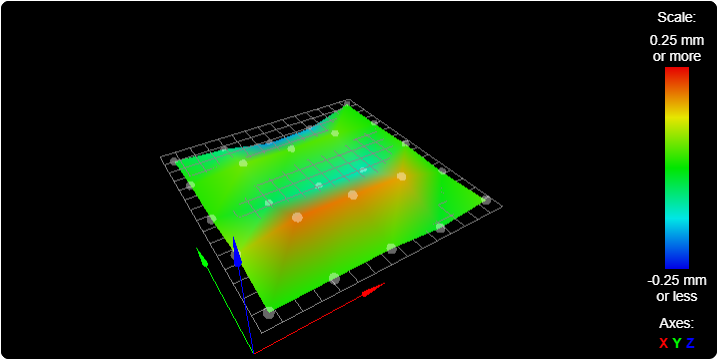
positive numbers are high spots, negative numbers are low. The visualiser exaggerates the differences.
What an odd way for the bed to be wonky.
I wonder what that would look like if I took off the filament feeder tube. I feel like it can push or pull on the extruder by 0.02mm pretty easy, and it would explain the straight lines. Or maybe it is the wires, since the do rub on the top of the shelf. Ultra precision is nothing like “eyeball it with a piece of paper”…
That’s how it’s always been explained to me for my printer. Up on the visualizer is actually a dip on the bed. Positive Z+ moves the bed down.
That’s also why Duet has an “invert z coordinates” toggle.
1 Like
My gut reaction to the image was that it looked like something might be offsetting the probe result based on if the preceeding motion is goin in the +X direction or the -X direction.
In this case, the first, third and 5th rows would have followed +x motion, and the second and fourth rows following -X motion.
The easiest way to compare would be to go to 3 rows, and see if the center point (which currently registers low) registers high instead.
As to how to fix it if this is the case… Beats me. I’m not seeing any regular patterns like this in mine.
I’m olkay with the numbers, I think I am going to reduce the leveling fade to something like 5mm instead of ten.
But I will run it again and put something on one of the spots, artificial high spot to see which way it is going.
I just think that moving left is low, moving right is high. So if it is only mine doing this is it either the wires or filament tube causing it since this did not show up until it was on the shelf, and the wires are hitting real good. Might even lower the shelf a notch to make this a bit less.
Or maybe the tape measure trick to keep it sideways instead of up.
2 Likes
MPCNC #0000002
G34
16:32:49.195 : G34 Iteration: 1
16:32:49.195 : //action:notification G34 Iteration: 1
16:34:04.840 : Z2-Z1=0.4300 Z3-Z2=0.5600 Z3-Z1=0.1300
16:34:04.840 : //action:notification 1:2=0.430 3-2=0.560 3-1=0.130
16:34:05.126 : G34 Iteration: 2
16:34:05.126 : //action:notification G34 Iteration: 2
16:34:36.857 : Z2-Z1=0.1100 Z3-Z2=0.0000 Z3-Z1=0.1100
16:34:36.857 : //action:notification 1:2=0.110 3-2=0.000 3-1=0.110
16:34:37.101 : G34 Iteration: 3
16:34:37.101 : //action:notification G34 Iteration: 3
16:35:08.752 : Z2-Z1=0.0400 Z3-Z2=0.0300 Z3-Z1=0.0100
16:35:08.752 : //action:notification 1:2=0.040 3-2=0.030 3-1=0.010
16:35:08.862 : Target accuracy achieved.
16:35:08.862 : //action:notification Accuracy Achieved
16:35:08.862 : Did 3 of 8
16:35:08.862 : Accuracy: 0.04
G29 no spacer,
16:39:33.878 : //action:notification V1 3DP Repeat c78df2dP Ready.
16:39:35.330 : Bilinear Leveling Grid:
16:39:35.330 : 0 1 2 3 4
16:39:35.330 : 0 +0.110 +0.080 -0.040 -0.050 +0.120
16:39:35.330 : 1 +0.260 +0.090 -0.150 -0.120 +0.140
16:39:35.330 : 2 +0.420 +0.230 +0.090 -0.010 +0.250
16:39:35.330 : 3 +0.510 +0.280 -0.030 -0.050 +0.270
16:39:35.330 : 4 +0.710 +0.530 +0.330 +0.230 +0.320
G29 with a Penny at position #7,
16:42:13.283 : //action:notification V1 3DP Repeat c78df2dP Ready.
16:42:14.723 : Bilinear Leveling Grid:
16:42:14.723 : 0 1 2 3 4
16:42:14.723 : 0 +0.110 +0.080 -0.040 -0.040 +0.110
16:42:14.723 : 1 +0.270 +0.090 -0.160 +1.180 +0.140
16:42:14.723 : 2 +0.400 +0.240 +0.080 -0.010 +0.240
16:42:14.723 : 3 +0.520 +0.280 -0.020 -0.050 +0.260
16:42:14.723 : 4 +0.720 +0.530 +0.320 +0.210 +0.320
So now we know on these it is + = a high spot.
Well, Barry, I bet you are feeling real good about your fancy beds now. Shoot, looks at those numbers  ! How did I not even notice that before mesh leveling…(like two months ago).
I’m getting the feeling we are missing some significant digits, why is it all rounded to the hundredths place?
2 Likes
I wonder if that has to do with the stepping resolution.
I am going to pick an argument here.
I don’t think this matters that much. Obviously having your first layer off by 0.7mm would make you have a bad day. But having a 200mm part have one corner 0.7mm lower would not make a difference on many 3D printed parts. Your parts, specifically have good tolerance built into that first layer. There is a certain amount of flex anyway. Flexing 0.7mm over 200mm would not take much force.
I don’t use the fade, personally. I am still surprised how flat parts come off of my printer. I think it is a bit about chasing zeros. 
1 Like
I can’t find anything, except all the examples seem to be showing more significant figures. If these are rounded, that could be slowing this down. If they are not rounded, why the heck would it not show all the info. I can’t fake a different resolution and still test this…ahhhhh. This sort of puzlle sucks.