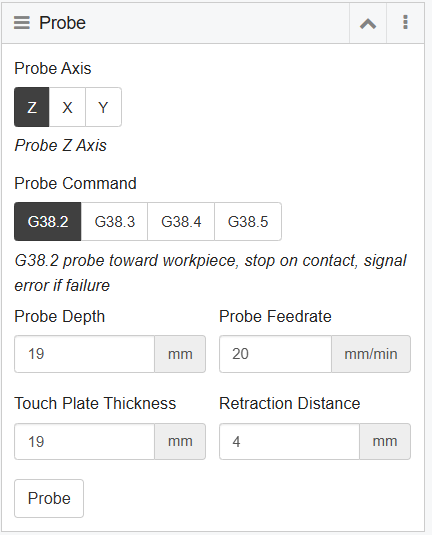
I have a 19mm thick Z probe plate and if I clip it to the bit and place the plate underneath I can use the “Z home” option from the Axes widget it ir probes correctly and retreacts the specified distance when it touches the probe.
But if I click “probe” from the probe widget, it just moves the Z axis up about 5mm and stops.
; Z-Probe
G91
G38.2 Z-19 F20
G90
; Set the active WCS Z0
G10 L20 P1 Z19
; Retract from the touch plate
G91
G0 Z4
G90

I am using a ramps 1.4 with the dual end-stop Marlin firmware.
I am not a marlin guy but looking at the starting gcode on milling basics, it seems marlin may use G28 instead of G38.2?
G92 X0 Y0 Z0 ; Set Current position to 0, all axes
G00 Z5.0000 F500 ; Raise Z 5mm at 8.3mm/s to clear clamps and screws
G28 Z ; Home Z touchplate
G92 Z0.5 ; Account for probe thickness (set your thickness)
G00 Z5.000 F500 ; Raise Z probe off of surface
M00 ; Pause for LCD button press so you can remove the touchplate
I think you can probably still use G10 instead G92.
Other way around. G38.2 is used for probing, G28 is used for homing.
G38.2 Z0 will move the designated axis (Z) toward the specified location (0). It will continue moving in that direction until it reaches the specified destination, or the probe circuit closes (whichever comes first).
G28 Z will move the designated axis (Z) in the direction specified in the configuration file (Configuration.h or Adv_Configuration.h, I’m not 100% sure) until the designated limit switch circuit opens.
Your feed rate for probing is 20mm/min. That would be imperceptibly slow movement. I’m guessing that you specified mm/s, and Marlin uses mm/min.
I would stay in Absolute mode the whole time, rather than Relative mode for the probe
I see. The command is actually in mm/min, but 20mm/min is ridiculously slow. Try 200. You’ll also have to change the probe thickness to the actual thickness of your probe (the Tiny Touch Plate from V1 is 0.5mm). Also try using a probe depth of 0 (depending on what value you set as the initial homing location).
G90 is Absolute, and G91 is Relative. It looks like your widget changes between these states automatically (it inserts the commands into the g-code). You can live with it, or edit your g-code after it is produced, or do the probing manually (enter the commands from a command line).
I’ll confess that I’m not 100% familiar with CNCjs, as I use Marlin on an SKR Pro v1.2. So I always use the command line for probing, rather than a widget.
Looking a little closer at this, it seems that the G38.2 (Probe target) and G10 (Set offset) gcodes are not recognised by the Marlin build I am using - 2.0.9.2-513.
If you aren’t using a Marlin version directly from the V1E repository, you pretty much need to go through the two configuration files line by line and enable or disable features and functions that you want (or don’t want) to use. That includes defining what type of probe you have.
If you did get the firmware from V1E, then I have no idea why it isn’t enabled. The current version in the repository is 2.1.1 (at least that is in the filename), and you say you are using 2.0.9.2.
Using CncJs is a whole other variable that I can’t help you with, and I don’t know how compatible that is with the V1E firmware builds.