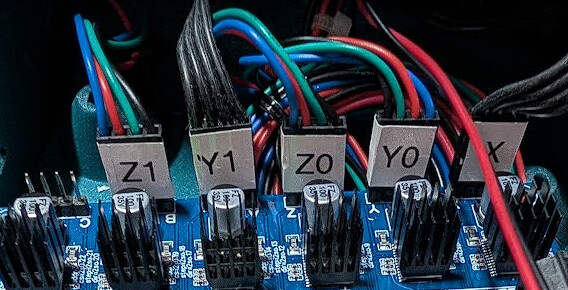
Z axis problems - new build

First off, my apologies for not starting a new thread previously. I jumped the gun without reading the rules and deserved the “smackdown” I got for it!

I’ve been 3d printing for a long time but this is my first foray into CNC. My build is a brand new LRv4 with a Jackpot3. It’s not permanently mounted yet, but I’m doing some bench testing to be sure motors are turning the right way and everything is happy before buttoning up the control box. I’m using only the FluidNC UI with all the default settings.

X axis works perfectly. Y axis is not ready for full testing yet, as the belts aren’t strung up, but the motors turn fine. The Z axis, however, is exhibiting some strange behavior. I can jog the two axes up and down ok (most of the time, more later). Homing is where things fall apart. It works fine maybe 30% of the time. The rest of the times, one side stops mid sequence. The motor that stops appears to have lost power since I can rotate the Z screw by hand at that point. The only way I have been able to recover is to cycle power to the Jackpot. I switched the motor and end stop connections at the board, and the problem shows up on the opposite motor. You can see the action in this video:
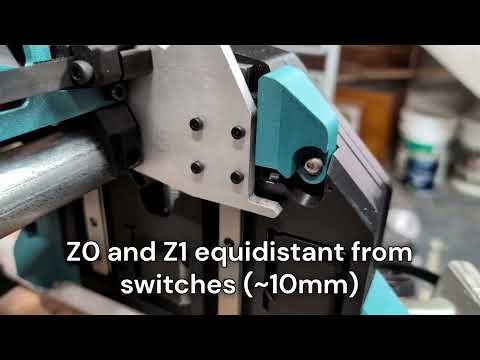
I’ve checked extensively for binding or interferences and so far found none. I have also verified that the XZ plates are parallel and the X axis tubes are level. In this video you can see smooth motion through the Z axis range when jogging 10mm at a time. In this case, the Z motors and switches are plugged into to their normal connections. When I go to move 25mm, trouble starts. Downward motion is fine. When moving up, Z1 starts to have trouble, while Z0 moves normally. Z1 stops with a grinding noise. No error is thrown. A second25mm command and both motors move normally again, although they are no longer in sync. The grinding appears again on the third 25mm motion. Homing brings them back into sync this time. The rest of the video shows a repeat of the same issue.
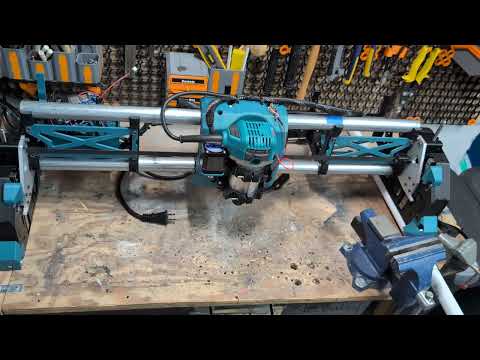
Again, I switched the Z connections, motors and end stops, at the board and the problem moved to the other side.
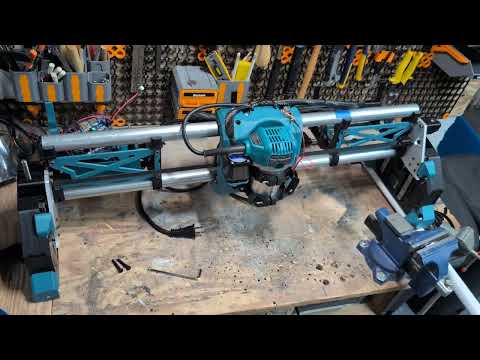
I will note that the Z tensioner screws are in place, but loose, in all but the last video (you can see them sitting on the table). I did go back and run all the same tests with them completely removed. The results were the same.

At the risk of influencing opinions, it seems to me that since the same problems move from one side to the other when swapping board connections, that indicates that the board itself has an issue. Everything else remained the same.

Any advice would be appreciated!
Nice looking build @RadBarchetta

The first thing that comes to mind after watching the video is; did you use super lube or lithium grease on the lead screws? After I used lithium grease on mine, they moved a lot smoother.

1 Like

This sounds an awful lot like a loose wiring connection, probably at the motor wire/extension cable connection. Did you use an S-bend at the connector, as shown in the documents?

1 Like

@Britt SuperLube. I wanted to use lithium but didn’t have any at the time. I can see that maybe helping with the grinding noise, but not the stopping during homing problem.

@Bartman I was thinking that as well, but if that were the case, the problem would stay on the same motor when I swap connections at the board. Instead it switches to the other one. If I can put the motor on another port without changing anything else and it works, that would indicate that the wiring and motor are ok. Good suggestion though!

I didn’t see anything about an S-bend in the assembly instructions. Where is that?

Edit: Nevermind, I found it! I used heat shrink and zip ties as strain relief instead.

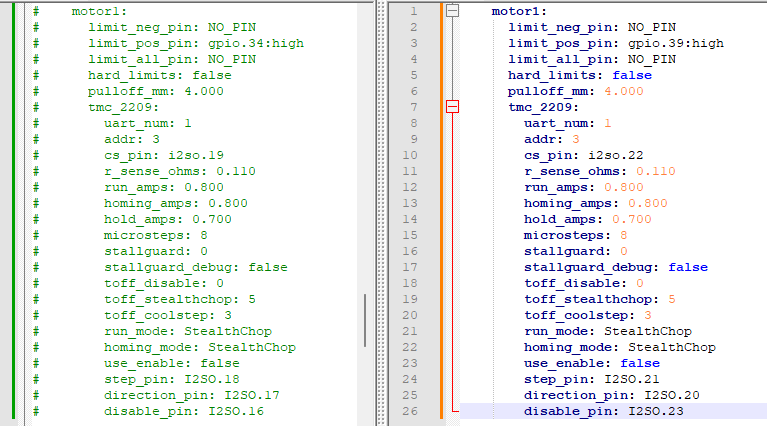
Here is a config with Z0 switched to the C driver and the endstop on gpio.39.

config.yaml.zip (2.0 KB)

Here is a config with Z1 switched to the C driver and the endstop on gpio.39.

configZ1-C.yaml.zip (2.0 KB)

I used that as well, and it failed intermittently.

S- bend is the only sure method

Well, unfortunately neither of those config files worked. With either one, I could move X and Y, but Z won’t budge.

Using your basic idea, though, I grabbed the default yaml here, commented out the lines assigning Z1 to B and replaced it with the data for C (at least I think I did!).

Using this configuration, I could move Z0 but not Z1. So again, I swapped the motors at the board, and now I can move Z1 but not Z0. Basically, whichever motor is on C won’t move at all. Here is the config I used.

config.yaml.zip (7.2 KB)

Did you try the second config I uploaded? I wasn’t sure which Z motor wasn’t working.

configZ1-C.yaml.zip (2.0 KB)

I did, yes.

1 Like

What about changing the stepper wire connection to an S bend?

Neither Z motor uses an extension, so there’s no connection that requires the S-bend relief. Black cables are the extensions, multicolor goes direct to the motor.

The Z1 motor is plugged into B. Did you move it over to C and try the new config?

Be sure to power down first.

1 Like

Yes :+1:

Post your $SS output. That will show anything awry in the config.

2 Likes

I pulled four $SS outputs. One for each of the config files we’re working with. I plugged Z0 and Z1 into the ports expected for each. I’ll put each one in a separate post.

  1. The default config.yaml. Z0 = Z, Z1 = B

MSG:INFO: FluidNC v3.9.9 GitHub - bdring/FluidNC: The next generation of motion control firmware ]
MSG:INFO: Compiled with ESP32 SDK:v4.4.7-dirty]
MSG:INFO: Local filesystem type is littlefs]
MSG:INFO: Configuration file:config.yaml]
MSG:INFO: Machine LowRider]
MSG:INFO: Board Jackpot3 TMC2226]
MSG:INFO: UART1 Tx:gpio.16 Rx:gpio.4 RTS:NO_PIN Baud:115200]
MSG:INFO: I2SO BCK:gpio.22 WS:gpio.17 DATA:gpio.21Min Pulse:2us]
MSG:INFO: SPI SCK:gpio.18 MOSI:gpio.23 MISO:gpio.19]
MSG:INFO: SD Card cs_pin:gpio.5 detect:NO_PIN freq:20000000]
MSG:INFO: Stepping:I2S_STATIC Pulse:2us Dsbl Delay:0us Dir Delay:1us Idle Delay:255ms]
MSG:INFO: User Digital Output: 0 on Pin:gpio.26]
MSG:INFO: User Digital Output: 1 on Pin:gpio.27]
MSG:INFO: User Digital Output: 2 on Pin:gpio.0]
MSG:INFO: User Digital Output: 3 on Pin:gpio.2]
MSG:INFO: Axis count 3]
MSG:INFO: Axis X (3.000,1223.000)]
MSG:INFO: Motor0]
MSG:INFO: tmc_2209 UART1 Addr:0 CS:NO_PIN Step:I2SO.2 Dir:I2SO.1 Disable:I2SO.0 R:0.110]
MSG:INFO: Neg Limit gpio.25]
MSG:INFO: Axis Y (3.000,2443.000)]
MSG:INFO: Motor0]
MSG:INFO: tmc_2209 UART1 Addr:1 CS:NO_PIN Step:I2SO.5 Dir:I2SO.4 Disable:I2SO.7 R:0.110]
MSG:INFO: Neg Limit gpio.33]
MSG:INFO: Motor1]
MSG:INFO: tmc_2209 UART1 Addr:3 CS:I2SO.14 Step:I2SO.13 Dir:I2SO.12 Disable:I2SO.15 R:0.110]
MSG:INFO: Neg Limit gpio.35]
MSG:INFO: Axis Z (-147.000,3.000)]
MSG:INFO: Motor0]
MSG:INFO: tmc_2209 UART1 Addr:2 CS:NO_PIN Step:I2SO.10 Dir:I2SO.9 Disable:I2SO.8 R:0.110]
MSG:INFO: Pos Limit gpio.32]
MSG:INFO: Motor1]
MSG:INFO: tmc_2209 UART1 Addr:3 CS:I2SO.19 Step:I2SO.18 Dir:I2SO.17 Disable:I2SO.16 R:0.110]
MSG:INFO: Pos Limit gpio.34]
MSG:INFO: X Axis driver test passed]
MSG:INFO: Y Axis driver test passed]
MSG:INFO: Y2 Axis driver test passed]
MSG:INFO: Z Axis driver test passed]
MSG:INFO: Z2 Axis driver test passed]
MSG:INFO: Kinematic system: Cartesian]
MSG:INFO: STA SSID is not set]
MSG:INFO: AP SSID FluidNC IP 192.168.0.1 mask 255.255.255.0 channel 1]
MSG:INFO: AP started]
MSG:INFO: WiFi on]
MSG:INFO: Captive Portal Started]
MSG:INFO: HTTP started on port 80]
MSG:INFO: Telnet started on port 23]
MSG:INFO: Probe gpio.36:low]

  1. Your Z0-C config.yaml Z0 = C, Z1 = B

MSG:INFO: FluidNC v3.9.9 GitHub - bdring/FluidNC: The next generation of motion control firmware ]
MSG:INFO: Compiled with ESP32 SDK:v4.4.7-dirty]
MSG:INFO: Local filesystem type is littlefs]
MSG:INFO: Configuration file:config.yaml]
MSG:INFO: Machine LowRider]
MSG:INFO: Board Jackpot TMC2209]
MSG:INFO: UART1 Tx:gpio.0 Rx:gpio.4 RTS:NO_PIN Baud:115200]
MSG:INFO: UART2 Tx:gpio.14 Rx:gpio.13 RTS:NO_PIN Baud:1000000]
MSG:INFO: uart_channel2 created at report interval: 75]
MSG:INFO: I2SO BCK:gpio.22 WS:gpio.17 DATA:gpio.21Min Pulse:2us]
MSG:INFO: SPI SCK:gpio.18 MOSI:gpio.23 MISO:gpio.19]
MSG:INFO: SD Card cs_pin:gpio.5 detect:NO_PIN freq:20000000]
MSG:INFO: Stepping:I2S_STATIC Pulse:2us Dsbl Delay:0us Dir Delay:1us Idle Delay:255ms]
MSG:INFO: User Digital Output: 0 on Pin:gpio.26]
MSG:INFO: User Digital Output: 1 on Pin:gpio.27]
MSG:INFO: Axis count 3]
MSG:INFO: Axis X (3.000,818.000)]
MSG:INFO: Motor0]
MSG:INFO: tmc_2209 UART1 Addr:0 CS:NO_PIN Step:I2SO.2 Dir:I2SO.1 Disable:I2SO.0 R:0.110]
MSG:INFO: Neg Limit gpio.25]
MSG:INFO: Axis Y (3.000,1171.000)]
MSG:INFO: Motor0]
MSG:INFO: tmc_2209 UART1 Addr:1 CS:NO_PIN Step:I2SO.5 Dir:I2SO.4 Disable:I2SO.7 R:0.110]
MSG:INFO: Neg Limit gpio.33]
MSG:INFO: Motor1]
MSG:INFO: tmc_2209 UART1 Addr:3 CS:I2SO.14 Step:I2SO.13 Dir:I2SO.12 Disable:I2SO.15 R:0.110]
MSG:INFO: Neg Limit gpio.35]
MSG:INFO: Axis Z (-297.000,3.000)]
MSG:INFO: Motor0]
MSG:INFO: tmc_2209 UART1 Addr:3 CS:I2SO.22 Step:I2SO.21 Dir:I2SO.20 Disable:I2SO.23 R:0.110]
MSG:INFO: Pos Limit gpio.39]
MSG:INFO: Motor1]
MSG:INFO: tmc_2209 UART1 Addr:3 CS:I2SO.19 Step:I2SO.18 Dir:I2SO.17 Disable:I2SO.16 R:0.110]
MSG:INFO: Pos Limit gpio.34]
MSG:ERR: X Axis TMC driver not detected - expected 0x21 got 0x0]
MSG:ERR: Y Axis TMC driver not detected - expected 0x21 got 0x0]
MSG:ERR: Y2 Axis TMC driver not detected - expected 0x21 got 0x0]
MSG:ERR: Z Axis TMC driver not detected - expected 0x21 got 0x0]
MSG:ERR: Z2 Axis TMC driver not detected - expected 0x21 got 0x0]
MSG:INFO: Kinematic system: Cartesian]
MSG:INFO: STA SSID is not set]
MSG:INFO: AP SSID FluidNC IP 192.168.0.1 mask 255.255.255.0 channel 1]
MSG:INFO: AP started]
MSG:INFO: WiFi on]
MSG:INFO: Captive Portal Started]
MSG:INFO: HTTP started on port 80]
MSG:INFO: Telnet started on port 23]
MSG:INFO: Flood coolant gpio.2]
MSG:INFO: Mist coolant gpio.16]
MSG:INFO: Probe gpio.36:low]

  1. Your Z1-C config.yaml Z0 = Z, Z1 = C

MSG:INFO: FluidNC v3.9.9 GitHub - bdring/FluidNC: The next generation of motion control firmware ]
MSG:INFO: Compiled with ESP32 SDK:v4.4.7-dirty]
MSG:INFO: Local filesystem type is littlefs]
MSG:INFO: Configuration file:config.yaml]
MSG:INFO: Machine LowRider]
MSG:INFO: Board Jackpot TMC2209]
MSG:INFO: UART1 Tx:gpio.0 Rx:gpio.4 RTS:NO_PIN Baud:115200]
MSG:INFO: UART2 Tx:gpio.14 Rx:gpio.13 RTS:NO_PIN Baud:1000000]
MSG:INFO: uart_channel2 created at report interval: 75]
MSG:INFO: I2SO BCK:gpio.22 WS:gpio.17 DATA:gpio.21Min Pulse:2us]
MSG:INFO: SPI SCK:gpio.18 MOSI:gpio.23 MISO:gpio.19]
MSG:INFO: SD Card cs_pin:gpio.5 detect:NO_PIN freq:20000000]
MSG:INFO: Stepping:I2S_STATIC Pulse:2us Dsbl Delay:0us Dir Delay:1us Idle Delay:255ms]
MSG:INFO: User Digital Output: 0 on Pin:gpio.26]
MSG:INFO: User Digital Output: 1 on Pin:gpio.27]
MSG:INFO: Axis count 3]
MSG:INFO: Axis X (3.000,818.000)]
MSG:INFO: Motor0]
MSG:INFO: tmc_2209 UART1 Addr:0 CS:NO_PIN Step:I2SO.2 Dir:I2SO.1 Disable:I2SO.0 R:0.110]
MSG:INFO: Neg Limit gpio.25]
MSG:INFO: Axis Y (3.000,1171.000)]
MSG:INFO: Motor0]
MSG:INFO: tmc_2209 UART1 Addr:1 CS:NO_PIN Step:I2SO.5 Dir:I2SO.4 Disable:I2SO.7 R:0.110]
MSG:INFO: Neg Limit gpio.33]
MSG:INFO: Motor1]
MSG:INFO: tmc_2209 UART1 Addr:3 CS:I2SO.14 Step:I2SO.13 Dir:I2SO.12 Disable:I2SO.15 R:0.110]
MSG:INFO: Neg Limit gpio.35]
MSG:INFO: Axis Z (-297.000,3.000)]
MSG:INFO: Motor0]
MSG:INFO: tmc_2209 UART1 Addr:2 CS:NO_PIN Step:I2SO.10 Dir:I2SO.9 Disable:I2SO.8 R:0.110]
MSG:INFO: Pos Limit gpio.32]
MSG:INFO: Motor1]
MSG:INFO: tmc_2209 UART1 Addr:3 CS:I2SO.22 Step:I2SO.21 Dir:I2SO.20 Disable:I2SO.23 R:0.110]
MSG:INFO: Pos Limit gpio.39]
MSG:ERR: X Axis TMC driver not detected - expected 0x21 got 0x0]
MSG:ERR: Y Axis TMC driver not detected - expected 0x21 got 0x0]
MSG:ERR: Y2 Axis TMC driver not detected - expected 0x21 got 0x0]
MSG:ERR: Z Axis TMC driver not detected - expected 0x21 got 0x0]
MSG:ERR: Z2 Axis TMC driver not detected - expected 0x21 got 0x0]
MSG:INFO: Kinematic system: Cartesian]
MSG:INFO: STA SSID is not set]
MSG:INFO: AP SSID FluidNC IP 192.168.0.1 mask 255.255.255.0 channel 1]
MSG:INFO: AP started]
MSG:INFO: WiFi on]
MSG:INFO: Captive Portal Started]
MSG:INFO: HTTP started on port 80]
MSG:INFO: Telnet started on port 23]
MSG:INFO: Flood coolant gpio.2]
MSG:INFO: Mist coolant gpio.16]
MSG:INFO: Probe gpio.36:low]

And finally,

  1. My config.yaml modified from default. Z0 = Z, Z1 = C

MSG:INFO: FluidNC v3.9.9 GitHub - bdring/FluidNC: The next generation of motion control firmware ]
MSG:INFO: Compiled with ESP32 SDK:v4.4.7-dirty]
MSG:INFO: Local filesystem type is littlefs]
MSG:INFO: Configuration file:config.yaml]
MSG:INFO: Machine LowRider]
MSG:INFO: Board Jackpot3 TMC2226]
MSG:INFO: UART1 Tx:gpio.16 Rx:gpio.4 RTS:NO_PIN Baud:115200]
MSG:INFO: I2SO BCK:gpio.22 WS:gpio.17 DATA:gpio.21Min Pulse:2us]
MSG:INFO: SPI SCK:gpio.18 MOSI:gpio.23 MISO:gpio.19]
MSG:INFO: SD Card cs_pin:gpio.5 detect:NO_PIN freq:20000000]
MSG:INFO: Stepping:I2S_STATIC Pulse:2us Dsbl Delay:0us Dir Delay:1us Idle Delay:255ms]
MSG:INFO: User Digital Output: 0 on Pin:gpio.26]
MSG:INFO: User Digital Output: 1 on Pin:gpio.27]
MSG:INFO: User Digital Output: 2 on Pin:gpio.0]
MSG:INFO: User Digital Output: 3 on Pin:gpio.2]
MSG:INFO: Axis count 3]
MSG:INFO: Axis X (3.000,1223.000)]
MSG:INFO: Motor0]
MSG:INFO: tmc_2209 UART1 Addr:0 CS:NO_PIN Step:I2SO.2 Dir:I2SO.1 Disable:I2SO.0 R:0.110]
MSG:INFO: Neg Limit gpio.25]
MSG:INFO: Axis Y (3.000,2443.000)]
MSG:INFO: Motor0]
MSG:INFO: tmc_2209 UART1 Addr:1 CS:NO_PIN Step:I2SO.5 Dir:I2SO.4 Disable:I2SO.7 R:0.110]
MSG:INFO: Neg Limit gpio.33]
MSG:INFO: Motor1]
MSG:INFO: tmc_2209 UART1 Addr:3 CS:I2SO.14 Step:I2SO.13 Dir:I2SO.12 Disable:I2SO.15 R:0.110]
MSG:INFO: Neg Limit gpio.35]
MSG:INFO: Axis Z (-147.000,3.000)]
MSG:INFO: Motor0]
MSG:INFO: tmc_2209 UART1 Addr:2 CS:NO_PIN Step:I2SO.10 Dir:I2SO.9 Disable:I2SO.8 R:0.110]
MSG:INFO: Pos Limit gpio.32]
MSG:INFO: Motor1]
MSG:INFO: tmc_2209 UART1 Addr:3 CS:I2SO.22 Step:I2SO.21 Dir:I2SO.20 Disable:I2SO.23 R:0.110]
MSG:INFO: Pos Limit gpio.39]
MSG:INFO: X Axis driver test passed]
MSG:INFO: Y Axis driver test passed]
MSG:INFO: Y2 Axis driver test passed]
MSG:INFO: Z Axis driver test passed]
MSG:INFO: Z2 Axis driver test passed]
MSG:INFO: Kinematic system: Cartesian]
MSG:INFO: STA SSID is not set]
MSG:INFO: AP SSID FluidNC IP 192.168.0.1 mask 255.255.255.0 channel 1]
MSG:INFO: AP started]
MSG:INFO: WiFi on]
MSG:INFO: Captive Portal Started]
MSG:INFO: HTTP started on port 80]
MSG:INFO: Telnet started on port 23]
MSG:INFO: Probe gpio.36:low]

I see 2 of the 4 $SS posts show each axis as: TMC driver not detected - expected 0x21 got 0x0]. That only happens if you have the USB connected before you power up the Jackpot. You have to power up before you plug in the USB.

1 Like

Well, I’m gonna have to go ahead and disagree with you there on that being the only way.

I loaded the yaml, disconnected USB, cycled power, waited long enough for the WebUI to re-establish connection, then plugged the USB back in. Opened FluidTerm, sent a $SS, and that’s what I got. Went back and redid it twice for both configs just to be sure I did it that way.