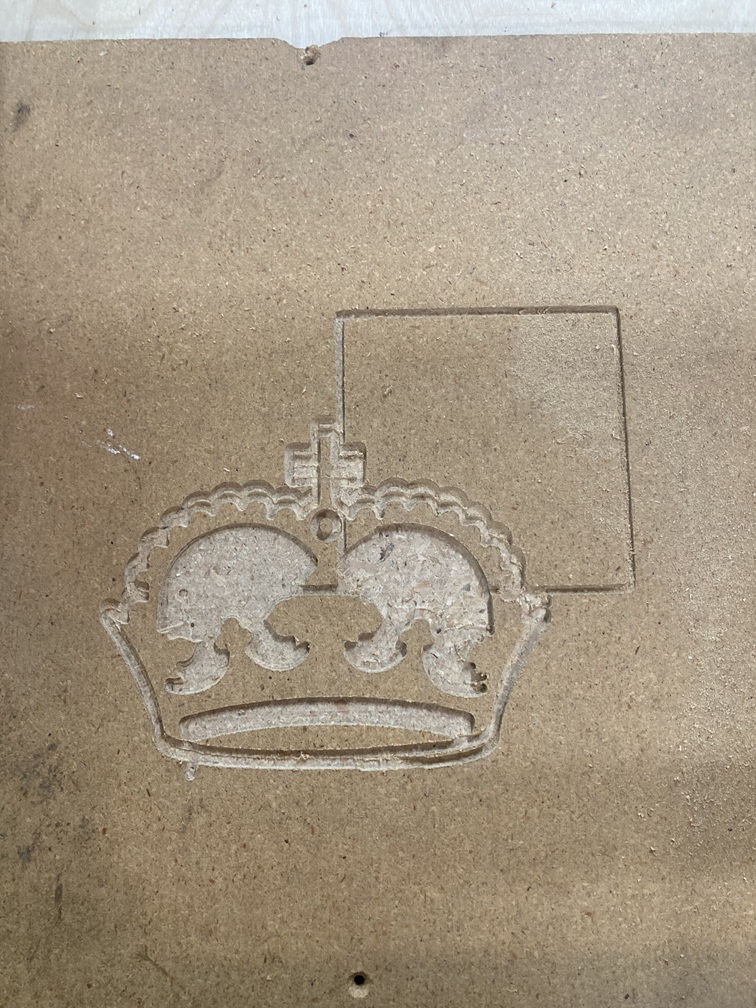
Afternoon everyone and I am new to the forum.
Preamble on my issue. Just finished putting together a Primo. I am looking at using the cnc for router work as well as plasma and possibly laser in the future. I built a metal fame that attaches to a plasma table and put a 3/4” ply board over the table frame for router.
CNC details:
X 30” (762 mm)
Y 20” (508 mm)
Z 3.5” (89mm)
23.5Mmm conduit
powering all five axis steppers independently
I have homing limit switches setup but not yet connected
I squared the frame per instructions and have the bars within a few mm and went through the core squaring but I am about 4-5mm out on the y axis after multiple attempts and loosening and tightening the core bearing holders.
Now to my problem. (And I have searched the forum pretty extensively so far and several of similar issues but every topic seems to be a bit different)
Y2, the far end y axis stepper, seems to be inconsistently either binding or losing steps. The location on the bar is not consistent, the timing or place in the project are not consistent but it has happened in all four of my test runs. I did the crown first for two runs and then created a 100 mm circle and square program routed at 1.5mm and 2 mm pockets respectively.
I am not sure if I have a binding issue on the Y2 axis or if the stepper is losing steps and at this point, not sure how I can dig deeper into the root cause.
Is there a way to monitor the output from the Mega and Ramps to see what signals are going to the y2 stepper? I am using Ponterface for controller ( I already had it installed so used it) And the output is a bit light on the monitor window
I have loosened the y2 and y1 tensioning bearings to the point of almost too loose to see if binding and still same behaviour so I am thinking it might be the stepper driver issue but not sure how I can rule out binding just yet. y axis is stiff to move with belts on and I have not taken belts off yet.
Any ideas from anyone that has experienced this issue?
Pic of the first test print crown
(edit: new users can only put in one media item )
Very much appreciated and I can add in more detail if required.
Welcome to the forums! Most of the new user limitations will clear away after a few posts.
Have you checked the grub/set screw securing the pulley to the motor shaft? They can work lose and allow the shaft to move separately from the pulley which could lead to the problem you’re describing.
Common solution is to use a temporary/light duty thread locker to prevent things from coming loose. A good indicator is to draw a line (I use a standard sharpie marker) across the end of the shaft and the pulley. Makes it obvious when things have shifted.
I would also check over your wiring. A plug that isn’t making good connection can cause what you are seeing as well. If you are using jumper wires (extensions) make sure you have the connection doubled over and taped like Ryan shows in the docs. Also make sure all of the wires are seated properly in all of the dupont connectors. I have seen one (or more) wires back out a little ways and cause a intermittent connection.
Thank you to both Johnathan and Tom for your replies.
I had checked grub screws through the build but will definitely do that again now. Ilike the connection thoughts. I have soldered in my wires through an LPT plug through the control box and confirmed continuity for the wires on the machine but I do not specifically remember doing that for Y2.
If these are OK, is there a possibility of EMF interference on the one stepper only? On the second pic I could not post earlier, I forgot to also mention that, and you will see below, the z axis completely skipped the raise 5 mm and move and cut through the centre of the crown from one pocket to the other so I wonder if I am narrowing down to the Ramps or Mega board issue? It is an older Ramps board I had from previous other work and I replaced the stepper divers to be sure I had latest on those but could be a board issue that is intermittent….
Again, appreciate the replies and the troubleshooting continues. I am looking forward to playing with this more as I enjoy a good challenge…. If it all just worked, where is the fun in that…..
Can you upload the gcode you used for those cuts? Or screen shots of your CAM settings? Its possible this is also a CAM issue. I dont think thats the issue for your Y2 but very possible for Z. Is your lead screw lubed??
I lubed the Z axis when building and just confirmed it still has lubrication.
(Edit: Can’t upload gcode files yet but my explanation). Here is the cnc file I created in ESTLCAM for the crown first two cuts. My first time using ESTLCAM as well so I can most certainly have issues in the setup or startup code. I don’t have the limit switches setup yet so I did not add in the x/y/z home lines from the instructions in milling basics. For initial testing, I am setting up the location myself and considering that origin.
I have been testing and I retested the voltage on each 8825 driver and I had originally set them all to as close to .8V as I cold get. I am using JK42HS48-1804 steppers and their phase current is 1.8 amps. I figured .8V getting 1.6A max would be a good starting place. The Y2 and Z drivers were getting extremely hot to the point of not being able to touch so I reduced across all drivers to a .625V.
I created a new test file that just did one external cut around the 100mm circle and square an set the z axis up so not using the router. Just running the axes for testing. I had two runs of the new file without the y2 skipping so I am now wondering if I was overpowering that stepper and after a bit of time, driver overheating and starting to lose steps. I will go back to a full circle and square run with router as that creates more drag and see if the lowered amperage setting is going to remove the issues.