My old asus has hit its end of life.
Flint 3 looks fun, Amazon.com, $150. Anything else I should be looking at?
My old asus has hit its end of life.
Flint 3 looks fun, Amazon.com, $150. Anything else I should be looking at?
https://www.amazon.com/TP-Link-Deco-AXE5400-Tri-Band-XE75/dp/B0B88T5RDY
so you don’t have wifi problems at your CNC anymore lol
That’s the version @Jonathjon and I have.
There are newer, but 3 stations for $199 is a good deal
Before I got this mesh one, I had one of these gaming routers
https://www.amazon.com/ASUS-RT-AC5300-AiProtection-Compatible-Accelerator/dp/B0167HG1V6
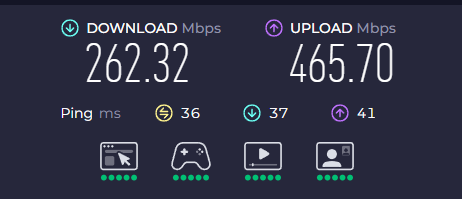
This new system blows that Asus out of the water on speed.
I have 5 across my house now. each computer has a node nearby connected on the 6GHz network, and the computer is hardwired into the router.
My computer is downstairs, main node upstairs through 2 walls, about 20ft away
You can also run an ethernet cable between the 2 if you need to extend to a longer distance
Want me to include a router running OpenWRT in the care pack I’m preparing to send you?
Gratis.
Would have three radios, one at 2.4Ghz and two 5Ghz radios
1000% agree with @Michael_Melancon Love my setup.
Oh, shoot I was planning on adding a few more hard wires. Now I have some things to think about. Ethernet backhaul would be easy.
I have a rt-ac86u, I didn’t think to check about new firmware. Asus is/has stopped updates for it so I did not want to mess around with an outdated router but I might be able to just reflash it!
So no, thank you though I think this one might have a few firmware options. Not sure why that did not come to mind.
Really??? Mesh has never really been great on anything. My asus is the bet thing i brought in the house!
That Flint 3 caught my eye because it has a lot of built-in options, one being a pi-hole ad blocker that looks pretty solid. I can pretty easily ad a pi-hole to anything though.
I have strong signal everywhere on my property.
Haven’t heard a Wi-Fi complaint since I switched. Kids used to constantly complain because they would get choked out.
We have 3 gaming PCs, and every tv is internet connected only for streaming.
It’s been over a year and haven’t had a problem.
Walking around or whatever. It’s all been seamless. No issues jumping between stations.
Edit: I did try mesh with my ASUS and it was terrible. Barely worked. Wasted money buying extra routers for that.
I used to only buy ASUS because it gave me VPN, etc. and I always loved my ASUS routers and recommended them, but I don’t regret getting this one at all
The only issue I have with this set is that for running AdGuard/PiHole it wouldn’t let me use my own DHCP server, but I just got around that with a hosts file and adding reservations for all the devices so I can read the logs better
Dang, there are so many freaking options. You guys have me rethinking everything.
Openwrt seems like it has taken off, last time I installed that was in a netgear with the two antenna black and blue cases, in what 2002??
I need to take a serious look at hard-wiring a few rooms, and the garage. I have been slowly removing an old alarm system in the house but I knew to leave the wires in case I can use them to pull through some new ones. I need to poke around and see if that works at all, or if they got stapled down.
Or just go ham with a Ubiquiti setup like I did.
UDM-Pro, 24port PoE Switch, 2-4 UAC-Pro access points, add a few of the new G6 bullet cameras and you’re away. Rock solid for ~6-7 years so far and couldn’t be happier, so much less f’n around with networking stuff.
Did you install the unifios too? I think real soon, i will have some unifi from work. We are replacing with Meraki
Do you mean the Unifi controller app running on separate hardware?
Originally I was using the Cloud Key to run the management interface but that got replaced by the UDM Pro once I needed cameras because the cloud key only supports 2.5" drives…
Unifi os server!
they made it downloadable afew months ago
currently we have hostifi, if we were keeping unifi i would have installed it at work!
Right. Without the ability self-host Protect I don’t really see the advantage, there. I guess if you already had a security gateway and NVR it’d mean you didn’t need the cloud key or similar, but that’s not a whole lot of savings for then having to host it yourself.
I guess if it fits into an existing management stack that could be good from a DR perspective, but the entire reason I like the Unifi ecosystem is how self-contained it is while still having single-pane management.
OpenWRT is awesome. I have two hard wired together. I have vlans for various iot things to keep them honest.
Mine are pretty old. But I use hardwire for anything where I care about speed. My Internet isn’t even that fast. I don’t notice when I stream videos. I only notice when downloading big files. Which is rare enough that I prefer to optimize for price.
Yeah, That was in the plan as well. vlan or guest network my oddball iot things, and keep my more important things priority. If I get it all wired up and a little mesh going on trying out home assistant might finally be a future project.
I am not having any speed issues or anything either, and relatively slow internet but I want to be able to use what I have. With my 5g not super reliable I keep getting dropped down to the 2.4g which is 1/3 the speed. Still prefer hardwired.
I poked around a bit more. I think I can get hardware to every room except one pretty easily from the attic (perfect winter time home upgrade). The one hard to get to room, I might be able to fish it around with no drywall holes 
I would definitely add a plus 1 for Ubiquiti. It’s the only gear we install at customer’s at the shop I work for. Also switched my home over from Cisco SB about 3 years ago. I run a UDM-Pro, US-16-PoE, and 4 U6-Pros. If you want to save a few bucks, start with a UDM-Pro SE and a couple APs. Their switches are spendy.
Edit: their mesh setup is really well done and easy to deploy.
I did look into it. The topology now makes a lot of sense in my head. Modem - router / switch - plug in wifi antenna’s. But the prices do seem a bit steep for home use. The nice part is you can literally swap out a single component if you ever need something better in one area specifically. The ceiling mount is a bit odd but digging further it makes great coverage and most people would never notice it.
As an example with 300-500mbs from the ISP why not just a UCG-Ultra for $129 plus one u7 lite on each floor? Why go up to a UDM-Pro SE??
I run Ubiquiti also. I had previously had a UDM Pro, but in my new house I’m just running a Cloud Gateway Fiber with 3 hardwired PoW Wifi 6 access points (including one in the garage.). We spent a little time running the wired backhaul so we have 2.5G speeds upstairs and 10G speeds downstairs if we ever need it (we won’t.) I also put in 3 Flex 2.5G PoE switches to ensure I have ethernet everywhere I want it. The first switch runs the others, as well as 1 access point, and the security cameras on the front and back of the house. The second switch is in my office and runs my homelab, the computers at my desk and my 3D printer. The third switch is in a spare room my (college student) sons use for homework and gaming. Their topography is so nice when troubleshooting