I agree with that strategy, except if you don’t need U7, you should be able to get some good Wifi 6 APs to save a bit more. You’d probably want at least 1 PoE switch as well to power the Access Points and/or cameras.
All mine are wall mounted, no drama.
You’re definitely paying for it, but it’s more of a lite business/prosumer product, so it has correspondingly higher lifespans, reliability, etc.
The single biggest thing for me is the single configuration pane for everything. It’s a little bit overkill for ~100 clients and 4 APs but it’s nice.
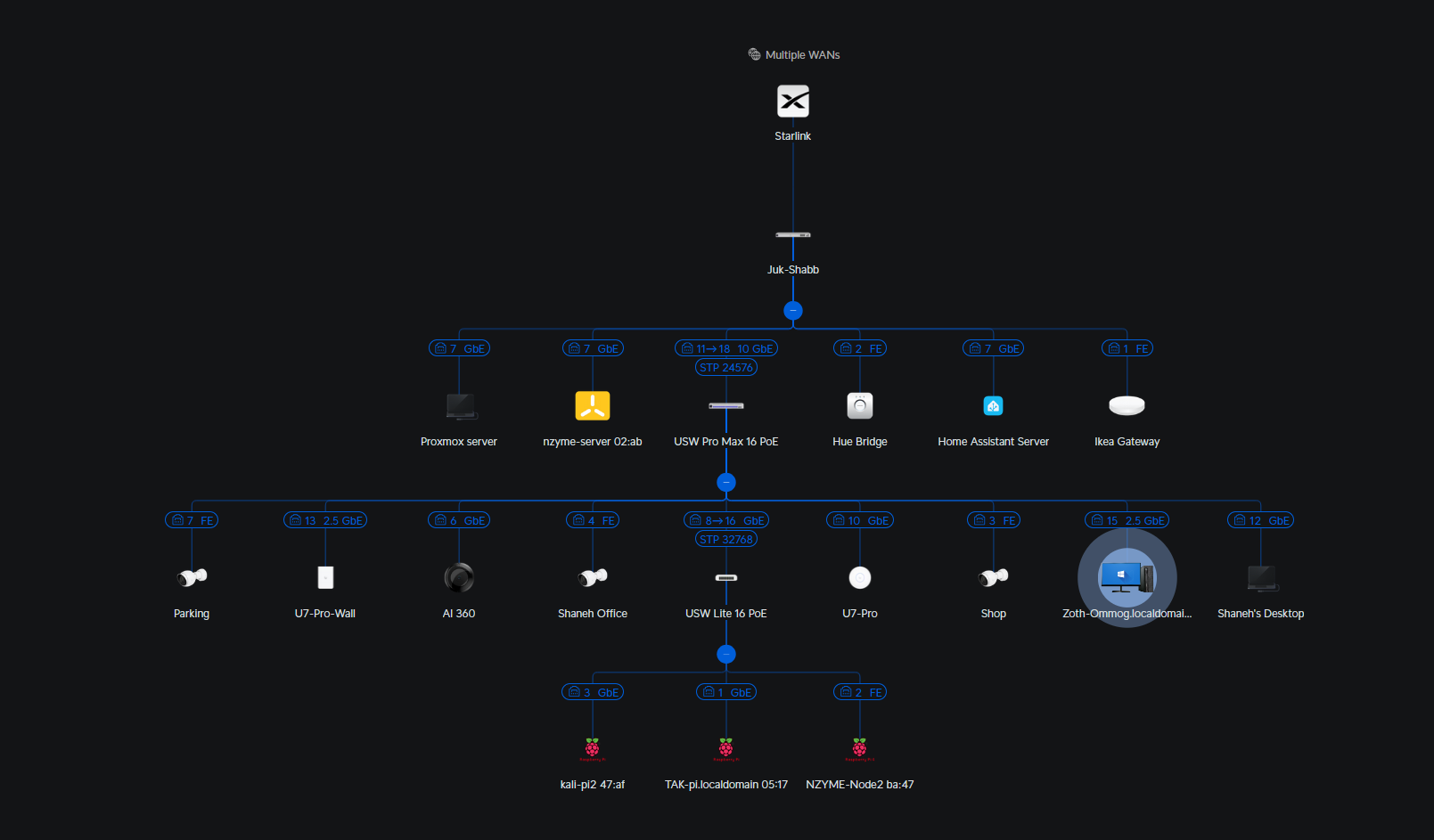
UCG to UDM - UDM is rackmount and mains powered, has a hard-drive slot, has more ports on its built-in switch. Pro is the ‘base’ rackmount UDM, SE adds PoE ports in the switch, Max adds a 2nd hard drive slot and a faster processor.
UCG Ultra looks significantly slower, less RAM, no storage expansion, fewer ports, powered by USB-C/external power brick.
There are other UCG options with more performance, too. If you weren’t ever looking at cameras and didn’t care about rackmount, the UCG Ultra looks pretty decent for the money.
The U7-lite looks like a decent option. Gets you WiFi 7 but without the 6GHz radios, which is disappointing but probably not worth doubling the price. From looking at prices, anything lower isn’t any better, specs wise, so I wouldn’t go below this.
I’m also a big fan of their tiny ‘flex’ series switches that are PoE powered. I have one at each ‘core’ desk.
This guy does some really great comparison charts:
And to be extremely clear, you definitely do not need any of this for home use, or even small business use. In my experience, consumer routers are ‘fine’, especially with one of the many replacement firmwares out there. Previously I had an Asus router running OpenWRT, a Linksys AP as a bridge, another AP of a brand I can’t remember, TP-link maybe, a couple of random network switches strung around, I’ve been running some cheap Dahua cameras on a Blue Iris box, etc. Everything was basically about half to 1/3 the price of the Ubiquiti gear. Nothing I have now does anything that’s all that different from what I had.
The downside to that setup was needing to manage settings to each unit individually and then there were plenty of times when something would die and not reconnect or the router would need a restart. Plenty of times a website wouldn’t load and I’d wonder if the router had fallen over. A camera would look crappy and I’d wonder wtf was going on. The Blue Iris box would sometimes fail to boot after a power outage and the interface was a bit ‘meh’, which led to my fiance asking me to check the cameras rather than wanting to look herself. Sometimes I’d get calls while away on business saying ‘the internet is gone, what do I do’, so I wrote a step-by-step troubleshooting guide. All of that is very manageable and really not ‘that’ big of a deal.
Since shifting to the Ubiquiti stuff (which also coincided with a ton more wiring around the house, to be fair so far fewer devices on the wireless in general), I can typically forget about the setup entirely for 6 months or more. Uptimes are now timers since last major power outage (longer than the ~1h of UPS). I have ZERO issues with things not wanting to connect to the WiFI randomly, I’ve never had internet issues that haven’t ended up being just the ISP or a website going weird. It’s no longer something I ever have to think about and realistically I’ve barely thought about it for the past 6 years. I’m in the remarkably privileged position to be able to afford what is very clearly a luxury and completely overkill IT setup but in terms of $ spent vs irritation avoided, I couldn’t be happier. There’s much stupider things you could waste a couple $k USD on and realistically if the gear lasts twice as long, which seems to be about on track, whether it even costs any extra is questionable.
Not even really sure what I’m trying to convey here. I guess that fundamentally it’s not getting you anything you can’t get for 1/3 the price, what it’s actually buying you is reliability, peace of mind and user friendliness, all of which free up mental bandwidth and spare time to do other things.
I get it, absolutely. It seems as if I can actually piece together a system with pretty good stats for way less than I originally thought. Will it do anything new for me…not really. Would it be super fun to play with some top tier gear, and some nice wiring…absolutely.
Either way I have to run some wires. I am trying to keep in mind this is probably not my forever house so I want to enjoy any money I put into it, and I would also like that to add a bit of value to the house just in case I do end up leaving it. So what is awesome now and what is likely to be beneficial in the future.
Hard-wire each room is nice. Most won’t use it, adds value.
Hard-wire a mesh connection. I have a feeling that would get more use in the future, simple, adds very little value.
Both get me a new secure connection with updates. Both will feel equally fast. Hardware gets slightly better pings…but I don’t game.
The tp-link stuff might actually best of both. Each AP has a few extra ports on it. I can hardwire the backhaul, and get a few easy to run temp hardwires from each of them. Fewer wires to run.
Yeah, and don’t be afraid to just run cables in small capped conduit where it’s too difficult to put them in the wall. The run to my desk is some square capped conduit along the skirtingboard and it annoyed me for a week and now I don’t see it at all.
I’d say don’t worry about future value too much. Just wire what you’ll use. As you say, chances are most won’t use it. Here in NZ most houses sell by auction so for something to ‘add value’, there need to be 2 people who see the value bidding against one another, realistically. Obviously that’s an over-simplification of the situation, but I find it a helpful thought exercise.
I’d also say don’t think of hardware as being for better ping, it’s for reliable throughput, better upload/download and just generally better reliability in the face of your neighbour getting a shitty drone that blasts out on 2.4GHz etc. Wireless stuff is getting cheaper and less policed every day so it’s an arms race between things getting better at rejecting noise and things being bad neighbours on the spectrum.
The other thing to look at are the Powerline Comms type units. I’ve not had any personal experience with them but I know a few people who swear by them.
Key thing is ethernet for infrastructure, primary PCs and APs. 2nd tier would be powerline comms. Last would be a ‘decent’ mesh setup, but in my experience they just suck as soon as there’s any other spectrum congestion.
Run wires wherever you need, even if that’s with them pinned to skirting boards. Clean them up and re-route them as needed later or as parts of other jobs, etc.
For one you have the expandability for a larger infrastructure, as well as the built in hdd bay if you ever want to add security cameras or their doorbells. Also for simplicity of the initial rollout as the SE has PoE built into it’s 8-port switch. So you just need the UDM and a couple APs and you’re off and running. Normally I wouldn’t recommend the SE because it’s switch only has a 1gb backplane fabric, but for residential use, it’s probably more than enough.
Sorry I sound like I’m a UniFi rep, but I really am happy with their products.
You can also throw in a cheap 1gb switch if you ever need more hardwire connections. That’s how I have mine now. Everything that can be hard wired is, and plenty of wifi for everything else.
I would LOVE to upgrade to a Ubiquiti setup!! Not for a need but like you said, it would be fun. I just cant justify it right now lol.
I built one of the largest municipal Ubiquiti networks in the province (perhaps the country) connecting over 100 sites, many with Unifi APs for wifi client access.
I have Unifi APs in my and my relatives homes (along with Ubiquiti outdoor gear to get Internet from town to each house). I use TP-Link gear, some running OpenWRT, for friends and cheaper family. It’s good stuff.
I note the AP you were originally looking at runs a fork of OpenWRT with the Qualcomm SDK.
I followed some videos from this guy:
I run two TP link archer A7 (one is a C7). They are older, but still handle all my needs just fine. I am not doing anything faster than 1Gbps, and my wifi isn’t very fast, but faster than my 100mbps Internet. I know some of you went faster than that 10 years ago. I just don’t think I would notice any significant difference. I notice latency much more than bandwidth.
Any concerns about the TP-Link security risks being talked about?
I’ve typically recommended Asus to friends and family.
I personally run a unifi house with 3 APs. An old AP-PRO in the garage, a HP-HD in the shop, and a HP-7 in the house. I went with the UDM-Pro as well as it was the best option at the time when we upgraded to 1G internet. The newer unifi firewall firmwares include a built-in wireguard server, so you can set that up to get access when you’re away from home. I also have the kids’ phones set up to use it when connected to ‘strange’ guest wifi.
I cheaped out and use Amcrest cameras instead of the unifi ones. The Amcrest cameras work with the UDM-Pro’s NVR, but you don’t get the AI alerts. I use home assistant to read the ONVIF of the cameras to send me alerts that way. Downside is I don’t get the video tagging on the Unifi side so I have to do a little scrolling to find the video clip. I’m pretty sure I could have the HA do a screen grab with the alert, but I haven’t played with that yet.
There’s a lot you can do with the more business class hardware. There’s also a lot you can do with OpenWRT. I have a travel router that runs OpenWRT and it has a lot of nice features. I use it to connect to hotel wifi and then have a wireguard tunnel back to the house for all my traffic to flow over.
The one downside to Unifi is I’ve noticed once you go down that path, the network ends up being a hobby.
I recommend if you buy TP-Link hardware that you only buy TP-Link hardware that can run OpenWRT, and the first step is replacing the firmware.
If you’re not able/competent to do that, then don’t buy their stuff.
You either manage your own stuff or you pay someone to do it.
Every vendor is a risk if you just buy stuff, plug it in, and forget it.
Ubiquity hardware/software is OK, and I used to recommend it. They’ve moved further and further away from support for open source or alternate uses (e.g. ham radio applications), so I’ve moved further and further away from recommending it.
You can get a really good environment that ‘just works’ with their stuff, so it’s a good option if you don’t mind paying the additional costs.
Yeah, especially Meraki. When you stop paying, the hardware quits working!
That suggests that it works right when you do pay for it. I’ve heard it’s gotten better, but it earned the name Merkrapi around here when it came out without supporting basic features like SNAT.
That sounds like when we started using Ubiquiti they didn’t have a way to enter static routes in the gui. I had to call support, log in via ssh, and do it from the console. I couldn’t believe it.
They do some really weird things sometimes. 
Little update, still crimping some of the new hard wires I have ran through the house. But seeing this ping and jitter on the computer that is on the second-longest Ethernet run, through a switch then to the router…then to the modem. Shoot I have not rebooted or anything I wonder if it can get any better..
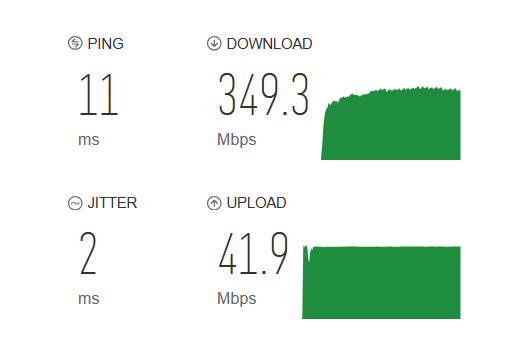
Some of my best pings from this same computer on wifi were 65ms and a 4ms jitter, all the way up to 150/40, very hit or miss. I know that is pretty good but very satisfying feeling of getting better numbers after doing the work of running wires.
Nice result. Speed tests like that also seldom tell the true story. You really need some pretty serious monitoring stuff to see the actual packet statistics over a wifi link.
We run into issues with this using wifi for system control. Best case scenario on a point to point link is sub 1ms. Hell, even the median round trip time is in the low ms range. The problem comes when you get a whole bunch of broadband noise, another nearby network with heavy utilisation and then some backoff/retry coincidences etc. Then it can be half a second or more before you can guarantee a packet gets delivered. That’s a real fun one to design a decent control system around.
Yes, indeed.
Try it when you have 40 minute plus round trip times. (My stuff does…) So we don’t actually do anything under direct telecommand.
Sadly, we appear to have lost one of our sibliings over the weekend…
Edit: What’s that have to do with routers? MAVEN acted as a telecommunications relay at Mars for surface assets. It didn’t just beam back its’ own science, it talked to surface spacecraft and both gathered their data and relayed commands down to them.
True, but you’ve ALWAYS got 40 minutes, so you plan for it. This would be equivalent to you having 40 minute RTT for 99.99% of the packets and then one that takes a week…
Regardless, I think my point stands. The improvements in throughput and ping times are great but the real value is the reliability and removal of outliers. You don’t tend to notice it as much because so much stuff caches and reads ahead, etc. but it’s definitely there…