So I completed my MPCNC (jackpot3 FluidNC), and I have successfully made good 2.5 D parts using Estlcam. The problem is that I want fully functional 3D. I have Fusion and Solidworks, but I can’t find a post processor that works for either.
Are there any 3D CAM programs that aren’t too expensive with working PP?
PP for Solidworks?
I have read the threads about Flyfisher, and they are way over my head. I can’t figure out how to make it work for Fusion.
Never expected I would finish the machine and then be foiled by PPs
I did pull an stl into Estlecam. I probabley should spend more time with it, but I couldn’t see much in the way of options or a 3d simulation (which is a must for me).
I ran the gcode generated by Flyfisher (V4.1.2) in Fusion through chat gpt along with my configuration file, and it identified some problematic lines of code (there are text lines that are too long). It also identified that it was trying to use a probe. Hopefully it will work (when I get home tonight).
The FlyFisher post processors worked well for me when I was still using Fusion. There’s a lot of buttons and values that can be tweaked when running it inside fusion. One of them is to turn off the initial probing.
What do you mean by this? In general, a 3 axis XYZ machine like a Lowrider/MPCNC only does 2.5D. Or are you talking about flipping to cut both sides? Or using a rotary axis?
@JerryMFreazyKam — CNC CAM in the browser can pull in an stl file and do a 3d carve with 3d simulation preview. It only supports raster and water line 3d carves but with out a rotary axis these hobby machines really only do 2.5D carves.
My understanding of 2.5D vs. 3D (and I hope I’m not wrong as I’ve been instructing my engineering students on this for years) is that 2.5D involves defining a toolpath with a 2D drawing (dxf, dwg , svg, etc), and then manually imputing the Z coordinate.
3D requires a 3d model and allows the cam program to calculate Z automatically thus allowing for organic shaped surfaces. Like a guitar neck. (Which is what I built the machine for)
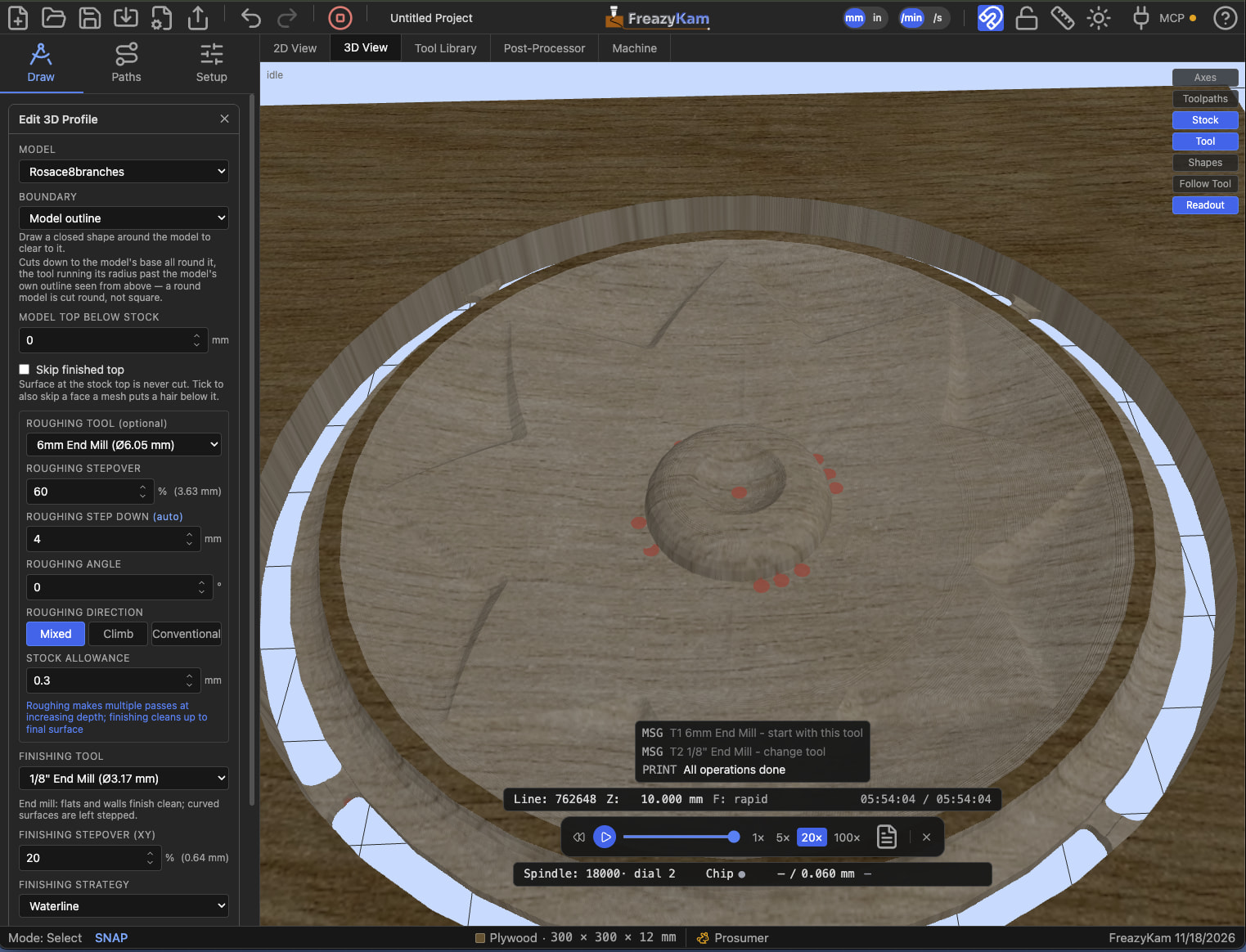
Yes your understanding is correct. If you are just looking to follow an organic 3d curve you can use FreazyKam. It can load an stl file and do a roughing raster over the part and then a finishing path will a smaller bit using a raster at a different angle or a waterline finish if the slopes are steep. There is a full simulation of the cutting passes that can be seen in 3d view. Here is an example screen shot of a carved rosette. Tabs are also supported that can connect the stl outline to the stock.
Thanks. I will check it out. I’m still trying to make Fusion work. It seems people in this group have been successful, I just can’t figure out what the problem is.