Hi all , I have been trying to figure out how to update the YAML file with the new WebUI v3.
With the WebUI V2 i was able to delete the old YAML file and replace it with a new on really easily. with the new WebUI V3 I can not find the file location. I am sure it has been explained here before but I can not find any posts on it. If someone can point me in the right direction I would be most grateful.
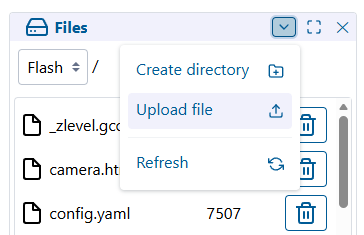
On the Files panel where you see the files on SD listed, there is a dropdown where you can select Flash. You can either drag and drop the file or there’s a menu to expand where you can upload. You can but don’t need to delete the file. If you upload a file with the same name, it overwrites it.
Hey Jason, Thank you so much !!! that worked perfectly.
One more question, I used to have my jackpot 1 board on my home wifi with out having to connect to directly, but I dont know which box to update to get it on my network,