Howdy, I’m finally getting around to putting everything back together with the new JP3. I took a hiatus from the cnc after the initial install, and never got past the basic wiring/function stage. I have (had on the jp1) been using the m8 or m9 command in my startup gcode to turn on a coolant pin, that tripped a 24 relay that turned on my dust collector and router at the beginning of a cut. It has been a long time since I did it on the jp1 and it looks a little different in the 3.
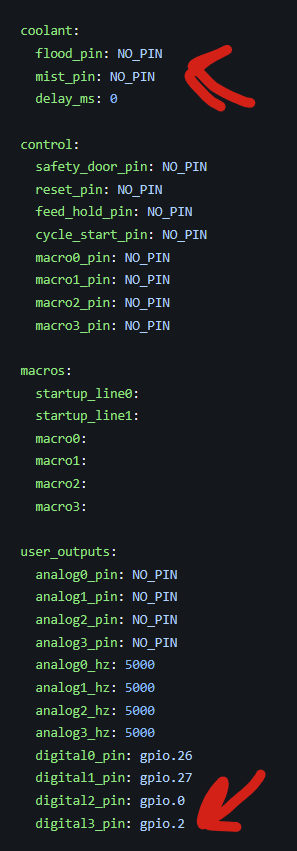
So I have the relay connected to the 24 socket #2 on the board and I need to configure the… config file. In the coolant section the stock yaml has
flood pin:NO_PIN
mist_pin:NO_PIN.
I tried flood_pin:Gpio.2, uploaded and rebooted, which I thought would assign it to that socket, but no bueno when pushing the flood button on the dashboard.
Soooooo long way of asking, how do I configure this?
So change the user output 3 to “no_pin” and then flood to gpio.2?
Since I’m just flipping a 24v relay, is there a difference between the analog and the digital outputs?
I honestly stopped scrolling the yaml when I found the coolant section :laugh:
That would explain the generic error message that popped up after I added to the flood line.
I use a touch screen at the machine itself, I like being able to use a ‘button’ whenever possible instead of typing commands. Being able to turn my dust collector on/off separately from a cut being run is
nice for clean up.
That’s where macros can help a lot. Then you can still have the commands in your gcode for it to automatically do it but you can also hit the macro button to turn on the dust collection or anything else separate as well. But I guess if you have it working with the coolant button you already have the same thing so this was all a waste of time to type
Yeah, I had 4 or 5 with my last setup, lost them when I changed over to the new card. I need to redo them, but I’ve not been working with the machine much so I haven’t taken the time. I’ve also removed a couple options I was using like my laser, so a couple would be useless now anyway. I just need to spend the 10 minutes and get it done.
But I have m8/m9 built in to the start and end gcode in vcarve so it takes care of itself when I hit play, and it already has has the ‘button’ on the screen. I’m not going to use them for anything else, no metal cutting for me so they’re a good one to repurpose. The only thing I really like to keep manual is probing, I don’t like having it built in to the file, prefer to do all my setup and be happy before I start anything up.