Okay following troubleshooting guide I’m making a new thread. Help clean up and bring in some new eyes.
Okay my main issues that I think are related are:
-Router is not parallel to surface; initially it seemed like my rails maybe twisted but couldn’t confirm
-My Router seems like it is running HOT; Measured it after letting it cool for 10 minute and it read around 100°F
Story:
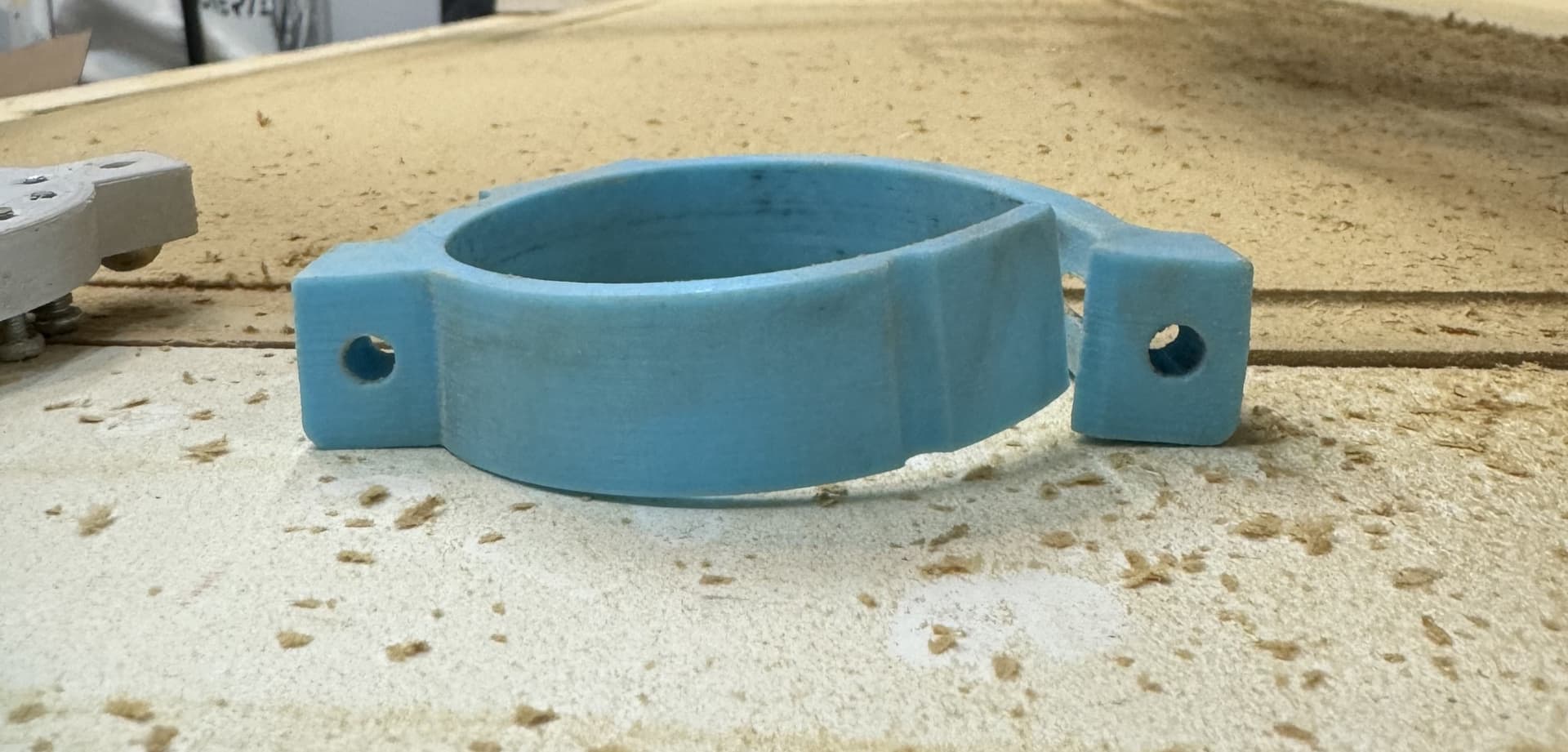
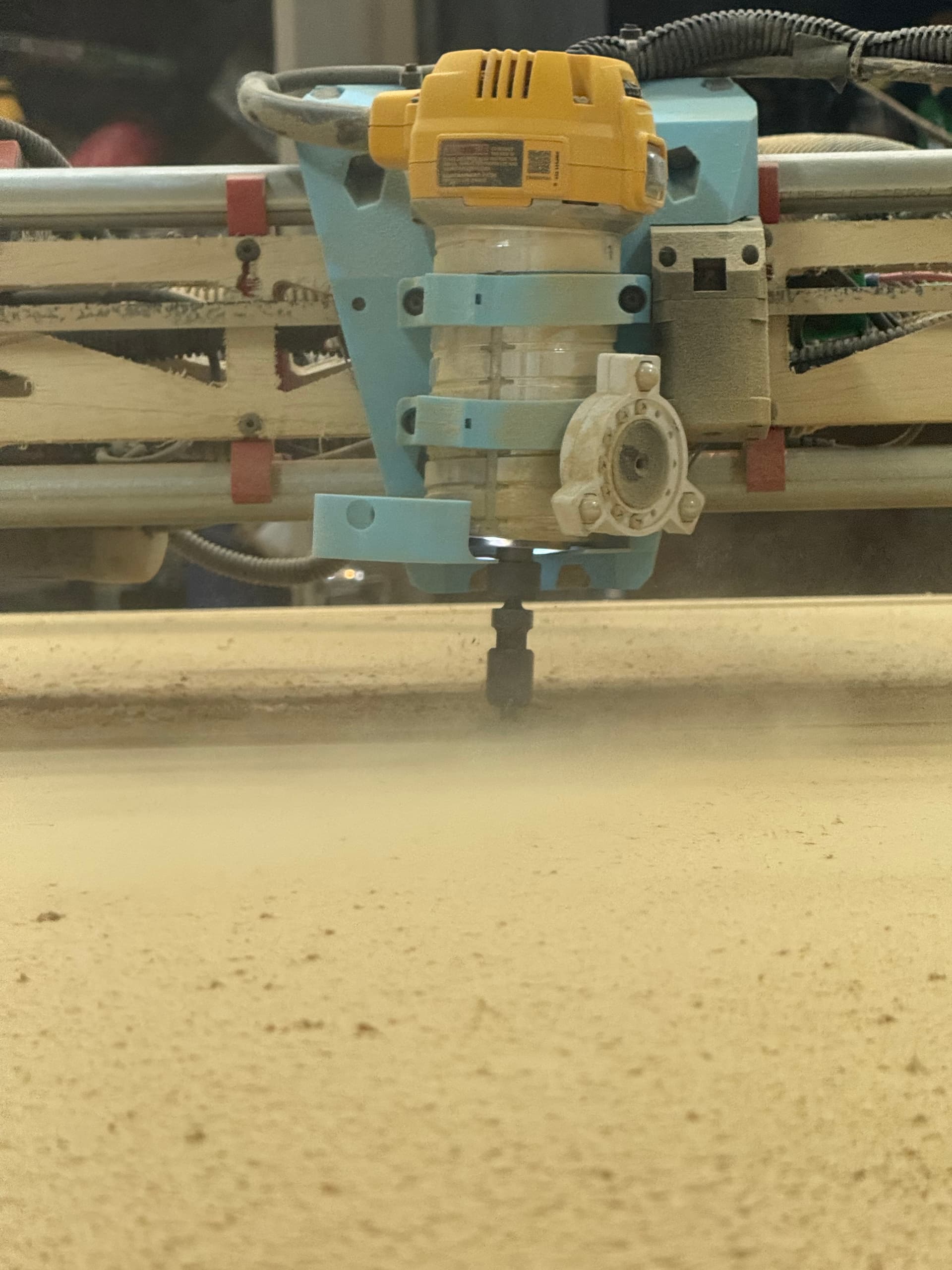
I decided after not getting it 100% trammed I would try and surface again as we couldn’t find what may have been causing the issue. After 3/4 of the way my GFCI was tripped (believe it was static build up in dust hose) I was out of shop time at that moment so I shut everything down took the SD card with me to slice the Gcode later. Later I sliced the Gcode and restarted it. I initially noticed bigger and more ridges. after going to the far end of the table I saw the router was significantly tilted (Image below), I went upto it and could physically wobble the router. After stopping it I took apart the tool mounts and the bottom looked Funny (Image below). Did the heat cause this? Was this a result of another issue? Top one doesn’t look twisted but will reprint both.
100F after cooling for 10 minutes is indeed very hot.
Are your parts printed in PLA as recommended?
The glass transition temp for PLA is around 140F, so it’s really likely that your router has heated the mounts at least enough for them to deform and fail.
There is significant misalignment of the router in the mounts in your picture, and based on the temps you reported you’re going to need to reprint all the deformed parts. The washer stack to get it back to level means that the deformation was well under way as you were trying to sort this all out.
I’m not sure that it was static that popped your GFCI, it could be an overcurrent trip.
Do you happen to have an ammeter or a DMM with a clamp on ammeter?
If you run the router with it removed from your LR3, how quickly does it heat up, and how hot does it get?
First steps are to figure out why that router is running so hot, and start reprinting the deformed parts.
I do. I have never used the ammeter but do have one. Tool mounts are almost reprinted. I didn’t notice any damage to the core minus maybe some slight slop in the bolts. I imagine that isn’t enough to need to reprint the core?
How hot should I expect it to run? And yes all PLA
We’ll need someone that has the DW611 router to comment, but it sounds like yours is way over.
If you power it up and let it run for about 10 minutes, how much current is it drawing, and how hot does the case get with no load?
What speed did you have it set to for your cuts?
Hopefully you didn’t deform the core- that would be a bummer.
I was not able to get my DMM clamp to work. Will need to take some old fashioned measurements.
After 10 minutes it got to 100°F on the propellers, the case got to 85°F it did not get any hotter than that after 15 minutes.
For the test I set the router to speed 1 while surfacing it was at 3
Update! Router is whack. After testing for 10 Minutes on speed dial 1 I though maybe I could stress the router more by doing a 10 minute on 7. Once the router was turned on and turned up to 7 it immediately started arcing and the RPMS became very inconsistent. Current read 1.5-1.8 µA during low speed, due to arcing and rpm change I didn’t push the test for the high speed.
Maybe the brushes? but why did they wear down this fast? (maybe 5 Hour total cut time), this issue wasn’t there when I was cutting struts (as I was using 5-6 speed dial).
I’ve decided to bite the bullet and get the Makita, the dewalt has me concerned with this type of issue so soon, I’ve also done some reading and it sounds like others are having similar issues with some of these dewalts made in 2023.
A lot of “consumer grade” products have an expected (but often undocumented) duty cycle, usually a few minutes of use followed by 30-40 minutes of “dwell”. Running them for more than 5-10 minutes under any load without a rest is probably exceeding that duty cycle.
5 hours is actually a long time for a non-industrial grade motor, especially if it has been run for hours at a time, and also especially if it has gotten very hot, as you mentioned. I would not be surprised if the brushes are worn out, and I would also check if the commutator is burnt or damaged (use a very fine emery cloth to polish it, and clean any dust away after doing so).
I don’t doubt the bushing wore this fast from the heat. But what caused this issue? A minor redesign? Manufacturing change/issue? Some unique damage cause by shipping?
The Makita 700 and dewalt 611 are the top choice routers for cnc. As I am sure we are exceeding the duty cycle intended; I feel like issues would be much more widespread.
One, don’t leave the shop when the machine is running. Two, you really need some dust collection. I bet the router is full of dust now. Mdf kicks up a ton of dust, especially when surfacing the table. I’ve never noticed either of my routers getting especially hot.
I agree, when I mention I left the shop I had shut everything down before leaving so nothing was running at that moment
I do and for 3/4 of the table it was on. The issue was 3/4 of the way through surfacing my table my GFI tripped, I had assumed it was from static build up in the hose (thinking it was more the router now), so for the last 3/4 I turned it off and just pulled it out entirely for good measure.
That’s what concerns me, it was like touching a hot pan at the hottest point which points to some kind of issue I believe outside of the bushings and that they are simply a symptom of a bigger issue with the router.
You know I’d have to check. Most the breakers on my panel are afci so I wouldn’t think they’d double that on the outlet but when I finished the basement I found all kinds of crap done… we’ll call it differently.
They were just working from an obscure revision of the building code…
When my brother (who was in high school at the time) wired our house for indirect lighting in our new cathedral ceiling, with neither permit nor license, my father, who retired from general contracting a few years ago, made sure that he did everything to a standard that would blow any inspection out of the water, just in case we needed to beg forgiveness…
Man I can’t even figure out this blog situation let alone get this thing together. Ever since I’ve tried to get into 3d printing and cnc stuff I’ve been more depressed than I ever thought I could get. Just stupid apparently. Sorry for random post but I couldn’t figure out how to make a post or where to find walkthroughs.
Oh man don’t beat yourself up man. What’s going on there is a lot of ppl willing to help. I was a complete noob when I started. I am no wiz but can make some cuts and learn everyday