So weird.
That is a step backward. Maybe the outer parameter would have less artifacts, if it worked at all… 
So weird.
That is a step backward. Maybe the outer parameter would have less artifacts, if it worked at all…
Aaaand it now happened with my old files as well. I have printed at least 5 of those without issues, I don’t know what else has changed… I know this print is hitting something, but why wasn’t it a problem before? I am kind of annoyed.
Now trying to reduce layer height to 0.32mm at those points to reduce the printing in the air… Maybe that helps.
@vicious1 Which layer height do you print yours in?
This was what I saw about fw also.
Give v6.3.1 a try-- the release notes say:
“We have also ported the fixes and features introduced in firmware versions 6.2.2 and 6.2.3, except for the layer skipping fix, which was not included in 6.3.0.” And the v6.2.2 release includes a fix for “consistent layer shifts” with a description matching what you’re experiencing.
Do yiu have cura just to rule out the slicer?
Driver current?
oh that makes sense
I have the newest beta.
Can’t be the slicer since I now used an old project that did work at least 5 times before. Really strange or I was just being lucky…
Or they reduced the power of the steppers so they skip instead of just running it over.
Any chance that the skips are happening near the same X, Y position each time, within about an inch and a half?
The ones on the dust shoe are just getting caught because it’s quite a steep overhang.
The ones on the core are exactly identical without any getting caught at all.
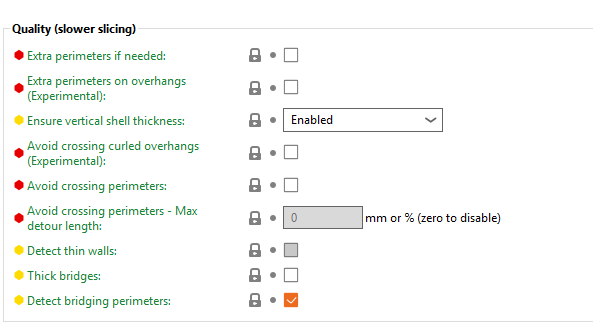
Things are getting more curious - it’s enabled by default! But I’m glad others are on the same page!
Really? I’ve never touched those settings… Maybe I should reset all of them.
Maybe it’s turned off by default for 0.6 nozzle?
It’s turned off for all the profiles and the lock indicates that it is the default for all of them not having it enabled. Maybe they did that because it could create errors?
Losing track of what you did, but is this a conversion to the Prusa core?
Did you try updating the firmware? If it is a conversion, are you supposed to install different firmware?
It’s just a normal core one. 
Man, the stupid printer did it again with a file that worked two times before… at another location, just to make it more exciting. The nozzle snags on very small protrusions that form when printing the overhangs for the holes. Really, really frustrating. Had two prints fail at the very bottom hole and now one for the very top hole again.
I am now trying a different printer profile that adds two hours of print time… I also have the oldest profile that used to work, maybe I should get that out again…
Try slowing down your rapids a little. That should gain a lot of torque during moves.
I tweaked the settings and went down to 0.32mm, maybe that helps. Takes longer to print, but should not be a problem.
I still didn’t try my old profile that I had used before the new features were introduced. I printed at least 8 cores without any problems with it. Going to do that after this one has printed, need to send a kit out to Italy after the weekend. 
Update: It works without issues with 0.32 because there is less curling.
It also works with the old profile (that I had used before to print 8 cores or so). So the changes Prusa made to the slicer to have the nicer finish with Balanced and Speed profiles mess something up that makes some of the edges curl more. Probably… -_-