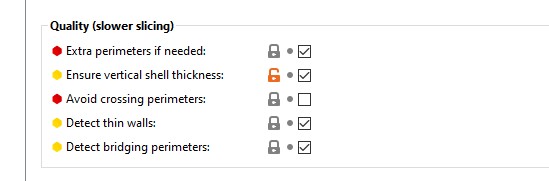
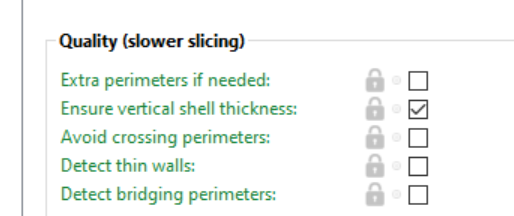
So the belt slides are having random print issues in Prusa slicer and cura so far. Some people are having the belt slot too wide and not locking the belt (~1.5mm too wide). Switch to a different slicer and the part is fine.
There are success and failures in both.
So can anyone think of a setting that might be causing this. I dug through prusa slicer and this is the only thing that has caught my eye so far.
I can try to print a few with different settings but I think crowdsourcing this might find it faster than me randomly changing settings.
If you have a fail or a success in either slicer maybe take a quick look through and see what you have changed from default settings?
nellson
(Nick Ellson)
July 22, 2020, 6:09pm
3
I am using pretty much the defaults.
I needed to use a shim to hold the belts tight enough not to slip.
nellson
(Nick Ellson)
July 22, 2020, 6:20pm
4
My complete settings are listed here
generated by Slic3r Prusa Edition 1.41.1+win64 on 2020-07-22 at 11:11:46
avoid_crossing_perimeters = 0
bed_shape = 0x0,250x0,250x210,0x210
bed_temperature = 60
before_layer_gcode = ;BEFORE_LAYER_CHANGE\nG92 E0.0\n;[layer_z]\n\n
between_objects_gcode =
bottom_solid_layers = 4
bridge_acceleration = 1000
bridge_angle = 0
bridge_fan_speed = 100
bridge_flow_ratio = 0.95
bridge_speed = 20
brim_width = 0
clip_multipart_objects = 1
compatible_printers_condition_cummulative = “printer_notes=~/.PRINTER_VENDOR_PRUSA3D. / and printer_notes=~/.PRINTER_MODEL_MK2[^.]. / and nozzle_diameter[0]==0.4”;“! (printer_notes=~/.PRINTER_VENDOR_PRUSA3D. / and printer_notes=~/.PRINTER_MODEL_MK(2.5|3). / and single_extruder_multi_material)”
complete_objects = 0
cooling = 1
cooling_tube_length = 5
cooling_tube_retraction = 91.5
default_acceleration = 1000
default_filament_profile = “Prusament PLA”
default_print_profile = 0.15mm OPTIMAL
deretract_speed = 0
disable_fan_first_layers = 1
dont_support_bridges = 1
duplicate_distance = 6
elefant_foot_compensation = 0
end_filament_gcode = “; Filament-specific end gcode”
end_gcode = G4 ; wait\nM104 S0 ; turn off temperature\nM140 S0 ; turn off heatbed\nM107 ; turn off fan\n{if layer_z < max_print_height}G1 Z{z_offset+min(layer_z+30, max_print_height)}{endif} ; Move print head up\nG1 X0 Y200; home X axis\nM84 ; disable motors
ensure_vertical_shell_thickness = 1
external_fill_pattern = rectilinear
external_perimeter_extrusion_width = 0.45
external_perimeter_speed = 50
external_perimeters_first = 0
extra_loading_move = -2
extra_perimeters = 0
extruder_clearance_height = 20
extruder_clearance_radius = 20
extruder_colour = #FFFF00
extruder_offset = 0x0
extrusion_axis = E
extrusion_multiplier = 1
extrusion_width = 0.45
fan_always_on = 1
fan_below_layer_time = 100
filament_colour = #FF3232
filament_cooling_final_speed = 3.4
filament_cooling_initial_speed = 2.2
filament_cooling_moves = 4
filament_cost = 25.4
filament_density = 1.24
filament_diameter = 1.75
filament_load_time = 0
filament_loading_speed = 28
filament_loading_speed_start = 3
filament_max_volumetric_speed = 15
filament_minimal_purge_on_wipe_tower = 15
filament_notes = “List of materials tested with standart PLA print settings:\n\nDas Filament\nEsun PLA\nEUMAKERS PLA\nFiberlogy HD-PLA\nFillamentum PLA\nFloreon3D\nHatchbox PLA\nPlasty Mladec PLA\nPrimavalue PLA\nProto pasta Matte Fiber\nVerbatim PLA\nVerbatim BVOH”
filament_ramming_parameters = “120 100 6.6 6.8 7.2 7.6 7.9 8.2 8.7 9.4 9.9 10.0| 0.05 6.6 0.45 6.8 0.95 7.8 1.45 8.3 1.95 9.7 2.45 10 2.95 7.6 3.45 7.6 3.95 7.6 4.45 7.6 4.95 7.6”
filament_settings_id = “Prusa PLA”
filament_soluble = 0
filament_toolchange_delay = 0
filament_type = PLA
filament_unload_time = 0
filament_unloading_speed = 90
filament_unloading_speed_start = 100
fill_angle = 45
fill_density = 45%
fill_pattern = cubic
first_layer_acceleration = 1000
first_layer_bed_temperature = 60
first_layer_extrusion_width = 0.42
first_layer_height = 0.2
first_layer_speed = 20
first_layer_temperature = 215
gap_fill_speed = 40
gcode_comments = 0
gcode_flavor = marlin
host_type = octoprint
infill_acceleration = 2000
infill_every_layers = 1
infill_extruder = 1
infill_extrusion_width = 0.45
infill_first = 0
infill_only_where_needed = 0
infill_overlap = 25%
infill_speed = 100
interface_shells = 0
layer_gcode = ;AFTER_LAYER_CHANGE\n;[layer_z]
layer_height = 0.2
machine_max_acceleration_e = 10000
machine_max_acceleration_extruding = 2000
machine_max_acceleration_retracting = 1500
machine_max_acceleration_x = 9000
machine_max_acceleration_y = 9000
machine_max_acceleration_z = 500
machine_max_feedrate_e = 120
machine_max_feedrate_x = 500
machine_max_feedrate_y = 500
machine_max_feedrate_z = 12
machine_max_jerk_e = 2.5
machine_max_jerk_x = 10
machine_max_jerk_y = 10
machine_max_jerk_z = 0.2
machine_min_extruding_rate = 0
machine_min_travel_rate = 0
max_fan_speed = 100
max_layer_height = 0.25
max_print_height = 200
max_print_speed = 150
max_volumetric_extrusion_rate_slope_negative = 0
max_volumetric_extrusion_rate_slope_positive = 0
max_volumetric_speed = 0
min_fan_speed = 100
min_layer_height = 0.07
min_print_speed = 15
min_skirt_length = 4
notes =
nozzle_diameter = 0.4
only_retract_when_crossing_perimeters = 0
ooze_prevention = 0
output_filename_format = {input_filename_base}{layer_height}mm {filament_type[0]}_{printer_model}.gcode
overhangs = 0
parking_pos_retraction = 92
perimeter_acceleration = 800
perimeter_extruder = 1
perimeter_extrusion_width = 0.45
perimeter_speed = 60
perimeters = 3
post_process =
print_host =
print_settings_id = 0.20mm 100mms Linear Advance
printer_model = MK2S
printer_notes = Don’t remove the following keywords! These keywords are used in the “compatible printer” condition of the print and filament profiles to link the particular print and filament profiles to this printer profile.\nPRINTER_VENDOR_PRUSA3D\nPRINTER_MODEL_MK2\n
printer_settings_id = Original Prusa i3 MK2
printer_variant = 0.4
printer_vendor =
printhost_apikey =
printhost_cafile =
raft_layers = 0
remaining_times = 0
resolution = 0
retract_before_travel = 1
retract_before_wipe = 0%
retract_layer_change = 1
retract_length = 0.8
retract_length_toolchange = 4
retract_lift = 0.6
retract_lift_above = 0
retract_lift_below = 199
retract_restart_extra = 0
retract_restart_extra_toolchange = 0
retract_speed = 35
seam_position = nearest
serial_port =
serial_speed = 250000
silent_mode = 0
single_extruder_multi_material = 0
single_extruder_multi_material_priming = 1
skirt_distance = 2
skirt_height = 3
skirts = 1
slowdown_below_layer_time = 20
small_perimeter_speed = 30
solid_infill_below_area = 0
solid_infill_every_layers = 0
solid_infill_extruder = 1
solid_infill_extrusion_width = 0.45
solid_infill_speed = 100
spiral_vase = 0
standby_temperature_delta = -5
start_filament_gcode = “M900 K{if printer_notes=~/.PRINTER_HAS_BOWDEN. /}200{else}30{endif}; Filament gcode”
start_gcode = M115 U3.2.3 ; tell printer latest fw version\nM83 ; extruder relative mode\nM204 S[machine_max_acceleration_extruding] T[machine_max_acceleration_retracting] ; MK2 firmware only supports the old M204 format\nM104 S[first_layer_temperature] ; set extruder temp\nM140 S[first_layer_bed_temperature] ; set bed temp\nM190 S[first_layer_bed_temperature] ; wait for bed temp\nM109 S[first_layer_temperature] ; wait for extruder temp\nG28 W ; home all without mesh bed level\nG80 ; mesh bed leveling\nG1 Y-3.0 F1000.0 ; go outside print area\nG92 E0.0\nG1 X60.0 E9.0 F1000.0 ; intro line\nG1 X100.0 E12.5 F1000.0 ; intro line\nG92 E0.0
support_material = 0
support_material_angle = 0
support_material_auto = 1
support_material_buildplate_only = 0
support_material_contact_distance = 0.1
support_material_enforce_layers = 0
support_material_extruder = 0
support_material_extrusion_width = 0.35
support_material_interface_contact_loops = 0
support_material_interface_extruder = 0
support_material_interface_layers = 2
support_material_interface_spacing = 0.2
support_material_interface_speed = 100%
support_material_pattern = rectilinear
support_material_spacing = 2
support_material_speed = 60
support_material_synchronize_layers = 0
support_material_threshold = 55
support_material_with_sheath = 0
support_material_xy_spacing = 50%
temperature = 210
thin_walls = 0
threads = 8
toolchange_gcode =
top_infill_extrusion_width = 0.4
top_solid_infill_speed = 70
top_solid_layers = 5
travel_speed = 180
use_firmware_retraction = 0
use_relative_e_distances = 1
use_volumetric_e = 0
variable_layer_height = 1
wipe = 1
wipe_into_infill = 0
wipe_into_objects = 0
wipe_tower = 1
wipe_tower_bridging = 10
wipe_tower_rotation_angle = 0
wipe_tower_width = 60
wipe_tower_x = 170
wipe_tower_y = 140
wiping_volumes_extruders = 70,70
wiping_volumes_matrix = 0
xy_size_compensation = 0
z_offset = 0
nellson
(Nick Ellson)
July 22, 2020, 6:26pm
5
Ryan, what was the slot width set for in your modeler?
I can check later, but just a hair over the thickness of the belt doubled up. It typically prints very tight. I have to cram it in with a flathead screwdriver, and wrestle it to get it out.
I would say check all the options I have and print another. See it that fixes it, pretty quick print.
jchaager
(CaptCosmic)
July 22, 2020, 6:40pm
8
My belt holders came out tight. Had to craw the belts in and wrestle them out to adjust the overlap. Using stock PursaSlicer settings at 0.3mm layer heights with extra perimeters and the recommended infill percentage. If it matters, I was using MatterHackers Build Series PLA to print it.
jamiek
(Jamie)
July 22, 2020, 6:49pm
9
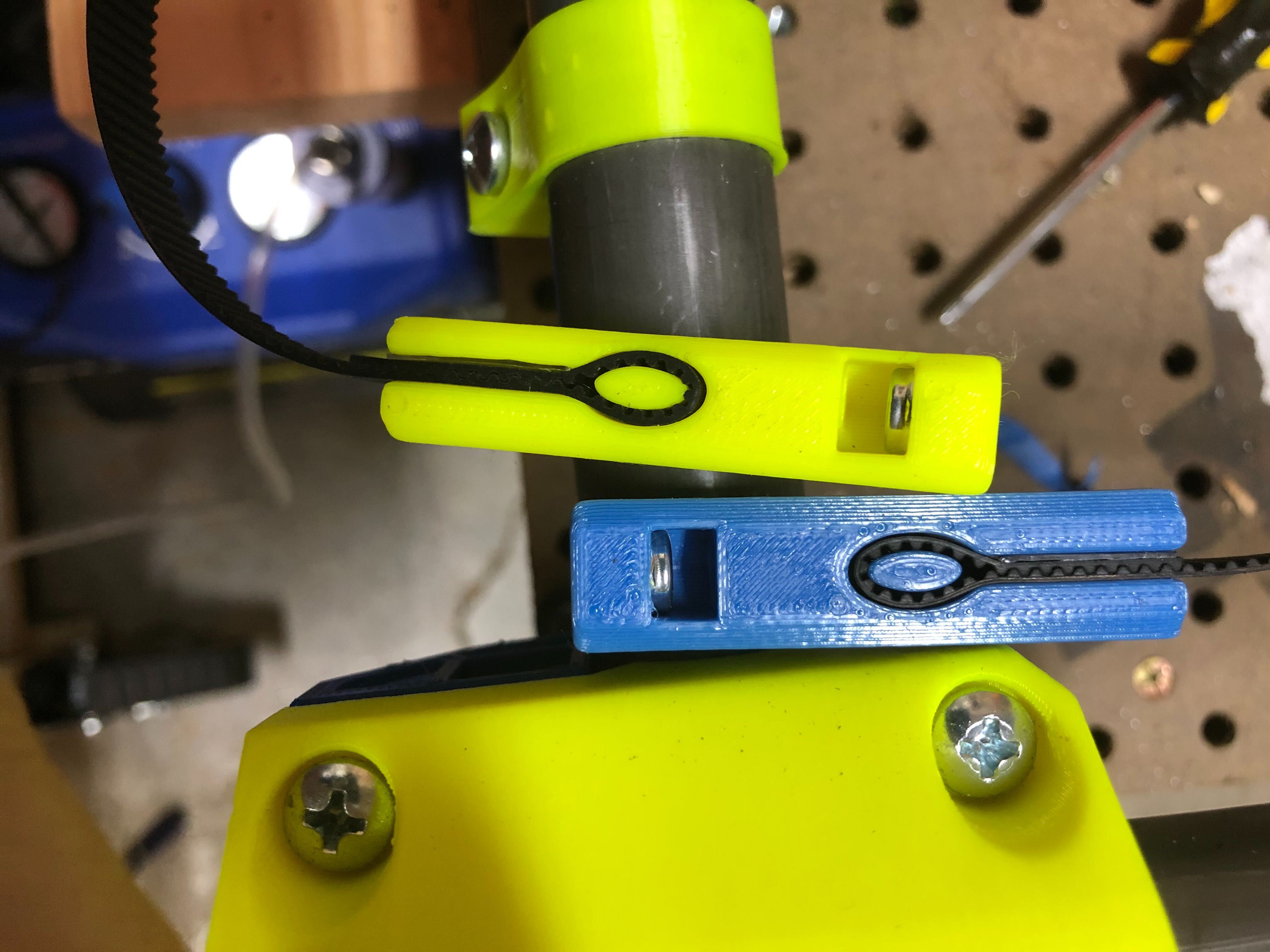
Can you post a picture of the belt holder? It might be a combination of multiple factors besides just slicing.
nellson
(Nick Ellson)
July 24, 2020, 4:02pm
10
Here is one of each. Using the plastic blister shield of a pair of pliers package to wedge into the slot works like a charm. The Yellow was a tad tighter than the blue.
nellson
(Nick Ellson)
July 24, 2020, 4:03pm
11
I will once my tool holder mods finish
1 Like