Hello, I recently upgraded from ramps to Jackpot3, have been running light burn as I am lasering. Everything worked with ramps, it sat off for awhile and I wanted to upgrade. I noticed that my Y/B and X/A were not moving equally (belt tension is adjusted). I am powering the JP3 with a 10amp 24v power supply. I disconnected the servos and hooked up a motor and just set it on the work bench to observe. What I have discovered is that between Y/B and X/A, with it plugged into Y, it rotates 2 rotations at a decent speed. With it plugged into B, it rotates 3 times very quickly. I have reviewed the yaml file, and all the settings between y/b and x/a match. I also noticed when I start light burn each time (after first starting the JK3) the axis will not move the same programmed distance. Do I have a bad board? Thanks!
Open the webui, and type $SS into the terminal, show us what it says.
It sounds like your config was deleted.
Did you edit it to run on an MPCNC, they come flashed for a LR?
For machine it states MPCNC, config file: config.yaml (upon arrival from V1E it stated LR4, (have a Mac) from the GitHub MPCNC JP3 page I downloaded the config.yaml and preferences files and deleted the original and uploaded the downloads.
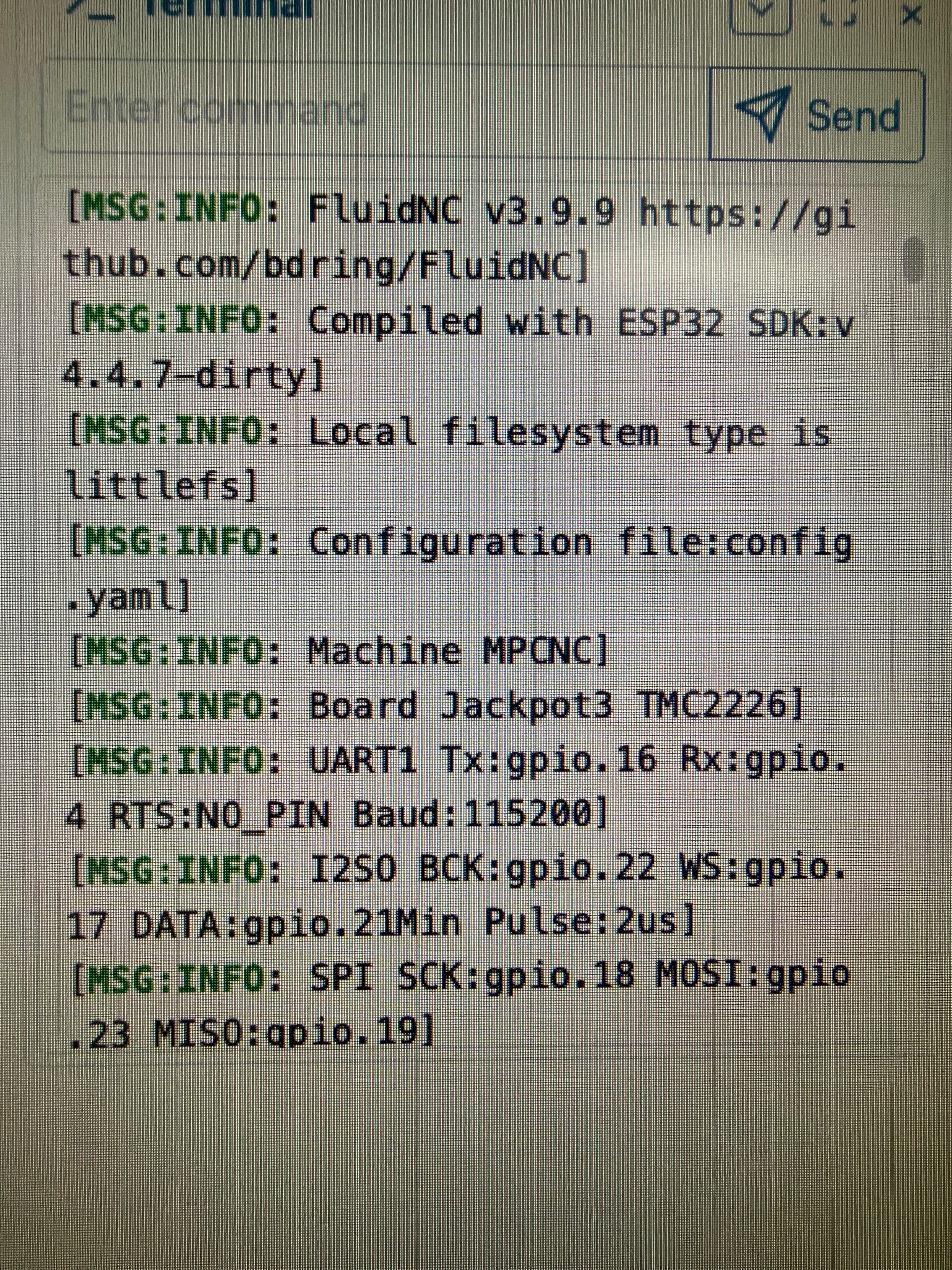
Instead of using lightburn for control, do your testing with the webui.
I am not sure what is actually going on.
Make sure you are not plugged into the computer with the USB cable when you start up the control board. This will not load the drivers correctly. Power down, unplug the usb, power back up and use the webui.
If you want to use lightburn, there are options to kill the USB power, if you do not want to unplug it each time, or just use gcode files.
I unplugged the usb c and rebooted and using the webui, Y/B, X/A move properly now. What are my options and how to for using lightburn to control? thank you.
Easiest is just plug in the USB after boot. You can edit your USB cable to delete the power line (or buy one without the power), or you can pull off one diode from the Jackpot 3.
24v, then usb, then starting lightburn has solved this. Thank you!
In initial testing, I have been able to run the jackpot (1 in my case, but I’d think 3 would work the same) connected to my home wifi in station mode and have Lightburn connect to the IP address of the jackpot board. I did set a DHCP reservation in my router so the jackpot always gets the same IP.
I haven’t run a lot of complex Lightburn jobs, but it works as expected once the TCP/IP connection is made.
If you have a good connection, station mode is really nice, keeping the same IP is just the icing on the cake.
Now I am having issues getting the laser to fire, if I have read the yaml file correctly, gpio.0 is used for PWM. I did find in the pref file that Pin 2 was set to be controlled by M62/63 P2, so when pin 2 button was pressed it was turning on pin 0, I changed it to P3 and now it fires pin 2. Using webui with the laser menu on, it will not fire. I can plug the laser into 26,27,2 (5v) and use the buttons and the laser fires just fine. I’ve also tried the spindle controls and no luck. $32=0, but it will not let me change $32=1. In lightburn the laser will not fire and in the device settings I have no options for which M codes to use for firing the laser. Laser is a jtech 34W.
Thank you.
If you have the laser section defined in the config.yaml, this should get you the rest of the settings: Using LightBurn with FluidNC | Wiki.js
Laser still does not fire. I have checked the config file, and gone over my LB settings, even deleted and re added the laser. Here is a photo of the laser section of the config. From what I have read online, fluidnc is supposed to default to laser mode, but my $32 remains 0, and I cannot get it to change either in the webui or LB.
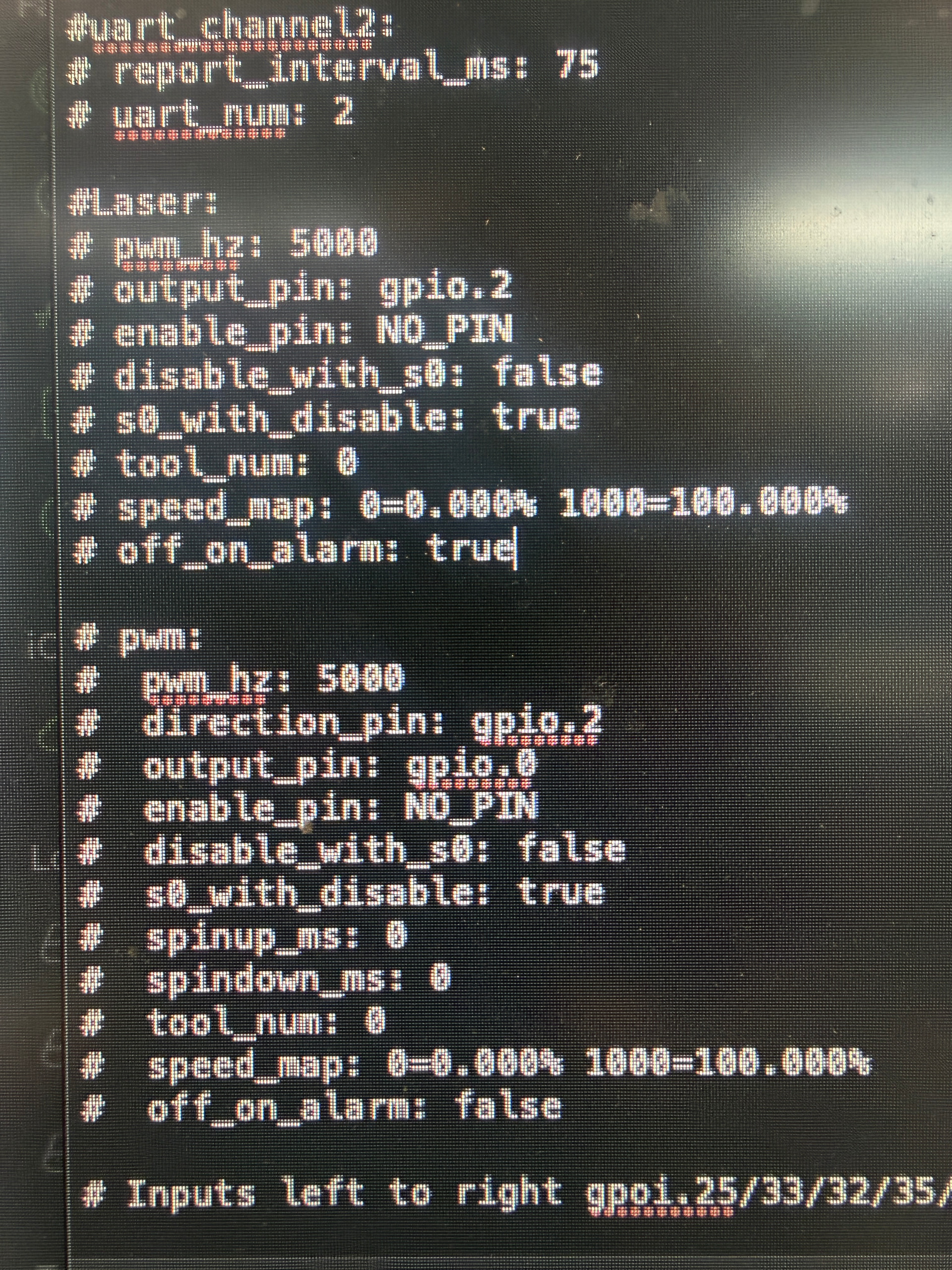
The “#” in front of all those lines means it is NOT enabled.From PWM_hz to off_on_alarm, remove the # in front of each line, leave one space.
Edited, and re uploaded through webui, cycled power, deleted and added laser in LB and still not working. I verified that if I plug into pin 2 and fire through button 2 in webui the laser does fire.
Do you have any errors in the webui terminal on boot or $ss?
You have to make sure you only have pin 2 configured once. I’m sorry I can’t just give you a config but I do not currently have lightburn to test with. Doing my best to help blind.
At boot I have a “sdmmc_card_init failed code 0x108]”
No alarms displayed with $SS. I appreciate your help, I’m a CNC/equipment tech myself, so I understand what it’s like.
Does the laser section of the webui work now?
I am going to change the title of this thread. You started a new topic so all the people using lightburn are staying away from “MPCNC Motors”, they could answer this real easy for us.
Laser does not work in webui. Now when I turn the board on, it’s in an actual alarm state with the same sdmmc_card (do not have a sd card in the slot), with every line beginning with a orange “alarm” and I cannot do anything.