I have an Atomstack laser engraver that I converted for pen plotter use. It uses the Harry Plotter setup - an Arduino Nano translates laser power over 5% to pen down, below that to pen up.
I’d like to test out the Atomstack plotter against my MPCNC with a pen mount for purposes of accuracy. I was hoping to use Estlcam to create the gcode so I could have a single source of truth for the tests. I can’t seem to find out how to set laser power or any details on how to set it. I’ve already created a tool using the waterjet/laser settings but that’s it.
Anyone know if there’s a way for me to set this? Optimally it’d be the same sort of setting in Lightburn and other laser software where you set fixed vs. variable power.
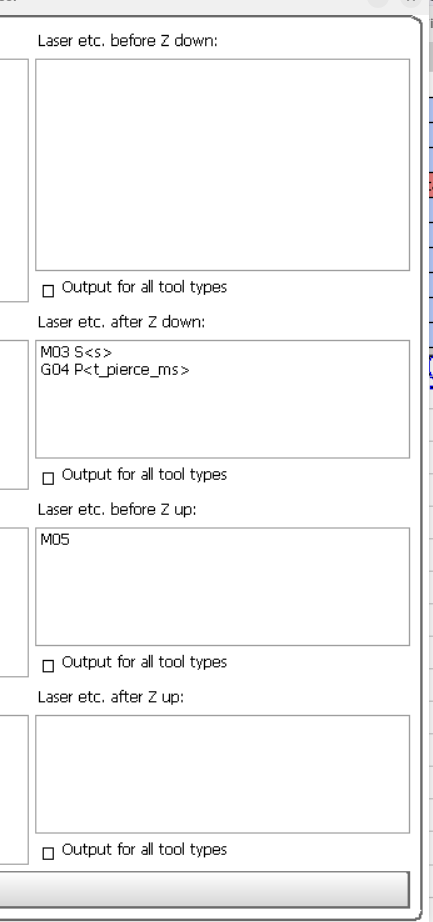
Spindle/laser control is done via a 5v on/off pin and a 5v speed/intensity PWM (0-100%) pin. My zero laser experience suggestions are: Add a Laser tool to Estlcam v12 and set RPM to your desired 0-100%. By default (Setup > Programs > Texts Laser) Estlcam will add ‘M03 S<s>’ (laser on @ 0-100%) lines to turn the laser on after each Z down move and ‘M05’ (laser off) before Z up moves.
Thanks - just to confirm, this is what I presently have. Since the gcode to turn on the laser at a certain power will cause it to deactivate the servo and drop the pen, do I need to make any changes? Likewise do I need the G04 dwell code since I’d want the pen to go up and down exactly when it’s needed?
Only if the pen isn’t where it needs to be before X,Y starts moving. Note that the laser tool Pierce time setting is in seconds (<t_pierce>), that using <t_pierce_ms> will multiply it by one thousand (appropriate if your controller expects ms).
Since you get a pen on your laser I am assuming it is a diode laser. And for diode laser often your machine can go way faster then necessary, and thus setting your pwm is pretty useless, you should set your speeds.