Questions about Compass

I just heard of this and think it’s very impressive! I was in awe of the shaper origin when it released and you are doing it without their “handle and blades” model which “needs” the special tape.

I would love to know if you can elaborate on some of the details of operation.

  • can it work with the tool right up to the edge, or even the corner, of the stock?
  • how does the workflow go, or how is it envisaged to be, for complex jobs? An example would be cutting out multiple closed shapes like circles to create a perforated sheet? What does workpiece referencing go and can you lift the tool mid-cut to check on the cut, prior to resuming a cut?

Congratulations on such a compelling machine.

3 Likes

Hey Simon, appreciate you reaching out! To answer your questions:

It needs to have a minimum of two sensors on the work surface at all times. The machine has four sensors which are centered around the tool, so depending on how you have your stock set up and the kind of design you’re doing, this may be possible–though it is always optimal to have as many sensors touching the surface as possible.
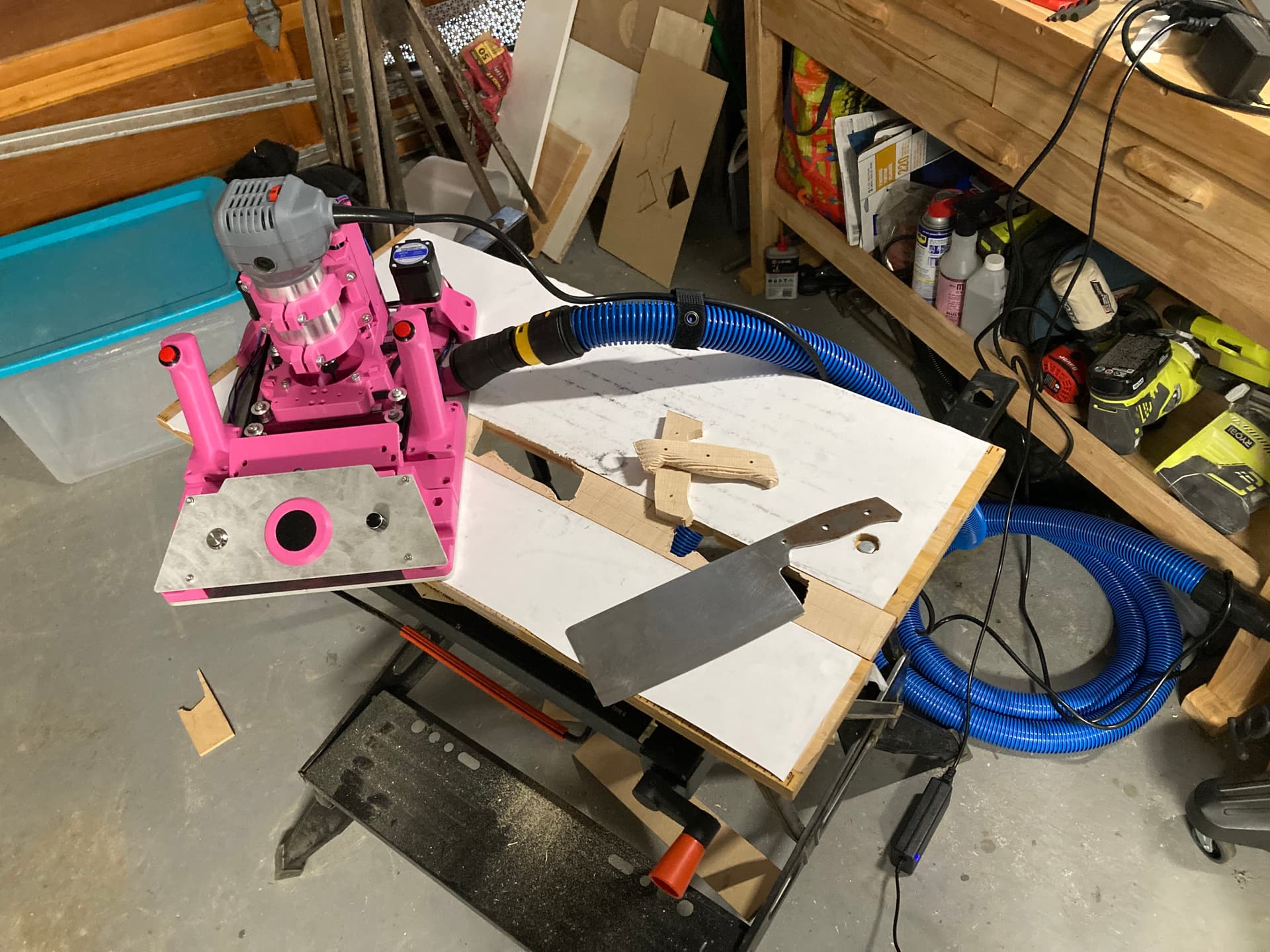
When I’m trying to cut small stock or edges, I will set up a workholding jig to essentially extend the surface of the stock so that I have more sensors reading. I’ve been using a B&D workmate bench that works pretty well for this. You can see here how I clamp a thin piece of stock in it order to get more sensor readings on either side:

The software workflow is the same as a standard CNC machine, going from CAD->CAM->a gcode file. Wherever you start the design from is (0,0), so you take that into account when developing your CAM. I use the baseplate as a reference so that I can align it with the corner of my workpiece . That was I know exactly where my tool head and design should be relative to that.

If I need extra precision, or compliance with lift-off (usually for tool-changing, but you could also lift the machine to check the cut like you were saying), I use a 3D printed “homing bracket” to start my design from. This way I can always return there and know that I’m at (0,0).

Thanks again for the support! Hope that clears some things up

5 Likes

It would be great if you could share a picture of how the work “homing bracket” in use, next time you use it.

I’m imagining there’s a lot of flexibility over homing and work referencing. For larger pieces of stock, I wonder if there is a way to reference fiducial marks to address sensor drift (which I imagine exists but have no idea what it’s impact on accuracy is).

2 Likes

Sure, I’m hoping to put out a lot more usage videos this week, so I will definitely include one with the homing bracket.

Hmmm, something like this? :sweat_smile:

Jokes aside, there are definitely a couple ways to add absolute positioning to eliminate sensor drift, but they would (as far as I can tell) require extra sensors and external markers. Things like computer vision with fiducials, IR towers, or physical string potentiometers mounted at the workpiece corners. The downside is that this would add significant setup complexity and cost to the system. Some kind of solution like this isn’t out of the question, though.

It is theoretically possible to implement workpiece mapping with the current optical flow setup, but in practice it would be a whole other thing. The actual FOV of each sensor is pretty small, so it would need a lot of data (i.e. a lot of manual movement by the user to map the surface) to get a good read of the workpiece. Ehh actually now that I think about it more, the mapped surface would still be prone to the drift of the sensors, so there’s no way to tell whether that map would be accurate… Alas it might not even be theoretically possible. Maybe someone smarter than me could figure out a way to do it

As far as accuracy goes with the current sensing setup (I’m just taking this from a reply to a YT comment that was asking a similar thing):

there’s always going to be some drift with this sort of relative positioning setup. The name of the game is figuring out ways to minimize that. Using optical flows instead of IMUs to get a single integration instead of double, starting with a baseline of high accuracy/precision sensors, as well as including a redundancy of sensors (4 optical flows instead of 2) all helps. With a super rudimentary averaging scheme between sensors, that comes out to about 0.1% error per unit distance traveled - which, depending on your use case may or may not be acceptable. There’s a lot of room for improvement on the software side in terms of sensor fusion to hopeful bring that drift down even more. We chose to prioritize ease of setup and the absence of consumables, while accepting some small level of drift

I’ll try to post a video that gives a bit more depth on the accuracy and drift as well :slight_smile:

5 Likes

Neat that Compass is Open Source, that creates an opportunity for diverse set of ideas/suggestions and contributions from Cam and/or community to solve/implement post V1.

4 Likes

Hi! I came across Compass from your YouTube video Cam, great stuff! Really looking forward in the only electronics/pcb kit. I was just in the shower pondering about about positioning to an absolute center. As that is needed for example to do joinery like mortise and tenons on already cut wood. I was thinking about those like following robots.

I’ve been looking into a method using a couple of simple and cheap IR line-following sensors that are mounted in the 3D printed router holder at. Here’s the theoretical approach:

  • Mount two IR sensors on the tool head, at a 90-degree angle to each other.
  • Draw a cross on your workpiece with a thick black marker.

The Method for True Centering:
To find the exact center, you can do a two-pass scan over each line.
First, move across the line and record the machine position the moment the sensor triggers. Then, move back across the line and record the position where the sensor turns off. The true center of the line is the halfway point between those two recorded positions.
You just repeat this for the other axis to find the precise center of the cross.

This way we can just use traditional woodworking’s technique with just a ruler; no need for fancy pattern tape. Only problematic on darker woods; but then you can flip the algo to only look a t lighter surfaces and use thin white tape or something.

Again; just a thought experiment; I did not test this

Great stuff! Thanks for all your work on the compass thus far!

3 Likes

Oh wow that’s a super cool idea!! Gonna read through again in the morning when I have more brain capacity

2 Likes

Okk a little delay lol ended up getting food poisoning yesterday.

I dig it tho. The one thing that would be tricky is incorporating orientation as well. But, you could probably use the same (or similar) approach to get this information as well. Just read do IR tracking on two parts of the line. And if the IR sensor is mounted to the toolhead, or even just to the XY plate, could we just get away with one sensor instead of two? I’m imagining moving the device in manually to the rough area of the cross, then getting a more refined/automatic analysis using the XY motion system to move the sensor back in forth. Is that sort of what you were imagining?

3 Likes

:poop: That sucks! Hope you feel better soon!!!

2 Likes

Thank you :pray: very appropriate emoji usage hahahah

2 Likes

Hi! Thanks for looking into this. Hope you’re feeling better from the food poisoning - that stuff can really knock you out and linger for days.

You brought up an excellent point that highlighted my blind spot. I completely forgot we’re working with an XY gantry system, so you’re absolutely right - we’d only need one sensor. The system can simply move that single sensor to perform both X and Y scans, operating like a flatbed scanner with a back-and-forth raster pattern.

We can efficiently start with a coarse scan of the first 5cm area to locate the general intersection, then do a detailed scan of targeted points around that area. The more measurement points we collect, the more accurately we can determine the true center. Throughout this process, we’d log the precise X and Y coordinates at each measurement point.

Knowing the crosshair position is only half the battle though when I think about it. If the router bit doesn’t cut where the system thinks it should, all that precision becomes offset as well, do you already have a way to calculate the router bit offset?

My idea for solving this - 4-Corner Router Bit Offset Calibration:

  1. Scan crosshair to establish reference position (X₀, Y₀)
  2. Cut 4 reference holes at known ±10mm offsets from center
  3. Scan the actual hole positions using the sensor system
  4. Calculate systematic offset by averaging the position errors

The math is straightforward - for each hole, calculate the error between commanded and actual position, then average all 4 errors to get the systematic offset: X_offset = (δx₁ + δx₂ + δx₃ + δx₄) / 4

This approach gives us redundancy through 4 measurement points, accounts for spindle runout and machine flex, and provides self-validation. Once calibrated, we apply the correction: corrected_position = target_position - calculated_offset

Essentially, we’re creating a mini coordinate measuring system using the gantry’s own capabilities. The crosshair gets us into the ballpark, but this calibration system gets us to precision.

What do you think about this approach for handling the router bit offset issue?

I made a Claude demo, so you can take a look at it: https:// claude.ai/public/artifacts/59bfa2f4-7291-4f02-8ed2-a3a8c140654a
Is one crosshair point enough? I’d say you’d either need two points or one point and a straight line / edge to create a full 2d plane. If you just got one point it might be harder to get the thing you are milling properly oriented to an existing workpiece.

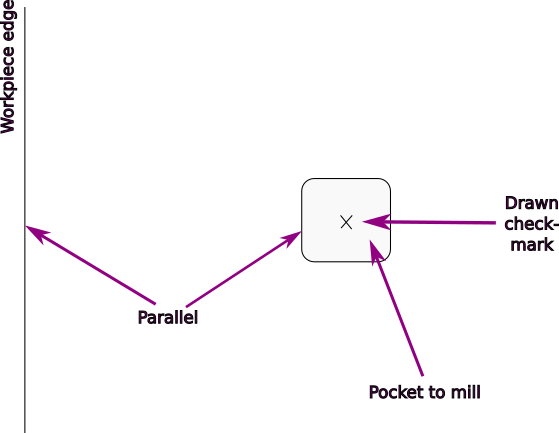
Let’s say you want to mill a pocket into an existing workpiece like this:

You draw a checkmark where you want the center of your pocket, but then you also want to move Compass to the edge of your workpiece and scan the edge, so that your pocket can be properly parallel to the edge.

Is this workpiece edge scanning something that is possible with Compass?

1 Like

When thinking about this some more I came up with more uses for edge scanning:

You are maybe familiar with biscuit joints (Lamello brand) or domino joints (Festool brand). They both require a dedicated and expensive routing tool to place. It would be nice to be able to use Compass for this.

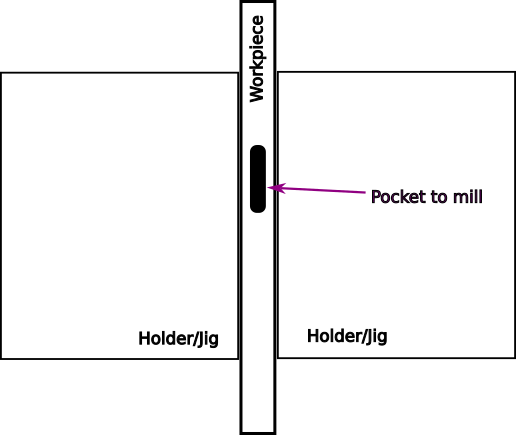
You would clamp the face side of your plank between two parts of a jig / holder, so that Compass has a flat plane to operate on. Then you would want to scan along the two edges of the workpiece and then set the reference point to the center, with the 2d plane oriented perpendicular to the edges… Then you could mill out the required pocket for the biscuit or domino joint.

Like this:

1 Like

That’s basically what Cam has shown already, that he clamps it in between to boards on his workbench. :slight_smile:

3 Likes

I don’t think edge finding is needed here, good suggestion though!

In the process of finding the center you actually have two points, making it possible to derive a 2d plane. (Or by doing multiple passes you even have more bounding of the two lines which all aid to finding the center of a thicker line drawn with a ruler)

Ideally the parralism to the edge comes from how straight and perpendicular you draw your crosshair on the material at the desired place and how real world dimensions you make your CAD.

That way you can choose what you want, create the CAD with edges in mind (and making the path for example start off-center) or starting at 0,0 and have the design router at exactly in the middle.

This is the way I currently do it when I make jigs for domino like holes: Just 3D print, align it to the crosshair I drew (dead center of both edges), clamp it down and router using a follower bit or a bushing. Sometimes you want center holes and sometimes you want holes offset from the center for visual purposes.

2 Likes

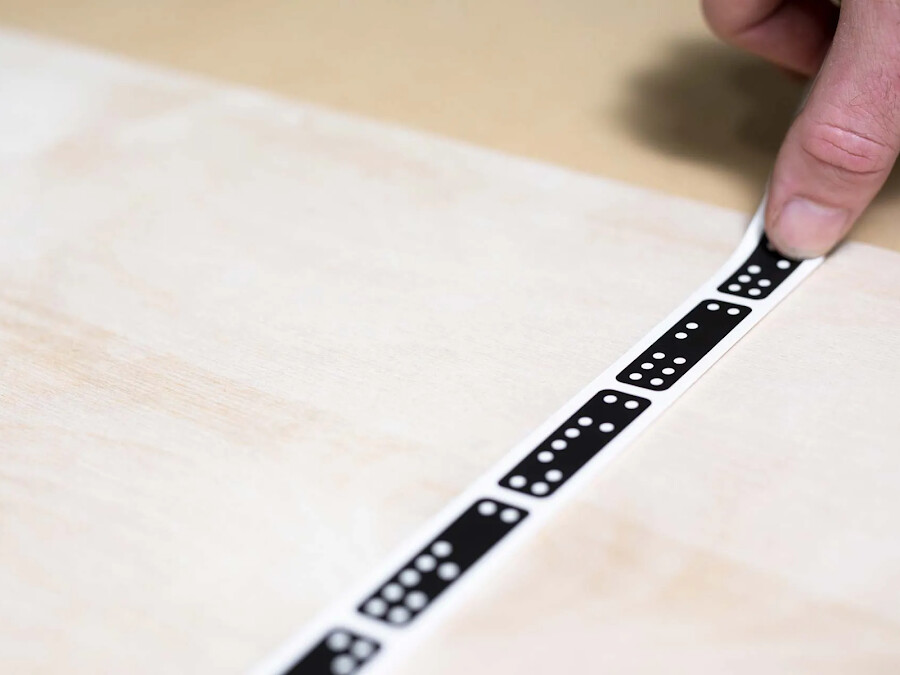
Yes, this is of course often possible. For example when you use a marking gauge tool like this to mark the line parallel to your edge:

But regardless how big you buy your tools, it is always going to be one size too small for your current project :slightly_smiling_face:
So you end up having to measure multiple points with a ruler and introduce inaccuracies this way.

I think the ability to measure edges would be a nice capability.

Yes, this should be assumed to be known. The tool location in the machine frame is found using limit switches on the machine. There are three limit switches, for X,Y, and Z.

I haven’t though about this before, but yes that should be possible! You could theoretically use the sensors to align with an edge or corner of the workpiece. They are able to detect lift-off (or when they stop getting readings), so they would be able to tell when they move off the workpiece (or when they move back on). There could be a shnazzy little interface to show the sensors’ status so that you could line it up as close to the edge as possible. To go even further, you could theoretically get the camera feed from the sensors so that you can actually see where on the edge you are. That would require a lot of processing power, though.

But yes, I agree that being able to reference edges is a pretty huge feature.

Yuppp, as @Tokoloshe mentioned, I have been using a B&D workmate for this. It’s not perfect (it’s got a bit of slop that sometimes makes the top planes bow if clamped too hard), but it does the trick.

2 Likes

The edge detection would be a feature that you explicitly enable, not something that constantly runs in the background. So the processing power to analyze the camera feed from the sensors would only be required in this moment, and there wouldn’t be any cutting action going on in this moment for example.

Also you wouldn’t have to analyze the camera feed of all sensors at once, but just one or two. You’d move Compass across the edge, so one or two sensors would go from regular motion to lift-off state. You’d then activate the camera feed from exactly these sensors. You then slowly move the Compass back onto the workpiece and this is when you’d grab the edge position from the camera feed.

I haven’t investigated the camera mode in the sensors datasheet in detail. Is it possible to grab one image at the frequency you want or is it a streaming mode where you either get a stream of n images per second or nothing at all? If you have a command to get one image, you’d be able to grab just as many images as the remaining cpu time allows.

That’s a good point.

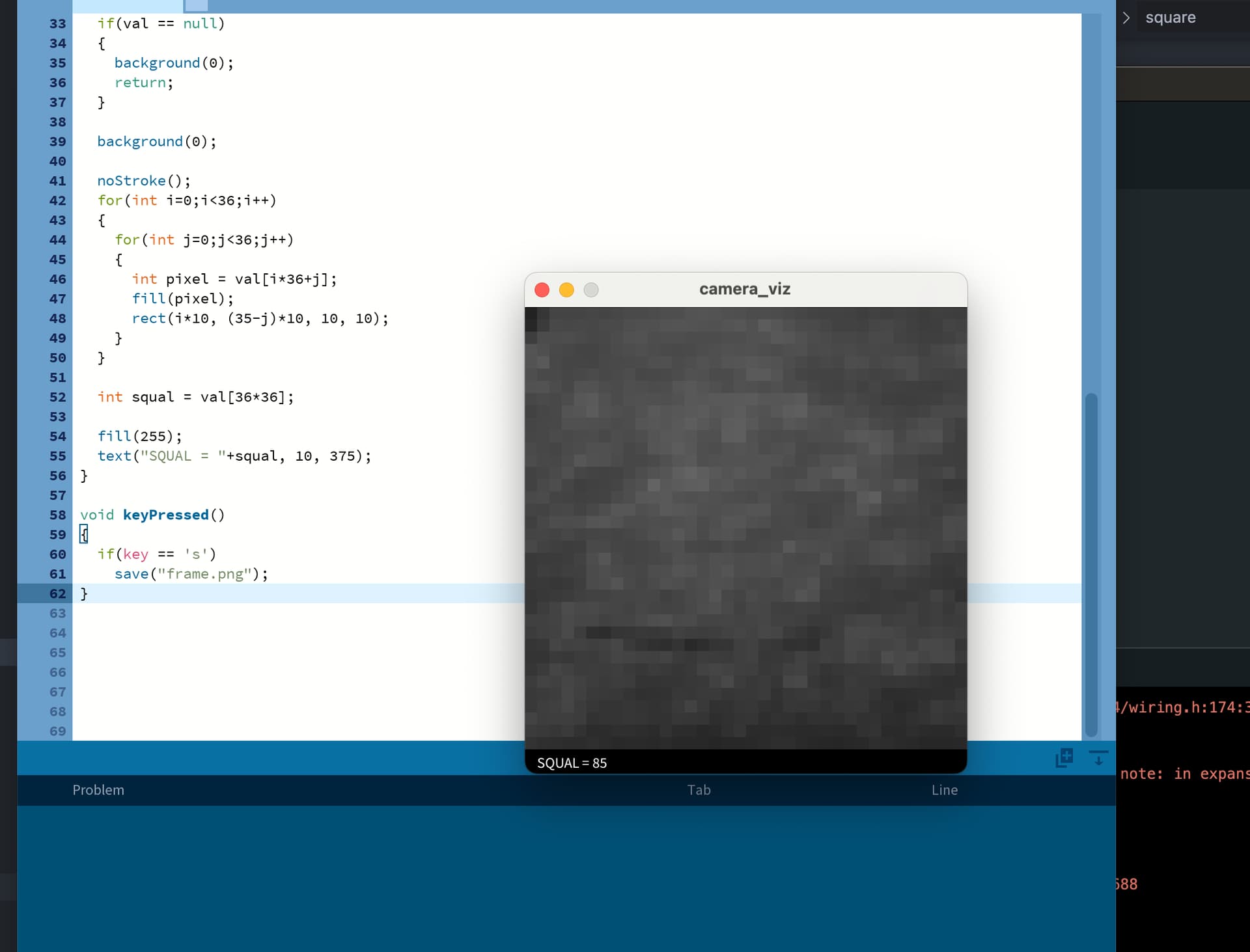
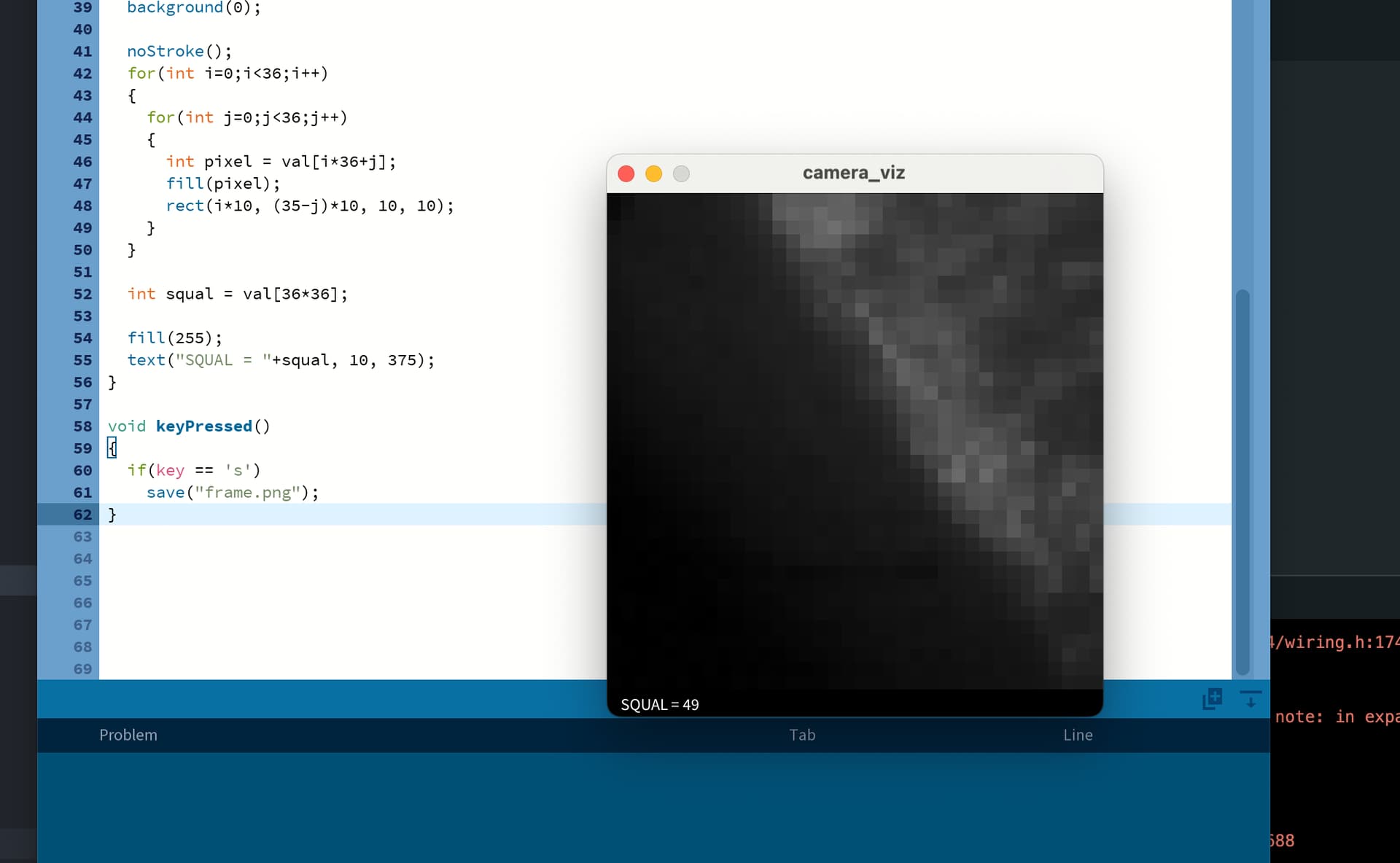
Yes, totally. Seems like it shouldn’t be an issue. I actually just found a script to run a little camera visualization with Processing. Pretty cool stuff:

This is polling every 50ms, but it could probably go a lot faster.

2 Likes

When placed on the edge of my table:

1 Like