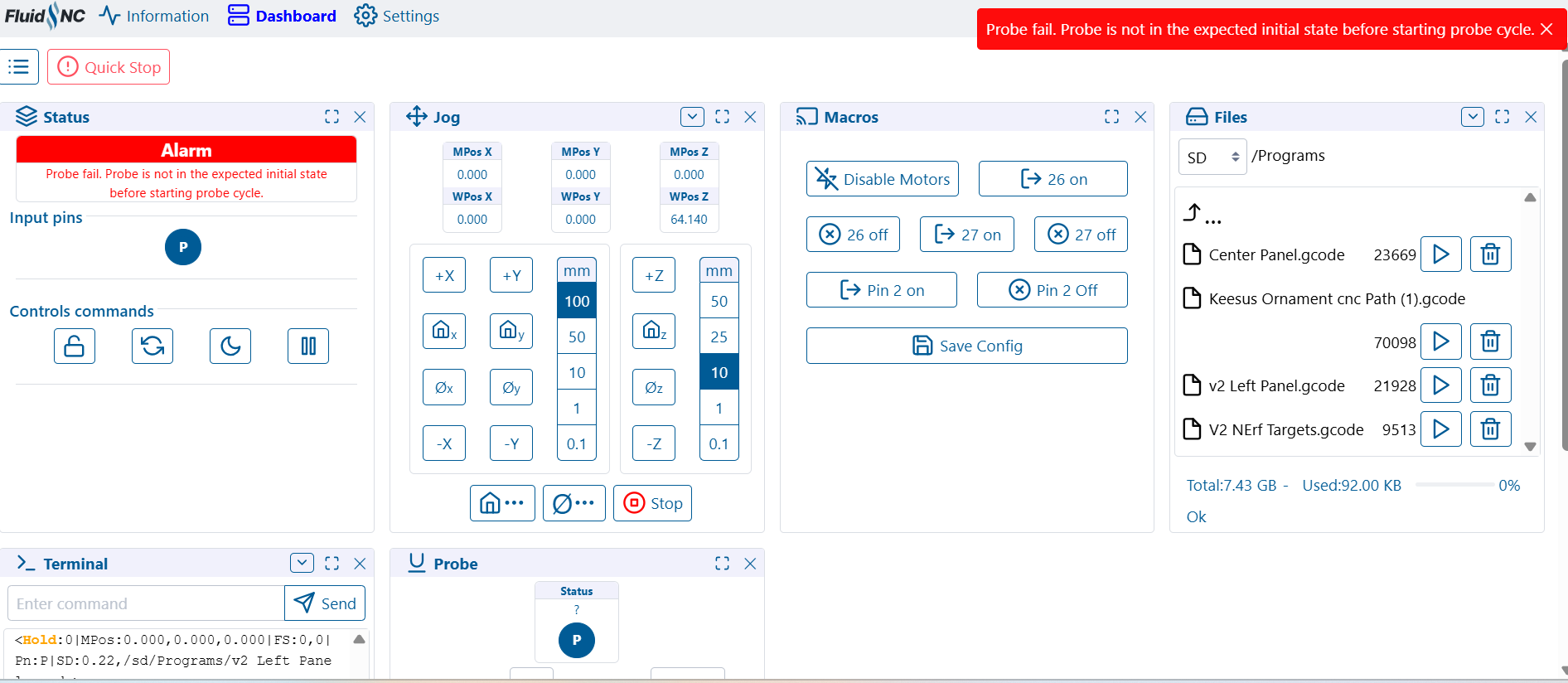
I looked at the probe continuity indicator light on the jackpot board and it seems to be behaving normally. The light turns on when I touch the probe to the bit and turns off when I take it away.
I even completely disconnected the probe from the jackpot board and the WebUI continued to say that the probe was still making continuity.
I have tried restating the software, power cycling the machine, and trying known good GCODE. With no success thus far
Anyone know whats going on here? Or how I can fix it?
Do you have dust collection? If so, is it grounded?
Ungrounded dust collection can cause all kinds of issues. Other things like moving the machine too fast by hand or swapping cables while powered can kill stepper drivers.
Where does your dust collection ground wire go to from the dust collection hose?
It should be going back to a ground as far away (electrically) from the jackpot VMOT power as is possible. A dedicated run back all the way before the Jackpot power supply is preferred.
Is it possible that you swapped pin polarity when you moved the probe pin? I’m curious if that pin on the Jackpot is fried, which most often comes from ESD damage.
I have the wire in my dust collection hose bolted to the steel body of my dust collector. I checked that there was continuity between the ground pin on the dust collector cord and the wire in the duct collection hose.
I have my jackpot power supply and router on 1 circuit. And my dust collector is on another circuit.
I don’t think I switched the polarity of the probe pins. But that wouldn’t matter because the board is just looking for continuity, right?
I definitely agree, that the pins are fried. Just have no idea how it happened.