You mean your hard drive bit the dust?
If you’re installing from buildbot it’s not too bad. Compiling from source takes a while.
You mean your hard drive bit the dust?
If you’re installing from buildbot it’s not too bad. Compiling from source takes a while.
USB stick, and the partitions are there still but no boot. I am sure I screwed something up. I am trying that new mx linux link you provided right now.
Let me know what you think, I haven’t used mx before. I tried to spin it up earlier today on a VM but my virtual disk ran out of space to install Linuxcnc and I lost motivation 
It did look nice though, better than the default debian install.
I think I am going to skip all the windows look alike stuff. I can get around in linux…I think. So I will get it installed and then go back to your setup to get the setting basics in.
I had to start keeping notes and labeling all the wires, it is getting bit excessive and I still need to punch in the new port for the touch probe, 4 wires.
I really do not want to run this control box 100% of the time, I am wondering if I can get away with shielded wires (my stock wires), or I will use the aviation connectors to wire up the SKR or a rambo and just plug and play. Now that I say it that is surely the best idea.
Just to big and bulky?
IRT Linuxcnc going from plasma to milling is as easy loading a different config.
I know that feeling.
I haven’t even started wiring up the new controller and I’m already having anxiety attacks about it. I’m still collecting parts. I’m hoping to do an all DIN rail controller. I’m picking up small individual 48v power supplies for each stepper driver/stepper. I’m having to design my own DIN mounts for some of the equipment that doesn’t have one.
I’m going to use Mach4 only because I have it and I’m hoping to have it drive the controller through an ESS card. My plan is to have the Lattepanda mounted to the back of the LCD on an arm and only have power and ethernet going from the computer down to the controller.
This is all in theory right now. 90% of the equipment for the controller is still living in boxes as I collect them. I do have enough parts collected that I could wire up at least 1 stepper motor. I should probably do that to test.
I do plan on using aviation connectors for everything going in/out of the controller box (except the ethernet).
Well at least at first I need to use recommend parts. A fresh build tends to need a lot of testing, mostly just to double check any issues or complaint that come through in the early days of release. (new/updated LowRider)
Kinda funny, linuxcnc is not really as bad as I expected to setup (so far), but the lack of a NEW inexpensive recommended computer makes it hard for a new builder. Like imagine if I wanted to sell a cnc based on running linuxcnc…browse eBay for a really old computer, cross your fingers it works, and if it does, see if it has low jitter. When this can run on some sort of pi, or ~$150 mini/nuc…it will gain a lot more traction. Even better would be a purpose built board with drivers.
I have MX linux disk ready to go. I am going to try the persistent setup, super interested to see if that will be enough. Rufus lets you specify the persistent disk space before even booting!
Home assistant has similar woes. They managed to get enough momentum themselves (there is a company backing the project now, that has a paid service for cloud features). Now they are making their own little boxes:
This one is really made by odriod. There are a few manufacturers willing to make just a little more expensive SOCs than rpi that are pretty good. They are almost all arm though, which can be a problem when trying to port i386 packages over. I wonder if one of those would work well enough to be a recommended platform.
There is another one (on crowdsupply, yuck): Home Assistant Yellow | Crowd Supply
It would be cool if I knew enough to test boards but I am not…yet. I am following directions, lots of typing, updates, installs, sudo everywhere…smooth so far. Very nervous that if something goes wrong I won’t even know. This is what mew marlin users feel like editing, compiling, and flashing boards for sure.
The oddest part is new faster computers are not better. Apparently it is harder to get real time stuff to cooperate because of all the power saving stuff and extra cores.
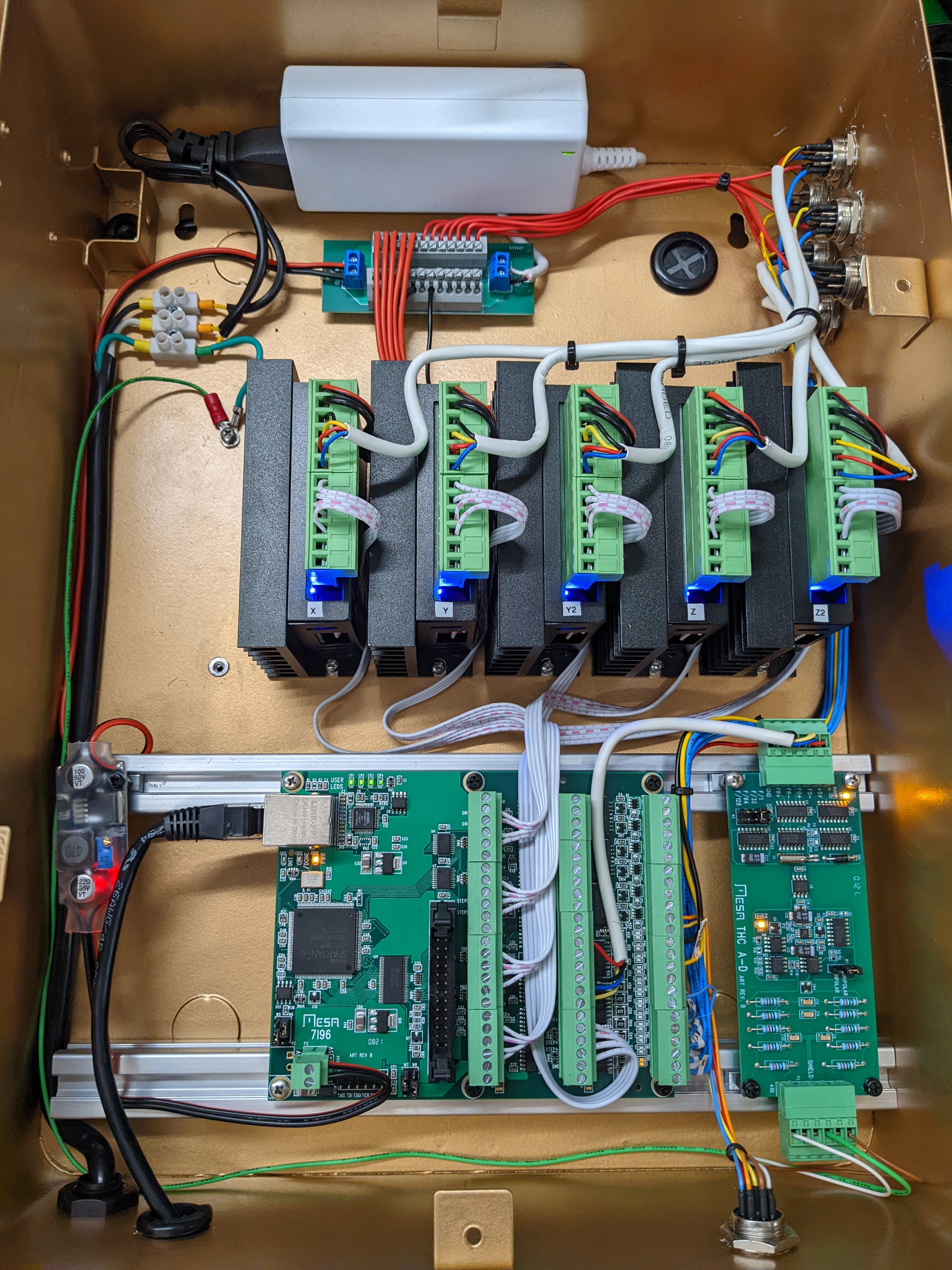
Pretty lights…and back in business. Motors are spinning and limit/homing switches work!
Might have to do a torch test.
Looking clean!
What power supply is that? And what’s that component on the far left? (Edit) oh that’s a dc step down for the 7i96
24v 2A, we’ll see how it does.
looks like I can’t test the dual axis without homing them. I only soldered up one pigtail so those are going to have to wait. Everything seems to be functional, and setup is a little easier now than the instructions you wrote, the thc-ad now has a calc built in.
Before I wire up the cnc all the way I think I will work on the torch controls tomorrow, plug them in at least and test them. I have the repeat build on my lowrider table for taking the build instructions pics, so I need to get that finished and cleared out, ASAP
You might try adding
kinstype=b
to the loadrt trivkins line in your hal file. I can’t test right now.
I will try that tomorrow, thank you!
Okay, so far everything is checking out. I now have control of the torch firing, and I can see the voltage, 127 while firing in midair, that should come down a ton while working? Or maybe that is 1.27? I have a THC-AD 10…
Now to wire up the touch sensor.
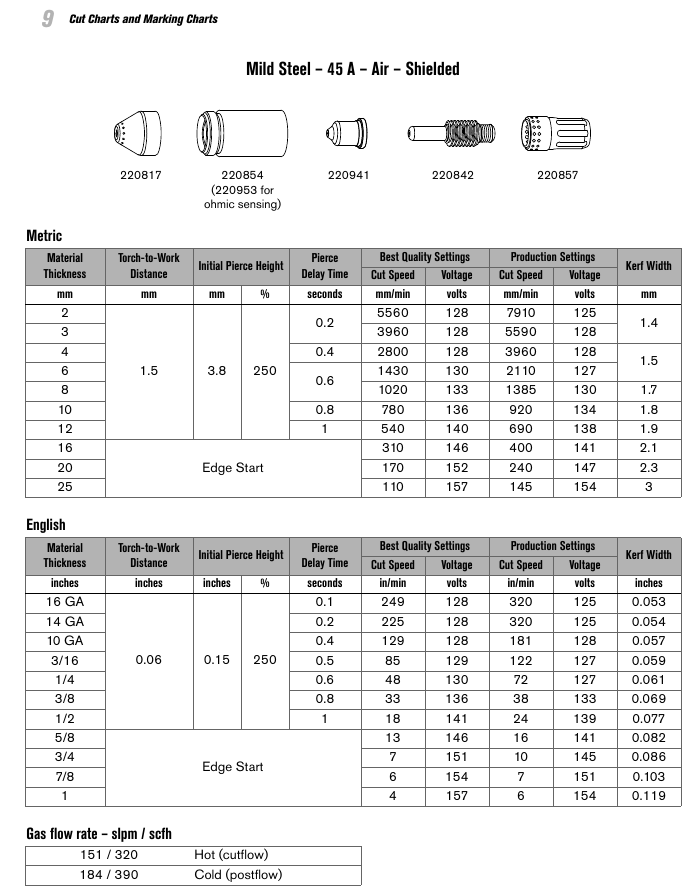
Are there any cut charts for your plasma machine?
For a frame of reference my hypertherm powermax 45xp cuts at between 128 and 157 volts. But the real thin stuff cuts around 70 to 80 volts.
Oh, so I put in the scaling numbers and the display is doing the math and showing the real volts not the actual input? That sounds right then. The charts I have do not have that much detail.
I only popped it a few times last night, I will have a better look today and check with some of those built in tools that qtplasmac has. There is a very slim chance, but I could possibly give it a test cut this evening.
Yep! I mean… if you wanna get super precise it’s showing the calculated voltage. If you trust the calibration values from the factory then it’s showing the real voltage. When I first got my thcad I plugged it into a large power supply on a voltage divider circuit with a pot and given the factory calibration values the calculated voltage was exactly the same as my multimeter readings across the range I tested.
I bring this up because early on there seemed to be some hesitancy on the part of some of the developers to trust the calibration stickers. I trusted mine so that’s why I slapped together the thcad calculator to convert sticker values to what plasmac needed. Now this calculation is incorporated into pncconf.
It’s even been suggested that maybe you should measure the cut voltage from the actual torch when it’s firing against this calculation but I haven’t been brave enough to go that far.