somewhere, I read that this router can sense and adjust speed depending on load!
Let me see if I cand find it.
somewhere, I read that this router can sense and adjust speed depending on load!
Let me see if I cand find it.
They all do that already.
I suspect that’s probably someone getting a bit overly ambitious with the advertising copy.
With a series-wound motor like this it will have to sense the load and adjust accordingly to maintain speed. The load sense is probably just ‘speed is lower than expected’ but could also be current based.
Without doing that, adjusting the speed adjusts the voltage applied to the two coils which in turn lowers the current. That lower current also means a linear reduction in torque, so setting the router to half speed would give you half torque and 1/4 the power. The way around that is to have the controller measure the speed and when the speed starts to drop, increase the applied voltage.
In that sense, any router with a speed adjustment could be considered load sensing which is what I suspect they mean. If they mean that the speed increases with load then that’s possible as well, just not really what would seem to be a great idea for CNC purposes.
I have yet to do a side by side test to confirm, as I need to fix the other issues with my machine first for it to be scientifical, but I’m pretty sure the KATSU makita clone does not.
My guess is the dial on the katsu is really varying power rather than speed, and it doesn’t work very well at all for CNC as a result. Need more data.
If you get your T1 delivered, are you willing to open it up to check what they put inside in compared to the makita controller?
Warranty likes a word I guess. 
Hi everyone, working on setting up the T1 in my config.yaml and need a sanity check. Does the code below look appropriate?
spindle:
  pwm:
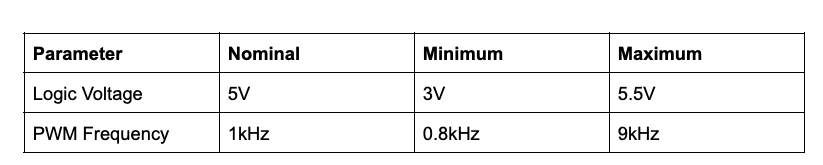
    pwm_hz: 1000
    output_pin: gpio.2   # GPIO pin 2 (PWM signal - blue wire)
    enable_pin: NO_PIN
    direction_pin: NO_PIN
    disable_with_s0: false
    s0_with_disable: true
    spinup_ms: 0
    spindown_ms: 0
    tool_num: 0
    speeds:
      min: 1
      max: 31250
    speed_map: 0=0% 0=20% 10000=20% 10000=32% 30000=95%
I am basing off of the info provided by Scienci from this page:
And logic from the FluidNC spindle speed page:
“spindle:” and “speeds” aren’t valid. You can get rid of those. Reference the PWM section here:
I think your speed map is ok.
I’m not 100% sure if everything is correct, but this is closer:
pwm:
  pwm_hz: 1000
  output_pin: gpio.2   # GPIO pin 2 (PWM signal - blue wire)
  enable_pin: NO_PIN
  direction_pin: NO_PIN
  disable_with_s0: false
  s0_with_disable: true
  spinup_ms: 0
  spindown_ms: 0
  tool_num: 0
  speed_map: 0=0% 0=20% 10000=20% 10000=32% 30000=95%
Also, I’m pretty sure you can’t have a comment after a variable. It needs to be on a separate line.
    output_pin: gpio.2
# GPIO pin 2 (PWM signal - blue wire)
    enable_pin: NO_PIN
Thanks! “Spindle:” - this is why I shouldn’t have AI help me…
I see what I did, I conflated the Scienci recommendations with the official. So speed_map is all I should need and do I need to worry about the $31 or $30 GRBL properties? I see $30 in the FluidNC config in the UI.
Really? In my experience YAML comments handle in-line comments fine. Good to know though, thanks.
I’m pretty sure I tried when I first set up my laser and I got an error message.
Okay, seem to be closer but getting a ‘Error 152’. It doesn’t like my current syntax:
#SOFTRESET#
[MSG:ERR: PWM spindle output_pin not defined]
Grbl 3.9 [FluidNC v3.9.9 (wifi) '$' for help]
[MSG:ERR: Configuration is invalid. Check boot messages for ERR's.]
Here is my current config:
pwm:
  pwm_hz: 5000
  output_pin: gpio.2
  enable_pin: NO_PIN
  direction_pin: NO_PIN
  disable_with_s0: false
  s0_with_disable: true
  spinup_ms: 0
  spindown_ms: 0
  tool_num: 0
  speed_map: 0=0% 0=20% 10000=20% 10000=32% 30000=95%
  off_on_alarm: false
@Britt I took out my comment altogether just be to certain.
This is from the wiki:
speed_map: 0=0.000% 1000=0.000% 24000=100.000%
So maybe try:
speed_map: 0=0.000% 1000=0.000% 31250=100.000%
No, that’s not what its complaining about, its the output_pin. Not sure why.
You have 3 extra spaces at the end of the enable_pin line.
What is the $SS output?
Just in case there was a silly syntax issue I deleted my version and un-commented the example settings in the bottom of config:
pwm:
  pwm_hz: 4000
#  direction_pin: gpio.2
  output_pin: gpio.2
  enable_pin: NO_PIN
  disable_with_s0: false
  s0_with_disable: true
  spinup_ms: 0
  spindown_ms: 0
  tool_num: 0
  speed_map: 0=0.000% 1000=100.000%
  off_on_alarm: false
Unfortunately getting the same issue. Is there somewhere else to enable it?
Good call with the $SS:
[MSG:ERR: gpio.2 - Pin is already used.]
[MSG:ERR: Configuration error at /machine/PWM: ]
The only other place I saw gpio.2 active is at user_outputs : digital3_pin: gpio.2
Commented that out of user_outputs and in business, thanks @Britt !
Just tried M3 and it spun right up. M5 shuts it down as it should.
However, when M3 turns it on there is a short pulse to what sounds close to 100% then backs down to a slower speed. Trying different M3 commands but I am not seeing any change in speed.
Tried M3 S500 thru S1000, S5000, S50%, S70%, nothing wants to change its speed.
You need to change your speed map back to what you had earlier.
I put my original speed mapping in when I figured out the gpio error.
I also just updated the speed map to have the 3 .000 just in case that was needed:
speed_map: 0=0.000% 0=20.000% 10000=20.000% 10000=32.000% 30000=95.000%