(Jackpot V3 is connected to computer via USB while doing/trying load firmware - it is not connected to my MPCNC yet)
I received the Jackpot V3 yesterday from elecrow. It had some web demo firmware installed so I went to https://installer.fluidnc.com/ and installed the latest 4.0.2.
Then I went about setting up the FluidTouch Pendant https://forum.v1e.com/t/fluidtouch-wireless-fluidnc-pendant/ . Got that going however 4.0.2 is not tested, so I went to downgrade to a 3.9 version of FluidNC….
First problem is “Could not determine the MCU” –> this did not happen on the first install of 4.0.2
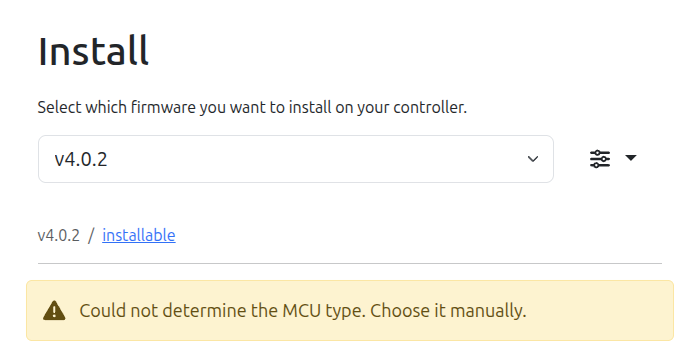
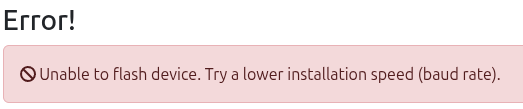
If I select and try to fresh install 3.9.9 it fails with…
esptool.js
Serial port WebSerial VendorID 0x10c4 ProductID 0xea60
[MSG:INFO: uart_channel0 created]

[MSG:RST]
[MSG:INFO: FluidNC v4.0.2 https://github.com/bdring/FluidNC]
[MSG:INFO: Local filesystem is /littlefs]
[MSG:INFO: Configuration file:config.yaml]
[MSG:INFO: Machine LowRider]
[MSG:INFO: Board Jackpot3 TMC2226]
[MSG:INFO: UART1 Tx:gpio.16 Rx:gpio.4 RTS:NO_PIN Baud:115200]
[MSG:INFO: I2SO BCK:gpio.22 WS:gpio.17 DATA:gpio.21Min Pulse:2us]
[MSG:INFO: SPI SCK:gpio.18 MOSI:gpio.23 MISO:gpio.19]
[MSG:INFO: SD Card cs_pin:gpio.5 detect:NO_PIN freq:20000000]
[MSG:INFO: Stepping:I2S_STATIC Pulse:2us Dsbl Delay:0us Dir Delay:1us Idle Delay:255ms]
[MSG:INFO: User Digital Output: 0 on Pin:gpio.26]
[MSG:INFO: User Digital Output: 1 on Pin:gpio.27]
[MSG:INFO: User Digital Output: 2 on Pin:gpio.0]
[MSG:INFO: User Digital Output: 3 on Pin:gpio.2]
[MSG:INFO: Axis count 3]
[MSG:INFO: Axis X (3.000,1223.000)]
[MSG:INFO:   Motor0]
[MSG:INFO:     tmc_2209 UART1 Addr:0 CS:NO_PIN Step:I2SO.2 Dir:I2SO.1 Disable:I2SO.0 R:0.110]
[MSG:INFO:  X Neg Limit gpio.25]
[MSG:INFO:   Motor1]
[MSG:INFO:     tmc_2209 UART1 Addr:3 CS:I2SO.14 Step:I2SO.13 Dir:I2SO.12 Disable:I2SO.15 R:0.110]
[MSG:INFO:  X2 Neg Limit gpio.35]
[MSG:INFO: Axis Y (3.000,2443.000)]
[MSG:INFO:   Motor0]
[MSG:INFO:     tmc_2209 UART1 Addr:1 CS:NO_PIN Step:I2SO.5 Dir:I2SO.4 Disable:I2SO.7 R:0.110]
[MSG:INFO:  Y Neg Limit gpio.33]
[MSG:INFO:   Motor1]
[MSG:INFO:     tmc_2209 UART1 Addr:3 CS:I2SO.19 Step:I2SO.18 Dir:I2SO.17 Disable:I2SO.16 R:0.110]
[MSG:INFO:  Y2 Neg Limit gpio.34]
[MSG:INFO: Axis Z (-147.000,3.000)]
[MSG:INFO:   Motor0]
[MSG:INFO:     tmc_2209 UART1 Addr:2 CS:NO_PIN Step:I2SO.10 Dir:I2SO.9 Disable:I2SO.8 R:0.110]
[MSG:INFO:  Z Pos Limit gpio.32]
[MSG:ERR: X Axis TMC driver not detected - expected 0x21 got 0x0]
[MSG:ERR: X2 Axis TMC driver not detected - expected 0x21 got 0x0]
[MSG:ERR: Y Axis TMC driver not detected - expected 0x21 got 0x0]
[MSG:ERR: Y2 Axis TMC driver not detected - expected 0x21 got 0x0]
[MSG:ERR: Z Axis TMC driver not detected - expected 0x21 got 0x0]
[MSG:INFO: Kinematic system: Cartesian]
[MSG:INFO: Connecting to STA SSID:Juno-WIFI-New]
[MSG:INFO: Connecting.]
[MSG:INFO: Connecting..]
[MSG:INFO: Connecting...]
[MSG:INFO: Connected - IP is 192.168.10.107]
[MSG:INFO: WiFi on]
[MSG:INFO: Start mDNS with hostname:http://fluidnc.local/]
[MSG:INFO: HTTP started on port 80]
[MSG:INFO: Telnet started on port 23]
ets Jul 29 2019 12:21:46

rst:0x1 (POWERON_RESET),boot:0x13 (SPI_FAST_FLASH_BOOT)
configsip: 0, SPIWP:0xee
clk_drv:0x00,q_drv:0x00,d_drv:0x00,cs0_drv:0x00,hd_drv:0x00,wp_drv:0x00
mode:DIO, clock div:1
load:0x3fff0030,len:1184
load:0x40078000,len:13260
load:0x40080400,len:3028
entry 0x400805e4
[MSG:INFO: uart_channel0 created]

[MSG:RST]
[MSG:INFO: FluidNC v4.0.2 https://github.com/bdring/FluidNC]
[MSG:INFO: Local filesystem is /littlefs]
[MSG:INFO: Configuration file:config.yaml]
[MSG:INFO: Machine LowRider]
[MSG:INFO: Board Jackpot3 TMC2226]
[MSG:INFO: UART1 Tx:gpio.16 Rx:gpio.4 RTS:NO_PIN Baud:115200]
[MSG:INFO: I2SO BCK:gpio.22 WS:gpio.17 DATA:gpio.21Min Pulse:2us]
[MSG:INFO: SPI SCK:gpio.18 MOSI:gpio.23 MISO:gpio.19]
[MSG:INFO: SD Card cs_pin:gpio.5 detect:NO_PIN freq:20000000]
[MSG:INFO: Stepping:I2S_STATIC Pulse:2us Dsbl Delay:0us Dir Delay:1us Idle Delay:255ms]
[MSG:INFO: User Digital Output: 0 on Pin:gpio.26]
[MSG:INFO: User Digital Output: 1 on Pin:gpio.27]
[MSG:INFO: User Digital Output: 2 on Pin:gpio.0]
[MSG:INFO: User Digital Output: 3 on Pin:gpio.2]
[MSG:INFO: Axis count 3]
[MSG:INFO: Axis X (3.000,1223.000)]
[MSG:INFO:   Motor0]
[MSG:INFO:     tmc_2209 UART1 Addr:0 CS:NO_PIN Step:I2SO.2 Dir:I2SO.1 Disable:I2SO.0 R:0.110]
[MSG:INFO:  X Neg Limit gpio.25]
[MSG:INFO:   Motor1]
[MSG:INFO:     tmc_2209 UART1 Addr:3 CS:I2SO.14 Step:I2SO.13 Dir:I2SO.12 Disable:I2SO.15 R:0.110]
[MSG:INFO:  X2 Neg Limit gpio.35]
[MSG:INFO: Axis Y (3.000,2443.000)]
[MSG:INFO:   Motor0]
[MSG:INFO:     tmc_2209 UART1 Addr:1 CS:NO_PIN Step:I2SO.5 Dir:I2SO.4 Disable:I2SO.7 R:0.110]
[MSG:INFO:  Y Neg Limit gpio.33]
[MSG:INFO:   Motor1]
[MSG:INFO:     tmc_2209 UART1 Addr:3 CS:I2SO.19 Step:I2SO.18 Dir:I2SO.17 Disable:I2SO.16 R:0.110]
[MSG:INFO:  Y2 Neg Limit gpio.34]
[MSG:INFO: Axis Z (-147.000,3.000)]
[MSG:INFO:   Motor0]
[MSG:INFO:     tmc_2209 UART1 Addr:2 CS:NO_PIN Step:I2SO.10 Dir:I2SO.9 Disable:I2SO.8 R:0.110]
[MSG:INFO:  Z Pos Limit gpio.32]
[MSG:ERR: X Axis TMC driver not detected - expected 0x21 got 0x0]
[MSG:ERR: X2 Axis TMC driver not detected - expected 0x21 got 0x0]
[MSG:ERR: Y Axis TMC driver not detected - expected 0x21 got 0x0]
[MSG:ERR: Y2 Axis TMC driver not detected - expected 0x21 got 0x0]
[MSG:ERR: Z Axis TMC driver not detected - expected 0x21 got 0x0]
[MSG:INFO: Kinematic system: Cartesian]
[MSG:INFO: Connecting to STA SSID:Juno-WIFI-New]
[MSG:INFO: Connecting.]
[MSG:INFO: Connecting..]
[MSG:INFO: Connecting...]
[MSG:INFO: Connected - IP is 192.168.10.107]
[MSG:INFO: WiFi on]
[MSG:INFO: Start mDNS with hostname:http://fluidnc.local/]
[MSG:INFO: HTTP started on port 80]
[MSG:INFO: Telnet started on port 23]
[MSG:INFO: HTTP command registered]
[MSG:INFO: Probe gpio.36:low]
[MSG:WARN: Input pin(s) active on startup:XYZ]
[MSG:INFO: ALARM: Hard Limit]
ALARM:1
[MSG:ERR: Reset to continue]
[MSG:INFO: ALARM: Hard Limit]
ALARM:1
[MSG:ERR: Reset to continue]
[MSG:INFO: ALARM: Hard Limit]
ALARM:1
[MSG:ERR: Reset to continue]
[MSG:INFO: ALARM: Hard Limit]
ALARM:1
[MSG:ERR: Reset to continue]
[MSG:INFO: ALARM: Hard Limit]
ALARM:1
[MSG:ERR: Reset to continue]

Grbl 4.0 [FluidNC v4.0.2 (esp32-wifi) '$' for help]
[VER:4.0 FluidNC v4.0.2 (esp32-wifi) :]
[OPT:PHS]
[MSG:Machine: LowRider]
[MSG:Mode=STA:SSID=Juno-WIFI-New:Status=Connected:IP=192.168.10.107]
ok
{"cmd":"420",
  "status":"ok",
  "data":[
    {"id":"Chip ID",
      "value":"4146"
    },
    {"id":"CPU Cores",
      "value":"2"
    },
    {"id":"CPU Frequency",
      "value":"240Mhz"
    },
    {"id":"CPU Temperature",
      "value":"43.9°C"
    },
    {"id":"Free memory",
      "value":"119.52 KB"
    },
    {"id":"SDK",
      "value":"v4.4.7-dirty"
    },
    {"id":"Flash Size",
      "value":"4.00 MB"
    },
    {"id":"Sleep mode",
      "value":"Modem"
    },
    {"id":"Available Size for update",
      "value":"1.88 MB"
    },
    {"id":"Available Size for LocalFS",
      "value":"192.00 KB"
    },
    {"id":"Web port",
      "value":"80"
    },
    {"id":"Data port",
      "value":"23"
    },
    {"id":"Hostname",
      "value":"fluidnc"
    },
    {"id":"Current WiFi Mode",
      "value":"STA (B0:CB:D8:F1:32:10)"
    },
    {"id":"Connected to",
      "value":"Juno-WIFI-New"
    },
    {"id":"Signal",
      "value":"100%"
    },
    {"id":"Phy Mode",
      "value":"11n"
    },
    {"id":"Channel",
      "value":"11"
    },
    {"id":"IP Mode",
      "value":"DHCP"
    },
    {"id":"IP",
      "value":"192.168.10.107"
    },
    {"id":"Gateway",
      "value":"192.168.10.1"
    },
    {"id":"Mask",
      "value":"255.255.255.0"
    },
    {"id":"DNS",
      "value":"192.168.10.1"
    },
    {"id":"Disabled Mode",
      "value":"AP (B0:CB:D8:F1:32:11)"
    },
    {"id":"FW version",
      "value":"FluidNC v4.0.2"
    }
  ]
}
ok
ok
[MSG:INFO: Received 89717 bytes to file /littlefs/index.html.gz]
[MSG:Files changed]
ok

