So as an update it seems it was the bit that was dead. The tip was bownish/rusty color so didnt look good. So when the bit is effed? why it causes the cnc to loose steps? its because it grips too much in the wood so does a lot of resistance?
Now that you say it it seems in my cuts mostly dust is produced. Its not like solid chips. Even if I used the chipload calculation I was suggested in another post. Im runing witha single flute 1/8 straight upcut endmill and i set the rpm to aprox 22000rpm
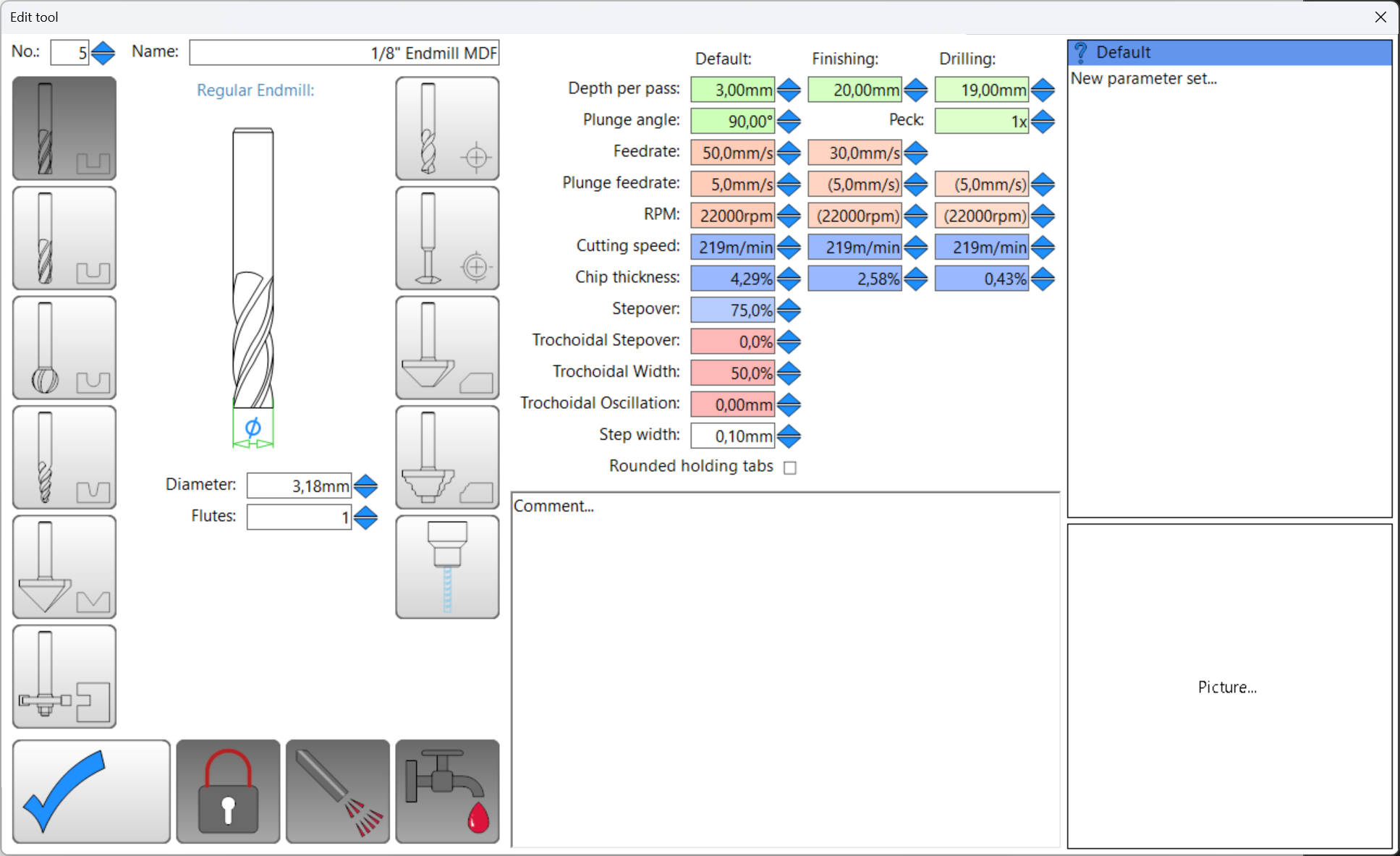
These are the settings
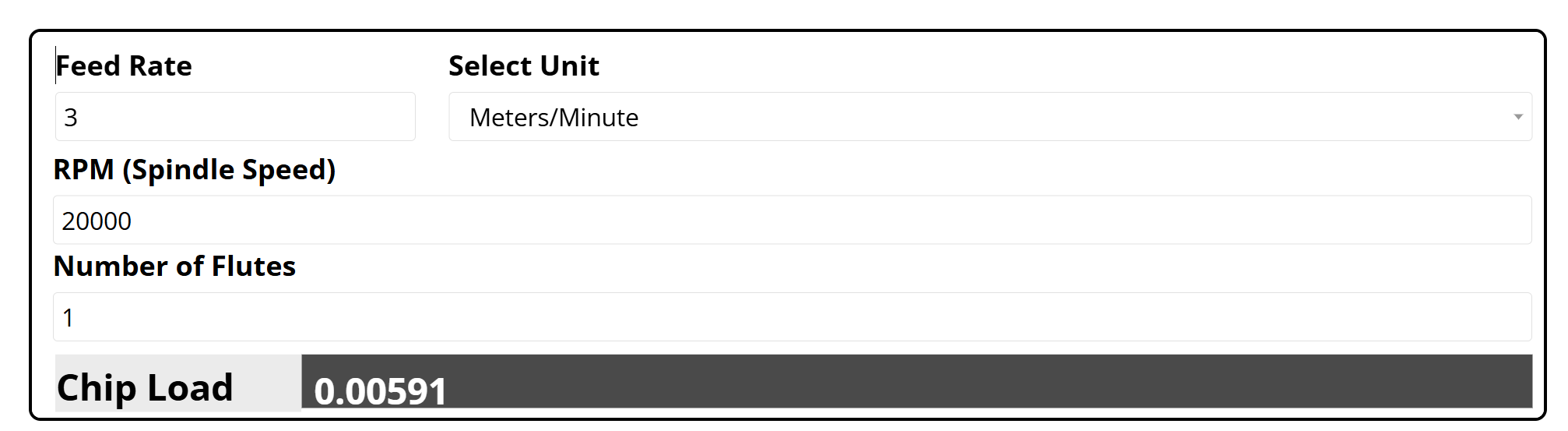
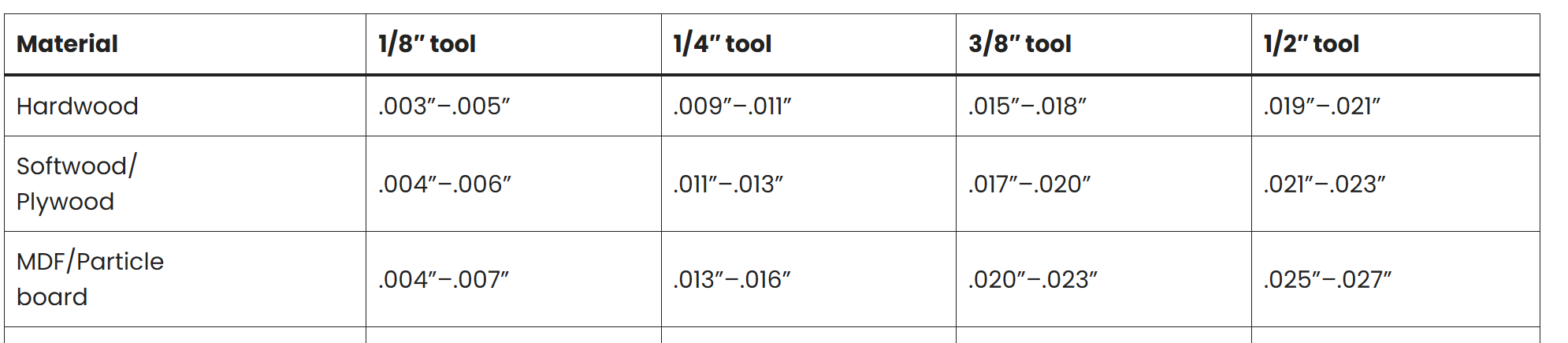
With this and if i made the calculations correctly chip load should be in the good range for MDF
Pretty much the opposite. If the bit is travelling too slowly, or is spinning too quickly, it isn’t removing good size chips, it is “rubbing” against the material instead.
Chips remove the heat from the material, whereas rubbing just generates more heat. You can toast a bit within a couple of minutes by moving too slowly and not creating chips.
Here’s a primer on the concept of chip load, which I found very helpful…
Put a new bit. Slowed down the speed of rhe router to make sure it was at 20k rpm, and after half of a sheet started doing it again.
I have a question: im using this endmill as well to do helicoidal and normal drills. This particular sheet had a ton of holes. The machine did all the drills and holes first then started with the part cuts. After finishing 3-4 parts tge issue started happening again in the 5th. Could all the prev drilling be messing up my endmill? Maybe im not supposed to use this endmill for this?
Could it be also my endmill plunge speed is too low?
Also i noticed that even with the slower rpm my machine mainly produces dust still from the mdf.
This endmill doesnt look as weel near in a bad state as the previous… Hmm
What i meant is: if the chip load wasnt big enough and bit overheats, why is it that it gets stuck on the board? Is because it becomes dull then so canmot advance through the material?
If you have lots of holes, get a drill endmill. I did that for aluminium and it’s day and night. Because holes are straight down, the endmill rubs on all sides without removing much material. Holes that have the same diameter as the endmill are the endmill killer that you must fear.
I need to start giving more complete answers, sorry. I was using my phone and dislike typing a lot on it.
If you are drilling a lot of holes 30+ a drill bit is worth the tool change. Otherwise, a helical drill or a few holes is not a big deal for an endmill.
Now we are kinda getting piecemeal info. If you are burning through endmills and this is costing you money take a little break and give us all the details of your CAM. Exactly what endmills are you using? What router?
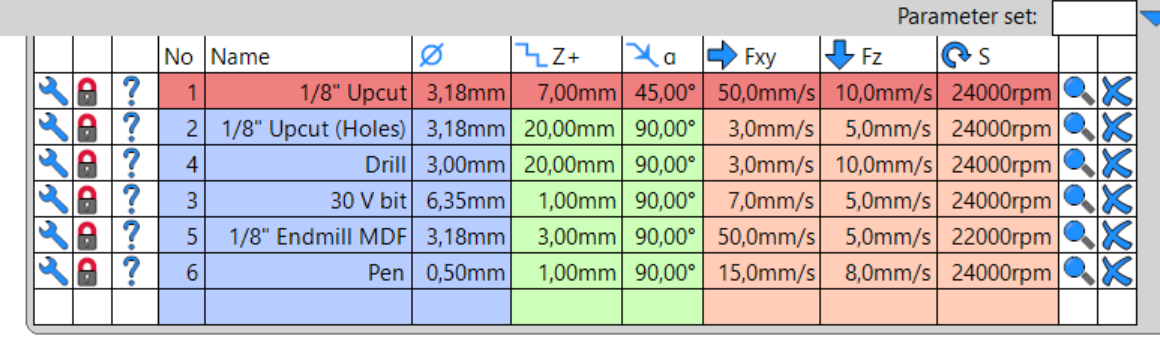
Click the wrench icon and show us, screenshot, all the details for your feeds and speeds for each tool you are using.
Ok. Wow guys thank you so much. I was just thinking this morning in general how nice people are in this forum and how much they help. Woke up thinking in the CNC problem and what could I do to solve this but knowing you can get nice tips here really gives one piece of mind so thanks for that
Ok so starting from the beginning
After my first disastrous cut where I ruined my nice bit I ordered from the V1 shop I decided for the next test I would buy these endmills.
They were still advertised as carbide endmills. Theyre single flute (although down cut) 1/8 endmills and long enough to be able to cut through a 19mm MDF board
These are the endmills Ive been using
Then as for the CAM file i send attached the dxf, gcode and e12 estlcam project
My tool configuration is this but really i only use the number 5 for all the project
The CAM has holes that are supposed to be 2mm in diameter but I use the 1/8 endmill anyway cause I figured out it will work as well that diameter of hole and this way I didnt have to change the tool
To reduce the heating on the bit youll notice I made the endmill just to drill up to 12mm or so from the total 19 of the board. My plan was to finish the holes by hand with an actual drill
So Z step is 3mm (same as the tool diameter), feedrate was 50mm/s, plunge speed is 5mm/s
The reason I didnt wanted to use a drill bit is because I had no idea how to configure it for the router (no idea whats a good rpm value then or plunge speed etc) and I never tested the tool change sequence neither.But thats on me reallyWith this sheet everything went more or less fine until it got to start cutting the first big squarish piece from the left. So prior to that had already made all drills (normal and helical), cut all the holes, cut the 5 smaller pieces on the right of the sheet.
I think first i need to source then the upcut mills
Would you recommend me then getting also drill bits? Dont know if the drill bits have to be specific for routers or normal drilling bits for a drill tool serve
Im having trouble finding 1/8in ones that are long enough (at least have 19mm of fluting which is the thickness of the board im cutting)
Ill report as soon as i can get some and try with thenew settings. Thanks a lot for the help
Regular drill bits will work, shorter ones are best. If you only have a handful of drill operations it is not really worth the tool change. If you are just doing helical, a drill bit won’t work for that anyway.
Drill bits aren’t ideal (IMO), due to the very high RPM of the router. 3.18 mm flat endmill for a 2mm hole also isn’t ideal (you’re cutting on the bottom of the bit, not on the flute, and the hole is larger than desired)
I had this issue when cutting the XZ plates in aluminum for my LR3. Instead of cutting all the way through, I used a V bit to cut about 1-2 mm deep into the stock to mark the location. then changed bits and used a 1/8" endmill to cut the rest of the shape. Then I used a drill press to cut the holes using the V bit markings as a pilot.
Im still waiting for the upcut endmills. Probably next week ill receive them and Ill be able to try. But now that I was looking at the last endmill I was using it doesnt even look blunt or worn (after all I placed it new and almost didnt have any time cutting).
So Im starting getting cocerned the problem was elsewhere. Strange thing is that in both ocassions was while cutting bigger sheets with many pieces and started happening after having cut more or less 50% of the total.
I guess when I get the new endmills Ill try with the new settings you suggested and then I can go from there and see. Ill review the connections as well just in case
So finally I received the upcut endmills and I will test after work what you suggested but I was thinking: I calculated the 50 mm/s feedrate based on the chip load calculator Bartman posted to me some time ago. If I reduce the feedrate wouldnt then the chip load be too low and then the bit overheat even more?