LR3 and EstlCAM v13

The problem may be related to the LR3 and EstlCAM v13.
I haven’t used my LR3 since last summer, which is
controlled by the old SKR Pro board.
I installed EstlCAM v13 and imported the settings from the previous version 12. I thought everything would work. Instead, I can send the LR3 to Home, perform a thickness probe, and everything works, but when I start the work gcode, the machine positions itself correctly on the piece and doesn’t proceed with milling. It seems stopped, but you can hear a stepper motor noise, as if it were moving at a very low, almost imperceptible speed.
I created a small test gcode that I’m attaching in the hope that someone will find the error.
Thanks in advance.
B.R.
Paolo

test 1 Hole 1mm deep.zip (440 Bytes)

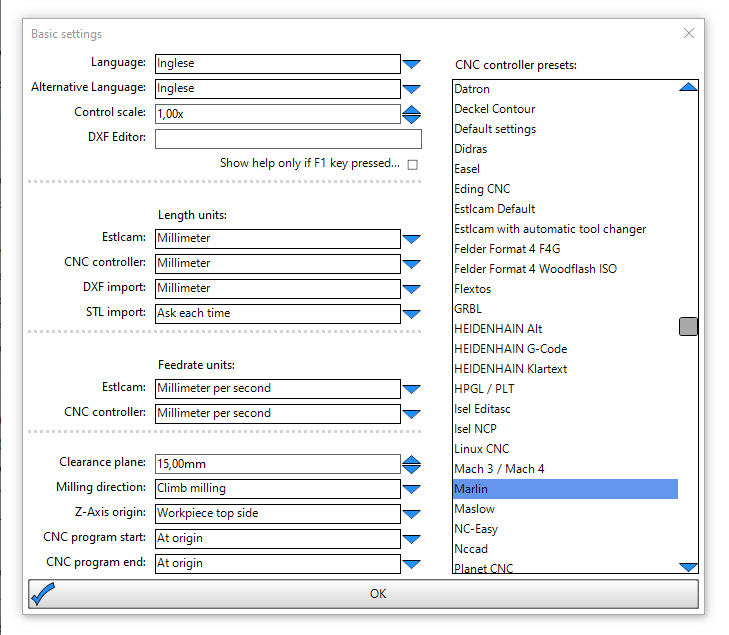
Pretty sure you switched mm/sec to mm/min in the basic settings by accident. Can you check please?

Thanks a lot Philipp, I checked but it doesn’t seem to be the case, I’m attaching an image of the setup

1 Like

OOPS nwo I see a difference.
CNC conbtroller must be Millimiter per minute. Is thios correct?

1 Like

I don’t know, I am using a different controller.. Just try. :sweat_smile:

Your Feedrate units are incorrect, should be mm/min. In your screen capture they’re mm/s

Correct.

Actually, the controller setting is unused (applies only if using EstlCam controller, you’re using Marlin).

The EstlCam setting MUST be in mm/minute, but it doesn’t hurt to do both.

That’s not correct. Mine is set at mm/sec for estlcam and the controller is set at mm/min and that works perfectly.

I stand corrected.(actually I’m reclining at the moment, but you get the gist…)

2 Likes

Many thanks to both of you, the problem was in the controller setup which was not set at mm/min

B.R.

Paolo

2 Likes

So to summarize:

  • the first setting is the units used for the gui when you pick cutting tools
  • the controller setting is the units put out as feed rate in the gcode
    Dies that sound right?

I can’t really help you.

I followed the instructions and still made a mistake.

See if the following link provides the answer. EstlCAM Setup - V1 Engineering Documentation
B.R.
Paolo

my bad