I have a diode laser mounted to my LR3. However, for some reason when I hit the “Stop” button in Lightburn, it cuts the power to the z-motors and the axis drops onto the piece. I’ve tried setting it up with the z-axis, and unchecking the box for the z-axis. I suspect the x loses power as well, but doesn’t move until it collapses.
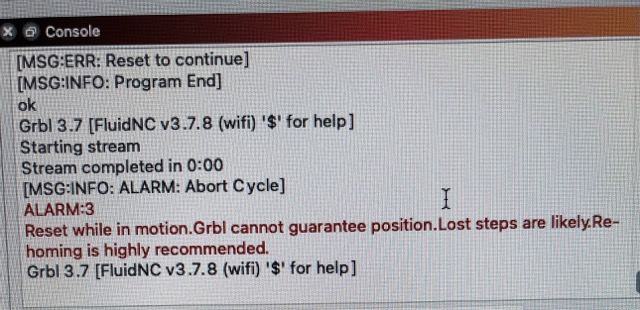
I’m getting an alarm in FluidNC when it happens, so I’m guessing it is causing a panic. Has anyone else run into this problem, or have a solution?
Looks like its
[MSG:INFO: ALARM: Abort Cycle]
Then it generates ALARM:3
Reset while in motion. Grbl cannot guarantee position. Lost steps are likely. Rehoming is highly recommended.
The first error (at the top) is because I hadn’t reset the working coordinates. I cleared that and had it move the head, which I then “Stopped”.
I’m wondering if there is a setting wrong? I don’t understand why the steppers are all instantly unpowered.
My version of grbl supports both a “Cycle Pause” and a “Cycle Stop” button. It looks like Lightburn is using the Stop as equivalent to a software emergency stop - kill the laser, remove power from all the motors, don’t let anything keep moving or cutting. This is probably best from a safety position, but does not allow the job to continue from that point.
Does the Lightburn interface provide a Pause rather than a Stop? That might be a better fit for your need.
Agreed. You are hitting an emergency stop. You might be looking for pause instead. The laser should turn off no matter what with no motion, if you are looking to resume.
Thanks - in Marlin the Stop button in the Laser control panel just stops execution of the gcode. I could then use the Preview to move forward to the point at which I stopped, and resume from that point. Very useful when cutting something for the first few times and discovering that the number of passes needs to be increased (or decreased) to cut all the way through. It’s weird that Grbl is interpreting this same button in the same panel as an e-stop.
There are a few Grbl flavors listed, and I used the one it auto-identified. Does anyone know if all flavors do the same thing? And/or which flavor is correct for fluidnc?
Well, I have found some if it is just more “correct”. Maybe not in this specific example but in other places it will trigger an alarm because technically it could have moved…did it, probably not. It will warn you about it. I don’t remember where I saw that.
If you ever have to compare, GRBL tends to be more correct in Gcode execution…kinda. It follows the older standard, marlin has adjusted some of the codes to their liking…fluid has as well, but it is closer to O.G. Gcode. All overly complicated but I am starting to understand why.
I need to check but I have a feeling they are very similar. If you can grab a screenshot I can dig deeper, otherwise it will be a while before I get to my light burn computer.
I need to do some testing. Allegedly, the conflict is that the “Stop” button issue is caused when it’s hit and the motors are in motion. The proposed solution is to pause, allow all motion to stop, then stop. Supposedly, it’s the alarm that’s then killing everything.
This is confirmed. A stop while in motion causes the Alarm 3, which cuts power to the steppers. A pause to ensure all motion stops, followed by the stop button maintains position and allows you to pick up the job if desired. (And it doesn’t drop the laser onto the workpiece.)
I use pause when I’m just in need of a little time to add some additional hold-downs, or to run into the house for a bio-break. But I use stop when a portion of the burn isn’t acceptable. I can actually use Preview to start the burn earlier than the stop (“back up” if you will) and re-burn some areas. It’s not as helpful with engraves, but it works with cuts if I notice they’re not going complete through. Sometimes I notice an area of the plywood needs another pass for a complete through cut.
But then again, I don’t have a ton of experience with this stuff yet.
Oh dear, everytime I read a thread about a different flavoured G-Code my brain melts a little I was 100% convinced that G-Code is something that is standardized But now as I’m typing it out I need to smile about my naivity as well…
 I was 100% convinced that G-Code is something that is standardized