Hey all,
Anyone know if auto bed leveling can be used with a fluidnc controller? i know it can run the z axis and all that and the bed leveling sensors are easily available, but has it all been cobbled together and done in fluidnc yet? I want to be able to get the laser im using to automatically keep optimal focal distance for the materials im cutting, which can have uneven height, and the table im using is 96"x96" so theres inevitably a bit of variation in the laser distance.
I do not believe FluidNC supports a texture map style of leveling.
1 Like
FluidNC doesn’t support it directly but you can probe for a heightmap and then that can be used to apply those changes by modifying the gcode.
FigUI has a heightmap plugin that does this:
Or the bCNC gcode sender can do it.
There are probably others out there.
4 Likes
Hey awesome, can you explain how I do that for the workflow? Would that be something that goes in fluidnc or would that be something between the fluidnc controller and the steppers?
The general idea is that you create your gcode file like normal. Attach the workpiece to the bed. Then you probe a grid on the workpiece to create a heightmap. Then you apply that heightmap to the gcode file. That is going to take the Z values and modify them to compensate for the bed height variation. It’s going to need to split lines and curves into shorter line segments to do that properly.
I haven’t done any of this but I get the concept. In FigUI, you select a gcode file from the SD card, it determines how big it is. Determine the appropriate grid. Then it probes each point and you get a heightmap which can be applied to the gcode file.
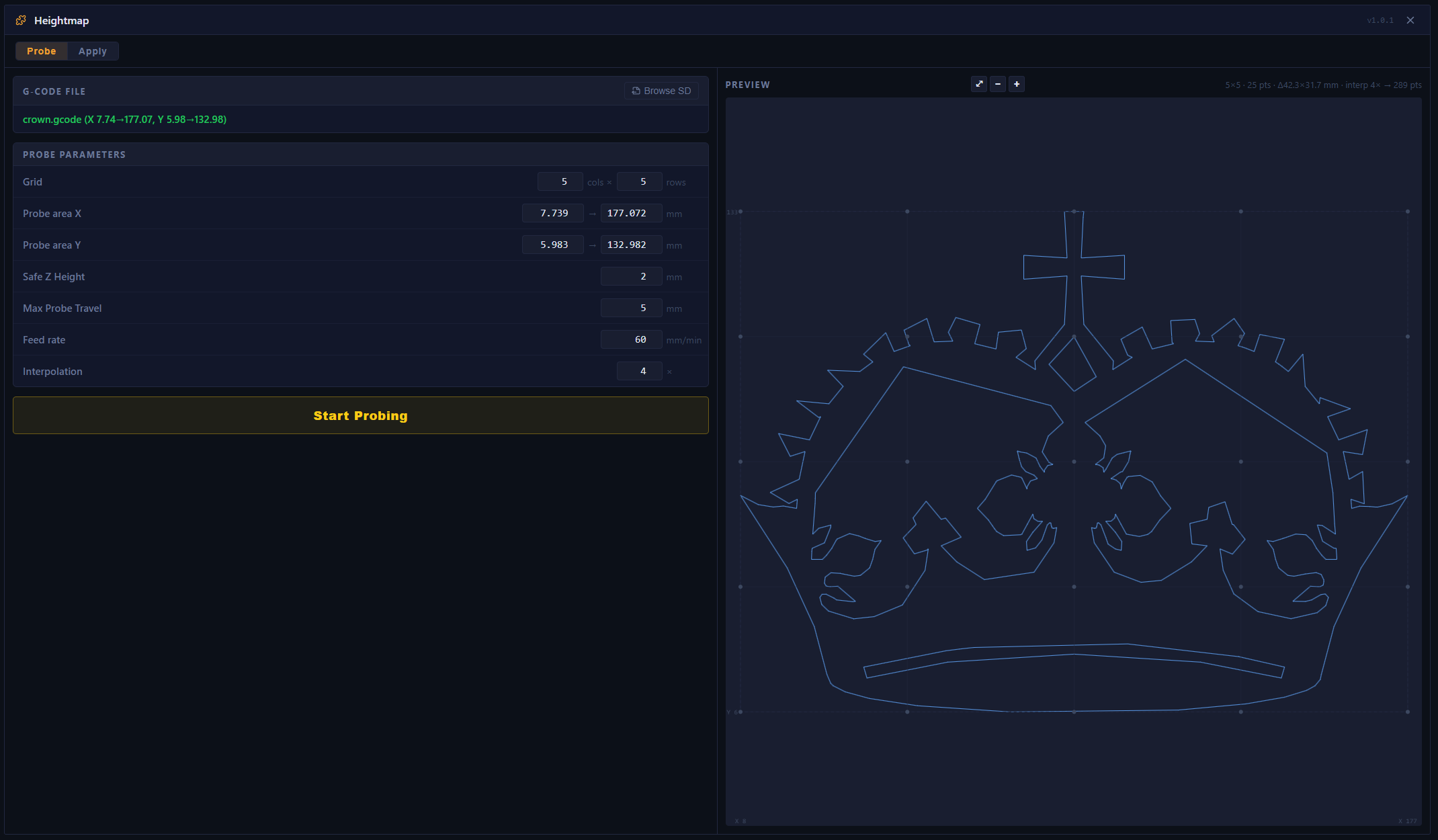
FigUI works quite well but there is a bug in the gcode handling
if there is a rapid without a Z then the leveling code will add a corrected Z to it. It is breaking my tool change macro
i have a fix for it but havent submitted the PR yet fix: do not append Z to G0 rapids in heightmap apply · zerg32/FigUI@2acbd6f
the other important thing is that you need to zero your probe at the beginning before running the leveling procedure or the heights in the corrected gcode will be wrong
so the correct flow is to move the probe to XY 0,0 and then probe and set Z to 0 before starting the leveling
do you have a probe connected already and do you have an example of the gcode that you generate for your laser? you need to try both FigUI and bCNC one. I do not think FigUI will work without tweaking because i do not think there will be a Z coordinate in your G1 commands
try bCNC first. you can connect it over the network port to FluidNC and then use the leveling function in there