I have a 3d milling project that takes 4 hours to do with a 0.5mm endmill.
Isn’t there a way I can break the gcode up into smaller parts, e.g. insert a stop approx. every 30 min? So if the endmill breaks, 2 hours in. I can start from the nearest stop point, instead of having to mill the first 2 hours again without it touching the wood.
you can open the cnc program with any text editor and add “M00” at intervals you like.
But if you’re using Estlcam to control the machine this is not necessary - you can restart at any line in the code. You can even click to the point your tool broke in the preview window with the right mouse button while holding shift key pressed and it will jump to the corresponding program line.
Well here’s a little update.
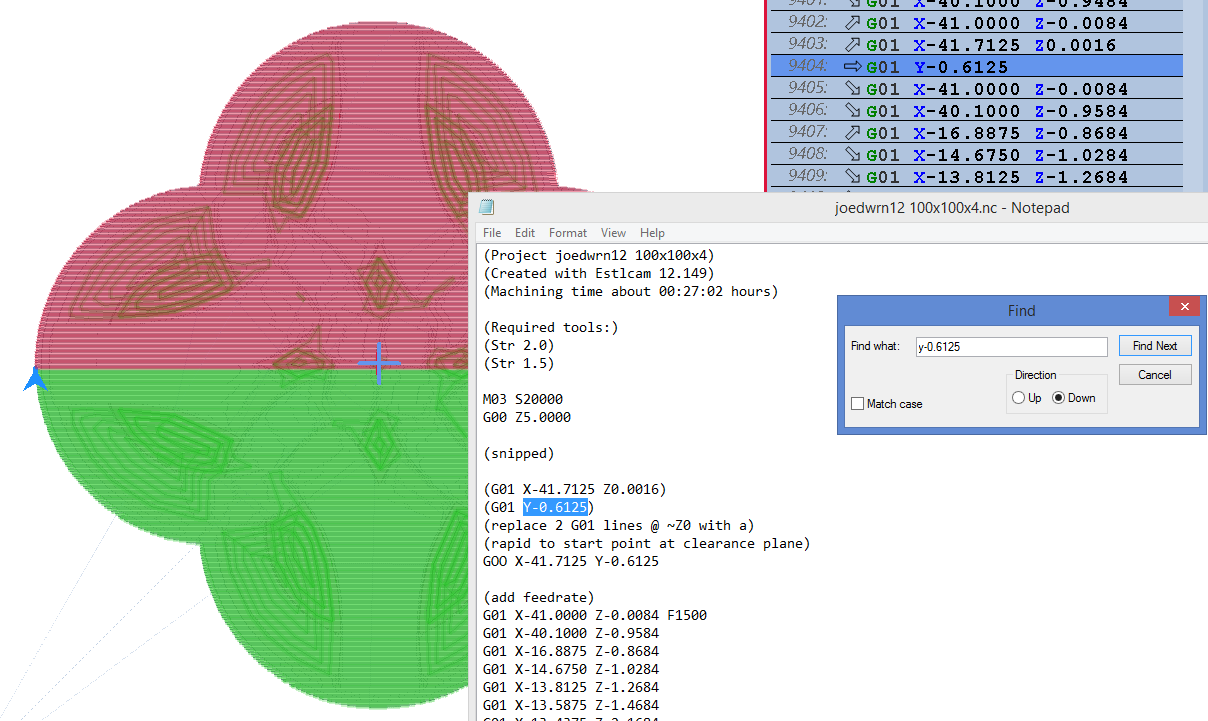
I’ve tried to split the gcode into several chunks, I remembered to copy both the start and end code into each. And I’ve split the code when the z axis goes up to travel height.
BUT As soon as I try to upload the new codes the programs lock up and I can’t use them. Is notepad not ok to use? Or should it be notepad ++?
I use the regular windows notpad to edit mine, but, after moving to Vectric aspire i started to do separate toolpath with an edited PP so for the first gcode it ends in a position i can replace the bit (since i use a bitsetter and stop collars i have no need to rezero the z axis). The last gcode sends my machine gantry to the back of the table so i can remove whatever is on the spoilboard.
The first gcode uses x100 y-90 z50 as final position. I do my bit change (usually v-bit to 1/8 cutter) then change code to the cutting one and just hit start, (I select manually the PP whan saving so the last one uses x0 y2500 z25 as ending position i mostly work with 4mm acm sheets so that works for me. I just measure z height once.
Chinese atc iso spindles arent even that expensive but i have to send them to usa and then forward it to my country (tariffs are the killer of the deal).a pedal pulse for release/unrelease is the fastest way. There is an amb/kress quickchange tool also
Geniuinly curious, why do you have to send them to USA first? Can you not use a package forwarder in a more trade friendly country? Reship in British Columbia, Canada, for instance (and I’m sure there are others) forward to your country.
No. The shipping forwarders to the Dominican Republic are located in Florida. There is one in china but i haven’t heard good things about it (it works for really big packages, not for small objects)