I think I killed my JP3 - MPCNC

Deep Newb, and I could be in over my head. I have been working for for four days trying hard not to open a new Forum thread, however here I am.

I purchased all the items for my items for my MPCNC in Dec 2025. I connected all the stepper motors, gave the JP3 power, found FluidNC in the wifi. Opened that and made my motors move. DL’d and loaded the proper MPCNC file. I built the MPCNC, connected the motors and made everything move. Here is where the problem started.

I cut the wires from the motors to extend and reconnect. Now all I had was Z working. Neither X nor Y would move. This is my first time using those Dupont connectors so my connections may not have been 100% but only 20% correct seemed way low. I metered the ends, found issues only with one. Corrected that. I connected my working Z to the X and Y terminals. nada. So in my mind it is not sending signal to X and Y.

I tried to install the firmware, again, and again, and again, v3.99, 4.02, 3.99. by “JP3 config for Primo”. nada. Now I have no Wifi connection as FluidNC isnt showing up as a Wifi connection. I went to “We will have 5-10 JPs not connect”. I think I killed her. This has been multiple attempts over 4 days.

I may have no business being here, but I’m trying really hard to understand. If someone could help with baby steps so I can get my JP3 and machine to move that’d be wonderful.

Greetings, Dhlatky. Welcome to the V1 community forums.
Here’s the first thing to fix: This isn’t a place where you’ll be criticized for opening a topic looking for help. If anything, you’ll get guff for waiting so damned long to ask for help. :slight_smile:

OK, as you’ve already deduced, theres something really amiss with your extensions.

How did you measure the ends? Did you measure coil A and Coil B resistance for every motor, looking in from the controller side connector in your wiring harness? That’s what I’d have you start with.

It’s really unlikely that the issue was ever with the controller firmware, so by flashing it until you broke it, you’ve added another thing to fix. The good news is that you pretty much can’t kill a jackpot by flashing firmware to it, it can still be re-flashed.

On the contrary. You can assemble an MPCNC and get it moving, so clearly you’re one of us. We need to help you unravel some things, but it’s still fixable.

Let’s start on both sides of the problem.

First off, tell us for all four of your steppers that don’t work X0,X1,Y0,Y1 - what do you measure for each of these coil A/B when you look into the connector where the stepper harness plugs into the Jackpot?

Second, What type of computer do you have, and are you sure you have a power and data USB cable?

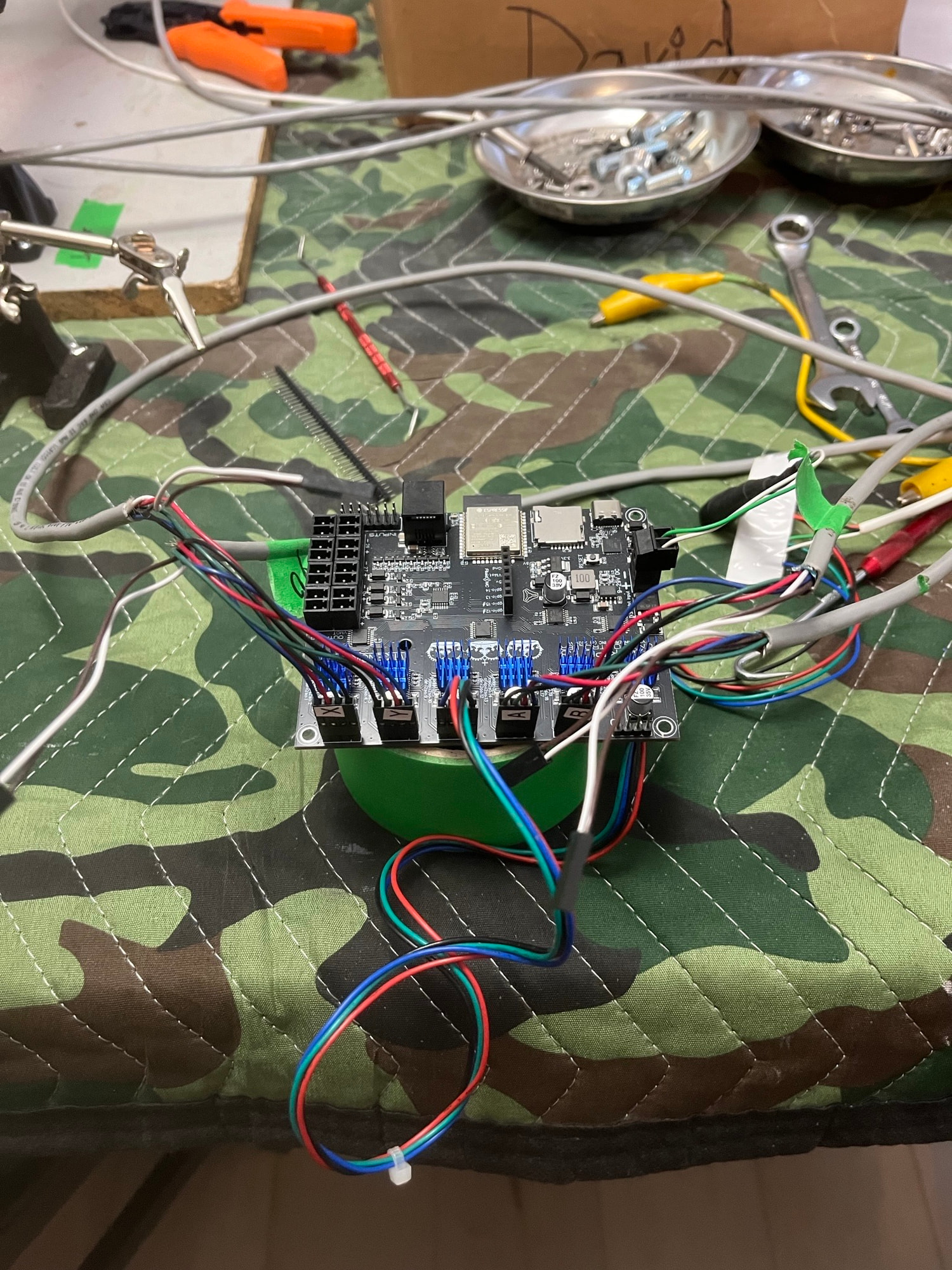
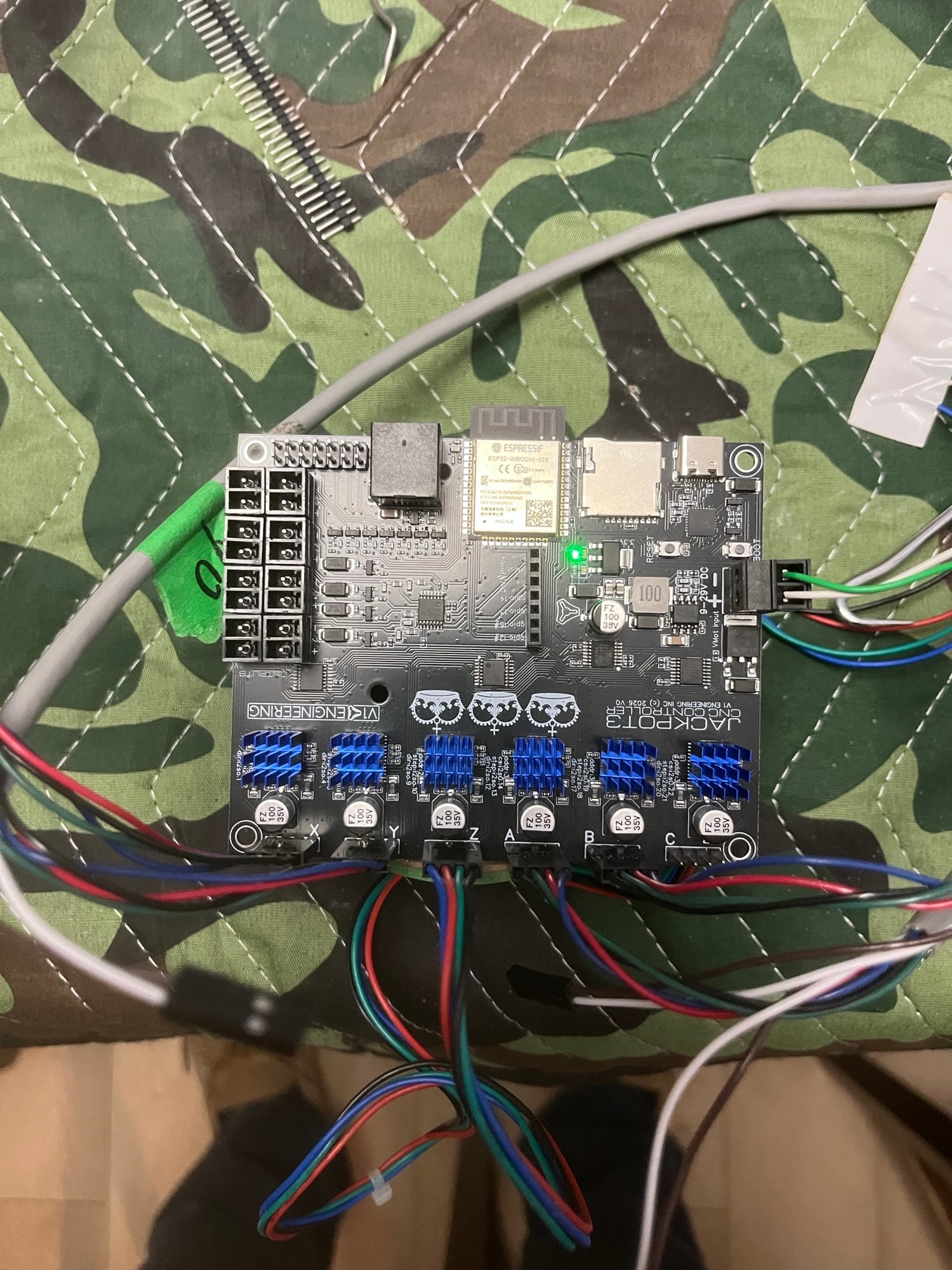
Third, let’s get some pictures of your build, in particular the jackpot controller and wiring.

You can fix this, and we’ll help you do so.

1 Like

Maker Jim, TY for responding.

Metered ends - I checked all with resistance. No cross connection between A & B. All motors land between 1.7 and 1.9, mostly 1.8. One 2.0. All from the controller side of the wire set.

Once I give the JP3 voltage, on each of the X0, X1, Y0, Y1, I can measure 24v on pins 1/2, and I measure low voltage 2v and lower (if I remember correctly) on pin 3/4. One motor “bumps” as I give the JP3 the 24v, Z is also unresponsive after my attempts to FIX IT. This lead me to think it was a firmware thing. Probably is a firmware thing now though. LOL

Computer - Older Thinkpad I intended to use strictly for the MPCNC. i5-6200 processor, 2.3 GHz, and 8G Ram. Nothing Special. Hoping it was the workhorse for the job. Not 100% sure it is a power and data cable. I did see a note for that but I figured as it said it “connected” and appeared to give me the loading bar (0-100%) that should be fine. What about a step for finish/save/complete? Didn’t see that, I saw a disconnect and I used that a time or four.
Extra wht/brown wires not plugged in at this time are for the endstops.

Just checked all my connections plugged into the board again but this time testing resistance on the backside of the JP3. In my mind, this would prove my wires AND connections were all good. X0&1/Y0&1 wires all 1.7-1.8 and Z is 2.0. (similar wire, that’s probably why)

You run windows?

To check your USB cable, turn off the VMOT power to the jackpot, plug the USB cable in. If the ESP-32 powers up when in this state, you have a cable that supplies power.

Since you think you were able to load it, next step on that front is to fire up a fluidterm while USB connected and pull a $SS out of the terminal.

You should be able to get the terminal from the web installer (DON"T flash it again :slight_smile: ) or you can extract the FuidNC .zip file and run fluidterm from in there.

We want to see what comes out of it during bootup.

If you run an MPCNC you need the correct yaml for it, the boards now always come with the one for the LR. Maybe that’s your problem.

Phillipp, thanks for the reply. I did notice the incorrect upon initial start up the incorrect steppers rotated, and realized the JP3 came with LR firmware. I did DL the proper file and made it work. Problem came when I cut the wires, thought they were better connections and started fussing with the files. With Maker Jim’s help I think I have the wiring stable and I hopefully can correct the firmware problems. I can see the light.

1 Like

Yes Windows, Yes the controller LED turns green when I plug it in. Is this what you are asking for?

ok
$ss

MSG:INFO: FluidNC v4.0.2 https://github.com/bdring/FluidNC
MSG:INFO: Local filesystem is /littlefs
MSG:INFO: Configuration file:config.yaml
MSG:INFO: Machine Default (Test Drive no I/O)
MSG:INFO: Board None
MSG:INFO: Stepping:RMT Pulse:4us Dsbl Delay:0us Dir Delay:0us Idle Delay:255ms
MSG:INFO: Axis count 3
MSG:INFO: Axis X (-1000.000,0.000)
MSG:INFO: Motor0
MSG:INFO: Axis Y (-1000.000,0.000)
MSG:INFO: Motor0
MSG:INFO: Axis Z (-1000.000,0.000)
MSG:INFO: Motor0
MSG:INFO: Kinematic system: Cartesian
MSG:INFO: Connecting to STA SSID:SASKTEL154
MSG:INFO: Connecting.
MSG:INFO: Connecting..
MSG:INFO: Connecting…
MSG:INFO: Connected - IP is 172.16.1.106
MSG:INFO: WiFi on
MSG:INFO: Start mDNS with hostname:http://fluidnc.local/
MSG:INFO: HTTP started on port 80
MSG:INFO: Telnet started on port 23
MSG:INFO: HTTP command registered

ok

Whoa don’t know how that happened. This look a little better. Don’t know why the msg info tags are not green here, they are on the fluid screen.

MSG:INFO: FluidNC v4.0.2 https://github.com/bdring/FluidNC
MSG:INFO: Local filesystem is /littlefs
MSG:INFO: Configuration file:config.yaml
MSG:INFO: Machine Default (Test Drive no I/O)
MSG:INFO: Board None
MSG:INFO: Stepping:RMT Pulse:4us Dsbl Delay:0us Dir Delay:0us Idle Delay:255ms
MSG:INFO: Axis count 3
MSG:INFO: Axis X (-1000.000,0.000)
MSG:INFO: Motor0
MSG:INFO: Axis Y (-1000.000,0.000)
MSG:INFO: Motor0
MSG:INFO: Axis Z (-1000.000,0.000)
MSG:INFO: Motor0
MSG:INFO: Kinematic system: Cartesian
MSG:INFO: Connecting to STA SSID:SASKTEL154
MSG:INFO: Connecting.
MSG:INFO: Connecting..
MSG:INFO: Connected - IP is 172.16.1.106
MSG:INFO: WiFi on
MSG:INFO: Start mDNS with hostname:http://fluidnc.local/
MSG:INFO: HTTP started on port 80
MSG:INFO: Telnet started on port 23
MSG:INFO: HTTP command registered

ok

The output needs to be formatted using the preformatted text icon on the editor toolbar. It looks like this: </> . If not, you get that weird formatting.

If you use preformatted, the text looks like this and is readable:
Preformatted text...


$ss 
[MSG:INFO: FluidNC v4.0.2 https://github.com/bdring/FluidNC]
[MSG:INFO: Local filesystem is /littlefs]
[MSG:INFO: Configuration file:config.yaml]
[MSG:INFO: Machine Default (Test Drive no I/O)]
[MSG:INFO: Board None]
[MSG:INFO: Stepping:RMT Pulse:4us Dsbl Delay:0us Dir Delay:0us Idle Delay:255ms]
[MSG:INFO: Axis count 3]
[MSG:INFO: Axis X (-1000.000,0.000)]
[MSG:INFO:   Motor0]
[MSG:INFO: Axis Y (-1000.000,0.000)]
[MSG:INFO:   Motor0]
[MSG:INFO: Axis Z (-1000.000,0.000)]
[MSG:INFO:   Motor0]
[MSG:INFO: Kinematic system: Cartesian]
[MSG:INFO: Connecting to STA SSID:SASKTEL154]
[MSG:INFO: Connecting.]
[MSG:INFO: Connecting..]
[MSG:INFO: Connected - IP is 172.16.1.106]
[MSG:INFO: WiFi on]
[MSG:INFO: Start mDNS with hostname:http://fluidnc.local/]
[MSG:INFO: HTTP started on port 80]
[MSG:INFO: Telnet started on port 23]
[MSG:INFO: HTTP command registered]

You need to upload the files for the MPCNC. Here is the link to them:

Your Jackpot3 is missing the config.yaml file and likely the other files that go on after flashing. That’s why you have no motion and no wifi, it’s entirely misconfigured.

You can use the web installer to reconfigure WiFi, instructions are here:

You also need to put the config.yaml file for your MPCNC back on the machine, which you can do over WiFi once you reconfigure your WiFi. If you were using AP mode before, you should put it back into AP mode for now.

The config files for a JP3/MPCNC live here:

In the file browser tab I see:

config.yaml 3156b Active config

favicon.ico 1150b

index.html.gz 120268b

So I don’t think I have nothing…. Or is it the incorrect file? the Board says its v4.02

It’s the incorrect file.

That’s the proof.

Edit: Load the correct config.yaml file for your MPCNC.
Make sure when you’re putting files on with the Web UI that you’re set to the flash filesystem and not to SD. The config files have to live in flash or they won’t be loaded.

2 Likes

Okay, here is what I see, here is what happened.

config (5).yaml 7365b Active

favicon.ico 4286b

index.html.gz 9162b

preferences.json 5830b.

I connected to Fluid NC over Wifi. It loaded the page. all sorts of errors showed up. Here are first two, could be more. they were repeating.

500 internal server

Alarm ERR sdmmc_card failed code 0x108

Use the normal, stock, unaltered config.

this is normal if you do not have the microsd card in.

You can connect with USB and use the online terminal or file transfer to fix it up.