Nah, while it’s a higher end and new model- it’s still consumer grade and should have supporting information.
I assume you’ve seen this-
Yes, that is the manual that came with it. I had not seen it online before so thanks.
@vicious1 do either of you know how to keep the laser on when using M3? . i know you said in the newer firmware it changed, but im am having an impossible time trying ro center the laser.
Your help is so appreciated
There is a new safety feature in Marlin that turns the laser off if a move command is not received in a specific period of time (one second by default). There are three methods I know of to get around this.
The first is to use an M42 to directly turn the laser pin on and off. I verified this works for the Rambo board, so it should work on the SKR Pro.
The second method is to use bit of g-code that does a small relative move every 0.9 seconds or so.
The third is to change the value of the safety timeout. This works but makes your machine less safe, and it does involve compiling and re-flashing the firmware.
For solutions 1 and 2, you will have to figure out how to execute that code. Assuming an SKR Pro with the TTF display:
- Type the commands into the terminal
- In Marlin mode, you can add the commands to the V1 custom menu (reflashing the board required)
- They can be run off a file on the SD card.
- If send your g-code via USB, then the g-code sender often has custom buttons that can be programmed, and a terminal to type in commands.
1 Like
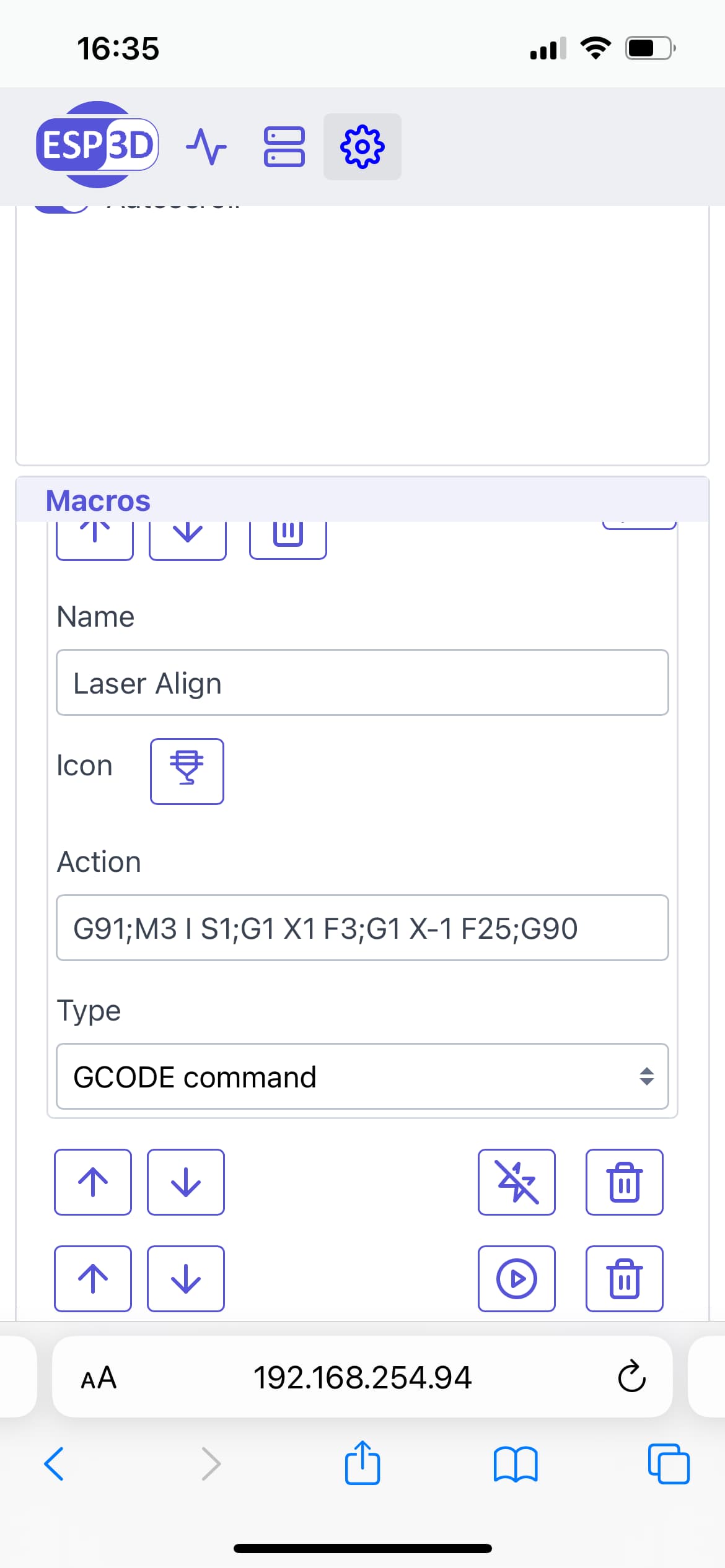
Here is what I do- it’s Robert’s ‘option 2’ above
I fire the laser at 1% and have it move to X+1 at a ridiculously slow speed, then have it return back to X0 a bit faster. This turns the laser on for around 20 seconds and moves it such a small amount it’s negligible
I control my lr3 over wifi and I have it as a macro in ESP3D
3 Likes
This was very helpful. Thank you.
My atomstack m100 has very low power as compared to prior to upgrading the firmware on my lowrider SKR Pro board. I just upgraded yeaterday to the most current version.
Is there a way i can check that the pc9 is still set to full power? It seems that its reduced 90% or so.
From which Marlin version did you updated from ?
In configuration_adv.h #define CUTTER_POWER_UNIT is set to PWM255 so Lightburn S-Value Max must be set to 255 for a 100% laser power that really burn at 100%. If your S-value max is set to 100 then it means when you think to burn at 100% it will run at 39% in reality.
1 Like
Since it has been 5 days since you first posted, I assume you have your laser fixed. If not, and if you are using inline commands, for the latest version you must have an “M3 I” at the top of your file. I doubt this is the root of your issue, but I wanted to mention it just in case.
As for checking PC9, you can carefully hookup a voltmeter to that pin and execute some laser code, or use M42 to set the value of the pin. At 255, the pin should read around 5V. At 128, it should read around 2.5V. Note that it is unlikely your laser is reading the voltage from this pin. Most laser modules these days directly use the PWM signal from the pin and therefore can take a range of voltages as input. This test just makes sure you have not burned out that pin.
Hello friends, excellent work, I am trying to connect a 5v relay with a 120v output, one of those that are for Arduino, to activate the trigger of a plasma cutter, it seems to me that it would be the same method. The conexión is (pc9 signal)+(heater 2 (+)(-)) is ok?
Hello.
You’re replying out of context in an existing forum thread about SKR boards and Marlin.
You might be better served creating a new topic about your plasma cutter build, where folks see your message and can respond on-topic.
It would also be good to see the machine you’re building and I’m sure you’ll get forum support.
1 Like