You can get a zigbee hub that is USB and plus into the computer running HA. The nice thing with that is your powered stuff like light switches will “extend” the network around your house. Zwave stuff works the same. I have some of both and they both work well.
Also be weary of some switch brands that the mesh network collapses around 100 switches.
I’ve got a question for the people here that have some experience setting up Home assistant. BestBuy is currently selling a refurbished Intel NUC core i5 for $80. Would that make a suitable Home Assistant server?
Here a link to the BestBuy page: https://www.bestbuy.ca/en-ca/product/refurbished-good-intel-nuc-kit-mini-pc-dc53427hye-intel-core-i5-8gb-ddr3-ram-128gb-ssd-windows-10/19362187?
I don’t see why not. I run mine on an old mini hp elitedesk with proxmox installed and HA running on that. I believe now you can install HA as its own operating system without needing proxmox but I have no experience with that.
It should be fine. It’ll be higher power draw than a lighter weight solution, but I’ve seen a bunch of people saying they use those instead of the HA Yellow because they can ‘do more’ with it… I assume they mean install stuff alongside it because mine seems to be keeping up just fine.
With stuff that’s always on, it’s worth considering the power draw. Whatever the draw is in watts, you’ll use roughly 9x that in kWh/year. So a 30W mini-PC would use 270kWh/year. For me that’s around $50 of electricity a year so it adds up.
The only issue I’m aware of when it comes to making a choice, is that if you choose to run HA in Docker, you don’t have the ability to install Add-ons.
A VM/Pi/Yellow/etc. that run the HA OS is the only way to get add-ons
I just saw that news. It looks like there is still the Home Assistant Green. The Green does not appear to be as user serviceable from what I read.
My understanding is that you can install addons, it’s just a configuration nightmare as they need to be in their own containers and cross-configured. I would absolutely avoid that at all costs considering how useful some of the addons are. ESPHome is basically the entire reason I tired HA out in the first place.
I just saw that they’re ending production, that’s not a huge surprise given the issues the Raspberry Pi compute modules have had in terms of stock etc. In that case I’d probably try the Home Assistant Green. That should be functionally pretty similar.
I run mine on a regular odroid - it’s really just like a pi but with a solid state drive.
For zigbee if you’re going to start I’d recommend an Ethernet based adapter - has its own ui for firmware updates usually and you can lace it where you need it not where the ha box is.
I’m not sure about serviceability, I think it’s more that the Yellow is intended to be expandable, as in you can put in whatever SSD or Raspberry Pi Compute module you want. Obviously if one of those things failed it’d be easier to replace but it should all be pretty reliable stuff for the most part…
In reality, I think mine is configured pretty close to a green in terms of capabilities, aside from the SSD. I have a 128GB SSD in mine but I’d be nowhere close to filling the 32GB eMMC… I think my backups with the databases included are around 3-4GB.
The key thing there is that a regular PC is likely 100-200W idle (at least my ones are), my i7 NUC is about 15-30W and the HA Yellow/Green should be under 5W.
So that’s $200/year, $50/year or $8/year in electricity costs, which adds up, as well as lower power means more UPS runtime, etc.
yeah, I guess “don’t have the ability” isn’t strictly correct…
I was always told, if you want to use add-ons, don’t use the container. The Add-on manager, I guess, is what’s missing. There’s no one-click add-on installation. For a lot of people… it’s probably pretty close to “can’t” lol
I did look into it at one time because I was initially wanting to run it on my Desktop in Docker, but after seeing the extra hassle, I bought the mini-PC instead.
Installing HA in proxmox using the scripts posted above will give you HAOS. Add ons are trivial. It is running as a VM, not docker container.
The shelly relays are pretty small. They make a new one (gen 3) that is very small. They also make a 2 channel one that works pretty well. I really like the dimmer one, but it is only one channel and the same size as the 2 channel.
Do you need to have all 3 controlled? Maybe you could get the benefits by just having one or two. I don’t know what I would do with 3 light switches in a bedroom.
I’m aware, that’s why I went that way instead of running it in Docker.
Well… I don’t NEED to automate any of them… 
Depends on the situation. In my bedroom, 1 is the light, 1 is the fan, and one controls outlets by the bed (lamps, etc.)
In other rooms, it’s a mix.
In the bedroom, if I only wanted to switch the light, it’s one of the 2 sideways switches, not the normal switch (annoying, I know…)
For most of the gang boxes I have opened in here, the boxes are pretty packed. The electrical in this house is a pain.
Almost every room has 3 switches in a 2 gang box like this, and 3 way switches in quite a few rooms
I’m a newbie to Home Assistant, and I chose the Home Assistant Yellow because it covers a lot of the radios you need to add if you spin it up on something else. I did a homelab last spring, which I mess around with occassionally, so I did start with HA on a Rpi, but I quickly switched when I realized I would be making the install permanent.
It opens my office blinds in the morning, then closes them automatically when the temperature outside hits 105F. I also have it turn on the kitchen light to 40% at midnight so the robot mop can navigate a bit better. Then off when it’s done. I put an auto timer on all the bathroom fans to keep my kids from venting all our AC.
There ARE drawbacks, so you should research them yourself, but I found that the home depot smart switches (paddles) work pretty well. I bought the house with some other hub space stuff already installed, so I went with the HubSpace switches for my upstairs. I did the Lutron Caseta switches downstairs in some key spots, but they’re freakin’ expensive to do very many.
I put a smart lock on the front door and I lock it after 5 mins if someone forgot on their way out. I guess for me it’s a lot of little conveniences rather than one killer app.
I do not recommend Home Assistant voice yet. Doesn’t recognize my voice well enough yet, and it seems pretty limited. I did get one and I use it to put stuff on a grocery list once in a while.
The fact so many of the options are paddle switches now really helped with the acceptance from other people in the house.
You could install the relay in the outlet, probably. Instead of the switch.
Shelly can only do on or off with the fan. AFAIK, none of their dimmers can handle a fan inductive load.
It is tricky. Zigbee is kind of terrible. It mostly works, but offers no help when it doesn’t. Wifi works much better at my house.
A tight electrical box can be super annoying too. I would tempted to cut the whole in the wall bigger and install a 3 gang old work box from the front.
One great thing about homeassistant is ESPHome. It allows you to turn an ESP32 into an IOT device with only yaml files. I’ve used this to make an automated controller for my aquaponic system, an air quality monitor for my shop, and several other projects. I’m an electrical engineer so I’ve programmed plenty of micro controllers from the ground up but being able to do it with just config files is awesome.
The nice thing about zigbee is it’s 900mhz, so it’s not adding a bunch of crap to your wifi.
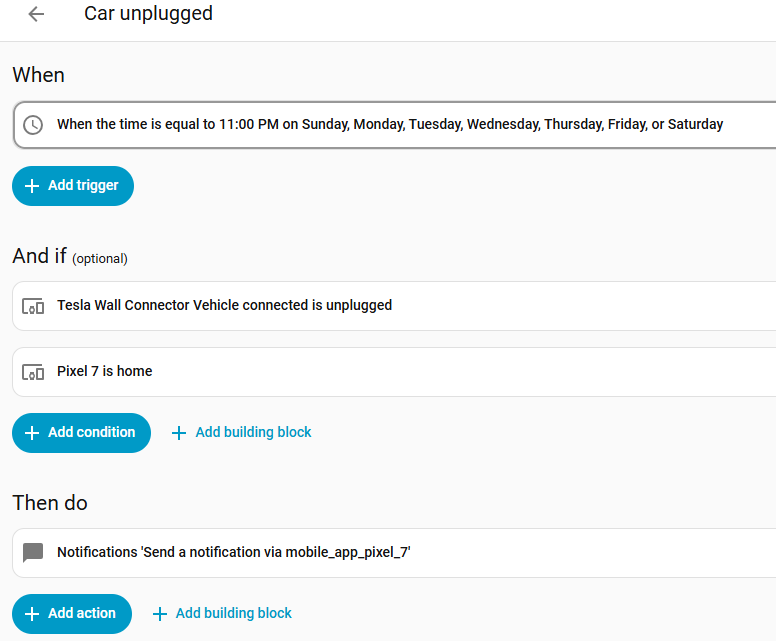
Just found a very useful automation (for me). Apparently Tesla powerwall charger is natively supported. It has kwh usage, way more than expected information about phases and voltages, temperatures, and more. It also has whether a car is connected. Its that last one that is most exciting.
There’s been a few times where I get back from a 300 mile trip, leave the charging cord unplugged so I don’t trip over it while unloading gear, and then forget to plug in over night. Only once have I had to go into work an hour late to charge up but there’s been a few tight margin trips. Or maybe I’ve been using the CNC located in my garage and move Lula out so she doesn’t get too dirty; then forget to move her back.
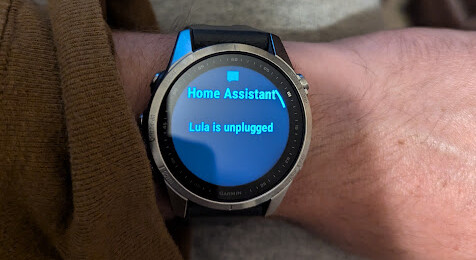
Now home assistant can alert me at 11:00 pm if the car is unplugged and my phone is at home! That will be pretty helpful in the rare scenarios needed. Phone notifications get forwarded to smart watch automatically.
Zigbee operates in the industrial, scientific and medical (ISM) radio bands, with the 2.4 GHz band being primarily used for lighting and home automation devices in most jurisdictions worldwide. While devices for commercial utility metering and medical device data collection often use sub-GHz frequencies, (902-928 MHz in North America, Australia, and Israel, 868-870 MHz in Europe, 779-787 MHz in China, even those regions and countries still using the 2.4 GHz for most globally sold Zigbee devices meant for home use. With data rates varying from around 20 kbit/s for sub-GHz bands to around 250 kbit/s for channels on the 2.4 GHz band range).
Are you thinking of LoRa?