Fluidnc refuses socket connection

New to FluidNC and having difficulties.

I want to use bCNC as a GCode sender but I cannot get bCNC to connect over WiFi. The FluidNC Web Interface works over WiFi and bCNC works over USB.
I try to connect using a web socket by entering “socket://192.168.0.234:81” into the bCNC port text box and when I try to connect I get an error message saying “connection refused”.
There is not any other interface connected to the controller when I try this.
Any thoughts on what could be causing this and / or things I can try?

Thanks,

Jack

What version FluidNC are you running?

If it’s greater than 4.0.0, you might need to connect on port 80.

Thanks for the response.

I am using the web installer and it looks like 4.0.3 is the version I have.
I have tried connecting on port 80. When I try this, bCNC appears to connect but the program freezes up and becomes unresponsive. I dealt with this by de-powering my RPi.

I’ve never heard of bCNC… maybe just want to make sure it supports the version of firmware you are on, if they say it supports FluidNC

Just checked the response on port 80. with the terminal open, I get the following error message:

read failed: [Errno 104] Connection reset by peer.

Googling the error message told me that this means the remote end of the network connection (the controller board) terminated connection.

bCNC is a light weight gCode sender that works well on Raspberry Pi. The FluidNC wiki (the page on GCode senders) links to the bCNC github page. I like bCNC because it has some minimal CAM features that I am familiar with.
I would think that any GCode sender would have to be able to connect over web sockets.

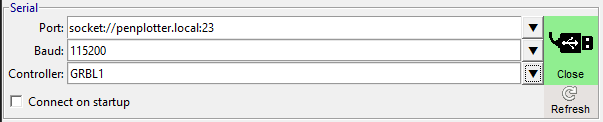
Port 23 or Port 81

Fluidnc rejects port 80 connections

image

it changed after 4.0.0

1 Like

I installed bCNC on Windows and was able to connect with these settings. You’ll need to use socket://192.168.0.234:23

This implies bCNC is using a normal TCP connection instead of a websocket connection.

2 Likes

That’s what it’s doing. bCNC has a great surface probe solution. I’ve seen it used to mill PCBs on cheap 3018 CNCs in the past.

1 Like

That worked! Huge thanks!

Jack

1 Like