The issue I’m facing is that when I move the machine to the left, the toolhead moves down on the screen instead of left. If I invert the axis, it moves up. Essentially, it’s rotated by 90 degrees.
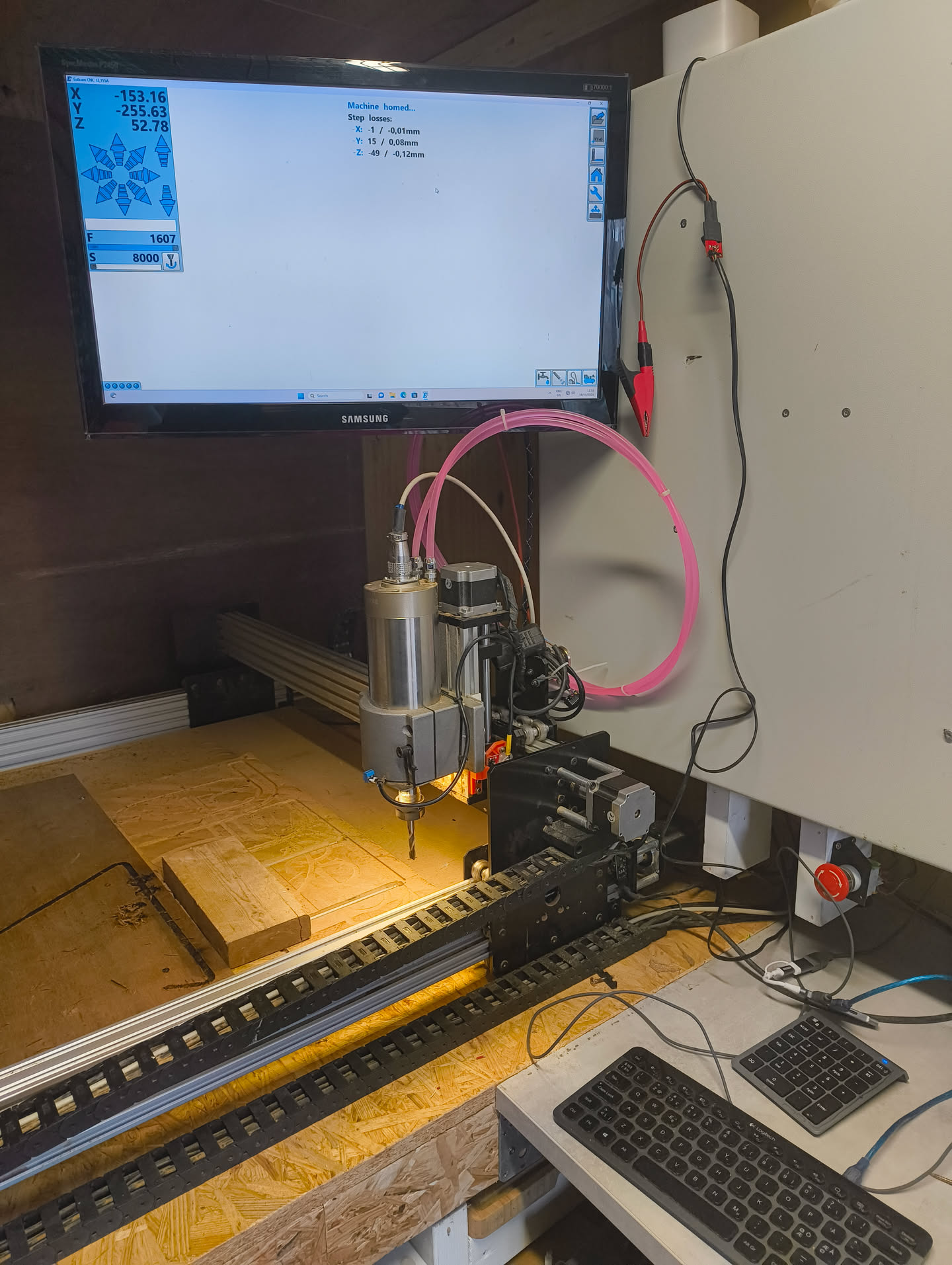
Below is my current setup. Everything seems to work, but the X and Y axes are flipped. Normally, I would just flip the axes on the hardware side, but I’m using the new Klemmen adapter for V12 and autosquaring.
Because of autosquaring, I cannot simply swap the X and Y wiring on the hardware. Inverting the axes in software doesn’t fully fix the problem either; the best result I get in ESTLcam is a mirrored version, not the correct orientation.
My first observation is, that you use Estlcam as a controller. Only a few people here do that because of availability of Christian’s Hardware outside of Europe.
I only know two other people using Estlcam as a controller here and that is @tokoloshe and myself.
I am not at home right now to look through the settings of Estlcam to see if there is an option for what you are trying to achieve. But is it really necessary? If I understand you correctly the CNC is working correct, but the movement of the tool head does not move in the same direction as the cursor on the monitor.
In Estlcam the x-axis is horizontal (left-right) and y is vertical (up-down) of the screen. The two simple solutions are:
Get used to it. Maybe paint the coordinate system on the spoilboard to remember which direction X is.
Turn your monitor 90 degrees and mount it to the gray wall. The axis match again.
when I am home again I will check my pc if there is an option to switch axis I’m the display part (but I have little hopes)
Nevertheless: What Bastian says is correct. Your router is at XY max in your picture, Y being the long rail, X being the gantry. You are basically looking from the wrong side.
I also think it’s not possible to swap axes in Estlcam, and I suspect it won’t work with the Klemmenadapter either. However, with the Open-CNC-Shield 2 Mini it would definitely be possible, because it includes an Arduino Mega, which allows you to configure all 5 axes.
I have build it according to specs, which I make up on the way
But all seriously, I think the Openbuild manual states that the cable belt should be on non-operative side. But since I don’t like crawling on the cnc to do something with the cable belt and assuming I probably need to do something too it, I left it at the operating side.
I am not going to rotate my monitor by 90 degrees!
I have been playing with the setup the complete day and I have no regrets into getting the Klemmen adapter. Everything works really nice! Nice job! @christian-knuell
I’ve considered making it adjustable but if I start with things like this Estlcam will slowly start to loose its simplicity and open up a lot of new ways for misconfigurations.
There is no need to have any change in the control software to swap the X and Y axes, but rather simply rewiring the steppers of the LowRider accordingly.
A virtual rotation of the table 90 degrees without rotating the logical orientation of the machine is what swapping X and Y accomplishes. You’d still be standing in front of X.
Put another way, a 90 degree rotation of the logical orientation of the machine (without virtual rotation of the table) is exactly the same as a virtual rotation of the table 90 degrees without rotating the logical orientation of the machine. Changing which side of the table (long or short) is X does not make you be “not standing in front of X” — just moves X to the side where you were already wanting to stand.
Even better would be a klemmadadapter v2 with autosquare for x and y . Than you do not need the Open-cnc-shield 2 and maybe get more people from abroad to use Estlcam as controller.
Ah, certainly right. ESTLcam controller would treat a LowRider exactly the same whether it had its X and Y swapped or not. No disclaimer is needed there.



 . Than you do not need the Open-cnc-shield 2 and maybe get more people from abroad to use Estlcam as controller.